Run out
A number that counts down limits a power-up, and the event checks it first, so it never goes below zero.
Ammo, fuel, a shield that flickers out: the best power-ups run out. Behind each one is a number counting down.
A power-up that runs out needs a number: shots left, seconds left. Each use takes 1 away. The ship says how many shots are left after each one.
- Predict: Read the code and say what it will do before you run anything. A wrong guess is fine: it shows you what to look for.
- Run: Run it and compare the result with your prediction.
- Investigate: Trace how each line of code connects to what you see.
- Modify: Change the code on purpose and check the result.
- Make: Build something new using what you have learned. Expect a few tries; that is normal.
Make your prediction first. Help opens once you've locked it in.
Predict
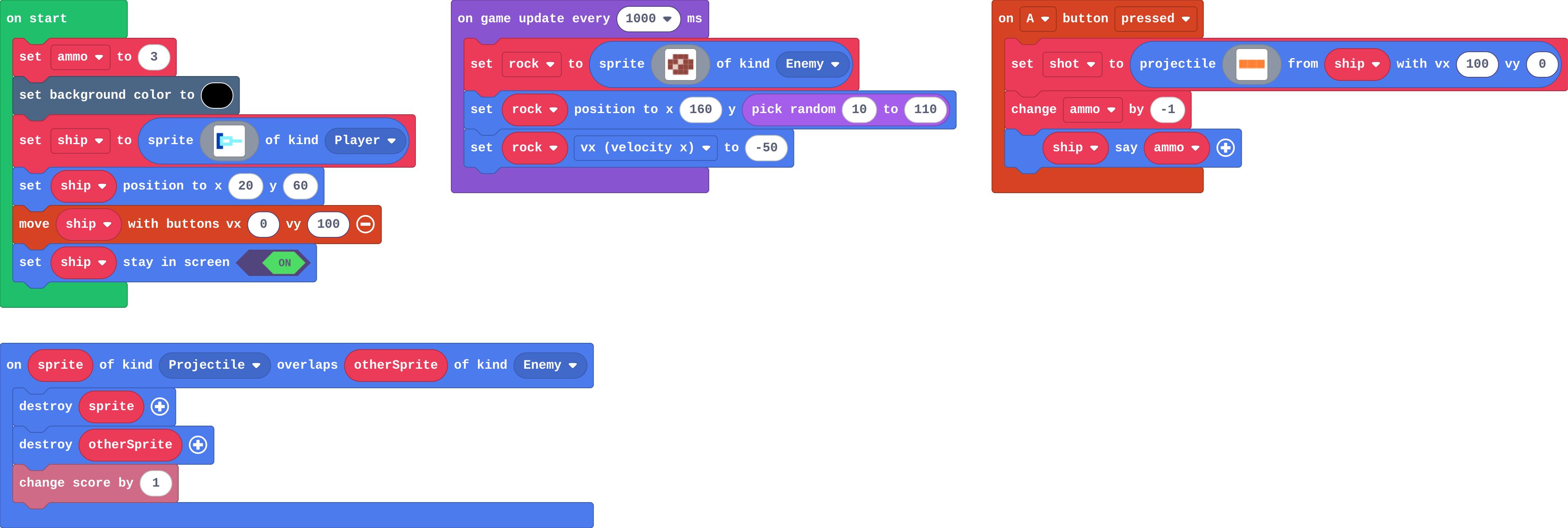
Show as code
let shot: Sprite = null
let rock: Sprite = null
let ammo = 3
scene.setBackgroundColor(15)
let ship = sprites.create(img`
8 8 . . . . . .
8 9 9 9 9 . . .
8 9 1 1 9 9 9 9
8 9 9 9 9 . . .
8 8 . . . . . .
`, SpriteKind.Player)
ship.setPosition(20, 60)
controller.moveSprite(ship, 0, 100)
ship.setStayInScreen(true)
controller.A.onEvent(ControllerButtonEvent.Pressed, function () {
shot = sprites.createProjectileFromSprite(img`
4 4 4
`, ship, 100, 0)
ammo += -1
ship.sayText(ammo)
})
game.onUpdateInterval(1000, function () {
rock = sprites.create(img`
. e e e .
e e d e e
e d e e e
. e e e .
`, SpriteKind.Enemy)
rock.setPosition(160, randint(10, 110))
rock.vx = -50
})
sprites.onOverlap(SpriteKind.Projectile, SpriteKind.Enemy, function (sprite, otherSprite) {
sprite.destroy()
otherSprite.destroy()
info.changeScoreBy(1)
})
Look at the on A pressed block. Does anything ask whether there is ammo left?
Run
Press A (space) again and again. Watch what the ship says.
Show as code
let shot: Sprite = null
let rock: Sprite = null
let ammo = 3
scene.setBackgroundColor(15)
let ship = sprites.create(img`
8 8 . . . . . .
8 9 9 9 9 . . .
8 9 1 1 9 9 9 9
8 9 9 9 9 . . .
8 8 . . . . . .
`, SpriteKind.Player)
ship.setPosition(20, 60)
controller.moveSprite(ship, 0, 100)
ship.setStayInScreen(true)
controller.A.onEvent(ControllerButtonEvent.Pressed, function () {
shot = sprites.createProjectileFromSprite(img`
4 4 4
`, ship, 100, 0)
ammo += -1
ship.sayText(ammo)
})
game.onUpdateInterval(1000, function () {
rock = sprites.create(img`
. e e e .
e e d e e
e d e e e
. e e e .
`, SpriteKind.Enemy)
rock.setPosition(160, randint(10, 110))
rock.vx = -50
})
sprites.onOverlap(SpriteKind.Projectile, SpriteKind.Enemy, function (sprite, otherSprite) {
sprite.destroy()
otherSprite.destroy()
info.changeScoreBy(1)
})
Investigate
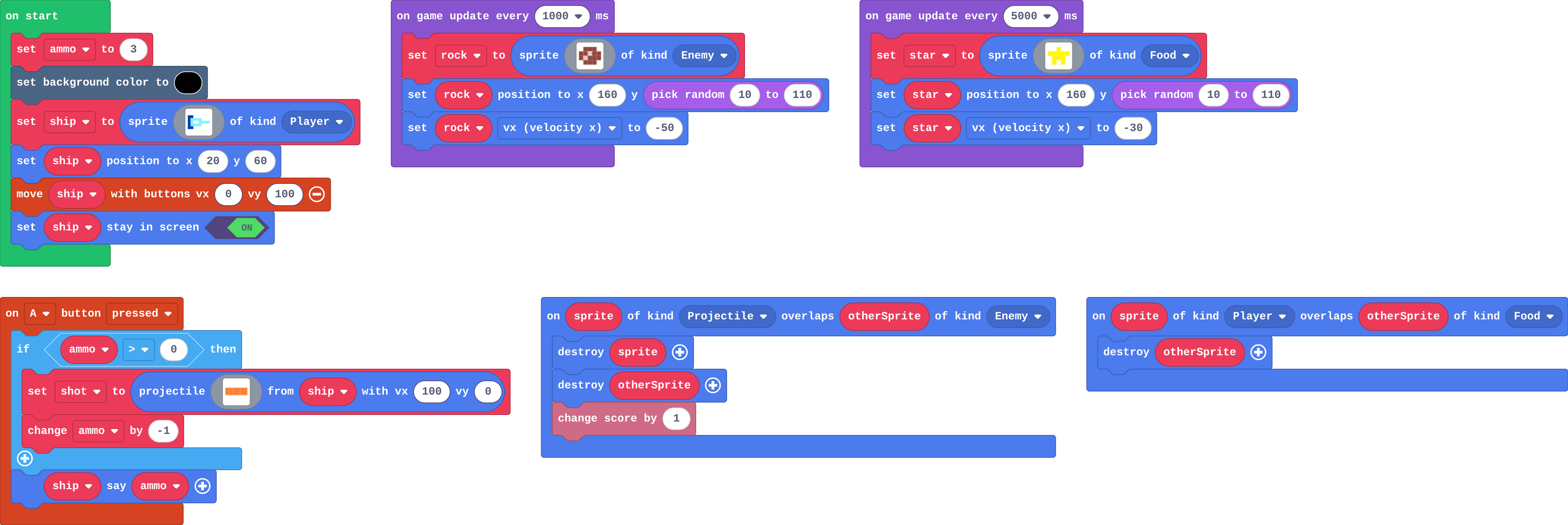
This version checks first. Try to fire a fourth shot.
Show as code
let star: Sprite = null
let shot: Sprite = null
let rock: Sprite = null
let ammo = 3
scene.setBackgroundColor(15)
let ship = sprites.create(img`
    8 8 . . . . . .
    8 9 9 9 9 . . .
    8 9 1 1 9 9 9 9
    8 9 9 9 9 . . .
    8 8 . . . . . .
    `, SpriteKind.Player)
ship.setPosition(20, 60)
controller.moveSprite(ship, 0, 100)
ship.setStayInScreen(true)
controller.A.onEvent(ControllerButtonEvent.Pressed, function () {
    if (ammo > 0) {
        shot = sprites.createProjectileFromSprite(img`
            4 4 4
            `, ship, 100, 0)
        ammo += -1
    }
    ship.sayText(ammo)
})
game.onUpdateInterval(1000, function () {
    rock = sprites.create(img`
        . e e e .
        e e d e e
        e d e e e
        . e e e .
        `, SpriteKind.Enemy)
    rock.setPosition(160, randint(10, 110))
    rock.vx = -50
})
game.onUpdateInterval(5000, function () {
    star = sprites.create(img`
        . . 5 . .
        5 5 5 5 5
        . 5 5 5 .
        . 5 . 5 .
        `, SpriteKind.Food)
    star.setPosition(160, randint(10, 110))
    star.vx = -30
})
sprites.onOverlap(SpriteKind.Projectile, SpriteKind.Enemy, function (sprite, otherSprite) {
    sprite.destroy()
    otherSprite.destroy()
    info.changeScoreBy(1)
})
sprites.onOverlap(SpriteKind.Player, SpriteKind.Food, function (sprite, otherSprite) {
    otherSprite.destroy()
})
This version fires only if ammo > 0. Fill in each press of A.
| ammo before | a shot? | ammo after |
|---|---|---|
| 3 | yes | 2 |
| 1 | ||
| 0 |
Modify
A star refills the ammo to 5.
Need a hint?
A star floats past every 5 seconds. Its overlap only destroys it.
Another hint
Add set ammo to 5 in the Player–Food overlap.
Now a star adds 3 to what you have. Which is better for a player with 4 shots left?
Need a hint?
Use change ammo by 3 in place of set.
A star refills the ammo to 5.
This ticks by itself when your blocks do what is asked.
A star adds 3 shots to what you have left.
This ticks by itself when your blocks do what is asked.
Mix it up
Make
The shield from last lesson. A new variable, shieldTime, is set to 5 when you catch a star.
- Every second while the shield is on, take 1 off
shieldTime. - When
shieldTimereaches 0, setshieldto false and put the black background back.
Need a hint?
Catching a star already sets shieldTime to 5. In the timer that runs every 1000 ms, add: if shield, change shieldTime by -1.
Another hint
Inside that if, add another: if shieldTime = 0, set shield to false and set the background back to 15 (black).
The shield switches off by itself after 5 seconds.
This ticks by itself when your blocks do what is asked.
Change a sprint boost
A runner with a sprint boost on B (enter on the keyboard): 3 seconds of extra speed, then back to normal. Make it fair: only 3 boosts for the whole game, counted down.
For teachers
Students limit a blaster with a number that counts down, check it first so it never goes below zero, refill it with a star, and make a shield run out after 5 seconds. About 45 minutes.
Open the teacher guide: answers, solutions, slides and a worksheet.
Students will be able to
- I can limit an action with a number that counts down.
- I can check the number first, so it never goes below zero.
- I can make a power-up last a set time with a timer.
Before class
A power-up that runs out is a number counting down. For ammo, the A event asks if ammo > 0 first, then fires and changes ammo by -1. Without the check, ammo goes below zero and the shots never stop (the misconception). With ≥ 0 there is one shot too many.
For time, a timer every 1000 ms counts shieldTime down while the shield is on, and at 0 sets the shield back to false: an if inside an if. Set (refill to 5) and change (add 3) are different, which Modify brings out.
Running the lesson
- Predict: let students find the -2 in the Run.
- Investigate: the trace shows the if saying no at 0. Lily's blaster checks the wrong block.
- Modify: ask which refill is kinder to a player with 4 shots.
- Mix it up: true or false from last lesson.
- Make: read it aloud: every second, if the shield is on, count down; if it reached zero, switch it off.
The hard part (on purpose)
Checking before using. When the count goes below zero, ask what the event asks first.
When students get stuck
- Shots never run out. Ask: Is the shot inside the if? Fix: Put both the shot and change ammo by -1 inside if ammo > 0.
- The shield switches off straight away, or never. Ask: Where is the countdown, and when does that block run? Fix: In the 1000 ms timer, inside if shield; set it to false only inside if shieldTime = 0.
- The countdown goes 5, 3, 1, -1. Ask: How many timers count it down? Fix: One: remove the second change.
Stretch and support
Stretch: Show the shield time with the ship's say block, every second.
Support: Give students the if shield in the timer, so they add only the countdown and the switch-off.
Where it leads
Next: the Power-ups challenge, with less help. Skillmap: Save the Galaxy (arcade.makecode.com/skillmaps).
What each step is for
- Investigate: A number that counts down limits an action: the event asks it first, and only then uses one up.
- Modify: Set throws away what is left; change by adds to it.
- Mix it up: A true or false variable stays as it is until a block sets it back.
- Limit an action with a number that counts down.
- Check the number first, so it never goes below zero.
- Make a power-up last a set time with a timer.