Functions
Name a job once as a function, call it wherever it is needed, and see that every event block is a function too.
A game makes enemies at the start, on a timer and when a level begins. Writing the same blocks three times is how bugs creep in: name the job once instead.
Making an enemy takes several blocks: create it, place it, set its speed. When a game needs that job in several places, you can name the blocks once as a function, then call the function by name wherever you need it. Make one in Functions › Make a Function (in the toolbox, under Advanced). Its call block then appears in the same place.
- Predict: Read the code and say what it will do before you run anything. A wrong guess is fine: it shows you what to look for.
- Run: Run it and compare the result with your prediction.
- Investigate: Trace how each line of code connects to what you see.
- Modify: Change the code on purpose and check the result.
- Make: Build something new using what you have learned. Expect a few tries; that is normal.
Make your prediction first. Help opens once you've locked it in.
Predict
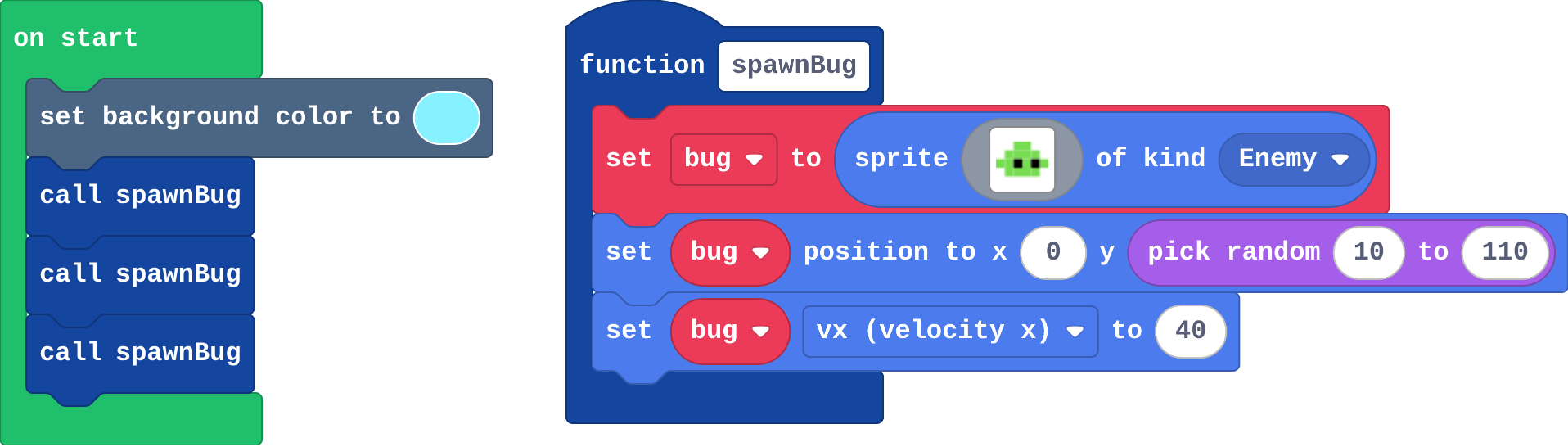
Show as code
let bug: Sprite = null
function spawnBug () {
bug = sprites.create(img`
. . 7 7 . .
. 7 7 7 7 .
7 7 f 7 f 7
. 7 7 7 7 .
`, SpriteKind.Enemy)
bug.setPosition(0, randint(10, 110))
bug.vx = 40
}
scene.setBackgroundColor(9)
spawnBug()
spawnBug()
spawnBug()
function spawnBug holds the blocks for one bug. They run only when something calls spawnBug.
Run
Count the bugs. Press the restart button under the simulator to watch again (the heights are random).
Show as code
let bug: Sprite = null
function spawnBug () {
bug = sprites.create(img`
. . 7 7 . .
. 7 7 7 7 .
7 7 f 7 f 7
. 7 7 7 7 .
`, SpriteKind.Enemy)
bug.setPosition(0, randint(10, 110))
bug.vx = 40
}
scene.setBackgroundColor(9)
spawnBug()
spawnBug()
spawnBug()
Investigate
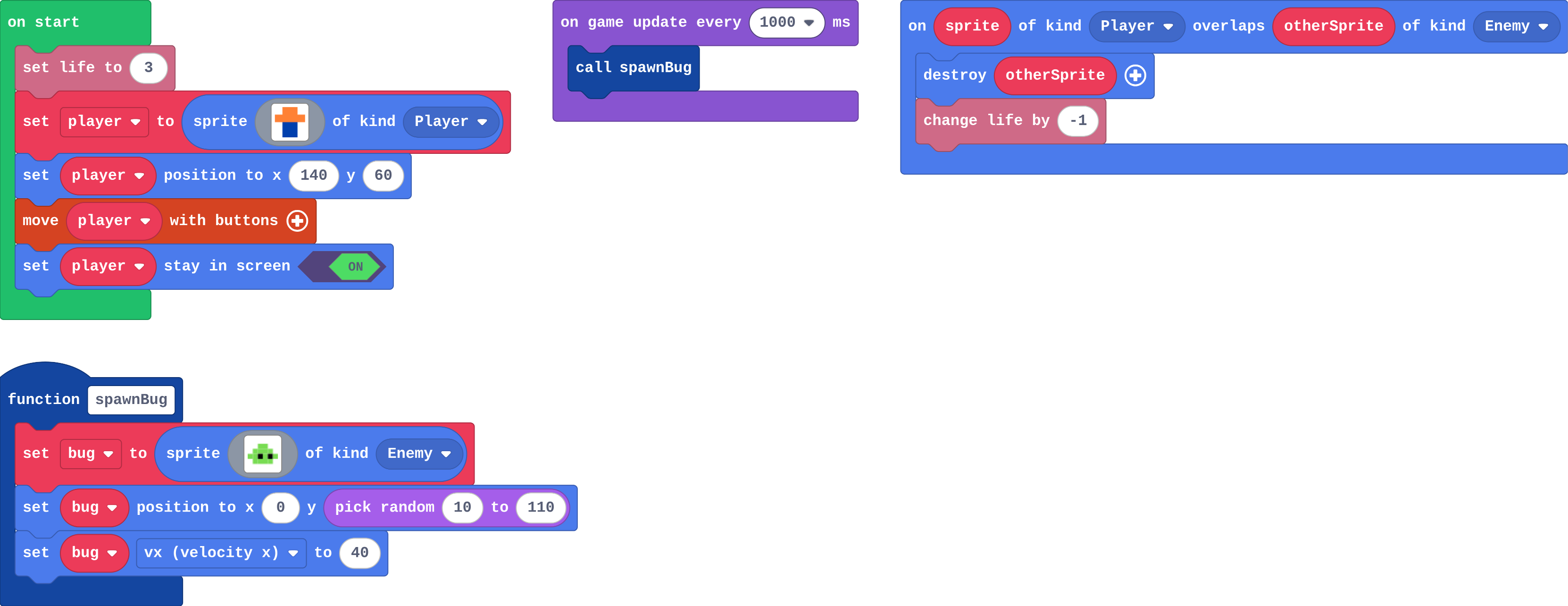
The game: a bug flies in from the left every second. Dodge them.
Show as code
let bug: Sprite = null
function spawnBug () {
    bug = sprites.create(img`
        . . 7 7 . .
        . 7 7 7 7 .
        7 7 f 7 f 7
        . 7 7 7 7 .
        `, SpriteKind.Enemy)
    bug.setPosition(0, randint(10, 110))
    bug.vx = 40
}
info.setLife(3)
let player = sprites.create(img`
    . 4 4 .
    4 4 4 4
    . 8 8 .
    . 8 8 .
    `, SpriteKind.Player)
player.setPosition(140, 60)
controller.moveSprite(player)
player.setStayInScreen(true)
game.onUpdateInterval(1000, function () {
    spawnBug()
})
sprites.onOverlap(SpriteKind.Player, SpriteKind.Enemy, function (sprite, otherSprite) {
    otherSprite.destroy()
    info.changeLifeBy(-1)
})
Ava's program:
Show as code
let bug: Sprite = null
function spawnBug () {
    bug = sprites.create(img`
        . . 7 7 . .
        . 7 7 7 7 .
        7 7 f 7 f 7
        . 7 7 7 7 .
        `, SpriteKind.Enemy)
    bug.setPosition(0, randint(10, 110))
    bug.vx = 40
}
game.onUpdateInterval(1000, function () {
})
def spawn_bug():
    global bug
    bug = sprites.create(img("""..."""), SpriteKind.enemy)
    bug.set_position(0, randint(10, 110))
    bug.vx = 40
def on_update_interval():
    spawn_bug()
game.on_update_interval(1000, on_update_interval)
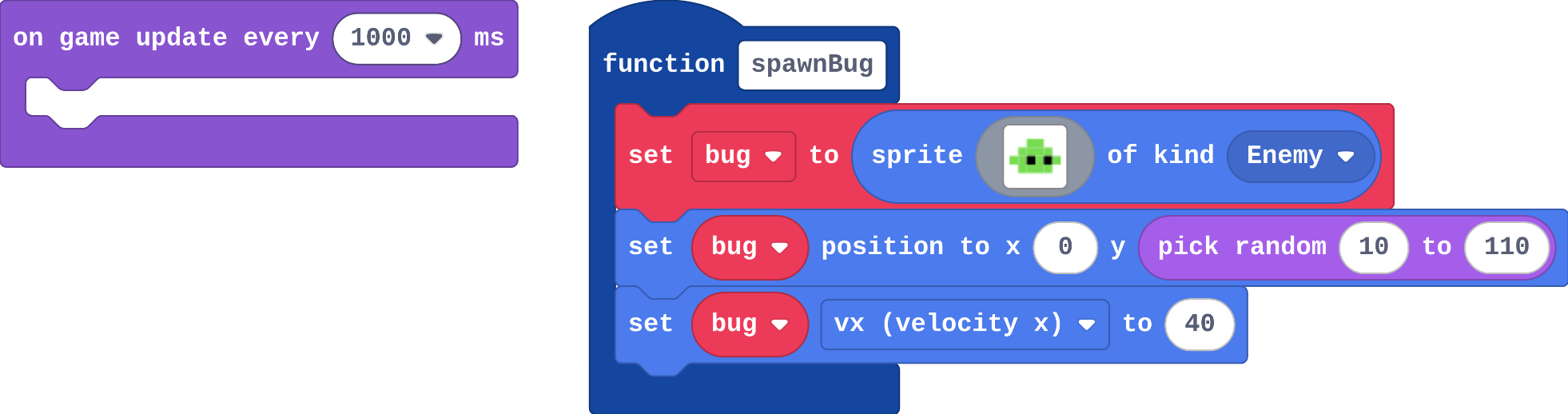
Look at what Python did with on game update every: it is a def, a function, and the line after it hands that function to the game. Every event block you have used is a function the game calls for you.
The game runs for 10 seconds. The timer calls spawnBug every 1000 ms. How many times do the blocks inside spawnBug run?
This is the game in Python (press Python at the top of the editor). Match each Python line with what it does.
Modify
Score a point for every bug that is made: a survival score. Change the function, so every call scores.
Need a hint?
Put the block inside the function, not inside the timer.
Another hint
change score by 1 (Info) goes at the end of spawnBug.
Make A call spawnBug too. Does the extra bug score a point?
Need a hint?
Drag in on A button pressed, and put call spawnBug inside it.
Score a point for every bug the game makes, by adding one block inside spawnBug.
This ticks by itself when your blocks do what is asked.
Make A send an extra bug.
This ticks by itself when your blocks do what is asked.
Mix it up
Show as code
let bug: Sprite = null
bug = sprites.create(img`
    . . 7 7 . .
    . 7 7 7 7 .
    7 7 f 7 f 7
    . 7 7 7 7 .
    `, SpriteKind.Enemy)
bug.setPosition(20, 30)
bug = sprites.create(img`
    . . 7 7 . .
    . 7 7 7 7 .
    7 7 f 7 f 7
    . 7 7 7 7 .
    `, SpriteKind.Enemy)
bug.setPosition(80, 60)
bug = sprites.create(img`
    . . 7 7 . .
    . 7 7 7 7 .
    7 7 f 7 f 7
    . 7 7 7 7 .
    `, SpriteKind.Enemy)
bug.setPosition(140, 90)
controller.B.onEvent(ControllerButtonEvent.Pressed, function () {
    for (let value of sprites.allOfKind(SpriteKind.Enemy)) {
        value.destroy()
    }
})
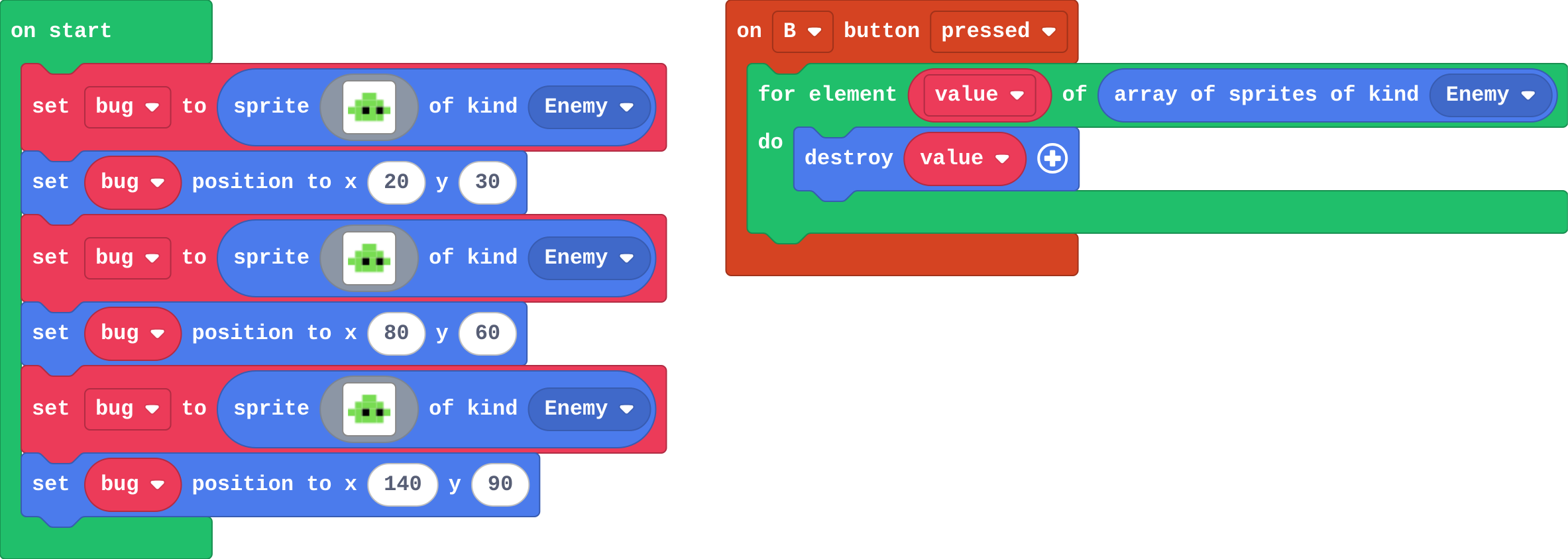
There are 3 bugs on the screen. You press B. How many bugs are destroyed?
Make
Make a coin collector that never runs out of coins:
- a function makeCoin makes one coin (kind Food) at a random place,
- on start calls it three times, so there are three coins,
- every time a coin is collected, the overlap calls it again, so there are always three.
Need a hint?
Make a Function called makeCoin. Inside: set coin to sprite of kind Food, then set its position to random x and y.
Another hint
Call makeCoin three times in on start.
Another hint
In the overlap, after destroy and change score, call makeCoin once more.
A makeCoin function, called three times at the start and again each time a coin is collected.
This ticks by itself when your blocks do what is asked.
Change a snow globe
Snow falls in this globe: a function addFlake makes one flake, and a timer calls it. Make every flake fall faster (one change, in the function), then make A shake the globe: five extra flakes at once.
For teachers
Students name a job (making an enemy) as a function, call it from several places, and see in Python that every event block is a function the game calls. About 40 minutes.
Open the teacher guide: answers, solutions, slides and a worksheet.
Students will be able to
- I can make a function and call it from more than one place.
- I can change a job in one place, for every call.
- I can explain that an event block is a function the game calls for me.
Before class
A function is a named job: some blocks with a name, made once in Functions (under Advanced in the toolbox). Making it does not run it. It runs when a call block calls it, once per call. One copy serves every call, so a change to the function changes every place that calls it. The Python button at the top of the editor shows the same program as text: every event block (on game update every, on overlap, on A pressed) becomes a def, handed to the game, which calls it. MakeCode adds a global bug line inside the function: it means "use the bug variable from outside". Parameters (inputs) are next lesson.
Running the lesson
- Predict: some students expect nothing, because the function is not an event. Each call runs it. Count the call blocks together.
- Investigate: Ava's empty timer is this lesson's misconception. Then switch the editor to Python together before the match.
- Modify: the score goes inside the function, so every call scores, wherever it is called from.
- Mix it up: the for element loop, from last lesson.
- Make: makeCoin is called four times in the code: three in on start, one in the overlap.
The hard part (on purpose)
Making a function does nothing until it is called. When nothing appears, ask which block calls the function.
When students get stuck
- No bugs appear. Ask: Which block calls your function? Fix: Add a call block (from Functions) inside the timer or on start.
- The call block is missing from the toolbox. Ask: Have you made the function yet? Fix: Make the function first; its call block then appears under Functions.
- Only one coin ever comes back. Ask: Where is the call to makeCoin in the overlap? Fix: Call it after destroy, inside the Player–Food overlap.
Stretch and support
Stretch: Make a second function, makeSpike, that adds an Enemy at a random place, and call it every 3 seconds.
Support: Give students the makeCoin function already made, and ask them to add the four calls.
Where it leads
Next lesson: a parameter, so one function can make a slow bug and a fast bug. Skillmap: the Game Maker Guide (arcade.makecode.com/skillmaps) builds bigger games from named jobs like these.
What each step is for
- Investigate: A function names a job once; its blocks run only when it is called, once per call. Every event block is a function too: in Python you can see the blocks handed to the game to call.
- Modify: Changing the function once changes every call, and any event can call it.
- Mix it up: A for element loop runs its blocks once for each sprite in the list.
- Make a function and call it from more than one place.
- Change a job in one place, for every call.
- Explain that an event block is a function the game calls for me.