Gravity
Give a sprite gravity with ay, so it falls faster and faster, and a jump rises, slows and comes back down.
Mario, Sonic and every runner game on a phone: you press jump, you rise, you slow down, you fall back. That curve is gravity.
You know velocity: vx and vy say how far the engine moves a sprite every frame. Arcade has a third number, ay: the acceleration down. Every frame, the engine adds a little to vy, so the sprite falls faster and faster. That is gravity. Set ay in Sprites: the same block as set vx, with ay chosen in its dropdown.
A jump is just a speed upwards: a negative vy (y counts down, so up is negative). Gravity then slows the sprite, stops it, and pulls it back down.
- Predict: Read the code and say what it will do before you run anything. A wrong guess is fine: it shows you what to look for.
- Run: Run it and compare the result with your prediction.
- Investigate: Trace how each line of code connects to what you see.
- Modify: Change the code on purpose and check the result.
- Make: Build something new using what you have learned. Expect a few tries; that is normal.
Make your prediction first. Help opens once you've locked it in.
Predict
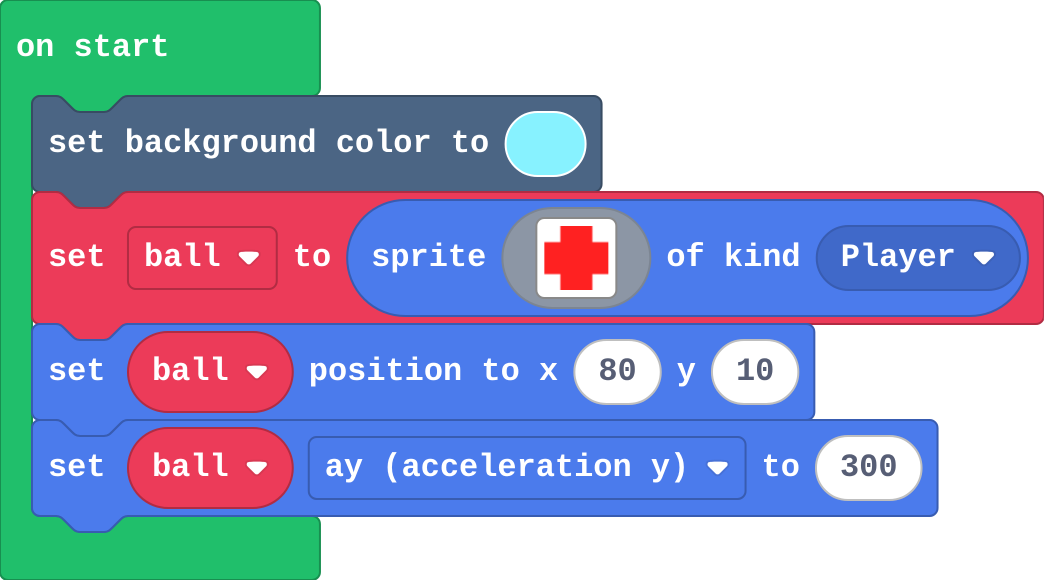
Show as code
scene.setBackgroundColor(9)
let ball = sprites.create(img`
. 2 2 .
2 2 2 2
2 2 2 2
. 2 2 .
`, SpriteKind.Player)
ball.setPosition(80, 10)
ball.ay = 300
Run
Watch the ball closely: does it fall at a steady speed? Press the restart button under the simulator to see it again.
Show as code
scene.setBackgroundColor(9)
let ball = sprites.create(img`
. 2 2 .
2 2 2 2
2 2 2 2
. 2 2 .
`, SpriteKind.Player)
ball.setPosition(80, 10)
ball.ay = 300
Investigate
This ball has gravity and a floor. Press A (space) to throw it up.
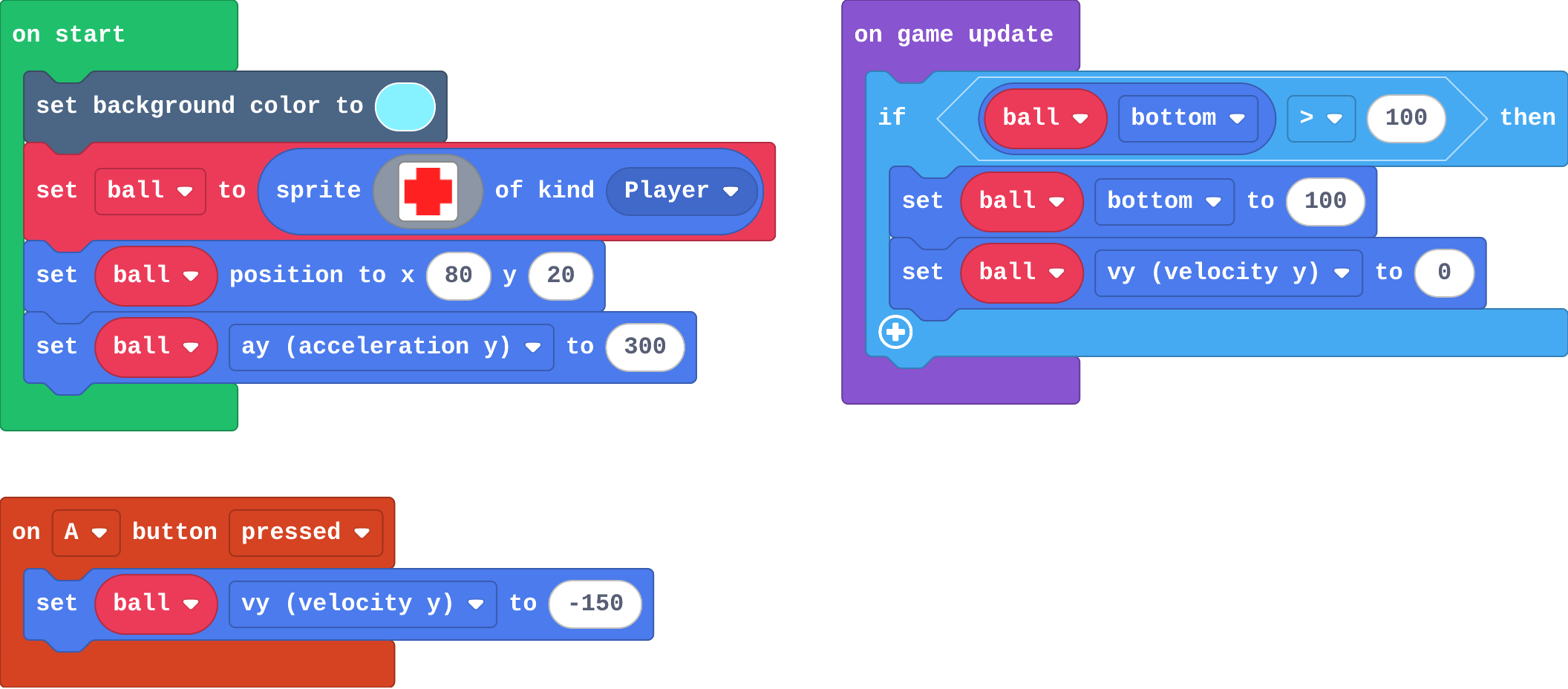
Show as code
scene.setBackgroundColor(9)
let ball = sprites.create(img`
    . 2 2 .
    2 2 2 2
    2 2 2 2
    . 2 2 .
    `, SpriteKind.Player)
ball.setPosition(80, 20)
ball.ay = 300
game.onUpdate(function () {
    if (ball.bottom > 100) {
        ball.bottom = 100
        ball.vy = 0
    }
})
controller.A.onEvent(ControllerButtonEvent.Pressed, function () {
    ball.vy = -150
})
bottom is the y of the sprite's bottom edge (choose it in the dropdown of the x block). There is no ground in an empty Arcade game, so the program builds one with an if.
Engine note. Arcade can do the floor for you. A tilemap is a game world drawn from squares (tiles) in the tile editor; tiles marked as walls stop sprites by themselves. That is why platformers suit Arcade so well. This course builds the floor by hand first: a wall is this if, done by the engine.
A sprite starts still (vy 0) with ay 300. Gravity adds 300 to vy every second. Fill in vy.
| seconds | vy (speed down) |
|---|---|
| 0 | 0 |
| 0.5 | |
| 1 | |
| 2 |
The ball is thrown up: vy is set to -150, with ay 300. How many seconds until it stops rising (vy is 0)?
Modify
Make A throw the ball higher.
Need a hint?
In on A pressed, change -150 to -220.
Change ay. What does ay 100 feel like? And ay 600?
Need a hint?
Change ay: try 100 for the Moon, 600 for a heavy planet.
Another hint
Pick the pair (throw and gravity) you like best.
Throw the ball higher: an upward speed of -220.
This ticks by itself when your blocks do what is asked.
Mix it up

Show as code
let bug: Sprite = null
function spawnEnemy (speed: number) {
    bug = sprites.create(img`
        . . 7 7 . .
        . 7 7 7 7 .
        7 7 f 7 f 7
        . 7 7 7 7 .
        `, SpriteKind.Enemy)
    bug.setPosition(150, randint(10, 110))
    bug.vx = speed
}
game.onUpdateInterval(1000, function () {
    spawnEnemy(-40)
})
Make
Make an apple drop. The basket moves along the bottom:
- every second an apple falls from a random place at the top,
- each apple has gravity, so it speeds up as it falls,
- catching one scores a point.
Need a hint?
A timer (on game update every 1000 ms) makes an apple of kind Food at the top, at a random x.
Another hint
Give each apple gravity: set apple ay to 150, inside the timer.
Another hint
A Player–Food overlap: destroy the apple and change score by 1.
An apple drop: a timer drops an apple with gravity every second, and catching one scores.
This ticks by itself when your blocks do what is asked.
Change a trampoline
This acrobat never stops bouncing: the floor sets vy to -180 instead of 0. Make the bounces higher, then make the trampoline a little higher up the screen (both numbers in the if must change).
For teachers
Students give a sprite gravity (acceleration down), see that a fall speeds up and a throw rises, slows and comes back, and use gravity in a catching game. About 40 minutes.
Open the teacher guide: answers, solutions, slides and a worksheet.
Students will be able to
- I can give a sprite gravity with ay and explain why it falls faster and faster.
- I can make a sprite go up with a negative vy, and say what gravity does to it.
- I can read a floor built with an if in on game update.
Before class
Velocity (vx, vy) is how far the engine moves a sprite every frame. Acceleration (ay) is how much the engine changes the velocity: with ay 300, vy grows by 300 every second, a little each frame. So a sprite with ay falls faster and faster, like a dropped ball. A throw or jump is a speed upwards: vy = -150 (negative, because y counts down). Gravity slows it, stops it at the top, and brings it back down. Nothing in an empty Arcade game is solid, so the lesson's program builds a floor with an if in on game update. Jumping only from the ground is next lesson. Tilemaps (wall tiles) do the floor for you in real platformers.
Running the lesson
- Predict: most expect a steady fall. Watch the ball closely: it speeds up.
- Investigate: the trace shows vy growing by ay each second. The throw shows gravity turning a negative vy round.
- Modify: bigger negative vy is a higher throw; ay is how strong gravity is.
- Mix it up: a parameter, from earlier.
- Make: ay goes inside the timer, on each new apple.
The hard part (on purpose)
Gravity as acceleration, not a speed. Ask what vy is after one second, then after two.
When students get stuck
- The ball falls through the bottom of the screen. Ask: What happens when the ball's bottom goes past 100? Fix: The floor if in on game update puts it back. Check it names the ball.
- The throw does nothing, or the ball sinks. Ask: Is vy set to a negative or a positive number? Fix: Up is negative: vy = -150.
- Apples fall at a steady speed. Ask: Which block gives each apple gravity? Fix: Set apple ay inside the timer, after the apple is made.
Stretch and support
Stretch: Make some apples heavier (bigger ay) and worth more points.
Support: Give students the timer that makes apples, and ask them only to add ay and the catch.
Where it leads
Next lesson: a jump that only works from the ground. Skillmaps: Jungle Jump Platformer and Monster Truck Racer (arcade.makecode.com/skillmaps) practise gravity and jumping with tilemaps.
What each step is for
- Investigate: Gravity is acceleration: the engine adds ay to vy every second, a little each frame, so a fall speeds up and a jump (a negative vy) slows, stops and comes back. An if in on game update builds a floor.
- Modify: ay sets how strong gravity is, and the size of the negative vy sets how high a throw or jump goes.
- Mix it up: A parameter is the value the call hands in; a negative vx moves left.
- Give a sprite gravity with ay and explain why it falls faster and faster.
- Make a sprite go up with a negative vy, and say what gravity does to it.
- Read a floor built with an if in on game update.