Power-ups
Challenge: grow the shield game into a prize box: a blaster with limited ammo, a smart bomb, then a power-up of your own.
A mushroom in Mario, a power pellet in Pac-Man, a shield in a space shooter: each one is a variable that changes the rules for a while.
Your shield game from the last two lessons: catch a star and you get a shield for 5 seconds. Now a star becomes a prize box. You will add three prizes, one milestone each, with less help each time. Everything you need is from earlier lessons: true or false, counting down, and every sprite of a kind.
- Predict: Read the code and say what it will do before you run anything. A wrong guess is fine: it shows you what to look for.
- Run: Run it and compare the result with your prediction.
- Investigate: Trace how each line of code connects to what you see.
- Modify: Change the code on purpose and check the result.
- Make: Build something new using what you have learned. Expect a few tries; that is normal.
Make your prediction first. Help opens once you've locked it in.
Predict
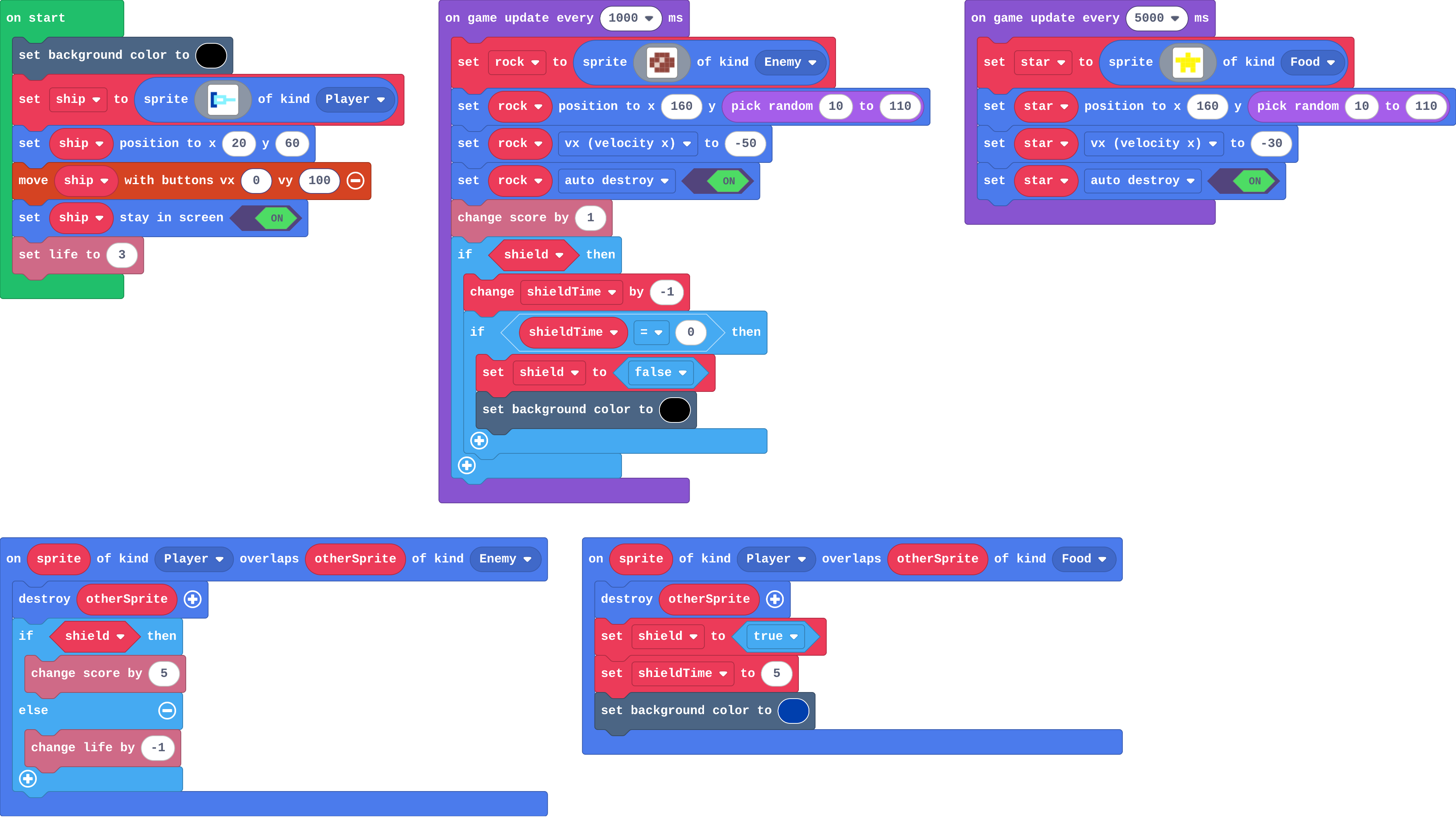
Show as code
let rock: Sprite = null
let star: Sprite = null
let shield = false
let shieldTime = 0
sprites.onOverlap(SpriteKind.Player, SpriteKind.Enemy, function (sprite, otherSprite) {
    otherSprite.destroy()
    if (shield) {
        info.changeScoreBy(5)
    } else {
        info.changeLifeBy(-1)
    }
})
sprites.onOverlap(SpriteKind.Player, SpriteKind.Food, function (sprite, otherSprite) {
    otherSprite.destroy()
    shield = true
    shieldTime = 5
    scene.setBackgroundColor(8)
})
scene.setBackgroundColor(15)
let ship = sprites.create(img`
    8 8 . . . . . .
    8 9 9 9 9 . . .
    8 9 1 1 9 9 9 9
    8 9 9 9 9 . . .
    8 8 . . . . . .
    `, SpriteKind.Player)
ship.setPosition(20, 60)
controller.moveSprite(ship, 0, 100)
ship.setStayInScreen(true)
info.setLife(3)
game.onUpdateInterval(1000, function () {
    rock = sprites.create(img`
        . e e e .
        e e d e e
        e d e e e
        . e e e .
        `, SpriteKind.Enemy)
    rock.setPosition(160, randint(10, 110))
    rock.vx = -50
    rock.setFlag(SpriteFlag.AutoDestroy, true)
    info.changeScoreBy(1)
    if (shield) {
        shieldTime += -1
        if (shieldTime == 0) {
            shield = false
            scene.setBackgroundColor(15)
        }
    }
})
game.onUpdateInterval(5000, function () {
    star = sprites.create(img`
        . . 5 . .
        5 5 5 5 5
        . 5 5 5 .
        . 5 . 5 .
        `, SpriteKind.Food)
    star.setPosition(160, randint(10, 110))
    star.vx = -30
    star.setFlag(SpriteFlag.AutoDestroy, true)
})
Read the star overlap and the 1-second timer.
Run
Catch a star, then another before the shield ends.
Show as code
let rock: Sprite = null
let star: Sprite = null
let shield = false
let shieldTime = 0
sprites.onOverlap(SpriteKind.Player, SpriteKind.Enemy, function (sprite, otherSprite) {
    otherSprite.destroy()
    if (shield) {
        info.changeScoreBy(5)
    } else {
        info.changeLifeBy(-1)
    }
})
sprites.onOverlap(SpriteKind.Player, SpriteKind.Food, function (sprite, otherSprite) {
    otherSprite.destroy()
    shield = true
    shieldTime = 5
    scene.setBackgroundColor(8)
})
scene.setBackgroundColor(15)
let ship = sprites.create(img`
    8 8 . . . . . .
    8 9 9 9 9 . . .
    8 9 1 1 9 9 9 9
    8 9 9 9 9 . . .
    8 8 . . . . . .
    `, SpriteKind.Player)
ship.setPosition(20, 60)
controller.moveSprite(ship, 0, 100)
ship.setStayInScreen(true)
info.setLife(3)
game.onUpdateInterval(1000, function () {
    rock = sprites.create(img`
        . e e e .
        e e d e e
        e d e e e
        . e e e .
        `, SpriteKind.Enemy)
    rock.setPosition(160, randint(10, 110))
    rock.vx = -50
    rock.setFlag(SpriteFlag.AutoDestroy, true)
    info.changeScoreBy(1)
    if (shield) {
        shieldTime += -1
        if (shieldTime == 0) {
            shield = false
            scene.setBackgroundColor(15)
        }
    }
})
game.onUpdateInterval(5000, function () {
    star = sprites.create(img`
        . . 5 . .
        5 5 5 5 5
        . 5 5 5 .
        . 5 . 5 .
        `, SpriteKind.Food)
    star.setPosition(160, randint(10, 110))
    star.vx = -30
    star.setFlag(SpriteFlag.AutoDestroy, true)
})
Investigate
Show as code
let rock: Sprite = null
let star: Sprite = null
let shield = false
let shieldTime = 0
sprites.onOverlap(SpriteKind.Player, SpriteKind.Enemy, function (sprite, otherSprite) {
    otherSprite.destroy()
    if (shield) {
        info.changeScoreBy(5)
    } else {
        info.changeLifeBy(-1)
    }
})
sprites.onOverlap(SpriteKind.Player, SpriteKind.Food, function (sprite, otherSprite) {
    otherSprite.destroy()
    shield = true
    shieldTime = 5
    scene.setBackgroundColor(8)
})
scene.setBackgroundColor(15)
let ship = sprites.create(img`
    8 8 . . . . . .
    8 9 9 9 9 . . .
    8 9 1 1 9 9 9 9
    8 9 9 9 9 . . .
    8 8 . . . . . .
    `, SpriteKind.Player)
ship.setPosition(20, 60)
controller.moveSprite(ship, 0, 100)
ship.setStayInScreen(true)
info.setLife(3)
game.onUpdateInterval(1000, function () {
    rock = sprites.create(img`
        . e e e .
        e e d e e
        e d e e e
        . e e e .
        `, SpriteKind.Enemy)
    rock.setPosition(160, randint(10, 110))
    rock.vx = -50
    rock.setFlag(SpriteFlag.AutoDestroy, true)
    info.changeScoreBy(1)
    if (shield) {
        shieldTime += -1
        if (shieldTime == 0) {
            shield = false
            scene.setBackgroundColor(15)
        }
    }
})
game.onUpdateInterval(5000, function () {
    star = sprites.create(img`
        . . 5 . .
        5 5 5 5 5
        . 5 5 5 .
        . 5 . 5 .
        `, SpriteKind.Food)
    star.setPosition(160, randint(10, 110))
    star.vx = -30
    star.setFlag(SpriteFlag.AutoDestroy, true)
})
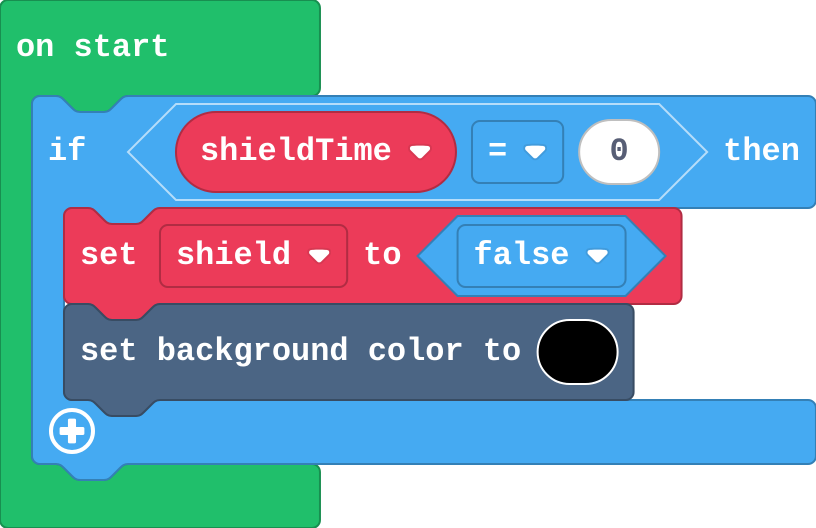
Sort the jobs.
Show as code
let shield = false
let shieldTime = 0
if (shieldTime == 0) {
    shield = false
    scene.setBackgroundColor(15)
}
Who decides each thing: Arcade's engine, or a game rule in your blocks? Match them.
Milestone 1: a blaster with limited ammo
Now a star gives a random prize: prize is 0 (the shield) or 1 (the blaster, still empty).
- Prize 1 sets
ammoto 5. - A (space on the keyboard) fires a shot only if ammo > 0, and each shot takes 1 from
ammo. - A shot that hits a rock destroys both.
Need a hint?
In the else of the star overlap: set ammo to 5. Then add on A button pressed with if ammo > 0.
Another hint
Inside the if: projectile from ship with vx 100, vy 0, then change ammo by -1. A Projectile–Enemy overlap destroys both and adds points.
A star sometimes refills the ammo; A fires only while there is ammo, and each shot uses one.
This ticks by itself when your blocks do what is asked.
Milestone 2: a smart bomb
Add a third prize: a smart bomb that destroys every rock on the screen, a point for each.
Need a hint?
Change prize to pick random 0 to 2, and turn the else into else if prize = 1 (the blaster). The new else is the bomb.
Another hint
In the bomb: for element value of array of sprites of kind Enemy, destroy value and change score by 1.
A third prize, a smart bomb, destroys every rock on the screen and scores for each.
This ticks by itself when your blocks do what is asked.
Milestone 3: your own power-up
Design a fourth power-up and add it to the prizes:
- Decide what it does and how long it lasts.
- A star now picks one of four prizes.
- Play it: is it too strong, too weak, or just right?
Need a hint?
Pick random 0 to 3, and one more else if. The last else is yours.
Another hint
Ideas: an extra life, a slow-down (a variable the rock timer uses for vx), or a magnet that makes stars follow the ship.
A star gives one of four prizes, and the fourth is a power-up you designed.
This ticks by itself when your blocks do what is asked.
For teachers
Challenge: students grow the shield game into a prize box with a blaster that runs out, a smart bomb that uses every sprite of a kind, and a power-up of their own design. About 60 minutes.
Open the teacher guide: answers, solutions, slides and a worksheet.
Students will be able to
- I can use true or false and a countdown to make a power-up that runs out.
- I can combine earlier moves into a bigger game with less help.
- I can say which jobs Arcade's engine does and which rules my blocks decide.
Before class
Nothing new: the challenge combines true or false (the shield), counting down (shieldTime, ammo) and every sprite of a kind (the smart bomb). A power-up is always three parts: a variable that remembers it, an event that changes it, and a rule that uses it. The Investigate match starts a thread for the next lesson: the engine (velocity, overlaps noticed, game over at zero lives, auto destroy) does the same jobs in every game, while game rules are the blocks you write.
Running the lesson
- Predict: set throws away what is left (from Run out). Ask whether that is fair.
- Investigate, game rule or engine: name the split. Ask students for one more example of each.
- Sam's shield revisits If, every frame: on start runs once, so an if there is asked once.
- Milestone 1: the prize is random, so students may need a few stars to test the blaster. They can set prize to 1 while testing.
- Milestone 2: the smart bomb is Every one of a kind again.
- Milestone 3: goals only. Ask each student to say their power-up as three parts: variable, event, rule.
The hard part (on purpose)
Holding several power-ups in one program. Ask students to point at the variable, the event and the rule for each prize.
When students get stuck
- A fires forever, or never. Ask: What is ammo at the start, and where does it change? Fix: ammo starts at 0, a prize-1 star sets it to 5, and each shot changes it by -1, all inside if ammo > 0.
- Shots pass through rocks. Ask: Which kinds does your overlap event name? Fix: A shot is a Projectile, so the event must be Projectile overlaps Enemy.
- The bomb destroys only one rock. Ask: Is the destroy inside the for element block? Fix: Destroy value, inside the loop.
- A prize never comes up. Ask: What range does pick random use? Fix: 0 to the number of prizes minus 1.
Stretch and support
Stretch: Show the ammo on screen with the ship's say block after each shot.
Support: A student who finishes Milestone 1 has the key idea. For Milestone 3, offer the extra life (change life by 1) as a first power-up, then ask for one more of their own.
Where it leads
Next: Will it work in Arcade?, judging which games Arcade does well by the building blocks they need. Class ideas: a power-up design jam where pairs swap power-ups and rate them for fairness; draw a power-up card (name, variable, event, rule, how long).
What each step is for
- Investigate: Arcade's engine moves sprites, notices touches and ends the game; the rules (what a touch means, when a power-up is on) are the blocks you write.
- Milestone 1: a blaster with limited ammo: A number variable limits an action: the button event asks the variable first, and a prize refills it.
- Milestone 2: a smart bomb: for element of a list of every sprite of a kind does a job once for each, so one prize can clear the screen.
- Milestone 3: your own power-up: Designing a power-up from goals alone shows whether a student can turn a game idea into a variable, an event that changes it, and a rule that uses it.
- Use true or false and a countdown to make a power-up that runs out.
- Combine earlier moves into a bigger game with less help.
- Say which jobs Arcade's engine does and which rules my blocks decide.