Will it work in Arcade?
Work out which games Arcade is built for, which take extra work, and which it cannot really do, then pitch and prototype a game that fits.
Game studios choose an engine before they choose a game: a racing game, a card game and a platformer each need different tools. Picking the wrong one costs months.
A game engine is the part of a game tool that does the work for you. In this course you have used Arcade's engine every lesson: it moves sprites by their speed, notices overlaps, keeps score and lives, and ends the game.
Arcade's building blocks so far: sprites and their kinds, the controller, position and velocity (and gravity), overlap events, score, lives and countdown, timers and every frame, projectiles, and lists of sprites. A game Arcade does well is made almost entirely from these. A game that needs something else is harder, or not a good fit.
- Predict: Read the code and say what it will do before you run anything. A wrong guess is fine: it shows you what to look for.
- Run: Run it and compare the result with your prediction.
- Investigate: Trace how each line of code connects to what you see.
- Modify: Change the code on purpose and check the result.
- Make: Build something new using what you have learned. Expect a few tries; that is normal.
Make your prediction first. Help opens once you've locked it in.
Predict
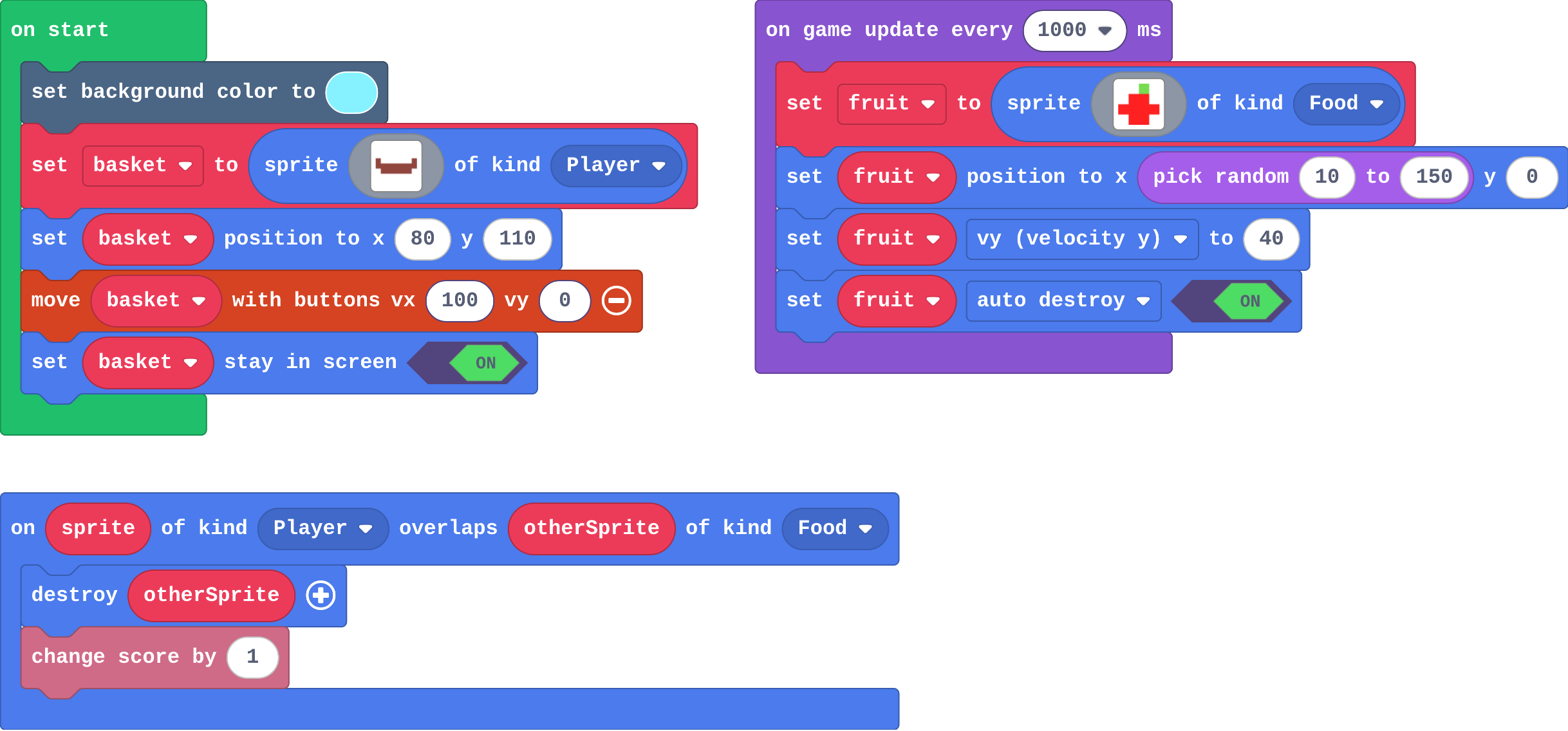
Show as code
let fruit: Sprite = null
scene.setBackgroundColor(9)
let basket = sprites.create(img`
    e . . . . . . e
    e e e e e e e e
    . e e e e e e .
    `, SpriteKind.Player)
basket.setPosition(80, 110)
controller.moveSprite(basket, 100, 0)
basket.setStayInScreen(true)
game.onUpdateInterval(1000, function () {
    fruit = sprites.create(img`
    . . 7 .
    . 2 2 .
    2 2 2 2
    . 2 2 .
    `, SpriteKind.Food)
    fruit.setPosition(randint(10, 150), 0)
    fruit.vy = 40
    fruit.setFlag(SpriteFlag.AutoDestroy, true)
})
sprites.onOverlap(SpriteKind.Player, SpriteKind.Food, function (sprite, otherSprite) {
    otherSprite.destroy()
    info.changeScoreBy(1)
})
Read the blocks. Each group is one building block of the game.
Run
Catch some apples with the arrow keys. Then point to the block that does each job.
Show as code
let fruit: Sprite = null
scene.setBackgroundColor(9)
let basket = sprites.create(img`
    e . . . . . . e
    e e e e e e e e
    . e e e e e e .
    `, SpriteKind.Player)
basket.setPosition(80, 110)
controller.moveSprite(basket, 100, 0)
basket.setStayInScreen(true)
game.onUpdateInterval(1000, function () {
    fruit = sprites.create(img`
    . . 7 .
    . 2 2 .
    2 2 2 2
    . 2 2 .
    `, SpriteKind.Food)
    fruit.setPosition(randint(10, 150), 0)
    fruit.vy = 40
    fruit.setFlag(SpriteFlag.AutoDestroy, true)
})
sprites.onOverlap(SpriteKind.Player, SpriteKind.Food, function (sprite, otherSprite) {
    otherSprite.destroy()
    info.changeScoreBy(1)
})
Investigate
This program is Ben's test. Run it and watch the ball.

Show as code
scene.setBackgroundColor(9)
let crate1 = sprites.create(img`
    e e e e e e
    e d d d d e
    e d e e d e
    e d d d d e
    e e e e e e
    `, SpriteKind.Food)
crate1.setPosition(80, 110)
let crate2 = sprites.create(img`
    e e e e e e
    e d d d d e
    e d e e d e
    e d d d d e
    e e e e e e
    `, SpriteKind.Food)
crate2.setPosition(80, 105)
let ball = sprites.create(img`
    . 2 2 .
    2 2 2 2
    2 2 2 2
    . 2 2 .
    `, SpriteKind.Player)
ball.setPosition(80, 10)
ball.ay = 200
Every game idea is a recipe of building blocks.
Three verdicts: built for it, possible with work, not a good fit.
Run the program in the playground, and watch the ball.
Match each game idea with the building blocks it needs most.
How well does Arcade fit each idea? Match each idea with its verdict and the reason.
Modify
Change one building block: the apples become rocks of kind Enemy, and catching one now costs a life.
Need a hint?
Change the falling sprite's kind from Food to Enemy, and draw a rock.
Another hint
The overlap needs Player and Enemy now. Swap change score for change life by -1 (in Info).
Add one more building block: a projectile. Now you can fight back.
Three genres, nearly the same blocks. That is what "Arcade is built for it" means.
Need a hint?
On A pressed (Controller): projectile from basket, with vy -100 so it flies up.
Another hint
Add an overlap for Projectile and Enemy: destroy both, and add a point.
Turn the catcher into a dodger: rocks of kind Enemy fall, and touching one costs a life.
This ticks by itself when your blocks do what is asked.
Turn the dodger into a shooter: A fires upwards, and a shot that hits a rock destroys it and scores.
This ticks by itself when your blocks do what is asked.
Make
Write a pitch card for a game of your own, on paper or in a document:
- Genre and a one-line idea ("a bee collects flowers before winter comes")
- Building blocks it needs
- The hard part: the one thing Arcade has no block for
- Your workaround: build it from the blocks, or change the idea so it fits
Swap with a partner. If their game needs 3D, real physics or a mouse, help them find a version that fits.
Need a hint?
Genre: what kind of game is it (catch, dodge, shooter, maze, platformer, sport)?
Another hint
Building blocks: list the ones from the top of this lesson that your game needs.
Another hint
The hard part: the one thing Arcade has no block for. Your workaround: how you will build it, or change the idea.
Build only the core of your game: the player, one other sprite and what happens when they touch. No levels, no polish. If you do the optional lesson Your own game, you will grow this prototype into a full game.
Need a hint?
Start with the player and the controller, then one other sprite and an overlap.
Another hint
Score or lives come from Info. Leave everything else for later.
A one-screen prototype of your game's core: a player, at least one other sprite, an overlap, and a score or lives.
This ticks by itself when your blocks do what is asked.
Change a car that turns
Arcade sprites cannot rotate, so this car swaps pictures instead: left and right each show the car facing that way. Add up and down pictures too (draw the car from above). This is "possible with work": the engine has no turn block, so you build turning from blocks it does have.
For teachers
Students judge which games suit Arcade by the building blocks each game needs, see that sprites pass through each other, change one building block to change a game's genre, then pitch and prototype a game that fits. About 50 minutes.
Open the teacher guide: answers, solutions, slides and a worksheet.
Students will be able to
- I can list Arcade's building blocks and name the ones a game needs.
- I can say whether a game idea is built for Arcade, possible with work, or not a good fit, and why.
- I can explain why sprites pass through each other in Arcade.
- I can pitch a game that fits Arcade and prototype its core.
Before class
A game engine is the part of a game tool that does common jobs for you. Arcade's engine moves sprites by their speed and gravity, notices overlaps, keeps score, lives and a countdown, runs timers, fires projectiles and (outside this course) draws tilemaps: walls, floors and a scrolling camera made in a tile editor.
The rule of thumb for students: a game suits Arcade when it is made of those building blocks.
- Built for it: catch and collect, dodge, top-down shooters, endless runners, single-screen sports such as pong, mazes and top-down adventures, side-scrolling platformers, two to four players on one keyboard.
- Possible with work: quizzes and stories (the screen is small), card and board games (no mouse: move a cursor with the controller), role-playing games with inventories, turning cars or ships (sprites do not rotate: draw a picture per direction), sprites that bounce off each other (you code it), saving more than the high score.
- Not a good fit: 3D, realistic physics (stacking, toppling, Angry Birds), detailed art, hundreds of moving sprites (it slows down), typing-heavy games, real-world data, and online play inside our lessons (MakeCode has its own online multiplayer with a join code, but it needs MakeCode's sharing, which our embedded editor switches off).
The key fact behind "realistic physics": an overlap is only an event. Sprites pass through each other unless blocks move or destroy them. The challenge primer has the full table. These engine facts were written from knowledge of Arcade; check anything a student disputes in the live editor.
Running the lesson
- Predict: most pick the dodger. Ask why the other three are hard; collect reasons on the board (3D, mouse, physics).
- Run: name each building block aloud as students point at it. Keep the list visible for the pitch card.
- Investigate: the first match is recipes; the second is verdicts. Ben's tower shows the biggest limit: sprites do not push each other. Contrast with the floor students built in Gravity and jumping: stopping one sprite is easy, real physics is not.
- Modify: two small changes give three genres. This is the lesson's main point: genres are recombinations of the same blocks.
- Make: pitch cards first, on paper. Partners check each other for 'needs 3D, physics or a mouse'. The prototype is deliberately small.
- Car: a worked example of 'possible with work'.
The hard part (on purpose)
Letting go of a dream game that Arcade can't make, and finding its core. Ask what the fun part is in one sentence and which building blocks it needs.
When students get stuck
- A student's dream game is 3D, online or physics-heavy. Ask: What is the fun part of that game, in one sentence? Fix: Keep the fun part and change the form: a top-down 2D racer instead of a 3D one; a 'knock the cans' game where hit crates are destroyed instead of toppling.
- The dodger's rocks still give points. Ask: Which kinds does the overlap block name? Fix: It must be Player and Enemy, and the falling sprite must be made of kind Enemy too.
- Shots pass through the rocks. Ask: What kind is a projectile? Fix: Projectile. Add an overlap for Projectile and Enemy (a spiral from Projectiles).
Stretch and support
Stretch: Pick a famous game and write two pitch cards: one for a version that fits Arcade, and a list of what would have to change. Or prototype the hard part first: a cursor moved with the controller for a board game.
Support: Give students a pitch card template with the building blocks listed as tick boxes, and three example ideas to choose from (catch, dodge, maze).
Where it leads
The optional lesson Your own game grows the prototype into a game in milestones. Beyond the course: tilemaps for mazes and platformers, animation frames, and extensions. Skillmaps (arcade.makecode.com/skillmaps): 3-in-a-row and Code an Adventure stretch the engine into genres it does not do out of the box. Games in text code (microStudio) and 3D engines are the next step for games Arcade cannot do.
What each step is for
- Investigate: A game suits Arcade when it is made from the engine's building blocks. When it needs something the engine does not have (3D, a mouse, real physics, rotation), you either build that part yourself from the blocks, or choose a different idea.
- Modify: Many games are the same engine with one building block changed: swap a kind and a point becomes a danger; add a projectile and a dodger becomes a shooter.
- List Arcade's building blocks and name the ones a game needs.
- Say whether a game idea is built for Arcade, possible with work, or not a good fit, and why.
- Explain why sprites pass through each other in Arcade.
- Pitch a game that fits Arcade and prototype its core.