Level up
Keep the level in a variable and change it where the score changes, with a goal that moves up each time.
Almost every game gets harder as you play. Behind it is one number, the level, and one place where it changes.
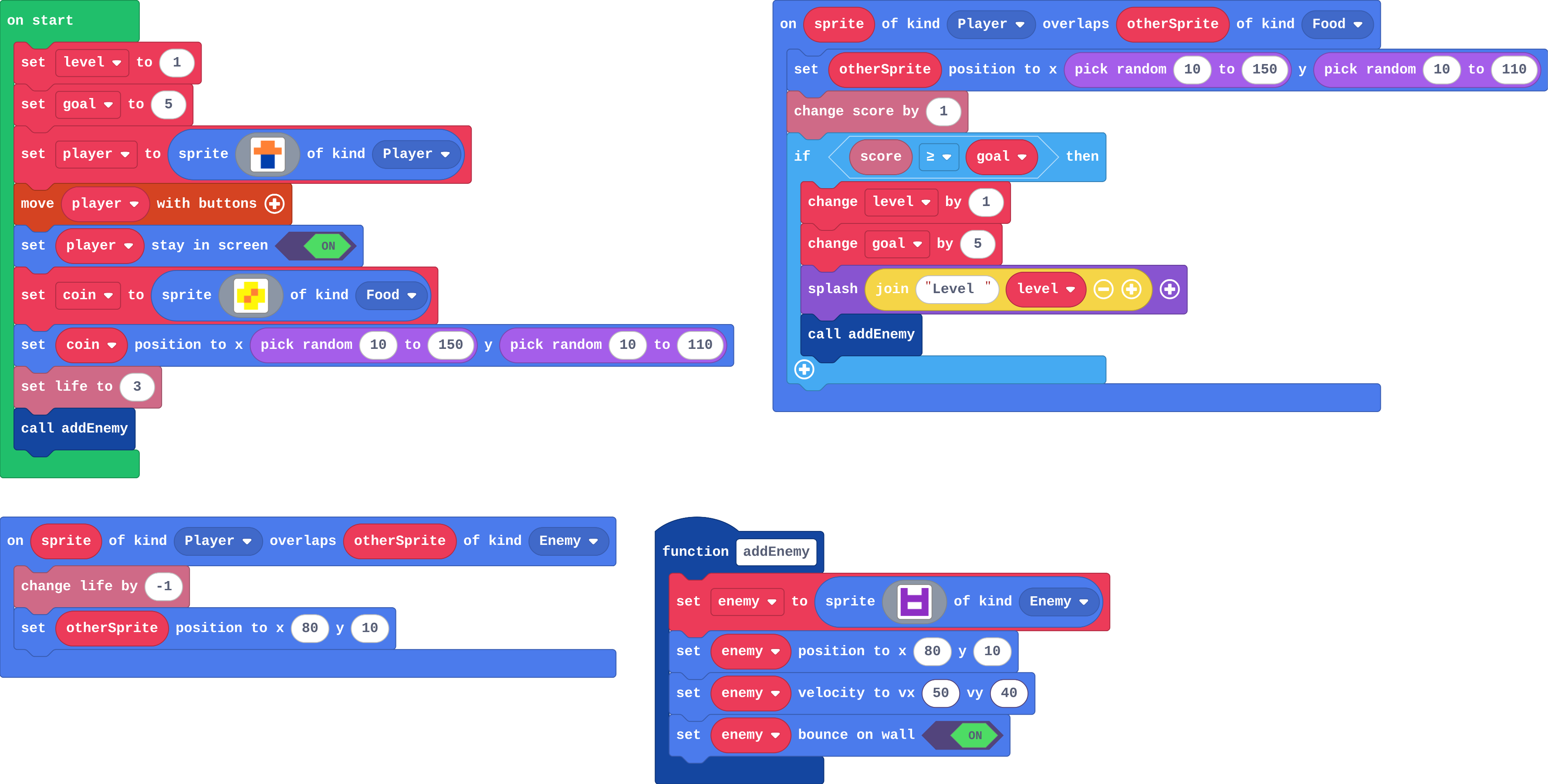
A game with levels needs a variable, level, that remembers where the player is, and one place where it goes up. This game also keeps a goal: the score the next level needs.
The splash uses join (in Text) to stick the word Level and the number together. Copy it as it is for now.
- Predict: Read the code and say what it will do before you run anything. A wrong guess is fine: it shows you what to look for.
- Run: Run it and compare the result with your prediction.
- Investigate: Trace how each line of code connects to what you see.
- Modify: Change the code on purpose and check the result.
- Make: Build something new using what you have learned. Expect a few tries; that is normal.
Make your prediction first. Help opens once you've locked it in.
Predict
Show as code
let enemy: Sprite = null
let level = 1
let goal = 5
function addEnemy () {
    enemy = sprites.create(img`
        a . . a
        a a a a
        a 1 1 a
        a a a a
        `, SpriteKind.Enemy)
    enemy.setPosition(80, 10)
    enemy.setVelocity(50, 40)
    enemy.setBounceOnWall(true)
}
let player = sprites.create(img`
    . 4 4 .
    4 4 4 4
    . 8 8 .
    . 8 8 .
    `, SpriteKind.Player)
controller.moveSprite(player)
player.setStayInScreen(true)
let coin = sprites.create(img`
    . 5 5 .
    5 5 4 5
    5 4 5 5
    . 5 5 .
    `, SpriteKind.Food)
coin.setPosition(randint(10, 150), randint(10, 110))
info.setLife(3)
addEnemy()
sprites.onOverlap(SpriteKind.Player, SpriteKind.Food, function (sprite, otherSprite) {
    otherSprite.setPosition(randint(10, 150), randint(10, 110))
    info.changeScoreBy(1)
    if (info.score() >= goal) {
        level += 1
        goal += 5
        game.splash("Level " + level)
        addEnemy()
    }
})
sprites.onOverlap(SpriteKind.Player, SpriteKind.Enemy, function (sprite, otherSprite) {
    info.changeLifeBy(-1)
    otherSprite.setPosition(80, 10)
})
Read the Player–Food overlap. What is goal after the first level-up?
Run
Collect coins and dodge the enemies. Press A (space) to close each splash.
Show as code
let enemy: Sprite = null
let level = 1
let goal = 5
function addEnemy () {
    enemy = sprites.create(img`
        a . . a
        a a a a
        a 1 1 a
        a a a a
        `, SpriteKind.Enemy)
    enemy.setPosition(80, 10)
    enemy.setVelocity(50, 40)
    enemy.setBounceOnWall(true)
}
let player = sprites.create(img`
    . 4 4 .
    4 4 4 4
    . 8 8 .
    . 8 8 .
    `, SpriteKind.Player)
controller.moveSprite(player)
player.setStayInScreen(true)
let coin = sprites.create(img`
    . 5 5 .
    5 5 4 5
    5 4 5 5
    . 5 5 .
    `, SpriteKind.Food)
coin.setPosition(randint(10, 150), randint(10, 110))
info.setLife(3)
addEnemy()
sprites.onOverlap(SpriteKind.Player, SpriteKind.Food, function (sprite, otherSprite) {
    otherSprite.setPosition(randint(10, 150), randint(10, 110))
    info.changeScoreBy(1)
    if (info.score() >= goal) {
        level += 1
        goal += 5
        game.splash("Level " + level)
        addEnemy()
    }
})
sprites.onOverlap(SpriteKind.Player, SpriteKind.Enemy, function (sprite, otherSprite) {
    info.changeLifeBy(-1)
    otherSprite.setPosition(80, 10)
})
Investigate
Show as code
let enemy: Sprite = null
let level = 1
let goal = 5
function addEnemy () {
    enemy = sprites.create(img`
        a . . a
        a a a a
        a 1 1 a
        a a a a
        `, SpriteKind.Enemy)
    enemy.setPosition(80, 10)
    enemy.setVelocity(50, 40)
    enemy.setBounceOnWall(true)
}
let player = sprites.create(img`
    . 4 4 .
    4 4 4 4
    . 8 8 .
    . 8 8 .
    `, SpriteKind.Player)
controller.moveSprite(player)
player.setStayInScreen(true)
let coin = sprites.create(img`
    . 5 5 .
    5 5 4 5
    5 4 5 5
    . 5 5 .
    `, SpriteKind.Food)
coin.setPosition(randint(10, 150), randint(10, 110))
info.setLife(3)
addEnemy()
sprites.onOverlap(SpriteKind.Player, SpriteKind.Food, function (sprite, otherSprite) {
    otherSprite.setPosition(randint(10, 150), randint(10, 110))
    info.changeScoreBy(1)
    if (info.score() >= goal) {
        level += 1
        goal += 5
        game.splash("Level " + level)
        addEnemy()
    }
})
sprites.onOverlap(SpriteKind.Player, SpriteKind.Enemy, function (sprite, otherSprite) {
    info.changeLifeBy(-1)
    otherSprite.setPosition(80, 10)
})
Follow level and goal coin by coin.
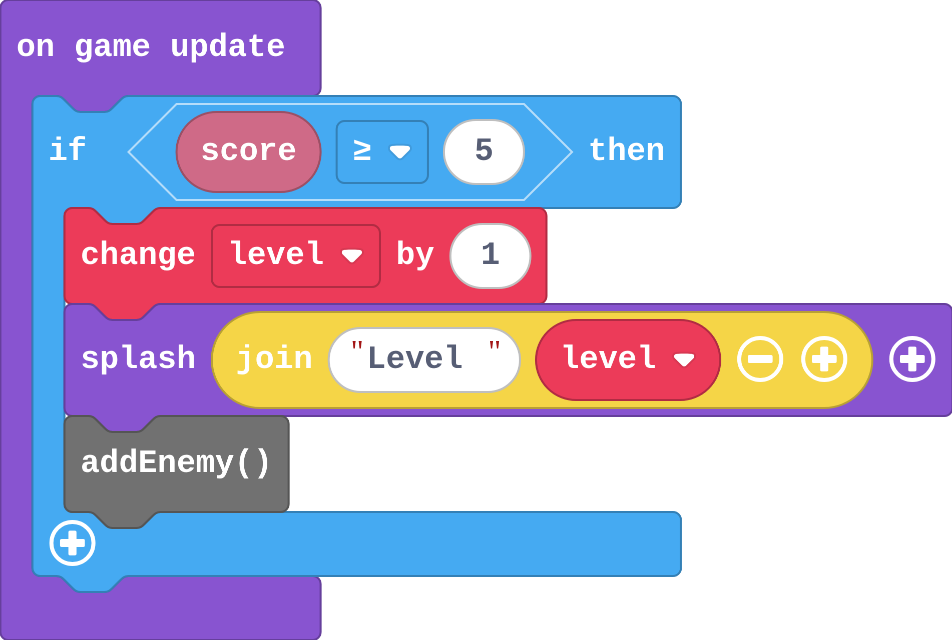
Zoe's level-up:
Show as code
game.onUpdate(function () {
    if (info.score() >= 5) {
        level += 1
        game.splash("Level " + level)
        addEnemy()
    }
})
level starts at 1 and goal at 5. Fill in level and goal after each coin.
| score | level | goal |
|---|---|---|
| 0 | 1 | 5 |
| 5 | ||
| 6 | ||
| 10 |
Modify
Make a new level come every 3 coins.
Need a hint?
Two numbers: the goal you start with and how much it changes by.
Another hint
Both 3.
Give the player a bonus life at every new level. One block, in the right place.
Need a hint?
change life by 1 (Info) goes inside the level-up if.
A new level every 3 coins.
This ticks by itself when your blocks do what is asked.
A bonus life at every new level.
This ticks by itself when your blocks do what is asked.
Mix it up
Show as code
scene.setBackgroundColor(9)
let player = sprites.create(img`
    . 4 4 .
    4 4 4 4
    . 8 8 .
    . 8 8 .
    `, SpriteKind.Player)
player.ay = 300
game.onUpdate(function () {
    if (player.bottom > 80) {
        player.bottom = 80
        player.vy = 0
    }
})
controller.A.onEvent(ControllerButtonEvent.Pressed, function () {
    if (player.bottom >= 100) {
        player.vy = -150
    }
})
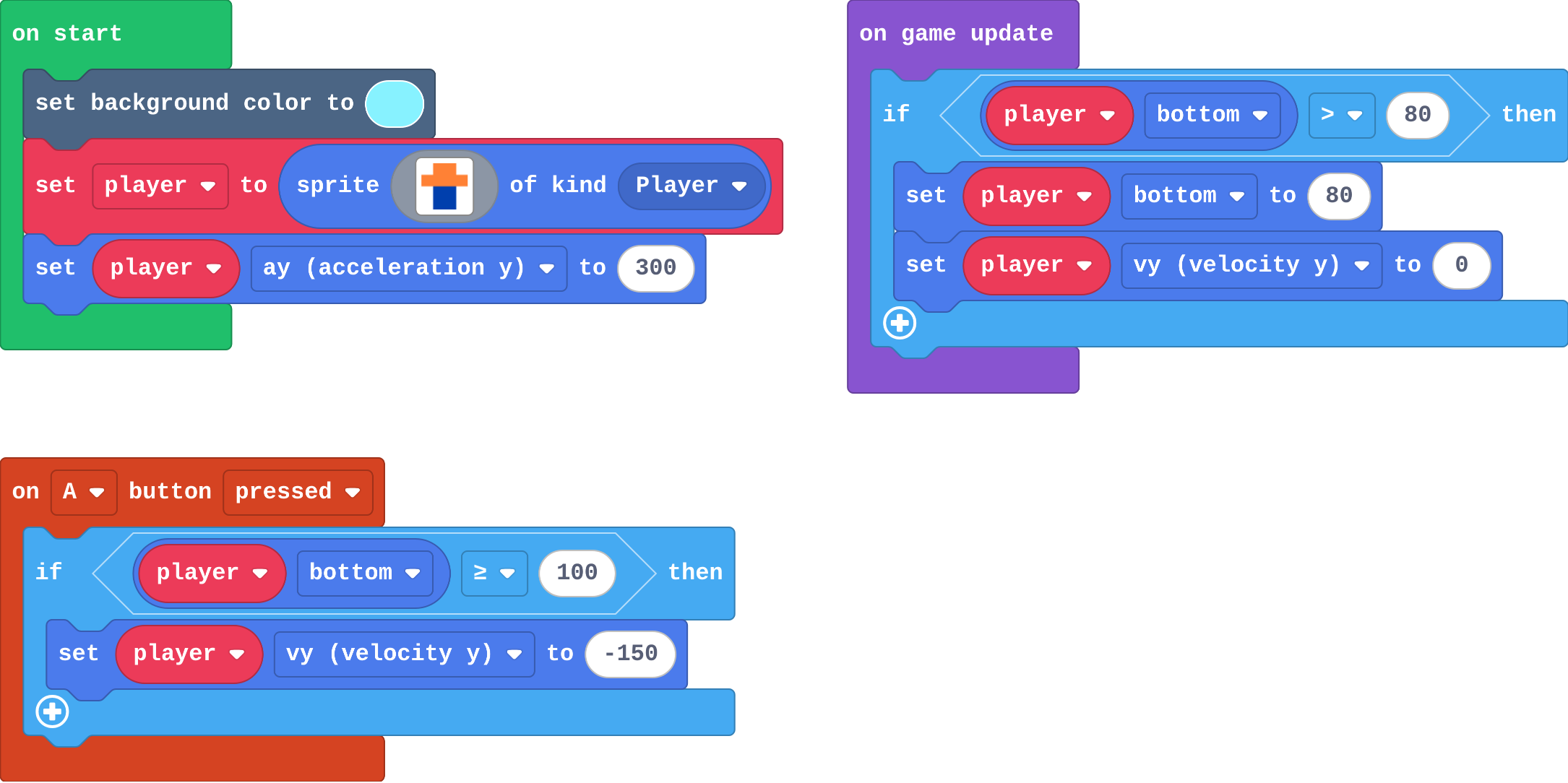
Ana raises the floor: the floor if now puts the player's bottom at 80. Her jump still asks bottom ≥ 100. What number should the jump ask about now?
Make
This is your runner from last lesson. Every rock that appears scores a point. Give it levels:
- every 10 points the level goes up, with a splash,
- each new level, the rocks are faster (change speed by -20: they fly left),
- the level-up goes where the score changes: in the timer.
Need a hint?
Two new variables in on start: level 1 and goal 10.
Another hint
The score changes in the timer, so the level-up goes there, just after change score.
Another hint
Inside the if: change level by 1, change goal by 10, change speed by -20, and a splash.
Every 10 points the runner levels up: a splash, and faster rocks.
This ticks by itself when your blocks do what is asked.
Change a fishing game
Catch fish with the net. Every 5 fish the level goes up and the fish swim faster. Make the water darker at every level too: one block, in the level-up.
For teachers
Students keep the level in a variable, change it where the score changes with a goal that moves up, see why a level-up in on game update fires every frame, and add levels to their runner. About 45 minutes.
Open the teacher guide: answers, solutions, slides and a worksheet.
Students will be able to
- I can use a variable to remember the level, and change it by 1.
- I can put a level-up where the score changes, with a goal that moves up.
- I can explain why a level-up in on game update happens every frame.
Before class
A level is a variable that starts at 1 and changes by 1. The level-up is an if in the event where the score changes (here the coin overlap): if score ≥ goal, change level by 1, change goal by 5, splash and add an enemy. goal is a target that moves up, so the question is false again until 5 more coins.
The trap is the lesson's misconception: put if score ≥ 5 in on game update and it fires every frame while the score stays 5 or more, so the level races up. The splash uses join ("Level " + level), labelled copy-for-now.
Next lesson keeps what changes per level in a list.
Running the lesson
- Predict: most students expect Level 2 at 5 coins. Ask what happens at 6.
- Investigate: Ben's game shows why goal moves; Zoe's shows why on game update is the wrong place.
- Modify: both numbers must change for every 3 coins. The bonus life shows the if runs once per level.
- Mix it up: the jump from last lesson.
- Make: the runner's score changes in the timer, so the level-up goes there.
The hard part (on purpose)
Where the level-up goes. When levels race up, ask how often that block runs.
When students get stuck
- The level races up as soon as the score reaches the goal. Ask: Where is the level-up if, and how often does that block run? Does goal move up? Fix: Put it in the event where the score changes, and change goal by 10 inside it.
- The splash says Level 1 after the first level-up. Ask: Is change level by 1 before or after the splash? Fix: Change the level first, then splash.
- The rocks get slower, not faster. Ask: Which way do the rocks fly? Fix: Left, so faster is more negative: change speed by -20.
Stretch and support
Stretch: Win the game at level 5: an if inside the level-up with game over (win).
Support: Give students the level and goal variables in the Make starter, so they write only the if in the timer.
Where it leads
Next: a list per level, so each level can have its own background and speed. Skillmap: Jungle Jump Platformer (arcade.makecode.com/skillmaps) moves between level maps.
What each step is for
- Investigate: A level goes up where the score changes, and a goal that moves up makes the question false again until the next level.
- Modify: The goal's step sets how long a level lasts, and anything inside the level-up if happens once per level.
- Mix it up: A jump belongs inside an if that asks whether the player is on the floor.
- Use a variable to remember the level, and change it by 1.
- Put a level-up where the score changes, with a goal that moves up.
- Explain why a level-up in on game update happens every frame.