Level up
Students keep the level in a variable, change it where the score changes with a goal that moves up, see why a level-up in on game update fires every frame, and add levels to their runner.
Classroom resources
Load these into Waypoints Prepare: choose Load URL and paste the copied address, or download the file and import it. In Prepare, the worksheet's Teacher edition shows the answers; the student copy hides them.
Students will be able to
- I can use a variable to remember the level, and change it by 1.
- I can put a level-up where the score changes, with a goal that moves up.
- I can explain why a level-up in on game update happens every frame.
Timing
Predict and Run 8 min · Investigate 12 min · Modify 8 min · Mix it up 3 min · Make 10 min · Fishing 4 min
Before class
A level is a variable that starts at 1 and changes by 1. The level-up is an if in the event where the score changes (here the coin overlap): if score ≥ goal, change level by 1, change goal by 5, splash and add an enemy. goal is a target that moves up, so the question is false again until 5 more coins.
The trap is the lesson's misconception: put if score ≥ 5 in on game update and it fires every frame while the score stays 5 or more, so the level races up. The splash uses join ("Level " + level), labelled copy-for-now.
Next lesson keeps what changes per level in a list.
Running the lesson
- Predict: most students expect Level 2 at 5 coins. Ask what happens at 6.
- Investigate: Ben's game shows why goal moves; Zoe's shows why on game update is the wrong place.
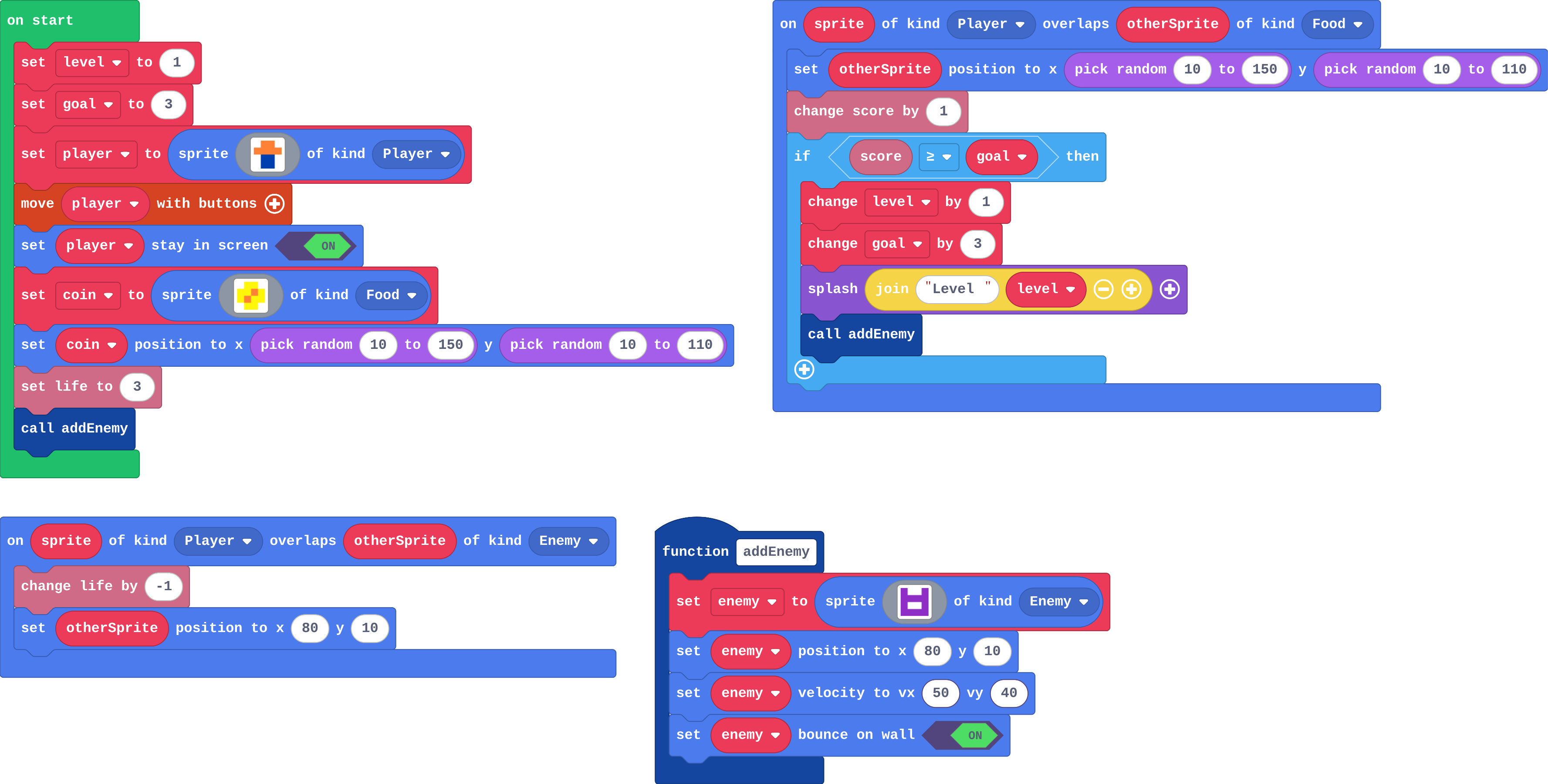
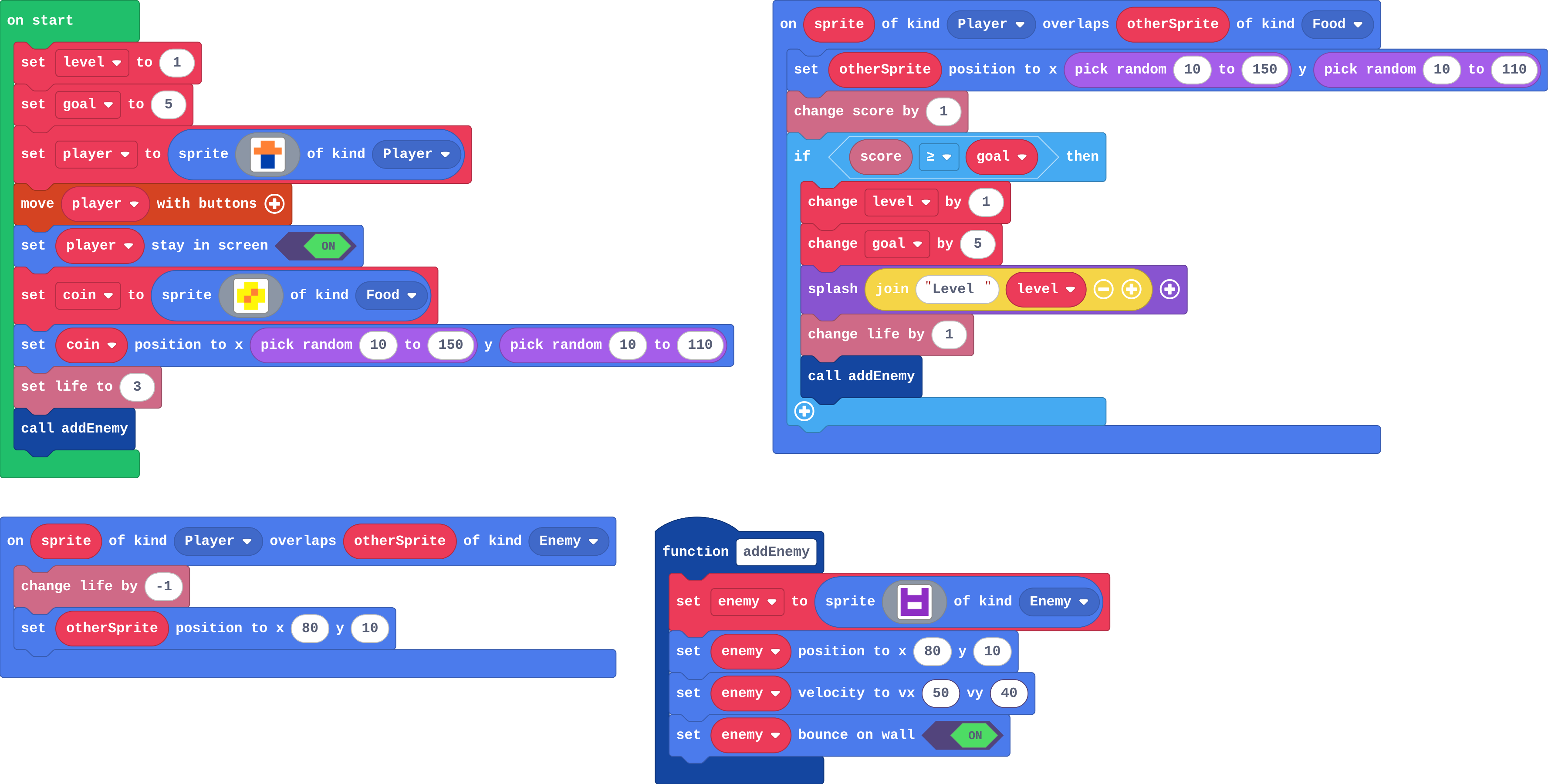
- Modify: both numbers must change for every 3 coins. The bonus life shows the if runs once per level.
- Mix it up: the jump from last lesson.
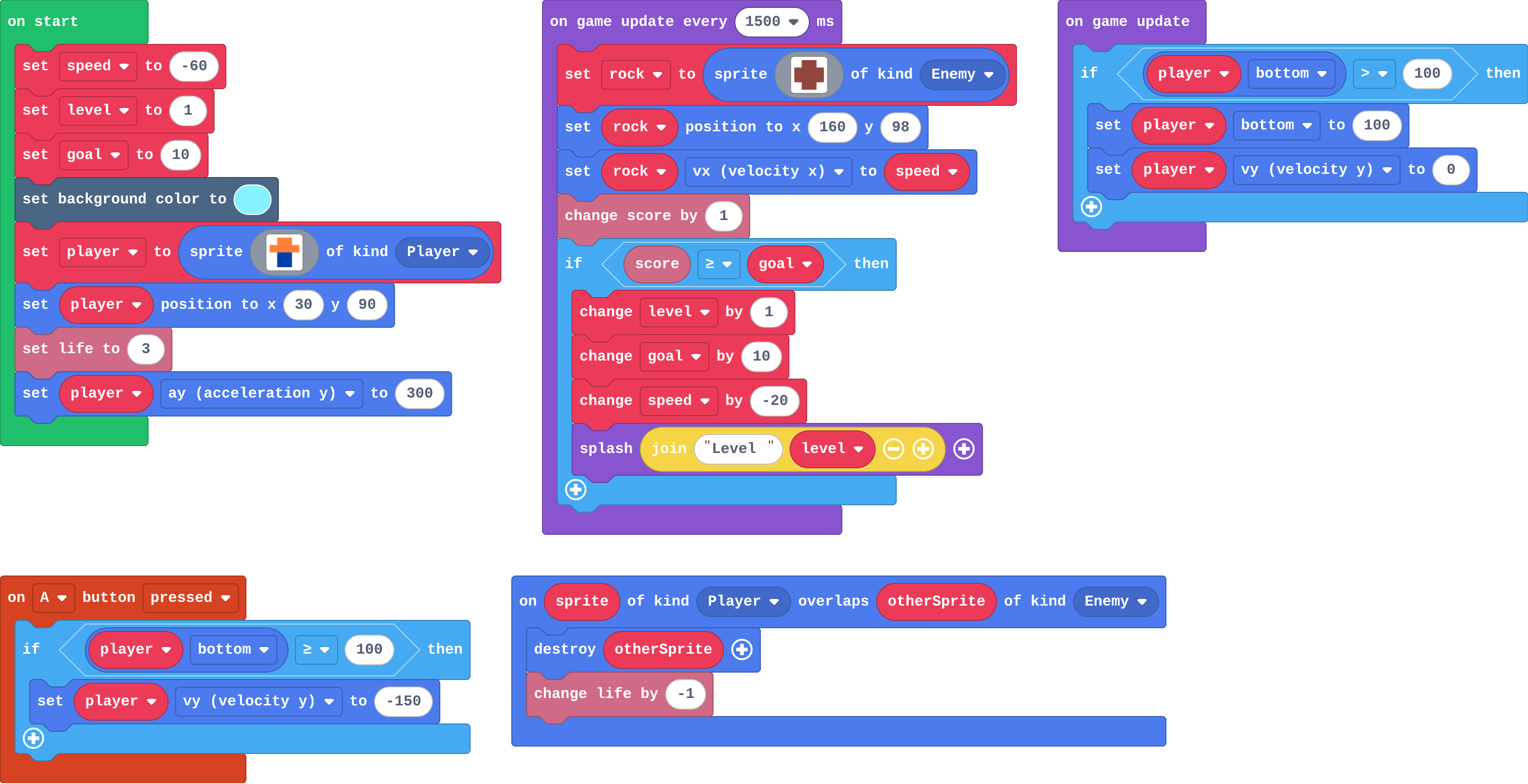
- Make: the runner's score changes in the timer, so the level-up goes there.
In class
On the slides at these points. Students can do the whole lesson on their own; these are for the room. In the deck, the Run, Modify and Make slides have the live playground in them (the tutorial link is the backup), and the notes above are in each slide's speaker notes.
- Ring the bell (investigate, 3 min)
One student counts up aloud; another rings (claps) when the count reaches the goal, then moves the goal up by 5. Then try without moving the goal.
Without the moving goal, every number after 5 rings.
- Level race (end, 4 min)
Play the next pair's runner. Which level did you reach?
The hard part (on purpose)
Where the level-up goes. When levels race up, ask how often that block runs.
When students get stuck
| What you will see | A question to ask | The fix |
|---|---|---|
| The level races up as soon as the score reaches the goal. | Where is the level-up if, and how often does that block run? Does goal move up? | Put it in the event where the score changes, and change goal by 10 inside it. |
| The splash says Level 1 after the first level-up. | Is change level by 1 before or after the splash? | Change the level first, then splash. |
| The rocks get slower, not faster. | Which way do the rocks fly? | Left, so faster is more negative: change speed by -20. |
Answers to the checks
- Predict: You collect 5 coins, then one more. What happens?
At 5 coins the if is true: level becomes 2, goal becomes 10, a splash shows Level 2 and addEnemy makes a second enemy. At 6 coins, 6 is less than 10, so nothing new happens. - Level and goal: level starts at 1 and goal at 5. Fill in level and goal after each coin.
2, 10, 2, 10, 3, 15
The level only goes up when the score reaches goal, and goal moves up by 5 each time, so the next level is 5 coins away. - Ben's game: Ben deleted change goal by 5. What happens after his 5th coin?
Every coin after that is a new level, because score ≥ 5 stays true
Without the moving goal, the question score ≥ 5 is true for coin 6, 7, 8 and every coin after, so each one levels up. - Zoe's levels: Zoe moved the level-up into on game update (below). The moment she reaches 5 points the splashes never stop, though she collects no more coins. Why?
on game update runs every frame, and the score stays 5 or more, so the if is true every frame
An if in on game update is asked every frame. Once the score is 5, the question stays true, so the level goes up again and again. Level up where the score changes: in the overlap. - Mix it up: Ana raises the floor: the floor if now puts the player's bottom at 80. Her jump still asks bottom ≥ 100. What number should the jump ask about now?
80
Standing now means bottom is 80. At ≥ 100 the jump never works, because the player never gets that low.
Solutions
One possible solution for each task. Other correct programs are fine.
Modify › Shorter levels
Show as code
let enemy: Sprite = null
let level = 1
let goal = 3
function addEnemy () {
    enemy = sprites.create(img`
        a . . a
        a a a a
        a 1 1 a
        a a a a
        `, SpriteKind.Enemy)
    enemy.setPosition(80, 10)
    enemy.setVelocity(50, 40)
    enemy.setBounceOnWall(true)
}
let player = sprites.create(img`
    . 4 4 .
    4 4 4 4
    . 8 8 .
    . 8 8 .
    `, SpriteKind.Player)
controller.moveSprite(player)
player.setStayInScreen(true)
let coin = sprites.create(img`
    . 5 5 .
    5 5 4 5
    5 4 5 5
    . 5 5 .
    `, SpriteKind.Food)
coin.setPosition(randint(10, 150), randint(10, 110))
info.setLife(3)
addEnemy()
sprites.onOverlap(SpriteKind.Player, SpriteKind.Food, function (sprite, otherSprite) {
    otherSprite.setPosition(randint(10, 150), randint(10, 110))
    info.changeScoreBy(1)
    if (info.score() >= goal) {
        level += 1
        goal += 3
        game.splash("Level " + level)
        addEnemy()
    }
})
sprites.onOverlap(SpriteKind.Player, SpriteKind.Enemy, function (sprite, otherSprite) {
    info.changeLifeBy(-1)
    otherSprite.setPosition(80, 10)
})
Modify › Bonus life
Show as code
let enemy: Sprite = null
let level = 1
let goal = 5
function addEnemy () {
    enemy = sprites.create(img`
        a . . a
        a a a a
        a 1 1 a
        a a a a
        `, SpriteKind.Enemy)
    enemy.setPosition(80, 10)
    enemy.setVelocity(50, 40)
    enemy.setBounceOnWall(true)
}
let player = sprites.create(img`
    . 4 4 .
    4 4 4 4
    . 8 8 .
    . 8 8 .
    `, SpriteKind.Player)
controller.moveSprite(player)
player.setStayInScreen(true)
let coin = sprites.create(img`
    . 5 5 .
    5 5 4 5
    5 4 5 5
    . 5 5 .
    `, SpriteKind.Food)
coin.setPosition(randint(10, 150), randint(10, 110))
info.setLife(3)
addEnemy()
sprites.onOverlap(SpriteKind.Player, SpriteKind.Food, function (sprite, otherSprite) {
    otherSprite.setPosition(randint(10, 150), randint(10, 110))
    info.changeScoreBy(1)
    if (info.score() >= goal) {
        level += 1
        goal += 5
        game.splash("Level " + level)
        info.changeLifeBy(1)
        addEnemy()
    }
})
sprites.onOverlap(SpriteKind.Player, SpriteKind.Enemy, function (sprite, otherSprite) {
    info.changeLifeBy(-1)
    otherSprite.setPosition(80, 10)
})
Make
Show as code
let rock: Sprite = null
let speed = -60
let level = 1
let goal = 10
scene.setBackgroundColor(9)
let player = sprites.create(img`
    . 4 4 .
    4 4 4 4
    . 8 8 .
    . 8 8 .
    `, SpriteKind.Player)
player.setPosition(30, 90)
info.setLife(3)
player.ay = 300
game.onUpdate(function () {
    if (player.bottom > 100) {
        player.bottom = 100
        player.vy = 0
    }
})
controller.A.onEvent(ControllerButtonEvent.Pressed, function () {
    if (player.bottom >= 100) {
        player.vy = -150
    }
})
game.onUpdateInterval(1500, function () {
    rock = sprites.create(img`
        . e e .
        e e e e
        e e e e
        . e e .
        `, SpriteKind.Enemy)
    rock.setPosition(160, 98)
    rock.vx = speed
    info.changeScoreBy(1)
    if (info.score() >= goal) {
        level += 1
        goal += 10
        speed += -20
        game.splash("Level " + level)
    }
})
sprites.onOverlap(SpriteKind.Player, SpriteKind.Enemy, function (sprite, otherSprite) {
    otherSprite.destroy()
    info.changeLifeBy(-1)
})
Change a fishing game
Open task: any program that does what the step asks.
Stretch and support
Stretch: Win the game at level 5: an if inside the level-up with game over (win).
Support: Give students the level and goal variables in the Make starter, so they write only the if in the timer.
Exit ticket
Why does a level-up go in the event where the score changes, not in on game update?
on game update runs every frame, so while the score stays high enough the level goes up every frame. In the event it is asked only when the score changes.
What each step is for
- Investigate: A level goes up where the score changes, and a goal that moves up makes the question false again until the next level.
- Modify: The goal's step sets how long a level lasts, and anything inside the level-up if happens once per level.
- Mix it up: A jump belongs inside an if that asks whether the player is on the floor.
Where it leads
Next: a list per level, so each level can have its own background and speed. Skillmap: Jungle Jump Platformer (arcade.makecode.com/skillmaps) moves between level maps.