---
marp: true
theme: default
html: true
---

# Level up

Arcade advanced skills · Levels

<!-- Speaker note: Students keep the level in a variable, change it where the score changes with a goal that moves up, see why a level-up in on game update fires every frame, and add levels to their runner. About 45 minutes (Predict and Run 8 min · Investigate 12 min · Modify 8 min · Mix it up 3 min · Make 10 min · Fishing 4 min). -->

---

## Today

**We are learning to** keep the level in a variable and change it where the score changes, with a goal that moves up each time.

- I can use a variable to remember the level, and change it by 1.
- I can put a level-up where the score changes, with a goal that moves up.
- I can explain why a level-up in on game update happens every frame.

<!-- Speaker note: Before class: A **level** is a variable that starts at 1 and changes by 1. The level-up is an if in the event where the score changes (here the coin overlap): *if score ≥ goal*, change level by 1, change **goal** by 5, splash and add an enemy. goal is a target that moves up, so the question is false again until 5 more coins. The trap is the lesson's misconception: put *if score ≥ 5* in **on game update** and it fires **every frame** while the score stays 5 or more, so the level races up. The splash uses join ("Level " + level), labelled copy-for-now. Next lesson keeps what changes per level in a list. Teacher: Mix it up: the jump from last lesson. -->

---

## Why it matters

> Almost every game gets harder as you play. Behind it is one number, the level, and one place where it changes.

<!-- Speaker note: A game with levels needs a **variable**, `level`, that remembers where the player is, and one place where it goes up. This game also keeps a **goal**: the score the next level needs. The splash uses **join** (in **Text**) to stick the word *Level* and the number together. Copy it as it is for now. -->

---

<span style="background:#dbeafe; color:#1a1a1a; border:1.5px solid #3b82f6; padding:6px 18px; border-radius:8px; font-size:1em; font-weight:500;">💬 Discussion</span>

## Predict

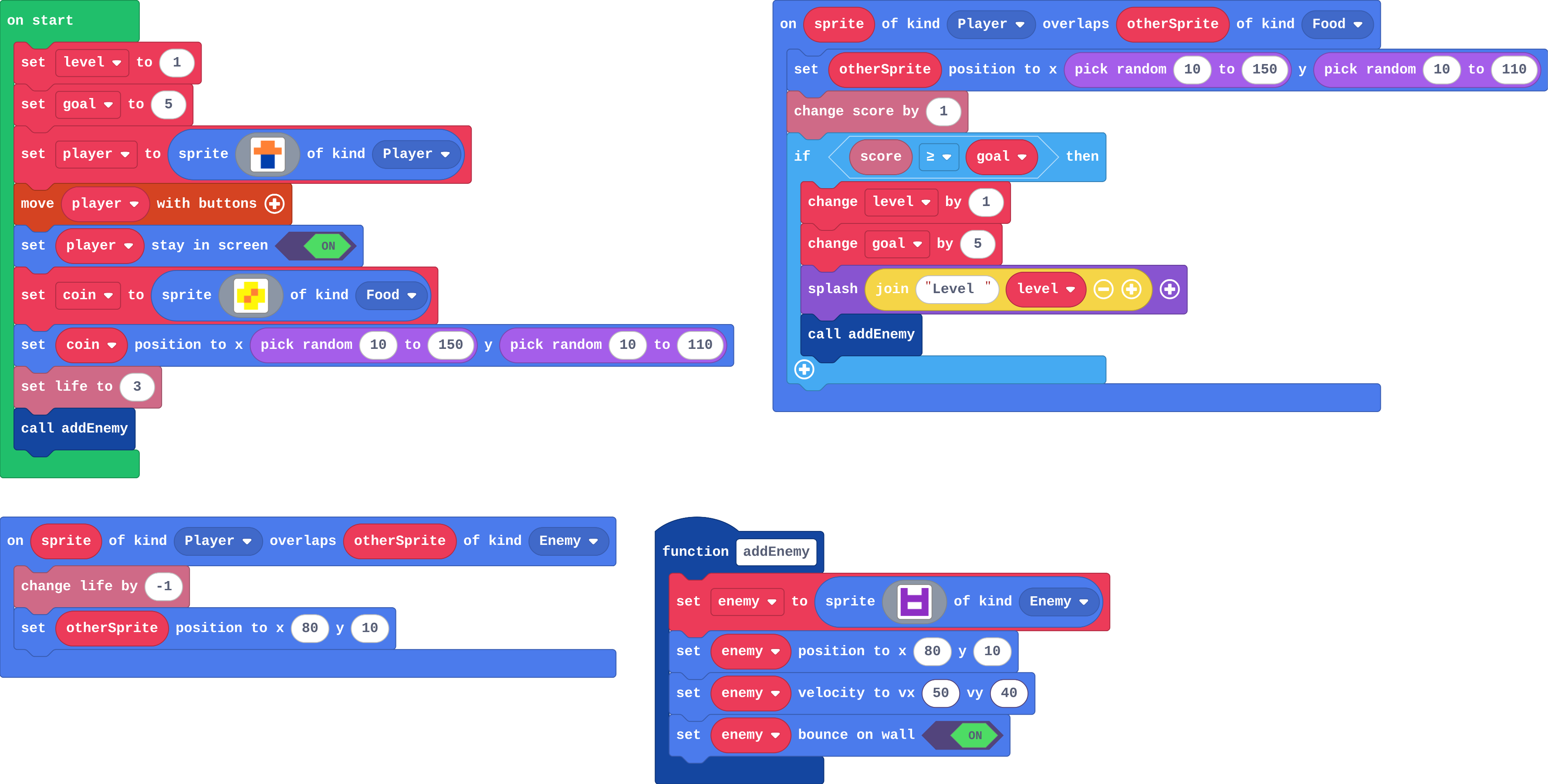
![h:360](https://studio.learningwaypoints.com/tutorials/_pictures/makecode/code/7e3c142f3068.png?v=8e670d24f65bd560)

**You collect 5 coins, then one more. What happens?**

- Every coin is a new level
- At 5 coins: Level 2. At 6: Level 3
- At 5 coins the first enemy is replaced by a faster one
- At 5 coins: a Level 2 splash and a second enemy. At 6: nothing new

<!-- Speaker note: What happens: At 5 coins the if is true: level becomes 2, goal becomes 10, a splash shows Level 2 and addEnemy makes a second enemy. At 6 coins, 6 is less than 10, so nothing new happens. Take two or three predictions before anyone runs it. -->

<!-- Speaker note: Teacher: most students expect Level 2 at 5 coins. Ask what happens at 6. -->

---

<span style="background:#dcfce7; color:#1a1a1a; border:1.5px solid #22c55e; padding:6px 18px; border-radius:8px; font-size:1em; font-weight:500;">✅ Check</span>

## What happened?

* At 5 coins the if is true: level becomes 2, goal becomes 10, a splash shows Level 2 and addEnemy makes a second enemy. At 6 coins, 6 is less than 10, so nothing new happens.

<!-- Speaker note: Reveal after running. Ask who predicted it, and what made them think so. -->

---

<span style="background:#fef3c7; color:#1a1a1a; border:1.5px solid #f59e0b; padding:6px 18px; border-radius:8px; font-size:1em; font-weight:500;">✍️ Activity</span>

## Run it

Open the lesson at this step and try it together.

[studio.learningwaypoints.com/tutorials/code/arcade-advanced/arcade-levels/?full=step-2#step-2](https://studio.learningwaypoints.com/tutorials/code/arcade-advanced/arcade-levels/?full=step-2#step-2)

<!-- Speaker note: Collect coins and dodge the enemies. Press **A** (space) to close each splash. Students should be able to say: I reached level 2 (or further) and compared with my prediction. -->

---

<span style="background:#dbeafe; color:#1a1a1a; border:1.5px solid #3b82f6; padding:6px 18px; border-radius:8px; font-size:1em; font-weight:500;">💬 Discussion</span>

## Investigate

![h:360](https://studio.learningwaypoints.com/tutorials/_pictures/makecode/code/7e3c142f3068.png?v=8e670d24f65bd560)

<!-- Speaker note: What this step is for: A level goes up where the score changes, and a goal that moves up makes the question false again until the next level. -->

<!-- Speaker note: Teacher: Ben's game shows why goal moves; Zoe's shows why on game update is the wrong place. -->

---

<span style="background:#dcfce7; color:#1a1a1a; border:1.5px solid #22c55e; padding:6px 18px; border-radius:8px; font-size:1em; font-weight:500;">✅ Check</span>

## Level and goal

**level starts at 1 and goal at 5. Fill in level and goal after each coin.**

| score | level | goal |
|---|---|---|
| 0 | 1 | 5 |
| 5 | ? | ? |
| 6 | ? | ? |
| 10 | ? | ? |

* Answer: 2, 10, 2, 10, 3, 15

<!-- Speaker note: The level only goes up when the score reaches goal, and goal moves up by 5 each time, so the next level is 5 coins away. -->

<style scoped>pre, marp-pre { font-size: 0.5em; line-height: 1.25; } section { font-size: 24px; }</style>

---

<span style="background:#dcfce7; color:#1a1a1a; border:1.5px solid #22c55e; padding:6px 18px; border-radius:8px; font-size:1em; font-weight:500;">✅ Check</span>

## Ben's game

**Ben deleted change goal by 5. What happens after his 5th coin?**

- The level never goes up
- Nothing: the game works the same
- The game ends
- Every coin after that is a new level, because score ≥ 5 stays true

* Answer: Every coin after that is a new level, because score ≥ 5 stays true

<!-- Speaker note: Without the moving goal, the question score ≥ 5 is true for coin 6, 7, 8 and every coin after, so each one levels up. -->

<style scoped>pre, marp-pre { font-size: 0.5em; line-height: 1.25; } section { font-size: 27px; }</style>

---

<span style="background:#dcfce7; color:#1a1a1a; border:1.5px solid #22c55e; padding:6px 18px; border-radius:8px; font-size:1em; font-weight:500;">✅ Check</span>

## Zoe's levels

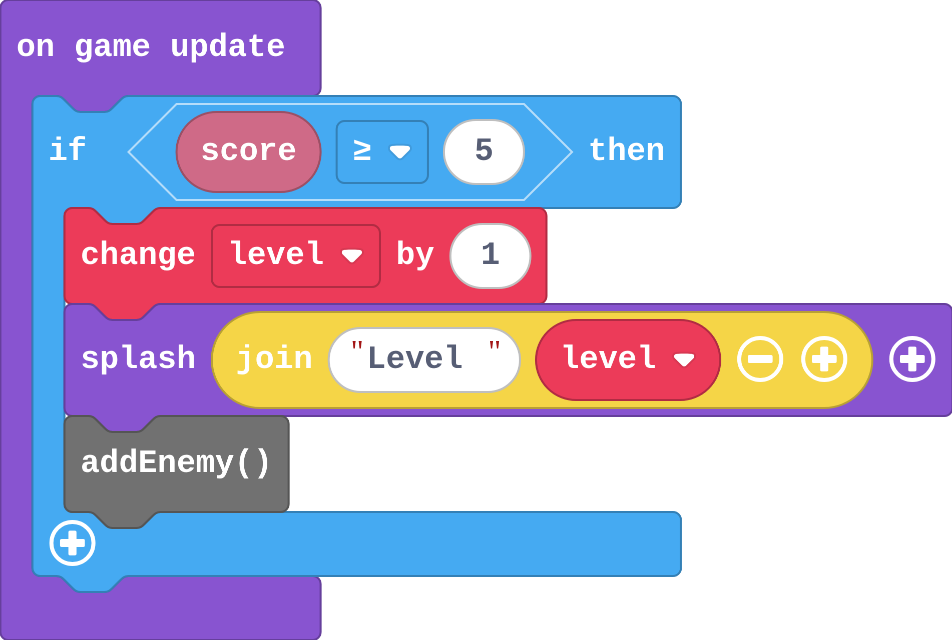
Zoe's level-up:

![h:320](https://studio.learningwaypoints.com/tutorials/_pictures/makecode/code/17f7baa90863.png?v=04a0d9b34b036071)

**Zoe moved the level-up into on game update (below). The moment she reaches 5 points the splashes never stop, though she collects no more coins. Why?**

- The goal is too small
- The splash adds points
- score ≥ 5 should be score &gt; 5
- on game update runs every frame, and the score stays 5 or more, so the if is true every frame

* Answer: on game update runs every frame, and the score stays 5 or more, so the if is true every frame

<!-- Speaker note: An if in on game update is asked every frame. Once the score is 5, the question stays true, so the level goes up again and again. Level up where the score changes: in the overlap. -->

<style scoped>pre, marp-pre { font-size: 0.5em; line-height: 1.25; } section { font-size: 20px; }</style>

---

<span style="background:#fef3c7; color:#1a1a1a; border:1.5px solid #f59e0b; padding:6px 18px; border-radius:8px; font-size:1em; font-weight:500;">✍️ Activity</span>

## Ring the bell <span style="font-size:.6em;color:#64748b">(3 min)</span>

One student counts up aloud; another rings (claps) when the count reaches the goal, then moves the goal up by 5. Then try without moving the goal.

<!-- Speaker note: Without the moving goal, every number after 5 rings. -->

---

<span style="background:#fef3c7; color:#1a1a1a; border:1.5px solid #f59e0b; padding:6px 18px; border-radius:8px; font-size:1em; font-weight:500;">✍️ Activity</span>

## Modify


- **Shorter levels:** Make a new level come every **3** coins.
- **Bonus life:** Give the player a **bonus life** at every new level. One block, in the right place.

[Open this step](https://studio.learningwaypoints.com/tutorials/code/arcade-advanced/arcade-levels/?full=step-4#step-4)

<!-- Speaker note: What this step is for: The goal's step sets how long a level lasts, and anything inside the level-up if happens once per level. Hints, in order: Two numbers: the goal you start with and how much it changes by. / Both 3. / change life by 1 (Info) goes inside the level-up if. For students who need more support: Give students the level and goal variables in the Make starter, so they write only the if in the timer. For early finishers: Win the game at level 5: an if inside the level-up with game over (win). The hard part, on purpose: Where the level-up goes. When levels race up, ask how often that block runs. When students get stuck: The level races up as soon as the score reaches the goal. Ask: Where is the level-up if, and how often does that block run? Does goal move up? Fix: Put it in the event where the score changes, and change goal by 10 inside it. / The splash says Level 1 after the first level-up. Ask: Is change level by 1 before or after the splash? Fix: Change the level first, then splash. / The rocks get slower, not faster. Ask: Which way do the rocks fly? Fix: Left, so faster is more negative: change speed by -20. -->

<!-- Speaker note: Teacher: both numbers must change for every 3 coins. The bonus life shows the if runs once per level. -->

---

<span style="background:#dbeafe; color:#1a1a1a; border:1.5px solid #3b82f6; padding:6px 18px; border-radius:8px; font-size:1em; font-weight:500;">💬 Discussion</span>

## Investigate: Mix it up

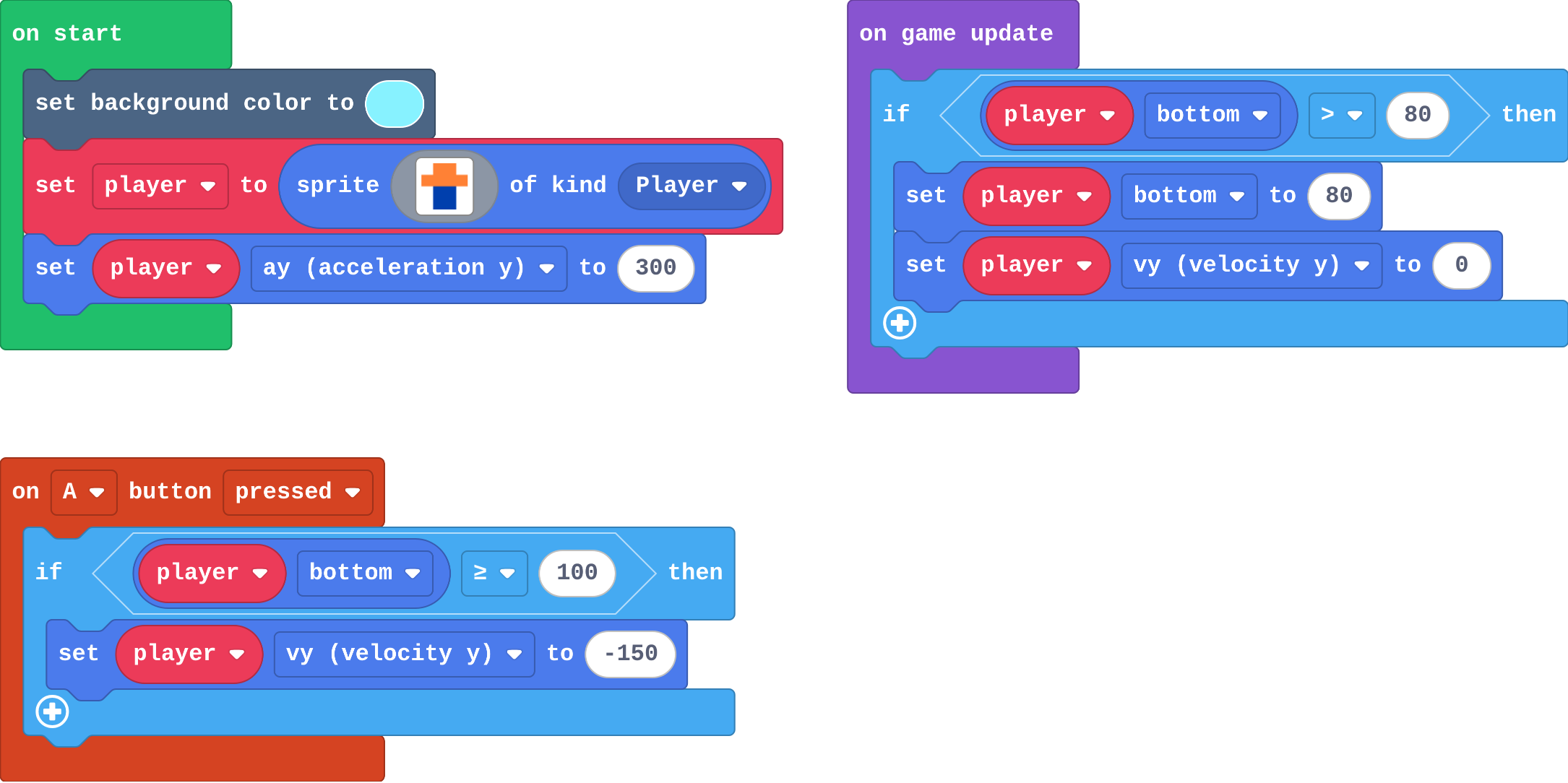
![h:360](https://studio.learningwaypoints.com/tutorials/_pictures/makecode/code/c9aa84d9b824.png?v=9c9e739b5c583bd0)

<!-- Speaker note: What this step is for: A jump belongs inside an if that asks whether the player is on the floor. -->

---

<span style="background:#dcfce7; color:#1a1a1a; border:1.5px solid #22c55e; padding:6px 18px; border-radius:8px; font-size:1em; font-weight:500;">✅ Check</span>

## Mix it up

**Ana raises the floor: the floor if now puts the player's bottom at 80. Her jump still asks bottom ≥ 100. What number should the jump ask about now?**

* Answer: 80

<!-- Speaker note: Standing now means bottom is 80. At ≥ 100 the jump never works, because the player never gets that low. What this step is for: A jump belongs inside an if that asks whether the player is on the floor. -->

---

<span style="background:#fef3c7; color:#1a1a1a; border:1.5px solid #f59e0b; padding:6px 18px; border-radius:8px; font-size:1em; font-weight:500;">✍️ Activity</span>

## Make

This is your runner from last lesson. Every rock that appears scores a point. Give it **levels**:

- every **10** points the level goes up, with a splash,
- each new level, the rocks are **faster** (change speed by -20: they fly left),
- the level-up goes **where the score changes**: in the timer.

[Open this step](https://studio.learningwaypoints.com/tutorials/code/arcade-advanced/arcade-levels/?full=step-6#step-6)

<!-- Speaker note: Hints, in order: Two new variables in on start: level 1 and goal 10. / The score changes in the timer, so the level-up goes there, just after change score. / Inside the if: change level by 1, change goal by 10, change speed by -20, and a splash. -->

<!-- Speaker note: Teacher: the runner's score changes in the timer, so the level-up goes there. -->

---

<span style="background:#fef3c7; color:#1a1a1a; border:1.5px solid #f59e0b; padding:6px 18px; border-radius:8px; font-size:1em; font-weight:500;">✍️ Activity</span>

## Change a fishing game

Catch fish with the net. Every 5 fish the level goes up and the fish swim faster. Make the water **darker** at every level too: one block, in the level-up.

[Open this step](https://studio.learningwaypoints.com/tutorials/code/arcade-advanced/arcade-levels/?full=step-7#step-7)

---

<span style="background:#fef3c7; color:#1a1a1a; border:1.5px solid #f59e0b; padding:6px 18px; border-radius:8px; font-size:1em; font-weight:500;">✍️ Activity</span>

## Level race <span style="font-size:.6em;color:#64748b">(4 min)</span>

Play the next pair's runner. Which level did you reach?

---

<span style="background:#dcfce7; color:#1a1a1a; border:1.5px solid #22c55e; padding:6px 18px; border-radius:8px; font-size:1em; font-weight:500;">✅ Check</span>

## Exit ticket

**Why does a level-up go in the event where the score changes, not in on game update?**

* on game update runs every frame, so while the score stays high enough the level goes up every frame. In the event it is asked only when the score changes.

<!-- Speaker note: Students answer on paper or a mini whiteboard before the reveal. Anyone who cannot answer needs the main idea again next lesson. Where this leads: Next: a list per level, so each level can have its own background and speed. Skillmap: Jungle Jump Platformer (arcade.makecode.com/skillmaps) moves between level maps. -->