Parameters
Give a function a parameter, so each call hands in a value and the job is done a little differently each time.
A slow bug, a fast bug, a boss: the same job, make an enemy, with one thing changed. A parameter is that one thing.
Last lesson spawnBug made the same bug every time. A function can also take a parameter: a value handed in by the call. spawnEnemy(speed) makes an enemy, and the call says how fast: spawnEnemy(20), spawnEnemy(100). When you make a function, click Add a parameter and choose Number.
- Predict: Read the code and say what it will do before you run anything. A wrong guess is fine: it shows you what to look for.
- Run: Run it and compare the result with your prediction.
- Investigate: Trace how each line of code connects to what you see.
- Modify: Change the code on purpose and check the result.
- Make: Build something new using what you have learned. Expect a few tries; that is normal.
Make your prediction first. Help opens once you've locked it in.
Predict
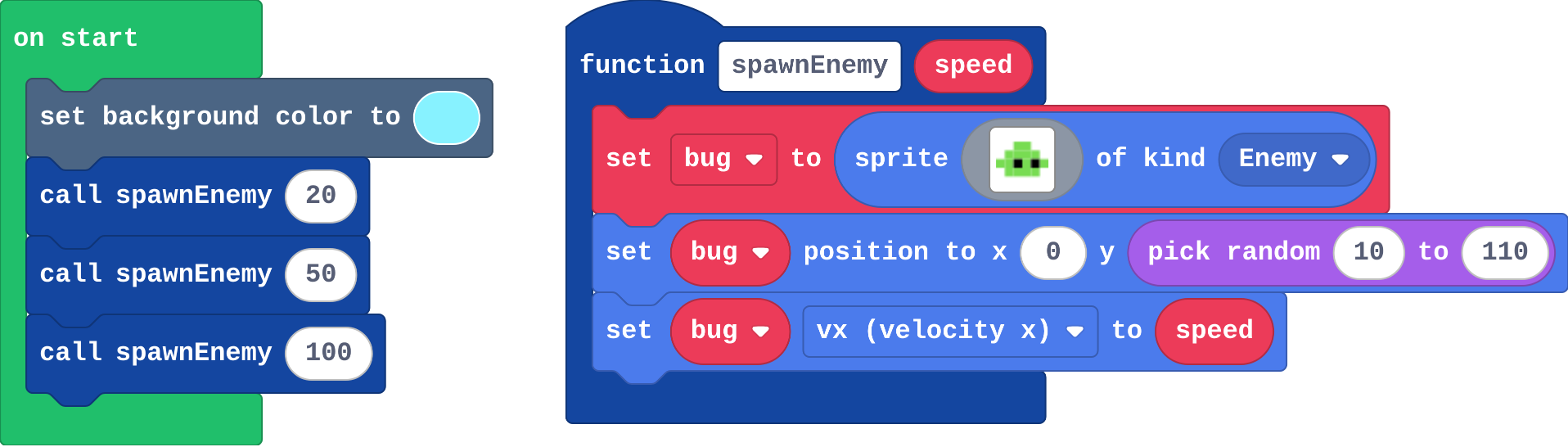
Show as code
let bug: Sprite = null
function spawnEnemy (speed: number) {
    bug = sprites.create(img`
        . . 7 7 . .
        . 7 7 7 7 .
        7 7 f 7 f 7
        . 7 7 7 7 .
        `, SpriteKind.Enemy)
    bug.setPosition(0, randint(10, 110))
    bug.vx = speed
}
scene.setBackgroundColor(9)
spawnEnemy(20)
spawnEnemy(50)
spawnEnemy(100)
Inside spawnEnemy, speed is whatever number the call hands in.
Run
Which one was spawnEnemy(100)? Press the restart button under the simulator to watch again.
Show as code
let bug: Sprite = null
function spawnEnemy (speed: number) {
    bug = sprites.create(img`
        . . 7 7 . .
        . 7 7 7 7 .
        7 7 f 7 f 7
        . 7 7 7 7 .
        `, SpriteKind.Enemy)
    bug.setPosition(0, randint(10, 110))
    bug.vx = speed
}
scene.setBackgroundColor(9)
spawnEnemy(20)
spawnEnemy(50)
spawnEnemy(100)
Investigate
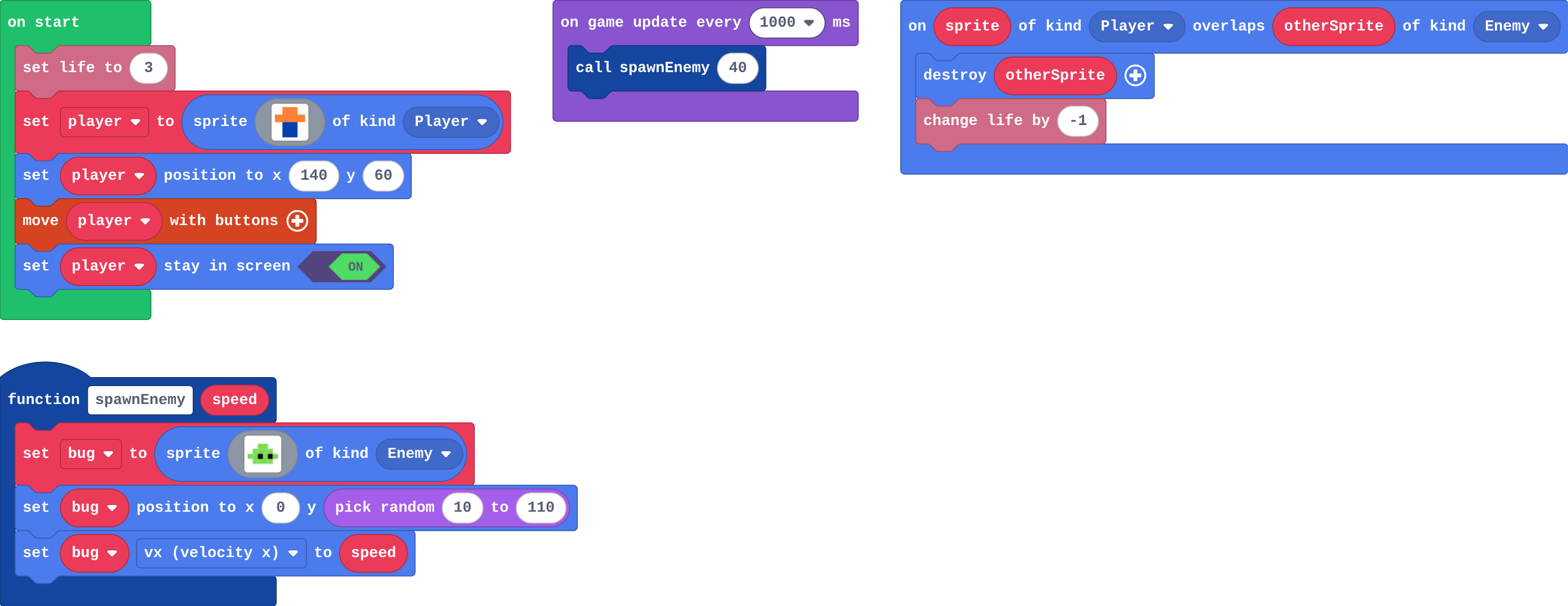
Show as code
let bug: Sprite = null
function spawnEnemy (speed: number) {
    bug = sprites.create(img`
        . . 7 7 . .
        . 7 7 7 7 .
        7 7 f 7 f 7
        . 7 7 7 7 .
        `, SpriteKind.Enemy)
    bug.setPosition(0, randint(10, 110))
    bug.vx = speed
}
info.setLife(3)
let player = sprites.create(img`
    . 4 4 .
    4 4 4 4
    . 8 8 .
    . 8 8 .
    `, SpriteKind.Player)
player.setPosition(140, 60)
controller.moveSprite(player)
player.setStayInScreen(true)
game.onUpdateInterval(1000, function () {
    spawnEnemy(40)
})
sprites.onOverlap(SpriteKind.Player, SpriteKind.Enemy, function (sprite, otherSprite) {
    otherSprite.destroy()
    info.changeLifeBy(-1)
})
def spawn_enemy(speed):
    global bug
    bug = sprites.create(img("""..."""), SpriteKind.enemy)
    bug.set_position(0, randint(10, 110))
    bug.vx = speed
def on_update_interval():
    spawn_enemy(40)
game.on_update_interval(1000, on_update_interval)
The program calls spawnEnemy(30), then spawnEnemy(80), then spawnEnemy(30). Fill in each bug's vx.
| call | bug's vx |
|---|---|
| spawnEnemy(30) | |
| spawnEnemy(80) | |
| spawnEnemy(30) |
The function in Python. Match each line with what it does.
Modify
Make every bug fly at a random speed between 20 and 100. Change the call, not the function.
Need a hint?
pick random is in Math.
Another hint
Drag pick random into the call's number slot: spawnEnemy(pick random 20 to 100).
Add a second parameter, height, and use it for the bug's y.
Need a hint?
Click the function's header and Add a parameter: a Number called height.
Another hint
Use height in set bug position, and give every call a second number.
Each bug gets a random speed: the timer calls spawnEnemy with a random number.
This ticks by itself when your blocks do what is asked.
Add a second parameter, height, so each call also chooses how high the bug flies.
This ticks by itself when your blocks do what is asked.
Mix it up

Show as code
let coin: Sprite = null
function makeCoin () {
    coin = sprites.create(img`
        . 5 5 .
        5 5 4 5
        5 4 5 5
        . 5 5 .
        `, SpriteKind.Food)
    coin.setPosition(randint(10, 150), randint(10, 110))
}
game.onUpdateInterval(500, function () {
    makeCoin()
})
This timer runs every 500 ms and calls makeCoin each time. How many times have makeCoin's blocks run after 3 seconds?
Make
Make two kinds of bug from one function:
- a slow bug (speed 30) every second
- a fast bug (speed 90) every three seconds
Need a hint?
spawnEnemy(speed) is made for you. You need two timers.
Another hint
One timer every 1000 ms calls spawnEnemy(30). Another every 3000 ms calls spawnEnemy(90).
Two kinds of bug from one function: slow bugs every second and fast bugs every three seconds.
This ticks by itself when your blocks do what is asked.
Change an aquarium
This aquarium uses one function, addFish(speed), to add every fish. A (space on the keyboard) adds a fish at a random speed. Start the tank with five fish instead of three, then add a second parameter so each call also chooses how high the fish swims.
For teachers
Students give a function a parameter, so each call hands in a value and the same job is done differently each time. About 40 minutes.
Open the teacher guide: answers, solutions, slides and a worksheet.
Students will be able to
- I can give a function a parameter and call it with different values.
- I can say where the value comes from inside the function.
- I can make two kinds of enemy from one function.
Before class
A parameter is an input to a function, such as speed in spawnEnemy(speed): the call hands in a number (spawnEnemy(50)), and inside the function speed is that number. So one function can make a slow bug and a fast bug. In the block editor, click Add a parameter when making the function; drag speed out of the function's header to use it inside. The common slip is typing a number inside the function, which ignores every call's value.
Running the lesson
- Predict: some students expect three bugs at the same speed. Point at the three numbers in the calls. Ask: where does speed get its value?
- Investigate: the trace pins down where speed comes from; Leo's bugs is the number fixed inside.
- Modify: random speeds change the call; the height parameter changes the function and every call.
- Mix it up: counting calls from a timer.
- Make: two timers, one function.
The hard part (on purpose)
Where the value comes from. Ask them to point at the call, then at where speed is used inside.
When students get stuck
- Every bug has the same speed. Ask: Is speed used inside the function, or a number? Fix: Drag speed from the function header into set vx.
- The call has no slot for a number. Ask: Did you add a parameter to the function? Fix: Click the function header, Add a parameter, Number.
- Only one kind of bug appears. Ask: What numbers do your two calls hand in? Fix: Use different numbers in the two calls: 30 and 90.
Stretch and support
Stretch: Add a third parameter for how many points the bug is worth when it is made, and give the fast bugs more.
Support: Give students one timer already calling spawnEnemy(30), and ask them to add the second.
Where it leads
Next unit: gravity and jumping. Skillmap: the Game Maker Guide (arcade.makecode.com/skillmaps).
What each step is for
- Investigate: A parameter is a value each call hands in, so one function does the job differently each time. The number belongs in the call, not inside the function.
- Modify: Change the call to change one bug; add a parameter to choose something new for every call.
- Mix it up: A timer calls the function each time it runs, so the function's blocks run once per call.
- Give a function a parameter and call it with different values.
- Say where the value comes from inside the function.
- Make two kinds of enemy from one function.