Parameters
Students give a function a parameter, so each call hands in a value and the same job is done differently each time.
Classroom resources
Load these into Waypoints Prepare: choose Load URL and paste the copied address, or download the file and import it. In Prepare, the worksheet's Teacher edition shows the answers; the student copy hides them.
Students will be able to
- I can give a function a parameter and call it with different values.
- I can say where the value comes from inside the function.
- I can make two kinds of enemy from one function.
Timing
Predict and Run 7 min · Investigate 10 min · Modify 9 min · Mix it up 3 min · Make 8 min · Aquarium 3 min
Before class
A parameter is an input to a function, such as speed in spawnEnemy(speed): the call hands in a number (spawnEnemy(50)), and inside the function speed is that number. So one function can make a slow bug and a fast bug. In the block editor, click Add a parameter when making the function; drag speed out of the function's header to use it inside. The common slip is typing a number inside the function, which ignores every call's value.
Running the lesson
- Predict: some students expect three bugs at the same speed. Point at the three numbers in the calls. Ask: where does speed get its value?
- Investigate: the trace pins down where speed comes from; Leo's bugs is the number fixed inside.
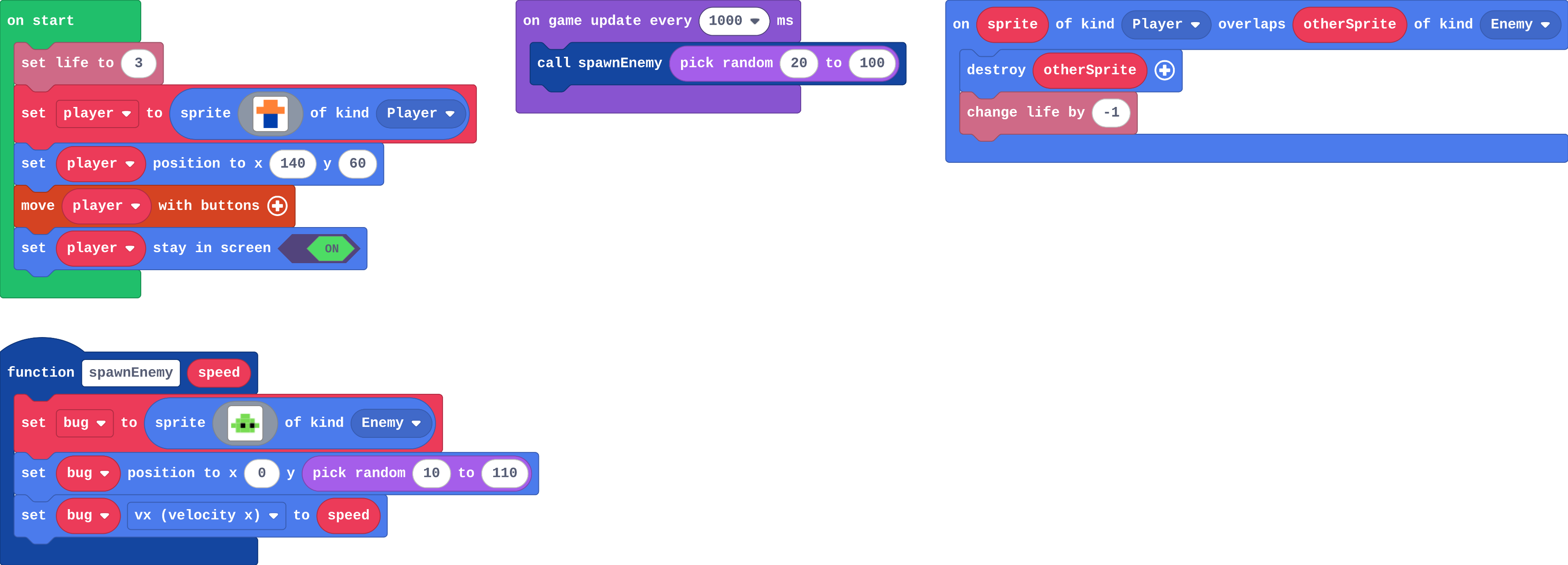
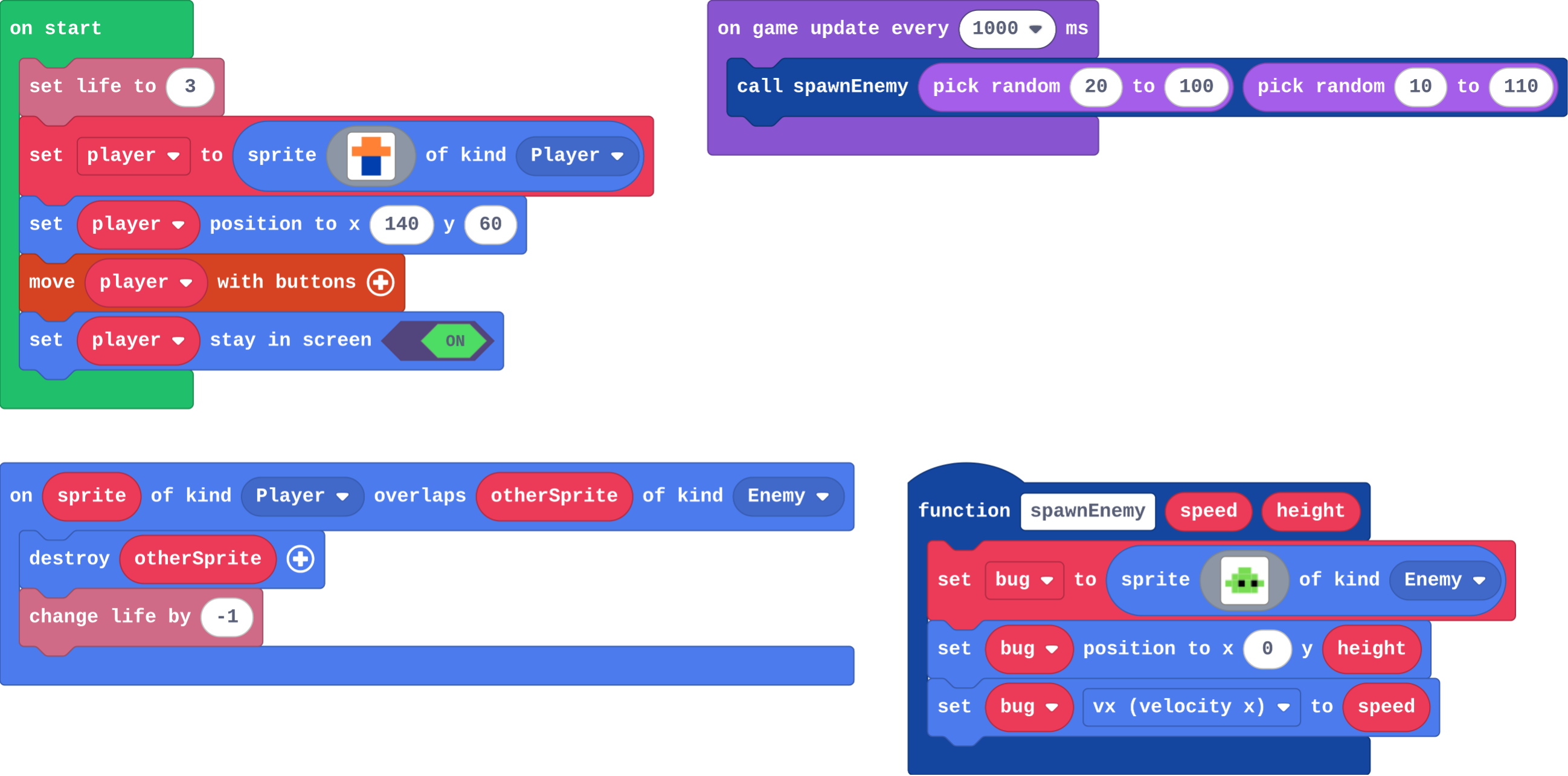
- Modify: random speeds change the call; the height parameter changes the function and every call.
- Mix it up: counting calls from a timer.
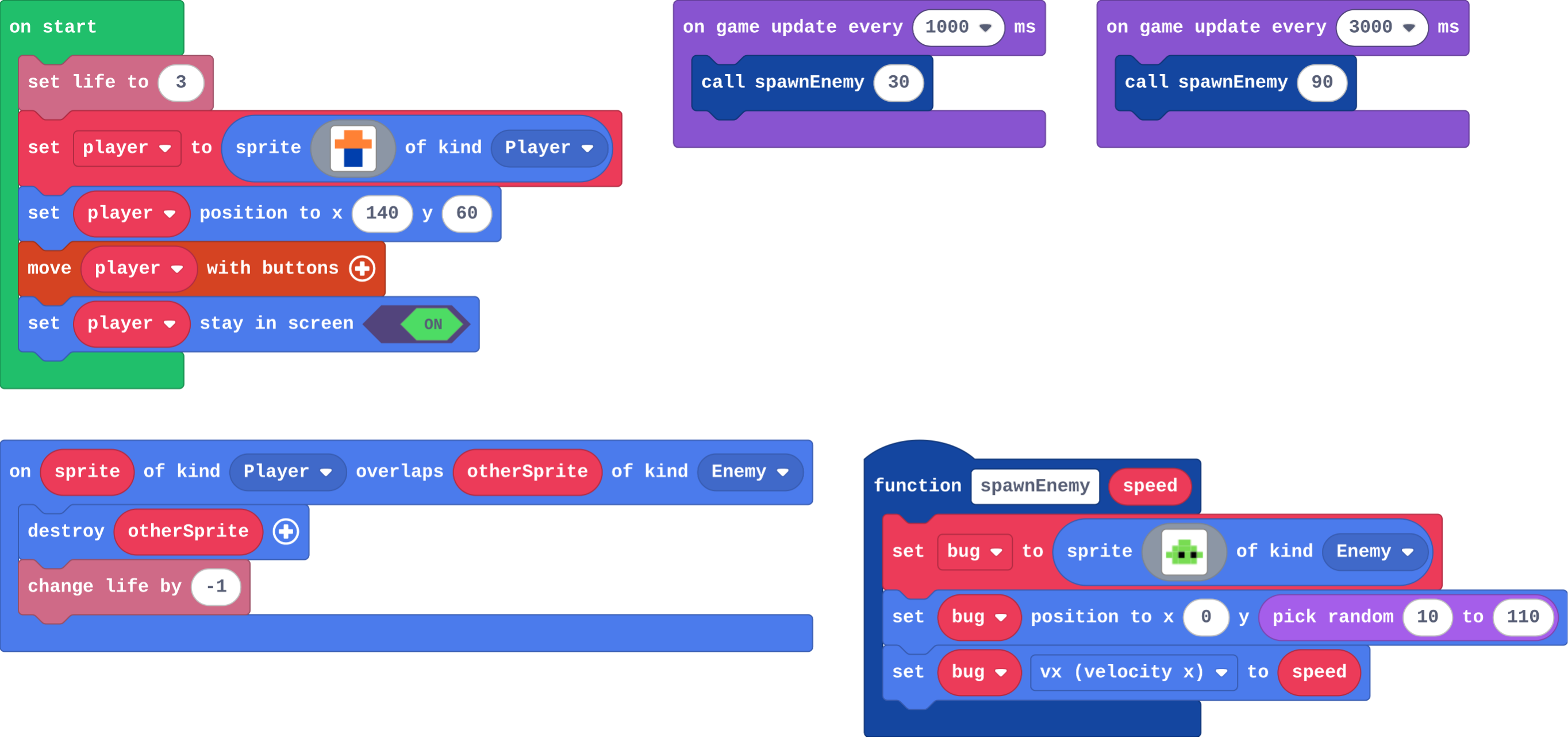
- Make: two timers, one function.
In class
On the slides at these points. Students can do the whole lesson on their own; these are for the room. In the deck, the Run, Modify and Make slides have the live playground in them (the tutorial link is the backup), and the notes above are in each slide's speaker notes.
- Fill in the blank (investigate, 3 min)
One student has a card: "walk across at ___ steps a second". The class calls a number; the student walks at that speed.
The card is the function; the number called out is the parameter.
The hard part (on purpose)
Where the value comes from. Ask them to point at the call, then at where speed is used inside.
When students get stuck
| What you will see | A question to ask | The fix |
|---|---|---|
| Every bug has the same speed. | Is speed used inside the function, or a number? | Drag speed from the function header into set vx. |
| The call has no slot for a number. | Did you add a parameter to the function? | Click the function header, Add a parameter, Number. |
| Only one kind of bug appears. | What numbers do your two calls hand in? | Use different numbers in the two calls: 30 and 90. |
Answers to the checks
- Predict: on start calls spawnEnemy three times, with 20, 50 and 100. What do you see?
Three bugs flying right, each at a different speed. Each call runs the function's blocks once, and speed is the number that call handed in: 20, then 50, then 100. - Trace the calls: The program calls spawnEnemy(30), then spawnEnemy(80), then spawnEnemy(30). Fill in each bug's vx.
30, 80, 30
Inside the function, vx is set to speed, and speed is whatever that call handed in. - Leo's bugs: Leo changes the line inside spawnEnemy to set bug vx to 60. His calls still say spawnEnemy(20) and spawnEnemy(100). What happens?
Every bug flies at 60: the number inside ignores what the calls hand in
speed is no longer used, so the value each call hands in is ignored. Put speed back inside, and choose the number in the call. - In Python: The function in Python. Match each line with what it does.
def spawn_enemy(speed): → B. makes the function, with a parameter called speed; bug.vx = speed → A. uses whatever number the call handed in; spawn_enemy(40) → C. calls it, with speed 40 - Mix it up: This timer runs every 500 ms and calls makeCoin each time. How many times have makeCoin's blocks run after 3 seconds?
6
500 ms is half a second, so the timer runs twice a second: 6 calls in 3 seconds.
Solutions
One possible solution for each task. Other correct programs are fine.
Modify › Random speeds
Show as code
let bug: Sprite = null
function spawnEnemy (speed: number) {
    bug = sprites.create(img`
        . . 7 7 . .
        . 7 7 7 7 .
        7 7 f 7 f 7
        . 7 7 7 7 .
        `, SpriteKind.Enemy)
    bug.setPosition(0, randint(10, 110))
    bug.vx = speed
}
info.setLife(3)
let player = sprites.create(img`
    . 4 4 .
    4 4 4 4
    . 8 8 .
    . 8 8 .
    `, SpriteKind.Player)
player.setPosition(140, 60)
controller.moveSprite(player)
player.setStayInScreen(true)
game.onUpdateInterval(1000, function () {
    spawnEnemy(randint(20, 100))
})
sprites.onOverlap(SpriteKind.Player, SpriteKind.Enemy, function (sprite, otherSprite) {
    otherSprite.destroy()
    info.changeLifeBy(-1)
})
Modify › Choose the height
Show as code
let bug: Sprite = null
function spawnEnemy (speed: number, height: number) {
    bug = sprites.create(img`
        . . 7 7 . .
        . 7 7 7 7 .
        7 7 f 7 f 7
        . 7 7 7 7 .
        `, SpriteKind.Enemy)
    bug.setPosition(0, height)
    bug.vx = speed
}
info.setLife(3)
let player = sprites.create(img`
    . 4 4 .
    4 4 4 4
    . 8 8 .
    . 8 8 .
    `, SpriteKind.Player)
player.setPosition(140, 60)
controller.moveSprite(player)
player.setStayInScreen(true)
game.onUpdateInterval(1000, function () {
    spawnEnemy(randint(20, 100), randint(10, 110))
})
sprites.onOverlap(SpriteKind.Player, SpriteKind.Enemy, function (sprite, otherSprite) {
    otherSprite.destroy()
    info.changeLifeBy(-1)
})
Make
Show as code
let bug: Sprite = null
function spawnEnemy (speed: number) {
    bug = sprites.create(img`
        . . 7 7 . .
        . 7 7 7 7 .
        7 7 f 7 f 7
        . 7 7 7 7 .
        `, SpriteKind.Enemy)
    bug.setPosition(0, randint(10, 110))
    bug.vx = speed
}
info.setLife(3)
let player = sprites.create(img`
    . 4 4 .
    4 4 4 4
    . 8 8 .
    . 8 8 .
    `, SpriteKind.Player)
player.setPosition(140, 60)
controller.moveSprite(player)
player.setStayInScreen(true)
game.onUpdateInterval(1000, function () {
    spawnEnemy(30)
})
game.onUpdateInterval(3000, function () {
    spawnEnemy(90)
})
sprites.onOverlap(SpriteKind.Player, SpriteKind.Enemy, function (sprite, otherSprite) {
    otherSprite.destroy()
    info.changeLifeBy(-1)
})
Change an aquarium
Open task: any program that does what the step asks.
Stretch and support
Stretch: Add a third parameter for how many points the bug is worth when it is made, and give the fast bugs more.
Support: Give students one timer already calling spawnEnemy(30), and ask them to add the second.
Exit ticket
spawnEnemy(speed) sets bug vx to speed. The timer calls spawnEnemy(70). How fast is that bug?
70. speed is the number the call handed in.
What each step is for
- Investigate: A parameter is a value each call hands in, so one function does the job differently each time. The number belongs in the call, not inside the function.
- Modify: Change the call to change one bug; add a parameter to choose something new for every call.
- Mix it up: A timer calls the function each time it runs, so the function's blocks run once per call.
Where it leads
Next unit: gravity and jumping. Skillmap: the Game Maker Guide (arcade.makecode.com/skillmaps).