---
marp: true
theme: default
html: true
---

# Parameters

Arcade advanced skills · Many sprites

<!-- Speaker note: Students give a function a parameter, so each call hands in a value and the same job is done differently each time. About 40 minutes (Predict and Run 7 min · Investigate 10 min · Modify 9 min · Mix it up 3 min · Make 8 min · Aquarium 3 min). -->

---

## Today

**We are learning to** give a function a parameter, so each call hands in a value and the job is done a little differently each time.

- I can give a function a parameter and call it with different values.
- I can say where the value comes from inside the function.
- I can make two kinds of enemy from one function.

<!-- Speaker note: Before class: A **parameter** is an input to a function, such as `speed` in *spawnEnemy(speed)*: the call hands in a number (*spawnEnemy(50)*), and inside the function `speed` is that number. So one function can make a slow bug and a fast bug. In the block editor, click **Add a parameter** when making the function; drag `speed` out of the function's header to use it inside. The common slip is typing a number inside the function, which ignores every call's value. Teacher: Mix it up: counting calls from a timer. -->

---

## Why it matters

> A slow bug, a fast bug, a boss: the same job, make an enemy, with one thing changed. A parameter is that one thing.

<!-- Speaker note: Last lesson spawnBug made the same bug every time. A function can also take a **parameter**: a value handed in by the call. **spawnEnemy(speed)** makes an enemy, and the call says how fast: *spawnEnemy(20)*, *spawnEnemy(100)*. When you make a function, click **Add a parameter** and choose **Number**. -->

---

<span style="background:#dbeafe; color:#1a1a1a; border:1.5px solid #3b82f6; padding:6px 18px; border-radius:8px; font-size:1em; font-weight:500;">💬 Discussion</span>

## Predict

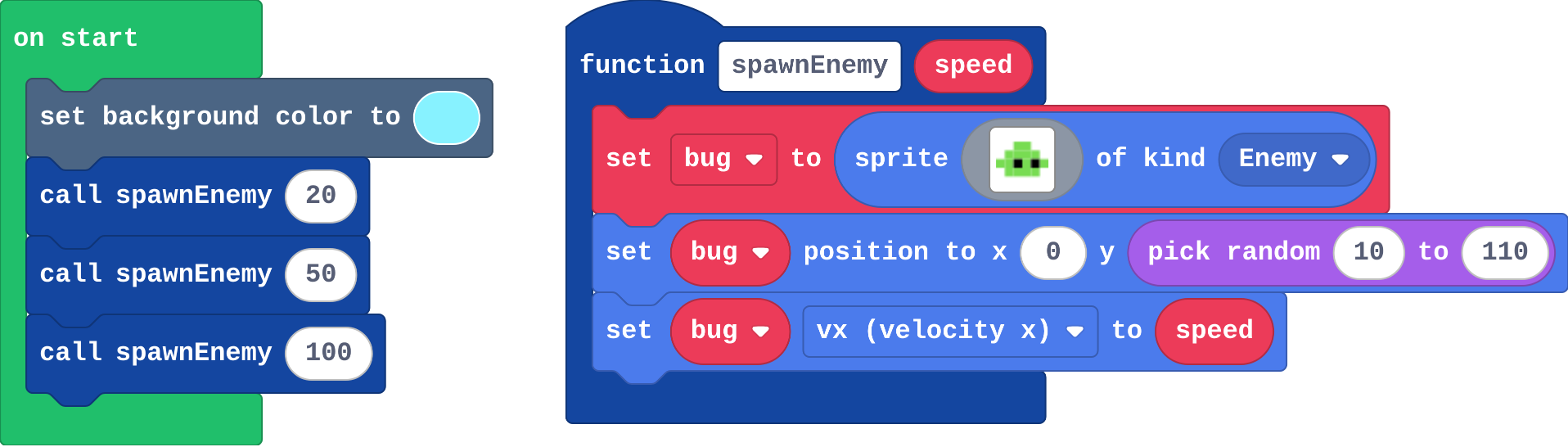
![h:272](https://studio.learningwaypoints.com/tutorials/_pictures/makecode/code/4e1441f4f855.png?v=bd1087802f73ffda)

**on start calls spawnEnemy three times, with 20, 50 and 100. What do you see?**

- Nothing: the function is never used
- Three bugs flying right at the same speed
- One bug, flying at speed 100
- Three bugs flying right, each at a different speed

<!-- Speaker note: What happens: Three bugs flying right, each at a different speed. Each call runs the function's blocks once, and speed is the number that call handed in: 20, then 50, then 100. Take two or three predictions before anyone runs it. -->

<!-- Speaker note: Teacher: some students expect three bugs at the same speed. Point at the three numbers in the calls. Ask: where does speed get its value? -->

---

<span style="background:#dcfce7; color:#1a1a1a; border:1.5px solid #22c55e; padding:6px 18px; border-radius:8px; font-size:1em; font-weight:500;">✅ Check</span>

## What happened?

* Three bugs flying right, each at a different speed. Each call runs the function's blocks once, and speed is the number that call handed in: 20, then 50, then 100.

<!-- Speaker note: Reveal after running. Ask who predicted it, and what made them think so. -->

---

<span style="background:#fef3c7; color:#1a1a1a; border:1.5px solid #f59e0b; padding:6px 18px; border-radius:8px; font-size:1em; font-weight:500;">✍️ Activity</span>

## Run it

Open the lesson at this step and try it together.

[studio.learningwaypoints.com/tutorials/code/arcade-advanced/arcade-parameters/?full=step-2#step-2](https://studio.learningwaypoints.com/tutorials/code/arcade-advanced/arcade-parameters/?full=step-2#step-2)

<!-- Speaker note: Which one was **spawnEnemy(100)**? Press the restart button under the simulator to watch again. Students should be able to say: I watched the three bugs' speeds and compared with my prediction. -->

---

<span style="background:#dbeafe; color:#1a1a1a; border:1.5px solid #3b82f6; padding:6px 18px; border-radius:8px; font-size:1em; font-weight:500;">💬 Discussion</span>

## Investigate

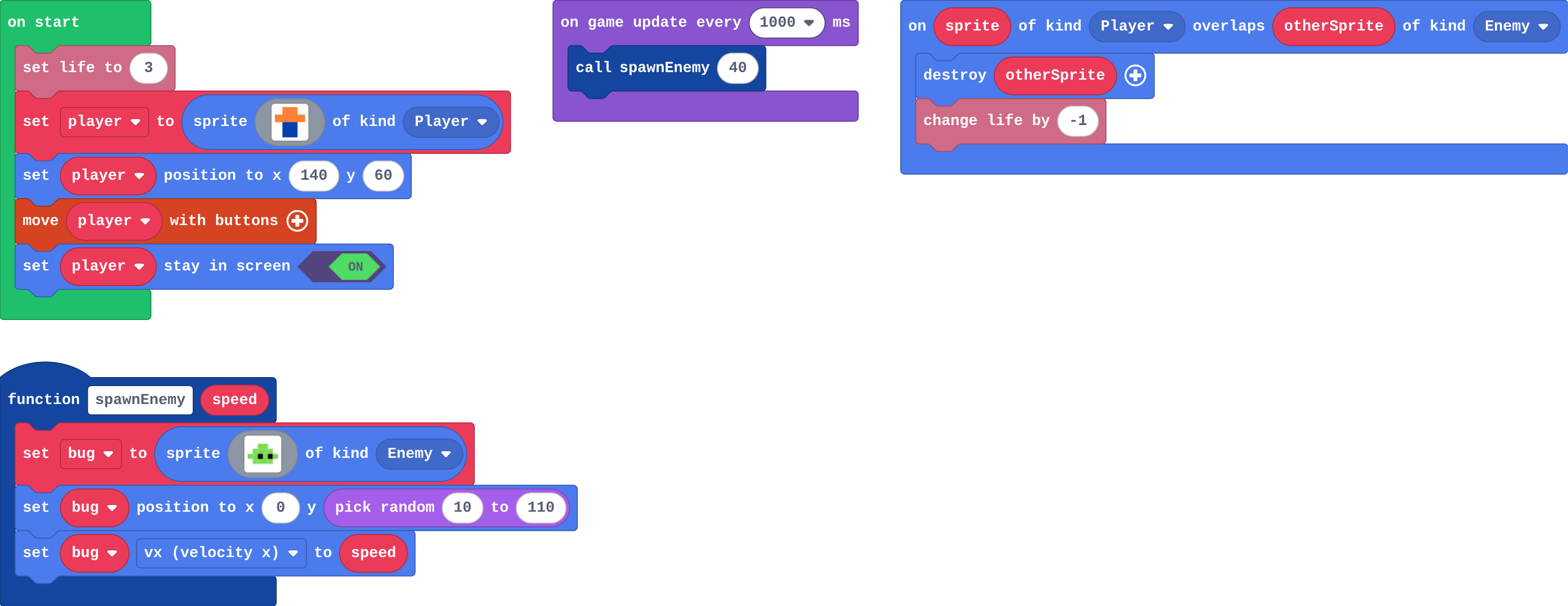
![h:360](https://studio.learningwaypoints.com/tutorials/_pictures/makecode/code/0e300225a0b1.png?v=02fea027b9d78933)

<!-- Speaker note: What this step is for: A parameter is a value each call hands in, so one function does the job differently each time. The number belongs in the call, not inside the function. -->

<!-- Speaker note: Teacher: the trace pins down where speed comes from; Leo's bugs is the number fixed inside. -->

---

<span style="background:#dcfce7; color:#1a1a1a; border:1.5px solid #22c55e; padding:6px 18px; border-radius:8px; font-size:1em; font-weight:500;">✅ Check</span>

## Trace the calls

**The program calls spawnEnemy(30), then spawnEnemy(80), then spawnEnemy(30). Fill in each bug's vx.**

| call | bug's vx |
|---|---|
| spawnEnemy(30) | ? |
| spawnEnemy(80) | ? |
| spawnEnemy(30) | ? |

* Answer: 30, 80, 30

<!-- Speaker note: Inside the function, vx is set to speed, and speed is whatever that call handed in. -->

<style scoped>pre, marp-pre { font-size: 0.5em; line-height: 1.25; } section { font-size: 27px; }</style>

---

<span style="background:#dcfce7; color:#1a1a1a; border:1.5px solid #22c55e; padding:6px 18px; border-radius:8px; font-size:1em; font-weight:500;">✅ Check</span>

## Leo's bugs

**Leo changes the line inside spawnEnemy to set bug vx to 60. His calls still say spawnEnemy(20) and spawnEnemy(100). What happens?**

- No bugs appear
- The bugs fly at 20 and 100
- Every bug flies at 60: the number inside ignores what the calls hand in
- The bugs fly at 80 and 160

* Answer: Every bug flies at 60: the number inside ignores what the calls hand in

<!-- Speaker note: speed is no longer used, so the value each call hands in is ignored. Put speed back inside, and choose the number in the call. -->

<style scoped>pre, marp-pre { font-size: 0.5em; line-height: 1.25; } section { font-size: 25px; }</style>

---

<span style="background:#dcfce7; color:#1a1a1a; border:1.5px solid #22c55e; padding:6px 18px; border-radius:8px; font-size:1em; font-weight:500;">✅ Check</span>

## In Python

```python
def spawn_enemy(speed):
    global bug
    bug = sprites.create(img("""..."""), SpriteKind.enemy)
    bug.set_position(0, randint(10, 110))
    bug.vx = speed
def on_update_interval():
    spawn_enemy(40)
game.on_update_interval(1000, on_update_interval)
```

**The function in Python. Match each line with what it does.**

| | |
|---|---|
| `def spawn_enemy(speed):` | A. makes the function, with a parameter called speed |
| `bug.vx = speed` | B. uses whatever number the call handed in |
| `spawn_enemy(40)` | C. calls it, with speed 40 |

* Answer: def spawn_enemy(speed): → A. makes the function, with a parameter called speed; bug.vx = speed → B. uses whatever number the call handed in; spawn_enemy(40) → C. calls it, with speed 40

<!-- Speaker note:  -->

<style scoped>pre, marp-pre { font-size: 0.5em; line-height: 1.25; } section { font-size: 18px; }</style>

---

<span style="background:#fef3c7; color:#1a1a1a; border:1.5px solid #f59e0b; padding:6px 18px; border-radius:8px; font-size:1em; font-weight:500;">✍️ Activity</span>

## Fill in the blank <span style="font-size:.6em;color:#64748b">(3 min)</span>

One student has a card: "walk across at ___ steps a second". The class calls a number; the student walks at that speed.

<!-- Speaker note: The card is the function; the number called out is the parameter. -->

---

<span style="background:#fef3c7; color:#1a1a1a; border:1.5px solid #f59e0b; padding:6px 18px; border-radius:8px; font-size:1em; font-weight:500;">✍️ Activity</span>

## Modify


- **Random speeds:** Make every bug fly at a **random** speed between 20 and 100. Change the **call**, not the function.
- **Choose the height:** Add a second parameter, **height**, and use it for the bug's y.

[Open this step](https://studio.learningwaypoints.com/tutorials/code/arcade-advanced/arcade-parameters/?full=step-4#step-4)

<!-- Speaker note: What this step is for: Change the call to change one bug; add a parameter to choose something new for every call. Hints, in order: pick random is in Math. / Drag pick random into the call's number slot: spawnEnemy(pick random 20 to 100). / Click the function's header and Add a parameter: a Number called height. / Use height in set bug position, and give every call a second number. For students who need more support: Give students one timer already calling spawnEnemy(30), and ask them to add the second. For early finishers: Add a third parameter for how many points the bug is worth when it is made, and give the fast bugs more. The hard part, on purpose: Where the value comes from. Ask them to point at the call, then at where speed is used inside. When students get stuck: Every bug has the same speed. Ask: Is speed used inside the function, or a number? Fix: Drag speed from the function header into set vx. / The call has no slot for a number. Ask: Did you add a parameter to the function? Fix: Click the function header, Add a parameter, Number. / Only one kind of bug appears. Ask: What numbers do your two calls hand in? Fix: Use different numbers in the two calls: 30 and 90. -->

<!-- Speaker note: Teacher: random speeds change the call; the height parameter changes the function and every call. -->

---

<span style="background:#dbeafe; color:#1a1a1a; border:1.5px solid #3b82f6; padding:6px 18px; border-radius:8px; font-size:1em; font-weight:500;">💬 Discussion</span>

## Investigate: Mix it up

![h:211](https://studio.learningwaypoints.com/tutorials/_pictures/makecode/code/814df8b8c0fb.png?v=6cd82ed0ba4fa463)

<!-- Speaker note: What this step is for: A timer calls the function each time it runs, so the function's blocks run once per call. -->

---

<span style="background:#dcfce7; color:#1a1a1a; border:1.5px solid #22c55e; padding:6px 18px; border-radius:8px; font-size:1em; font-weight:500;">✅ Check</span>

## Mix it up

**This timer runs every 500 ms and calls makeCoin each time. How many times have makeCoin's blocks run after 3 seconds?**

* Answer: 6

<!-- Speaker note: 500 ms is half a second, so the timer runs twice a second: 6 calls in 3 seconds. What this step is for: A timer calls the function each time it runs, so the function's blocks run once per call. -->

---

<span style="background:#fef3c7; color:#1a1a1a; border:1.5px solid #f59e0b; padding:6px 18px; border-radius:8px; font-size:1em; font-weight:500;">✍️ Activity</span>

## Make

Make **two kinds of bug** from one function:

- a **slow** bug (speed 30) every second
- a **fast** bug (speed 90) every three seconds

[Open this step](https://studio.learningwaypoints.com/tutorials/code/arcade-advanced/arcade-parameters/?full=step-6#step-6)

<!-- Speaker note: Hints, in order: spawnEnemy(speed) is made for you. You need two timers. / One timer every 1000 ms calls spawnEnemy(30). Another every 3000 ms calls spawnEnemy(90). -->

<!-- Speaker note: Teacher: two timers, one function. -->

---

<span style="background:#fef3c7; color:#1a1a1a; border:1.5px solid #f59e0b; padding:6px 18px; border-radius:8px; font-size:1em; font-weight:500;">✍️ Activity</span>

## Change an aquarium

This aquarium uses one function, **addFish(speed)**, to add every fish. **A** (space on the keyboard) adds a fish at a random speed. Start the tank with five fish instead of three, then add a second parameter so each call also chooses how high the fish swims.

[Open this step](https://studio.learningwaypoints.com/tutorials/code/arcade-advanced/arcade-parameters/?full=step-7#step-7)

---

<span style="background:#dcfce7; color:#1a1a1a; border:1.5px solid #22c55e; padding:6px 18px; border-radius:8px; font-size:1em; font-weight:500;">✅ Check</span>

## Exit ticket

**spawnEnemy(speed) sets bug vx to speed. The timer calls spawnEnemy(70). How fast is that bug?**

* 70. speed is the number the call handed in.

<!-- Speaker note: Students answer on paper or a mini whiteboard before the reveal. Anyone who cannot answer needs the main idea again next lesson. Where this leads: Next unit: gravity and jumping. Skillmap: the Game Maker Guide (arcade.makecode.com/skillmaps). -->