Power-ups
Challenge: students grow the shield game into a prize box with a blaster that runs out, a smart bomb that uses every sprite of a kind, and a power-up of their own design.
Classroom resources
Load these into Waypoints Prepare: choose Load URL and paste the copied address, or download the file and import it. In Prepare, the worksheet's Teacher edition shows the answers; the student copy hides them.
Students will be able to
- I can use true or false and a countdown to make a power-up that runs out.
- I can combine earlier moves into a bigger game with less help.
- I can say which jobs Arcade's engine does and which rules my blocks decide.
Timing
Predict, Run, Investigate 12 min · Milestone 1 15 min · Milestone 2 13 min · Milestone 3 20 min
Before class
Nothing new: the challenge combines true or false (the shield), counting down (shieldTime, ammo) and every sprite of a kind (the smart bomb). A power-up is always three parts: a variable that remembers it, an event that changes it, and a rule that uses it. The Investigate match starts a thread for the next lesson: the engine (velocity, overlaps noticed, game over at zero lives, auto destroy) does the same jobs in every game, while game rules are the blocks you write.
Running the lesson
- Predict: set throws away what is left (from Run out). Ask whether that is fair.
- Investigate, game rule or engine: name the split. Ask students for one more example of each.
- Sam's shield revisits If, every frame: on start runs once, so an if there is asked once.
- Milestone 1: the prize is random, so students may need a few stars to test the blaster. They can set prize to 1 while testing.
- Milestone 2: the smart bomb is Every one of a kind again.
- Milestone 3: goals only. Ask each student to say their power-up as three parts: variable, event, rule.
In class
On the slides at these points. Students can do the whole lesson on their own; these are for the room. In the deck, the Run, Modify and Make slides have the live playground in them (the tutorial link is the backup), and the notes above are in each slide's speaker notes.
- Power-up cards (start, 3 min)
Each pair draws a card for their fourth power-up: name, variable, event, rule, how long.
- Fair test (end, 5 min)
Play the next pair's game. Rate their power-up: too strong, too weak, or just right?
The hard part (on purpose)
Holding several power-ups in one program. Ask students to point at the variable, the event and the rule for each prize.
When students get stuck
| What you will see | A question to ask | The fix |
|---|---|---|
| A fires forever, or never. | What is ammo at the start, and where does it change? | ammo starts at 0, a prize-1 star sets it to 5, and each shot changes it by -1, all inside if ammo > 0. |
| Shots pass through rocks. | Which kinds does your overlap event name? | A shot is a Projectile, so the event must be Projectile overlaps Enemy. |
| The bomb destroys only one rock. | Is the destroy inside the for element block? | Destroy value, inside the loop. |
| A prize never comes up. | What range does pick random use? | 0 to the number of prizes minus 1. |
Answers to the checks
- Predict: The shield has 2 seconds left and you catch another star. How long does the shield last now?
5 seconds. The star sets shieldTime to 5, which throws away the 2 that were left. - Game rule or engine?: Who decides each thing: Arcade's engine, or a game rule in your blocks? Match them.
Each rock slides left a little every frame → C. engine: velocity moves it every frame; The game ends when the lives reach 0 → A. engine: info ends the game at zero lives; A star that leaves the screen is removed → E. engine: auto destroy removes it; Catching a star turns the shield on → D. game rule: your overlap event decides; A rock costs no life while the shield is on → B. game rule: your if decides
The engine does the same jobs in every game. The rules are what make this game yours, and they are where the bugs (and the fun) live. - Sam's shield: Sam wants the shield to switch off when shieldTime reaches 0. He puts the blocks below in on start. He catches a star, and shieldTime counts down to 0. What happens to the shield?
It never switches off: the if was asked once, at the start, before the star was caught
Blocks in on start run once, before the game begins. The if is never asked again. A check that must keep happening goes in a timer or in on game update.
Solutions
One possible solution for each task. Other correct programs are fine.
Milestone 1: a blaster with limited ammo
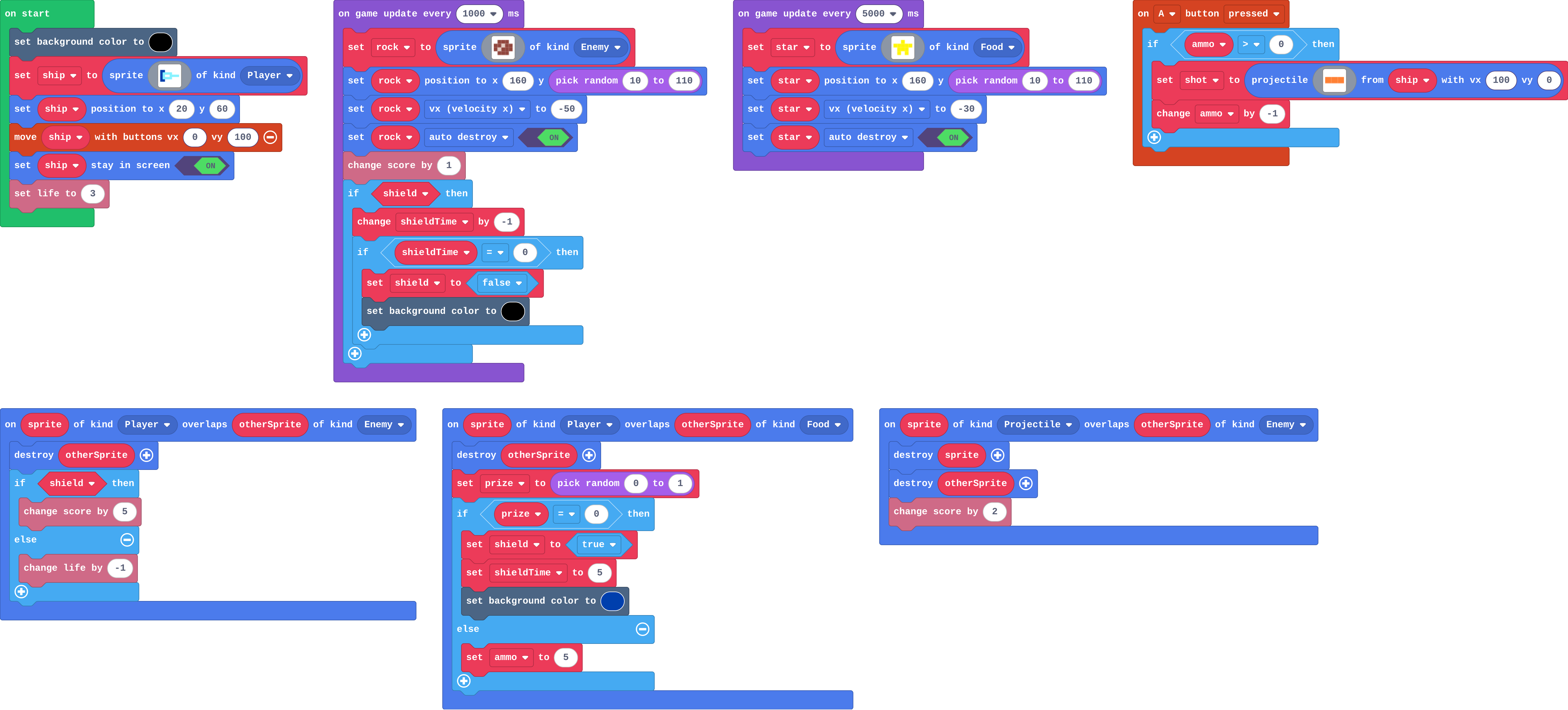
Show as code
let shot: Sprite = null
let rock: Sprite = null
let star: Sprite = null
let shield = false
let shieldTime = 0
let ammo = 0
let prize = 0
sprites.onOverlap(SpriteKind.Player, SpriteKind.Enemy, function (sprite, otherSprite) {
    otherSprite.destroy()
    if (shield) {
        info.changeScoreBy(5)
    } else {
        info.changeLifeBy(-1)
    }
})
sprites.onOverlap(SpriteKind.Player, SpriteKind.Food, function (sprite, otherSprite) {
    otherSprite.destroy()
    prize = randint(0, 1)
    if (prize == 0) {
        shield = true
        shieldTime = 5
        scene.setBackgroundColor(8)
    } else {
        ammo = 5
    }
})
controller.A.onEvent(ControllerButtonEvent.Pressed, function () {
    if (ammo > 0) {
        shot = sprites.createProjectileFromSprite(img`
            4 4 4
            `, ship, 100, 0)
        ammo += -1
    }
})
sprites.onOverlap(SpriteKind.Projectile, SpriteKind.Enemy, function (sprite, otherSprite) {
    sprite.destroy()
    otherSprite.destroy()
    info.changeScoreBy(2)
})
scene.setBackgroundColor(15)
let ship = sprites.create(img`
    8 8 . . . . . .
    8 9 9 9 9 . . .
    8 9 1 1 9 9 9 9
    8 9 9 9 9 . . .
    8 8 . . . . . .
    `, SpriteKind.Player)
ship.setPosition(20, 60)
controller.moveSprite(ship, 0, 100)
ship.setStayInScreen(true)
info.setLife(3)
game.onUpdateInterval(1000, function () {
    rock = sprites.create(img`
        . e e e .
        e e d e e
        e d e e e
        . e e e .
        `, SpriteKind.Enemy)
    rock.setPosition(160, randint(10, 110))
    rock.vx = -50
    rock.setFlag(SpriteFlag.AutoDestroy, true)
    info.changeScoreBy(1)
    if (shield) {
        shieldTime += -1
        if (shieldTime == 0) {
            shield = false
            scene.setBackgroundColor(15)
        }
    }
})
game.onUpdateInterval(5000, function () {
    star = sprites.create(img`
        . . 5 . .
        5 5 5 5 5
        . 5 5 5 .
        . 5 . 5 .
        `, SpriteKind.Food)
    star.setPosition(160, randint(10, 110))
    star.vx = -30
    star.setFlag(SpriteFlag.AutoDestroy, true)
})
Milestone 2: a smart bomb
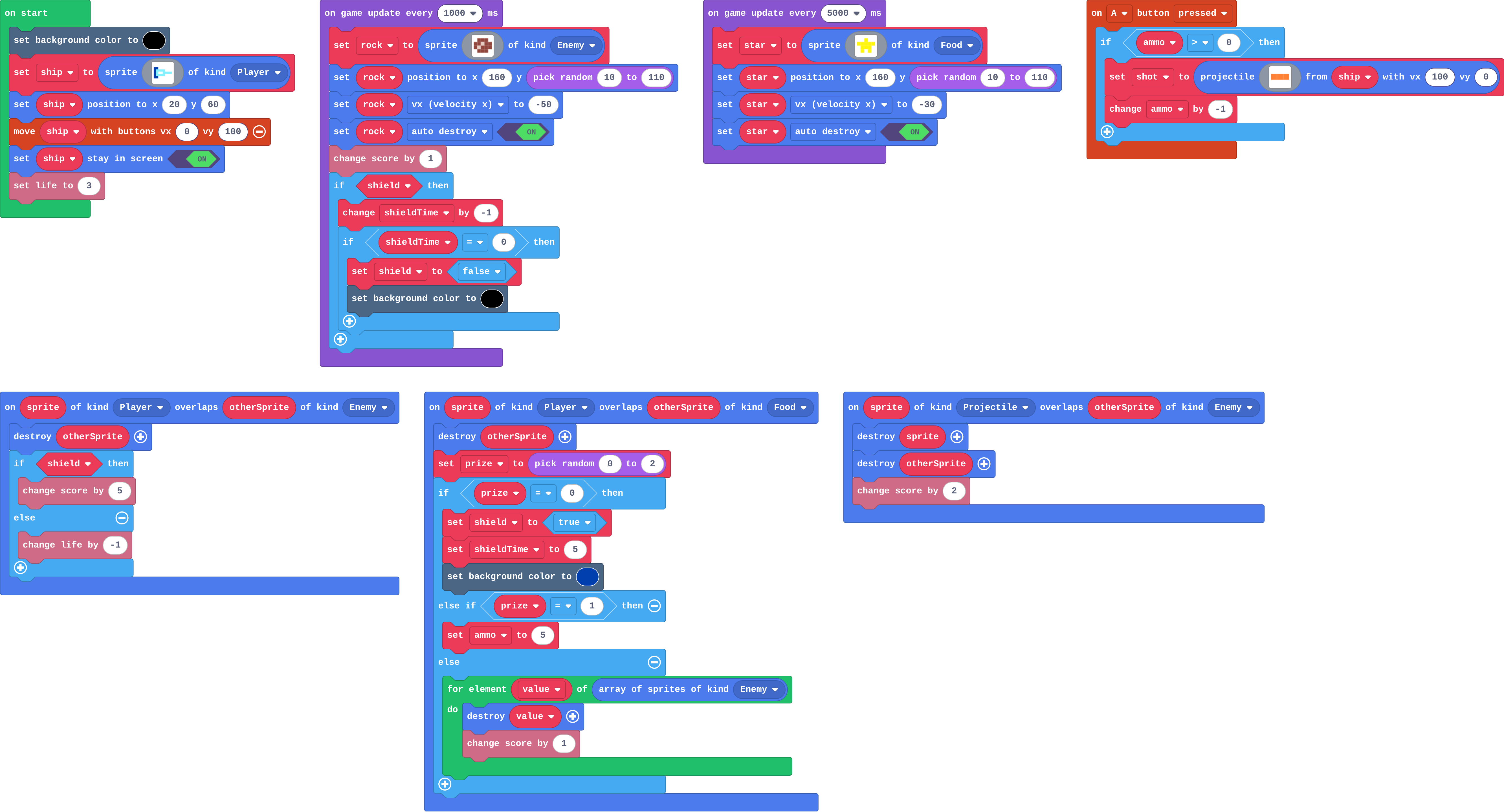
Show as code
let shot: Sprite = null
let rock: Sprite = null
let star: Sprite = null
let shield = false
let shieldTime = 0
let ammo = 0
let prize = 0
sprites.onOverlap(SpriteKind.Player, SpriteKind.Enemy, function (sprite, otherSprite) {
    otherSprite.destroy()
    if (shield) {
        info.changeScoreBy(5)
    } else {
        info.changeLifeBy(-1)
    }
})
sprites.onOverlap(SpriteKind.Player, SpriteKind.Food, function (sprite, otherSprite) {
    otherSprite.destroy()
    prize = randint(0, 2)
    if (prize == 0) {
        shield = true
        shieldTime = 5
        scene.setBackgroundColor(8)
    } else if (prize == 1) {
        ammo = 5
    } else {
        for (let value of sprites.allOfKind(SpriteKind.Enemy)) {
            value.destroy()
            info.changeScoreBy(1)
        }
    }
})
controller.A.onEvent(ControllerButtonEvent.Pressed, function () {
    if (ammo > 0) {
        shot = sprites.createProjectileFromSprite(img`
            4 4 4
            `, ship, 100, 0)
        ammo += -1
    }
})
sprites.onOverlap(SpriteKind.Projectile, SpriteKind.Enemy, function (sprite, otherSprite) {
    sprite.destroy()
    otherSprite.destroy()
    info.changeScoreBy(2)
})
scene.setBackgroundColor(15)
let ship = sprites.create(img`
    8 8 . . . . . .
    8 9 9 9 9 . . .
    8 9 1 1 9 9 9 9
    8 9 9 9 9 . . .
    8 8 . . . . . .
    `, SpriteKind.Player)
ship.setPosition(20, 60)
controller.moveSprite(ship, 0, 100)
ship.setStayInScreen(true)
info.setLife(3)
game.onUpdateInterval(1000, function () {
    rock = sprites.create(img`
        . e e e .
        e e d e e
        e d e e e
        . e e e .
        `, SpriteKind.Enemy)
    rock.setPosition(160, randint(10, 110))
    rock.vx = -50
    rock.setFlag(SpriteFlag.AutoDestroy, true)
    info.changeScoreBy(1)
    if (shield) {
        shieldTime += -1
        if (shieldTime == 0) {
            shield = false
            scene.setBackgroundColor(15)
        }
    }
})
game.onUpdateInterval(5000, function () {
    star = sprites.create(img`
        . . 5 . .
        5 5 5 5 5
        . 5 5 5 .
        . 5 . 5 .
        `, SpriteKind.Food)
    star.setPosition(160, randint(10, 110))
    star.vx = -30
    star.setFlag(SpriteFlag.AutoDestroy, true)
})
Milestone 3: your own power-up
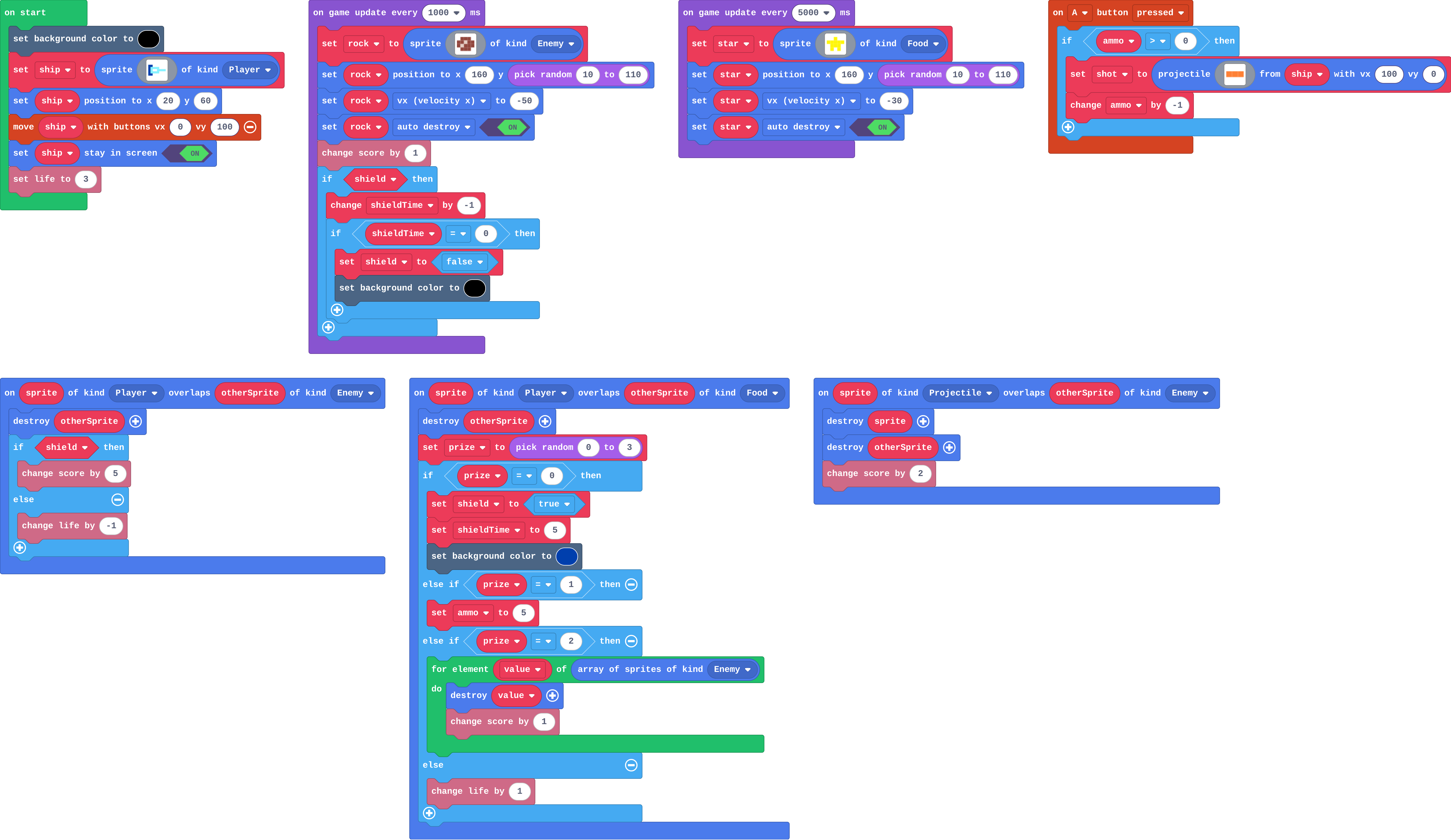
Show as code
let shot: Sprite = null
let rock: Sprite = null
let star: Sprite = null
let shield = false
let shieldTime = 0
let ammo = 0
let prize = 0
sprites.onOverlap(SpriteKind.Player, SpriteKind.Enemy, function (sprite, otherSprite) {
    otherSprite.destroy()
    if (shield) {
        info.changeScoreBy(5)
    } else {
        info.changeLifeBy(-1)
    }
})
sprites.onOverlap(SpriteKind.Player, SpriteKind.Food, function (sprite, otherSprite) {
    otherSprite.destroy()
    prize = randint(0, 3)
    if (prize == 0) {
        shield = true
        shieldTime = 5
        scene.setBackgroundColor(8)
    } else if (prize == 1) {
        ammo = 5
    } else if (prize == 2) {
        for (let value of sprites.allOfKind(SpriteKind.Enemy)) {
            value.destroy()
            info.changeScoreBy(1)
        }
    } else {
        info.changeLifeBy(1)
    }
})
controller.A.onEvent(ControllerButtonEvent.Pressed, function () {
    if (ammo > 0) {
        shot = sprites.createProjectileFromSprite(img`
            4 4 4
            `, ship, 100, 0)
        ammo += -1
    }
})
sprites.onOverlap(SpriteKind.Projectile, SpriteKind.Enemy, function (sprite, otherSprite) {
    sprite.destroy()
    otherSprite.destroy()
    info.changeScoreBy(2)
})
scene.setBackgroundColor(15)
let ship = sprites.create(img`
    8 8 . . . . . .
    8 9 9 9 9 . . .
    8 9 1 1 9 9 9 9
    8 9 9 9 9 . . .
    8 8 . . . . . .
    `, SpriteKind.Player)
ship.setPosition(20, 60)
controller.moveSprite(ship, 0, 100)
ship.setStayInScreen(true)
info.setLife(3)
game.onUpdateInterval(1000, function () {
    rock = sprites.create(img`
        . e e e .
        e e d e e
        e d e e e
        . e e e .
        `, SpriteKind.Enemy)
    rock.setPosition(160, randint(10, 110))
    rock.vx = -50
    rock.setFlag(SpriteFlag.AutoDestroy, true)
    info.changeScoreBy(1)
    if (shield) {
        shieldTime += -1
        if (shieldTime == 0) {
            shield = false
            scene.setBackgroundColor(15)
        }
    }
})
game.onUpdateInterval(5000, function () {
    star = sprites.create(img`
        . . 5 . .
        5 5 5 5 5
        . 5 5 5 .
        . 5 . 5 .
        `, SpriteKind.Food)
    star.setPosition(160, randint(10, 110))
    star.vx = -30
    star.setFlag(SpriteFlag.AutoDestroy, true)
})
Stretch and support
Stretch: Show the ammo on screen with the ship's say block after each shot.
Support: A student who finishes Milestone 1 has the key idea. For Milestone 3, offer the extra life (change life by 1) as a first power-up, then ask for one more of their own.
Exit ticket
Name the three parts of a power-up in your game, using the shield as the example.
A variable that remembers it (shield), an event that changes it (catching a star sets it to true), and a rule that uses it (if shield, a rock costs no life).
What each step is for
- Investigate: Arcade's engine moves sprites, notices touches and ends the game; the rules (what a touch means, when a power-up is on) are the blocks you write.
- Milestone 1: a blaster with limited ammo: A number variable limits an action: the button event asks the variable first, and a prize refills it.
- Milestone 2: a smart bomb: for element of a list of every sprite of a kind does a job once for each, so one prize can clear the screen.
- Milestone 3: your own power-up: Designing a power-up from goals alone shows whether a student can turn a game idea into a variable, an event that changes it, and a rule that uses it.
Where it leads
Next: Will it work in Arcade?, judging which games Arcade does well by the building blocks they need. Class ideas: a power-up design jam where pairs swap power-ups and rate them for fairness; draw a power-up card (name, variable, event, rule, how long).