Gravity
Students give a sprite gravity (acceleration down), see that a fall speeds up and a throw rises, slows and comes back, and use gravity in a catching game.
Classroom resources
Load these into Waypoints Prepare: choose Load URL and paste the copied address, or download the file and import it. In Prepare, the worksheet's Teacher edition shows the answers; the student copy hides them.
Students will be able to
- I can give a sprite gravity with ay and explain why it falls faster and faster.
- I can make a sprite go up with a negative vy, and say what gravity does to it.
- I can read a floor built with an if in on game update.
Timing
Predict and Run 7 min · Investigate 12 min · Modify 6 min · Mix it up 3 min · Make 9 min · Trampoline 3 min
Before class
Velocity (vx, vy) is how far the engine moves a sprite every frame. Acceleration (ay) is how much the engine changes the velocity: with ay 300, vy grows by 300 every second, a little each frame. So a sprite with ay falls faster and faster, like a dropped ball. A throw or jump is a speed upwards: vy = -150 (negative, because y counts down). Gravity slows it, stops it at the top, and brings it back down. Nothing in an empty Arcade game is solid, so the lesson's program builds a floor with an if in on game update. Jumping only from the ground is next lesson. Tilemaps (wall tiles) do the floor for you in real platformers.
Running the lesson
- Predict: most expect a steady fall. Watch the ball closely: it speeds up.
- Investigate: the trace shows vy growing by ay each second. The throw shows gravity turning a negative vy round.
- Modify: bigger negative vy is a higher throw; ay is how strong gravity is.
- Mix it up: a parameter, from earlier.
- Make: ay goes inside the timer, on each new apple.
In class
On the slides at these points. Students can do the whole lesson on their own; these are for the room. In the deck, the Run, Modify and Make slides have the live playground in them (the tutorial link is the backup), and the notes above are in each slide's speaker notes.
- Drop a ball (predict, 3 min)
Drop a ball from head height while everyone watches. Does it fall at a steady speed?
Drop a real ball: it speeds up. That is ay.
- Throw and catch (investigate, 3 min)
Throw a soft ball straight up and watch: fast, slower, stop, faster down.
That is vy = -150 with gravity adding to it every moment.
The hard part (on purpose)
Gravity as acceleration, not a speed. Ask what vy is after one second, then after two.
When students get stuck
| What you will see | A question to ask | The fix |
|---|---|---|
| The ball falls through the bottom of the screen. | What happens when the ball's bottom goes past 100? | The floor if in on game update puts it back. Check it names the ball. |
| The throw does nothing, or the ball sinks. | Is vy set to a negative or a positive number? | Up is negative: vy = -150. |
| Apples fall at a steady speed. | Which block gives each apple gravity? | Set apple ay inside the timer, after the apple is made. |
Answers to the checks
- Predict: The ball starts near the top with ay 300 and nothing else. What does it do?
It falls faster and faster and drops off the bottom of the screen. ay makes vy grow every frame, and nothing tells the ball where the ground is. - Faster and faster: A sprite starts still (vy 0) with ay 300. Gravity adds 300 to vy every second. Fill in vy.
150, 300, 600
Every second vy grows by ay, 300. That is why a fall speeds up: the sprite moves further each frame than the frame before. - Top of the throw: The ball is thrown up: vy is set to -150, with ay 300. How many seconds until it stops rising (vy is 0)?
0.5
Gravity adds 300 every second, so after 0.5 seconds -150 has become 0: the top of the throw. Then vy is positive and it falls back down. - The floor: What does the if in on game update do?
It is a floor: when the ball's bottom goes past 100, it puts it back at 100 and stops it falling
Every frame it asks whether the ball has sunk below y 100. If so, it puts the bottom back at 100 and sets vy to 0: the ball lands. - Mix it up: spawnEnemy(speed) sets bug vx to speed. The timer calls spawnEnemy(-40). Which way does the bug fly?
Left
speed is -40, so vx is -40: a negative vx moves the bug left.
Solutions
One possible solution for each task. Other correct programs are fine.
Modify › Higher
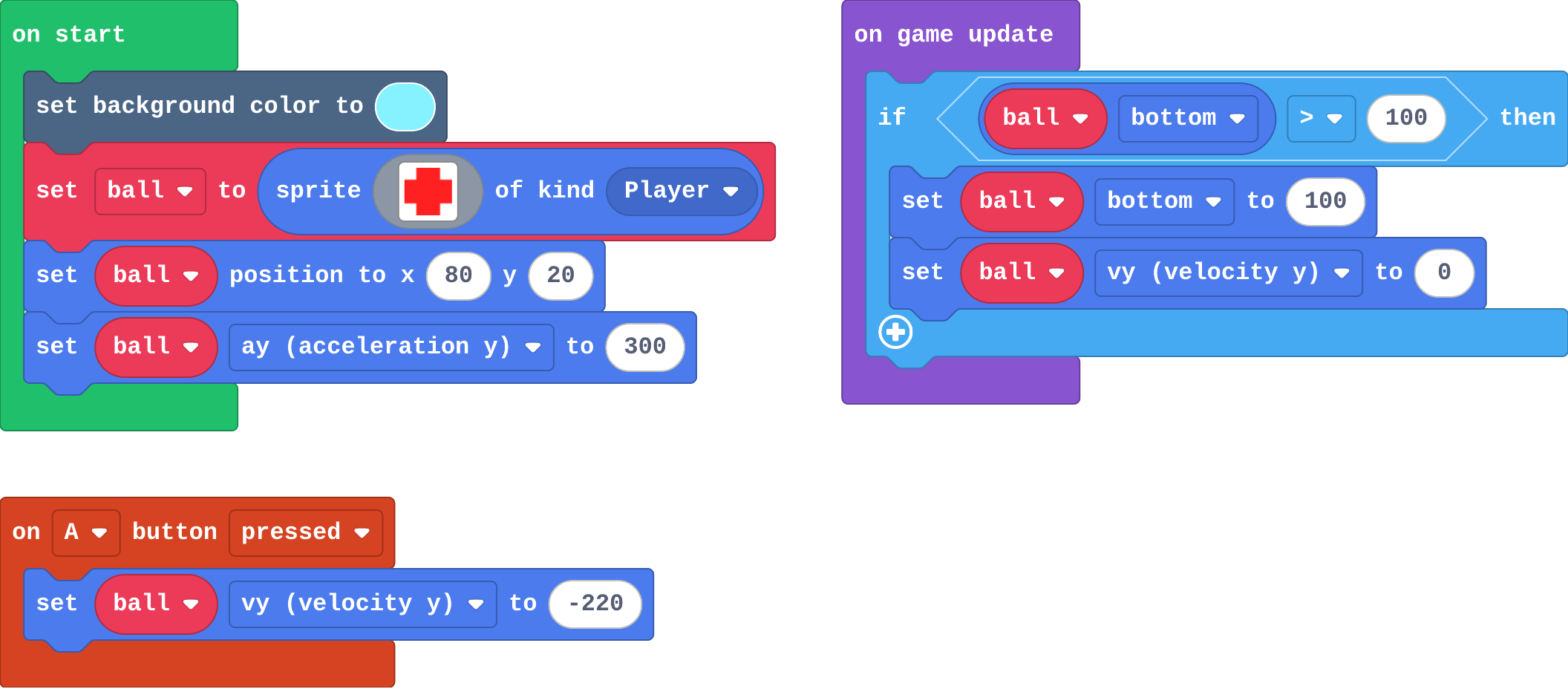
Show as code
scene.setBackgroundColor(9)
let ball = sprites.create(img`
    . 2 2 .
    2 2 2 2
    2 2 2 2
    . 2 2 .
    `, SpriteKind.Player)
ball.setPosition(80, 20)
ball.ay = 300
game.onUpdate(function () {
    if (ball.bottom > 100) {
        ball.bottom = 100
        ball.vy = 0
    }
})
controller.A.onEvent(ControllerButtonEvent.Pressed, function () {
    ball.vy = -220
})
Modify › Moon gravity
Open task: any program that does what the step asks.
Make
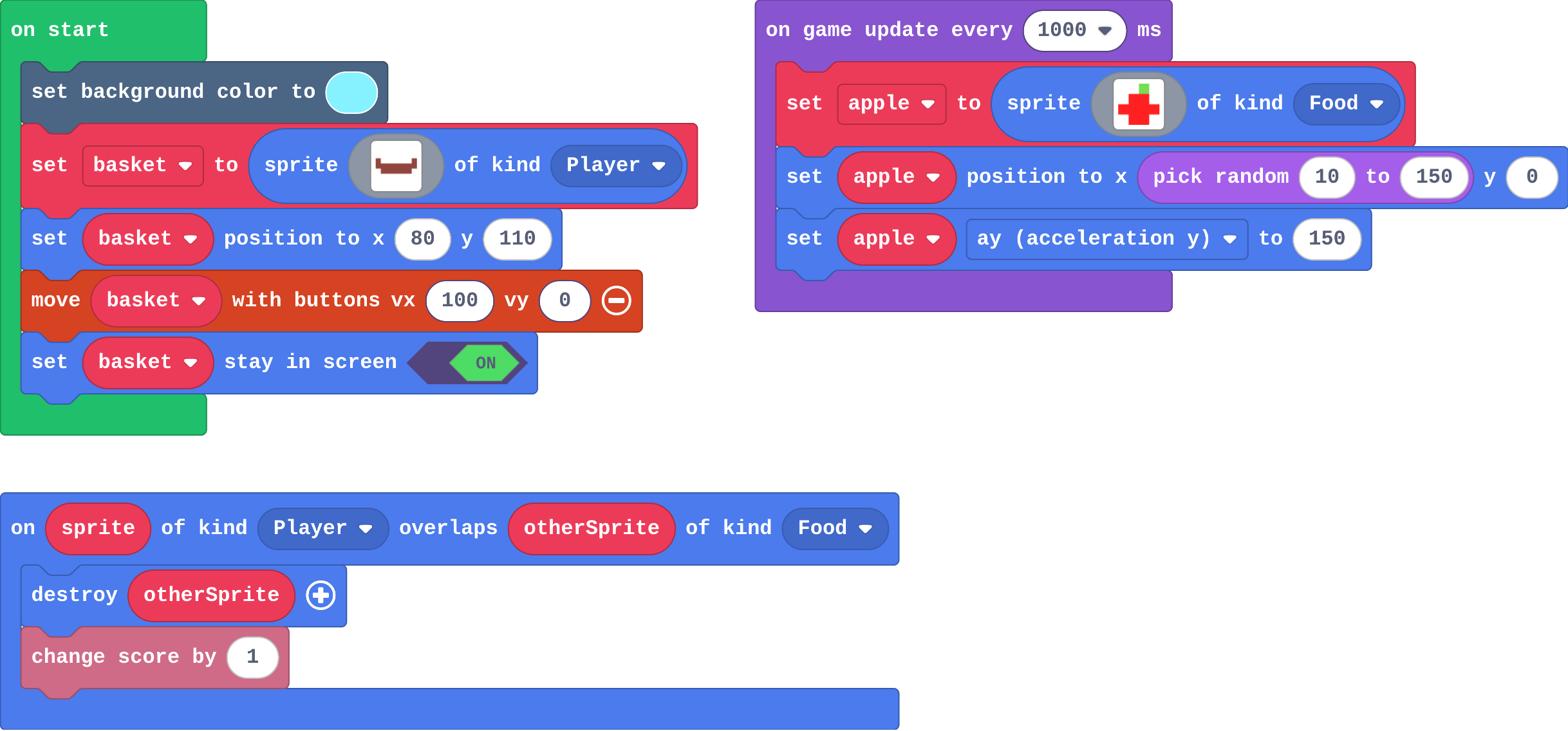
Show as code
let apple: Sprite = null
scene.setBackgroundColor(9)
let basket = sprites.create(img`
    e . . . . . . e
    e e e e e e e e
    . e e e e e e .
    `, SpriteKind.Player)
basket.setPosition(80, 110)
controller.moveSprite(basket, 100, 0)
basket.setStayInScreen(true)
game.onUpdateInterval(1000, function () {
    apple = sprites.create(img`
        . . 7 .
        . 2 2 .
        2 2 2 2
        . 2 2 .
        `, SpriteKind.Food)
    apple.setPosition(randint(10, 150), 0)
    apple.ay = 150
})
sprites.onOverlap(SpriteKind.Player, SpriteKind.Food, function (sprite, otherSprite) {
    otherSprite.destroy()
    info.changeScoreBy(1)
})
Change a trampoline
Open task: any program that does what the step asks.
Stretch and support
Stretch: Make some apples heavier (bigger ay) and worth more points.
Support: Give students the timer that makes apples, and ask them only to add ay and the catch.
Exit ticket
A sprite with ay 200 starts still. What is its vy after 2 seconds, and why is it not still 0?
400. Gravity adds 200 to vy every second.
What each step is for
- Investigate: Gravity is acceleration: the engine adds ay to vy every second, a little each frame, so a fall speeds up and a jump (a negative vy) slows, stops and comes back. An if in on game update builds a floor.
- Modify: ay sets how strong gravity is, and the size of the negative vy sets how high a throw or jump goes.
- Mix it up: A parameter is the value the call hands in; a negative vx moves left.
Where it leads
Next lesson: a jump that only works from the ground. Skillmaps: Jungle Jump Platformer and Monster Truck Racer (arcade.makecode.com/skillmaps) practise gravity and jumping with tilemaps.