← Arcade advanced skills

Arcade advanced skills: recap

Answer each question in your head or on paper first, then check it.

Many sprites

1. Every one of a kind

Try firstThere are 5 enemies on the screen. A for element loop over array of sprites of kind Enemy contains change score by 1. How much does the score go up?

Check your answer

By 5. The list has 5 enemies, and the loop runs its blocks once for each one.

  1. array of sprites of kind Enemy is a list of every enemy in the game right now.
  2. A for element loop runs its blocks once for each item in the list, with value as that item.
  3. Blocks inside the loop run once per sprite; blocks after it run once.

So one press of B can reach every enemy, even though none of them has a name.

The program as blocks
Show as code
scene.setBackgroundColor(15)
let ship = sprites.create(img`
    . . 1 . .
    . 1 1 1 .
    1 1 1 1 1
    `, SpriteKind.Player)
ship.setPosition(80, 110)
controller.moveSprite(ship, 100, 0)
game.onUpdateInterval(1000, function () {
    let alien = sprites.create(img`
        . 7 . 7 .
        7 7 7 7 7
        7 f 7 f 7
        . 7 . 7 .
        `, SpriteKind.Enemy)
    alien.setPosition(randint(10, 150), 0)
    alien.vy = 20
})
controller.B.onEvent(ControllerButtonEvent.Pressed, function () {
    for (let value of sprites.allOfKind(SpriteKind.Enemy)) {
        value.vy = 0
    }
})
The example, as blocks
What this program shows in the game simulator
What it makes (a moment from the game)
array of sprites of kind is a list of every one · Sound on for the voiceover
Open the lesson →

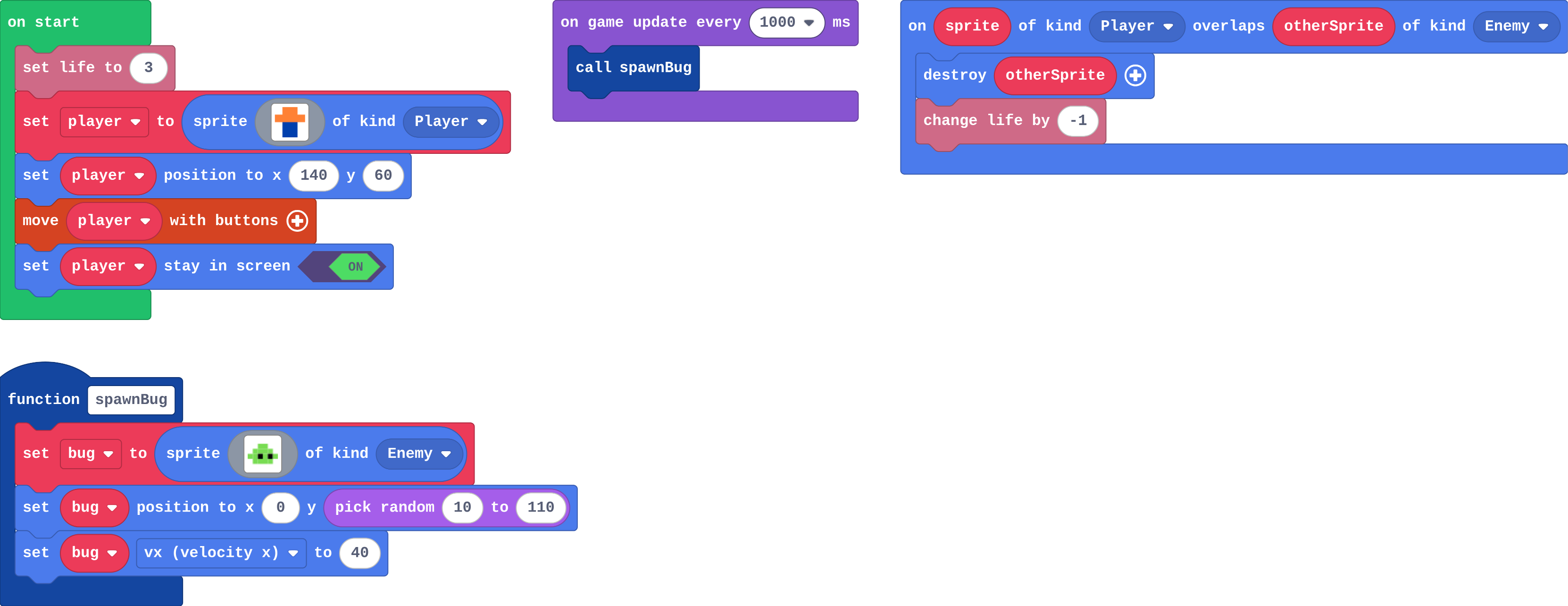
2. Functions

Try firstYou make a function, but never call it. What happens when the game runs?

Check your answer

Nothing from that function: its blocks only run when something calls it.

A function is a named job. Making it does not run it: a call block runs it, once per call.

One copy serves every call, so changing the function changes every place that calls it.

Press Python in the editor: every event block is a function too. The game calls it for you each time the event happens.

The program as blocks
Show as code
let bug: Sprite = null
function spawnBug () {
    bug = sprites.create(img`
        . . 7 7 . .
        . 7 7 7 7 .
        7 7 f 7 f 7
        . 7 7 7 7 .
        `, SpriteKind.Enemy)
    bug.setPosition(0, randint(10, 110))
    bug.vx = 40
}
info.setLife(3)
let player = sprites.create(img`
    . 4 4 .
    4 4 4 4
    . 8 8 .
    . 8 8 .
    `, SpriteKind.Player)
player.setPosition(140, 60)
controller.moveSprite(player)
player.setStayInScreen(true)
game.onUpdateInterval(1000, function () {
    spawnBug()
})
sprites.onOverlap(SpriteKind.Player, SpriteKind.Enemy, function (sprite, otherSprite) {
    otherSprite.destroy()
    info.changeLifeBy(-1)
})
The example, as blocks
What this program shows in the game simulator
What it makes (a moment from the game)
A function is a named job · Sound on for the voiceover
Open the lesson →

3. Parameters

Try firstspawnEnemy(speed) sets bug vx to speed. The timer calls spawnEnemy(70). How fast is that bug?

Check your answer

70. speed is the number the call handed in.

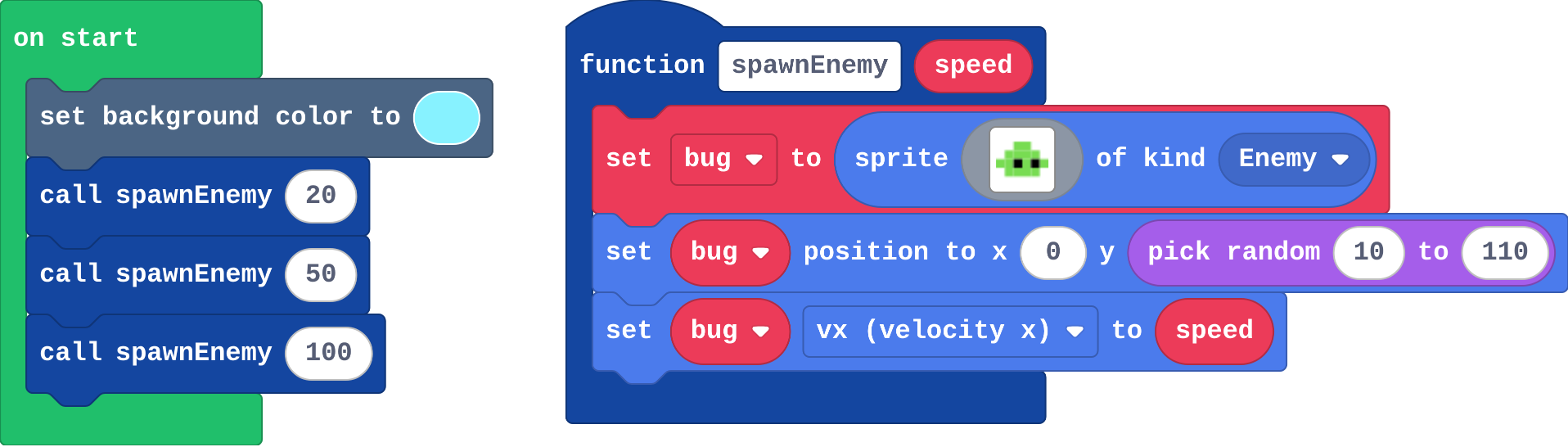
A parameter is a value the call hands in. spawnEnemy(20) makes speed 20 inside the function; spawnEnemy(100) makes it 100.

So one function can do its job differently each time. Choose the number in the call, and use the parameter inside the function.

The program as blocks
Show as code
let bug: Sprite = null
function spawnEnemy (speed: number) {
    bug = sprites.create(img`
        . . 7 7 . .
        . 7 7 7 7 .
        7 7 f 7 f 7
        . 7 7 7 7 .
        `, SpriteKind.Enemy)
    bug.setPosition(0, randint(10, 110))
    bug.vx = speed
}
scene.setBackgroundColor(9)
spawnEnemy(20)
spawnEnemy(50)
spawnEnemy(100)
The example, as blocks
What this program shows in the game simulator
What it makes (a moment from the game)
A parameter is a value the call hands in · Sound on for the voiceover
Open the lesson →

Platforms

4. Gravity

Try firstA sprite with ay 200 starts still. What is its vy after 2 seconds, and why is it not still 0?

Check your answer

400. Gravity adds 200 to vy every second.

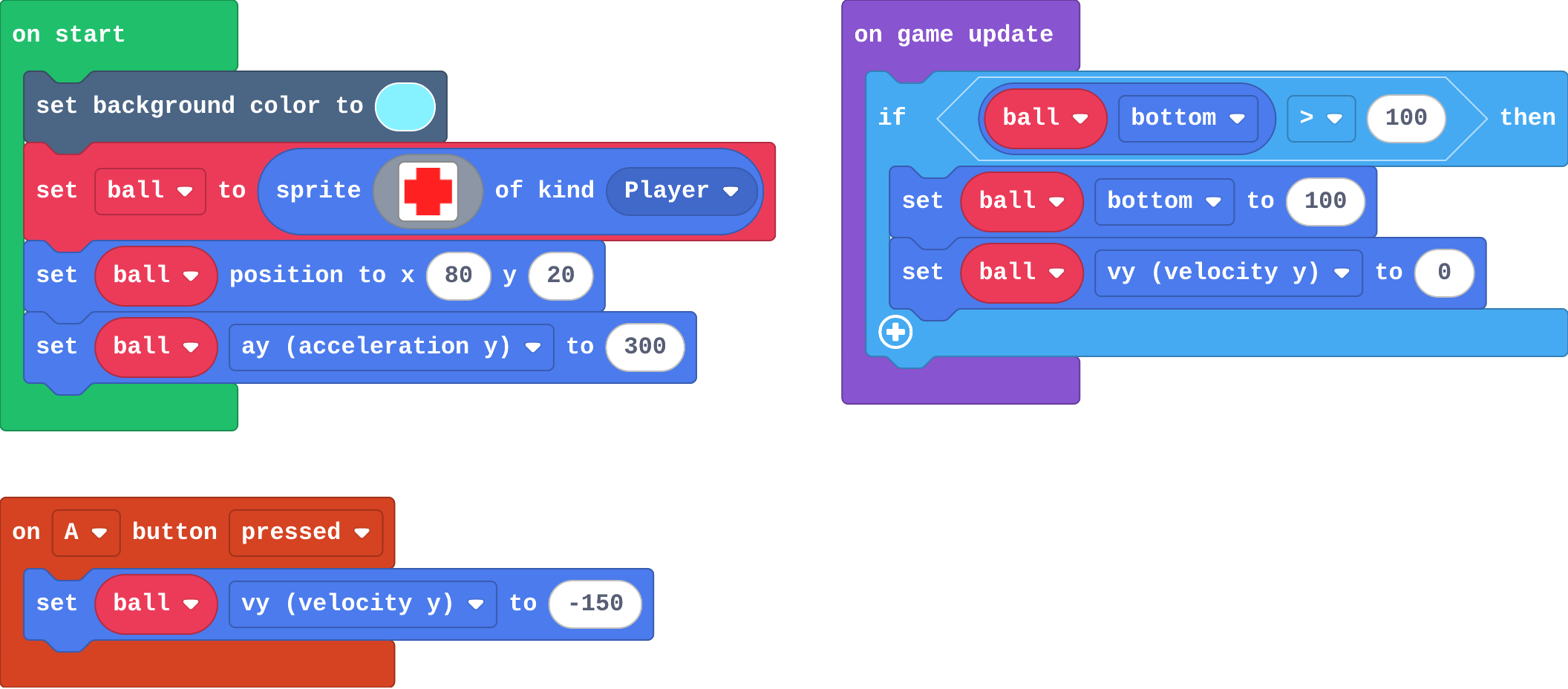
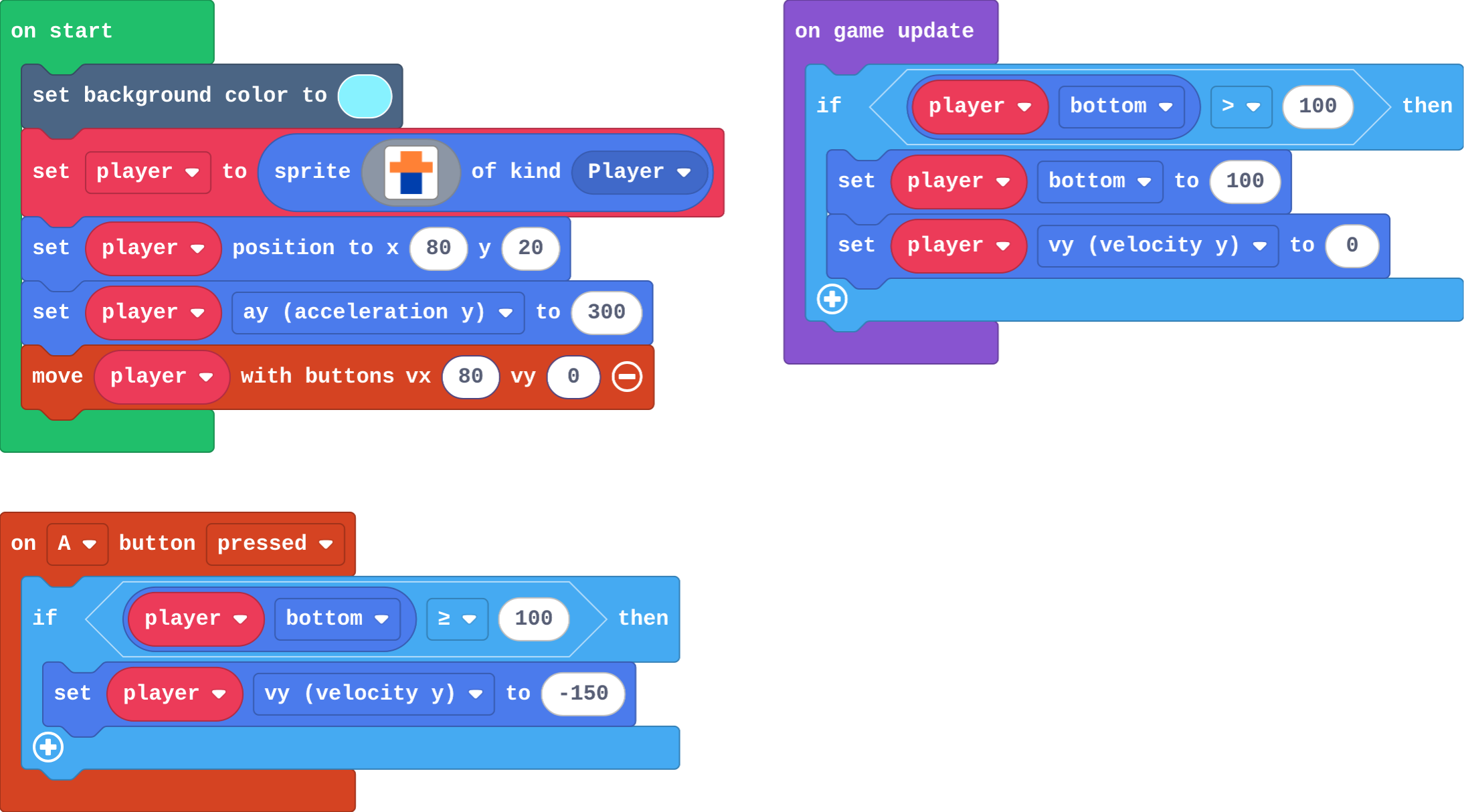
  1. ay is gravity: every frame the engine adds a little to vy, so a sprite falls faster and faster.
  2. A throw or jump is a speed upwards: vy = -150. Gravity slows it, stops it and brings it back down.
  3. There is no floor, so an if in on game update makes one: if bottom > 100, set bottom to 100 and vy to 0.
The program as blocks
Show as code
scene.setBackgroundColor(9)
let ball = sprites.create(img`
    . 2 2 .
    2 2 2 2
    2 2 2 2
    . 2 2 .
    `, SpriteKind.Player)
ball.setPosition(80, 20)
ball.ay = 300
game.onUpdate(function () {
    if (ball.bottom > 100) {
        ball.bottom = 100
        ball.vy = 0
    }
})
controller.A.onEvent(ControllerButtonEvent.Pressed, function () {
    ball.vy = -150
})
The example, as blocks
What this program shows in the game simulator
What it makes (a moment from the game)
ay is gravity · Sound on for the voiceover
Open the lesson →

5. Jump from the ground

Try firstWhy does a jump need an if that checks the player is on the ground?

Check your answer

A jump only sets vy upwards. Without the check, every press of A jumps again, even in mid-air, so the player can fly.

A jump sets vy upwards. On its own it works on every press, even in mid-air.

So put the jump inside an if that asks whether the player is on the floor: if bottom ≥ 100. The floor keeps the bottom at 100 while the player stands, so the press only counts from the ground.

The program as blocks
Show as code
scene.setBackgroundColor(9)
let player = sprites.create(img`
    . 4 4 .
    4 4 4 4
    . 8 8 .
    . 8 8 .
    `, SpriteKind.Player)
player.setPosition(80, 20)
player.ay = 300
controller.moveSprite(player, 80, 0)
game.onUpdate(function () {
    if (player.bottom > 100) {
        player.bottom = 100
        player.vy = 0
    }
})
controller.A.onEvent(ControllerButtonEvent.Pressed, function () {
    if (player.bottom >= 100) {
        player.vy = -150
    }
})
The example, as blocks
What this program shows in the game simulator
What it makes (a moment from the game)
A jump only sets vy upwards · Sound on for the voiceover
Open the lesson →

Levels

6. Level up

Try firstWhy does a level-up go in the event where the score changes, not in on game update?

Check your answer

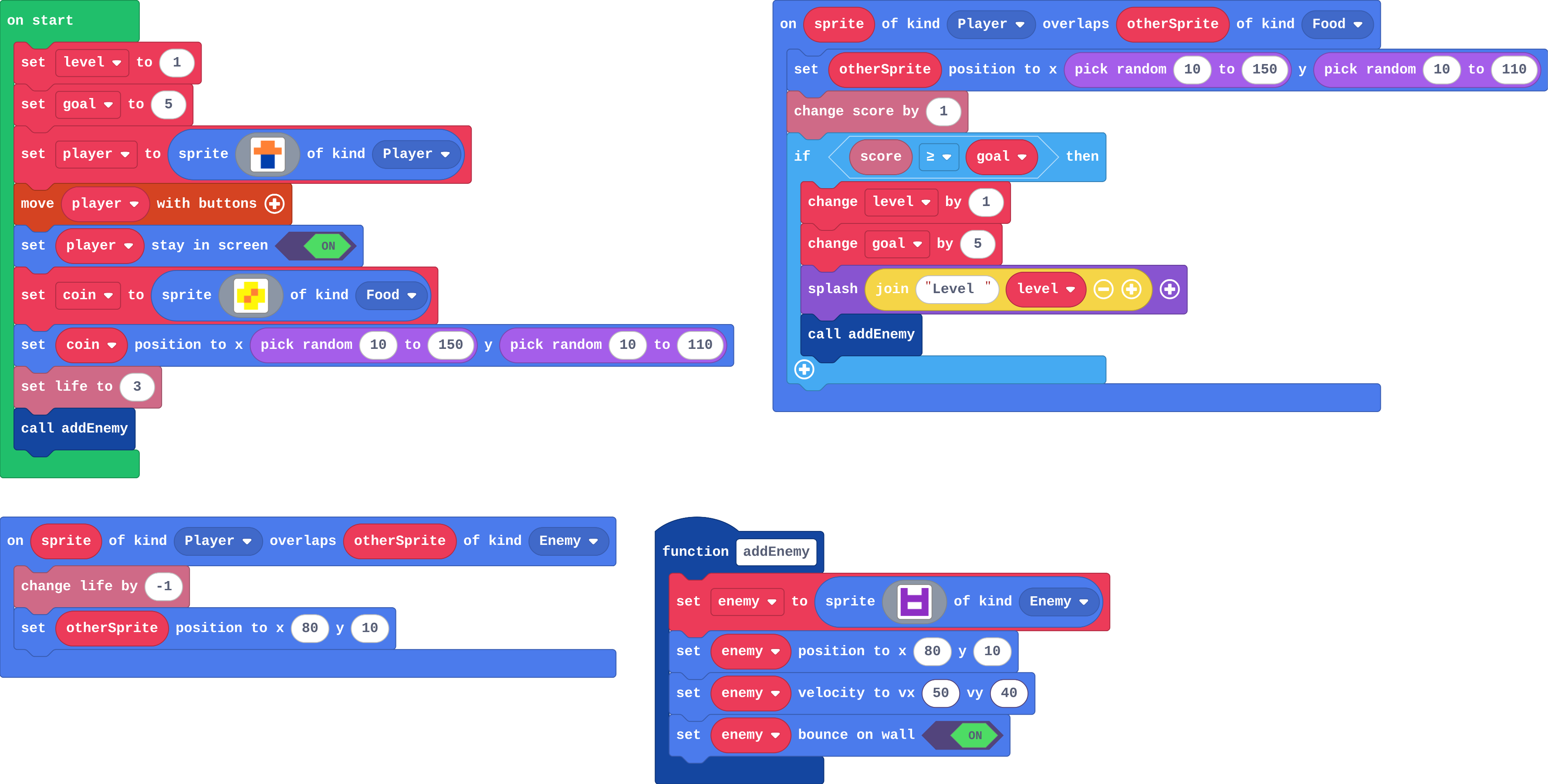
on game update runs every frame, so while the score stays high enough the level goes up every frame. In the event it is asked only when the score changes.

A variable level remembers where the player is. It goes up by 1 where the score changes, with a goal that moves up, so the next level is further away.

An if in on game update is asked every frame, so it would level up again and again while the score stays high.

The program as blocks
Show as code
let enemy: Sprite = null
let level = 1
let goal = 5
function addEnemy () {
    enemy = sprites.create(img`
        a . . a
        a a a a
        a 1 1 a
        a a a a
        `, SpriteKind.Enemy)
    enemy.setPosition(80, 10)
    enemy.setVelocity(50, 40)
    enemy.setBounceOnWall(true)
}
let player = sprites.create(img`
    . 4 4 .
    4 4 4 4
    . 8 8 .
    . 8 8 .
    `, SpriteKind.Player)
controller.moveSprite(player)
player.setStayInScreen(true)
let coin = sprites.create(img`
    . 5 5 .
    5 5 4 5
    5 4 5 5
    . 5 5 .
    `, SpriteKind.Food)
coin.setPosition(randint(10, 150), randint(10, 110))
info.setLife(3)
addEnemy()
sprites.onOverlap(SpriteKind.Player, SpriteKind.Food, function (sprite, otherSprite) {
    otherSprite.setPosition(randint(10, 150), randint(10, 110))
    info.changeScoreBy(1)
    if (info.score() >= goal) {
        level += 1
        goal += 5
        game.splash("Level " + level)
        addEnemy()
    }
})
sprites.onOverlap(SpriteKind.Player, SpriteKind.Enemy, function (sprite, otherSprite) {
    info.changeLifeBy(-1)
    otherSprite.setPosition(80, 10)
})
The example, as blocks
What this program shows in the game simulator
What it makes (a moment from the game)
A variable called level remembers where the player is · Sound on for the voiceover
Open the lesson →

7. A list per level

Try firstspeeds is 40, 70, 100 and level is 1. What speed does the enemy get, and why?

Check your answer

70: level 1 is the second place in the list, because places are counted from 0.

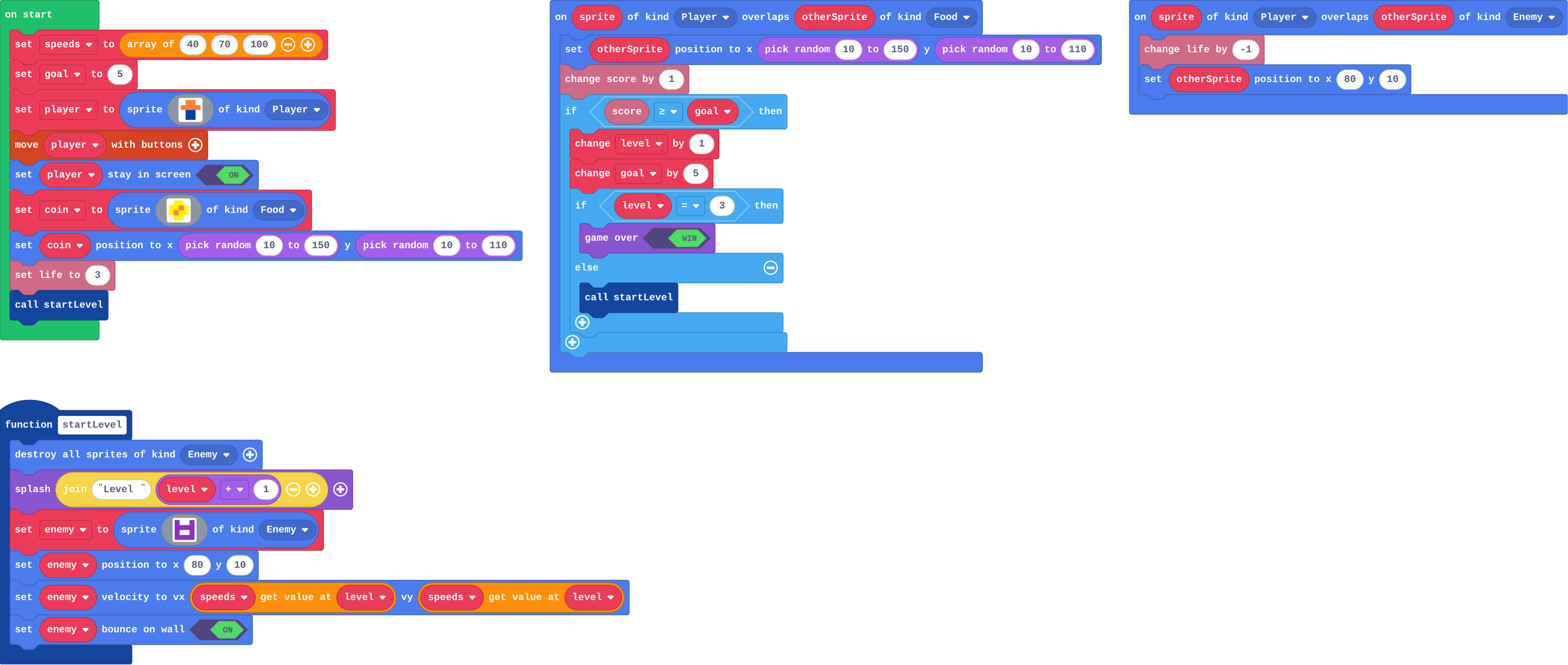
A list holds what changes per level: speeds[level] is the speed for this level.

Places are counted from 0, so the level starts at 0 and the splash shows level + 1.

startLevel clears the old enemies, splashes the level and sets up the new one.

The program as blocks
Show as code
let enemy: Sprite = null
let speeds = [40, 70, 100]
let level = 0
let goal = 5
function startLevel () {
    sprites.destroyAllSpritesOfKind(SpriteKind.Enemy)
    game.splash("Level " + (level + 1))
    enemy = sprites.create(img`
        a . . a
        a a a a
        a 1 1 a
        a a a a
        `, SpriteKind.Enemy)
    enemy.setPosition(80, 10)
    enemy.setVelocity(speeds[level], speeds[level])
    enemy.setBounceOnWall(true)
}
let player = sprites.create(img`
    . 4 4 .
    4 4 4 4
    . 8 8 .
    . 8 8 .
    `, SpriteKind.Player)
controller.moveSprite(player)
player.setStayInScreen(true)
let coin = sprites.create(img`
    . 5 5 .
    5 5 4 5
    5 4 5 5
    . 5 5 .
    `, SpriteKind.Food)
coin.setPosition(randint(10, 150), randint(10, 110))
info.setLife(3)
startLevel()
sprites.onOverlap(SpriteKind.Player, SpriteKind.Food, function (sprite, otherSprite) {
    otherSprite.setPosition(randint(10, 150), randint(10, 110))
    info.changeScoreBy(1)
    if (info.score() >= goal) {
        level += 1
        goal += 5
        if (level == 3) {
            game.gameOver(true)
        } else {
            startLevel()
        }
    }
})
sprites.onOverlap(SpriteKind.Player, SpriteKind.Enemy, function (sprite, otherSprite) {
    info.changeLifeBy(-1)
    otherSprite.setPosition(80, 10)
})
The example, as blocks
What this program shows in the game simulator
What it makes (a moment from the game)
A list holds one speed for each level · Sound on for the voiceover
Open the lesson →

Power-ups

8. True or false

Try firstName the three parts of a power-up, using the shield as the example.

Check your answer

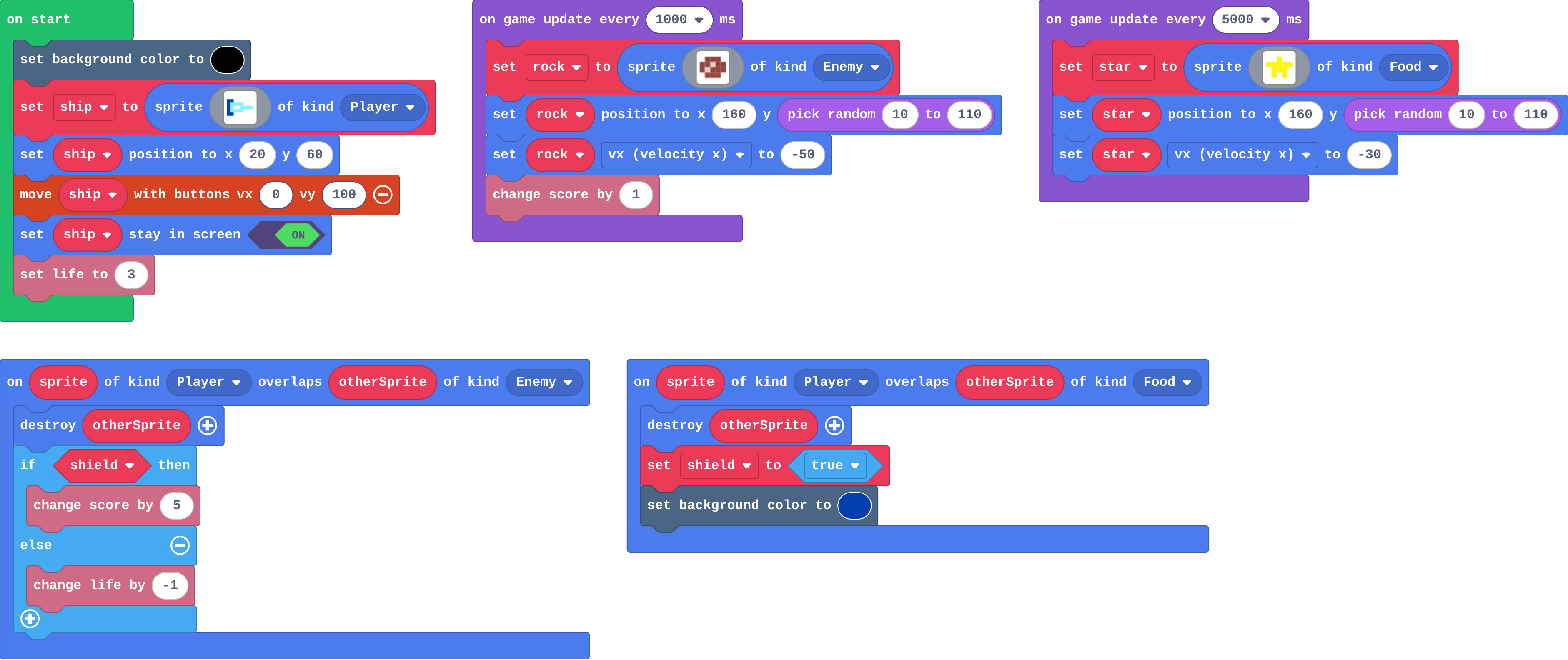
A variable that remembers it (shield), an event that changes it (catching a star sets it to true), and a rule that uses it (if shield, a rock costs no life).

A power-up has three parts:

  1. a variable that remembers it: shield is true while it is on,
  2. an event that changes it: catching a star sets it to true,
  3. a rule that uses it: if shield, a rock costs no life.

It stays true until a block sets it back to false.

The program as blocks
Show as code
let rock: Sprite = null
let star: Sprite = null
let shield = false
sprites.onOverlap(SpriteKind.Player, SpriteKind.Enemy, function (sprite, otherSprite) {
    otherSprite.destroy()
    if (shield) {
        info.changeScoreBy(5)
    } else {
        info.changeLifeBy(-1)
    }
})
sprites.onOverlap(SpriteKind.Player, SpriteKind.Food, function (sprite, otherSprite) {
    otherSprite.destroy()
    shield = true
    scene.setBackgroundColor(8)
})
scene.setBackgroundColor(15)
let ship = sprites.create(img`
    8 8 . . . . . .
    8 9 9 9 9 . . .
    8 9 1 1 9 9 9 9
    8 9 9 9 9 . . .
    8 8 . . . . . .
    `, SpriteKind.Player)
ship.setPosition(20, 60)
controller.moveSprite(ship, 0, 100)
ship.setStayInScreen(true)
info.setLife(3)
game.onUpdateInterval(1000, function () {
    rock = sprites.create(img`
        . e e e .
        e e d e e
        e d e e e
        . e e e .
        `, SpriteKind.Enemy)
    rock.setPosition(160, randint(10, 110))
    rock.vx = -50
    info.changeScoreBy(1)
})
game.onUpdateInterval(5000, function () {
    star = sprites.create(img`
        . . 5 . .
        5 5 5 5 5
        . 5 5 5 .
        . 5 . 5 .
        `, SpriteKind.Food)
    star.setPosition(160, randint(10, 110))
    star.vx = -30
})
The example, as blocks
What this program shows in the game simulator
What it makes (a moment from the game)
A power-up has three parts · Sound on for the voiceover
Open the lesson →

9. Run out

Try firstWhy does the A event ask ammo > 0 before it fires?

Check your answer

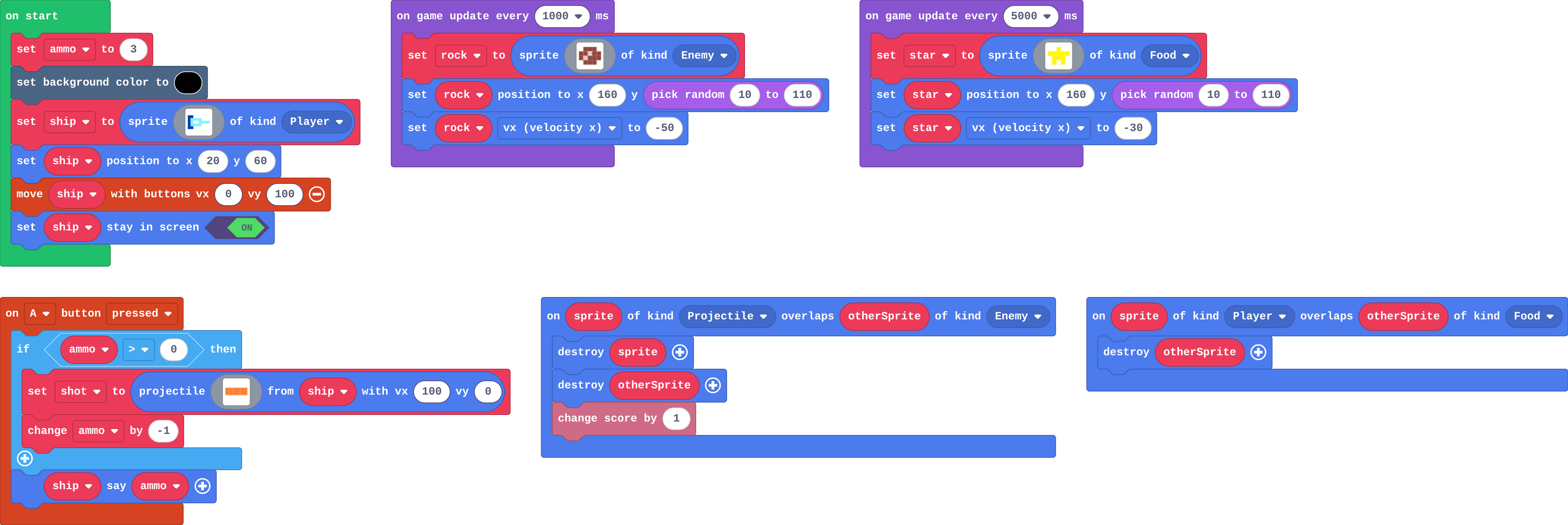
So it only fires while there are shots left. Without the check, ammo goes below zero and the shots never run out.

A power-up that runs out is a number counting down.

The event asks first: if ammo > 0, fire, then change ammo by -1. So it stops at zero.

For time, a timer takes 1 away every second, and at 0 switches the power-up off.

The program as blocks
Show as code
let star: Sprite = null
let shot: Sprite = null
let rock: Sprite = null
let ammo = 3
scene.setBackgroundColor(15)
let ship = sprites.create(img`
    8 8 . . . . . .
    8 9 9 9 9 . . .
    8 9 1 1 9 9 9 9
    8 9 9 9 9 . . .
    8 8 . . . . . .
    `, SpriteKind.Player)
ship.setPosition(20, 60)
controller.moveSprite(ship, 0, 100)
ship.setStayInScreen(true)
controller.A.onEvent(ControllerButtonEvent.Pressed, function () {
    if (ammo > 0) {
        shot = sprites.createProjectileFromSprite(img`
            4 4 4
            `, ship, 100, 0)
        ammo += -1
    }
    ship.sayText(ammo)
})
game.onUpdateInterval(1000, function () {
    rock = sprites.create(img`
        . e e e .
        e e d e e
        e d e e e
        . e e e .
        `, SpriteKind.Enemy)
    rock.setPosition(160, randint(10, 110))
    rock.vx = -50
})
game.onUpdateInterval(5000, function () {
    star = sprites.create(img`
        . . 5 . .
        5 5 5 5 5
        . 5 5 5 .
        . 5 . 5 .
        `, SpriteKind.Food)
    star.setPosition(160, randint(10, 110))
    star.vx = -30
})
sprites.onOverlap(SpriteKind.Projectile, SpriteKind.Enemy, function (sprite, otherSprite) {
    sprite.destroy()
    otherSprite.destroy()
    info.changeScoreBy(1)
})
sprites.onOverlap(SpriteKind.Player, SpriteKind.Food, function (sprite, otherSprite) {
    otherSprite.destroy()
})
The example, as blocks
What this program shows in the game simulator
What it makes (a moment from the game)
ammo counts the shots left · Sound on for the voiceover
Open the lesson →

Final challenge: Power-ups and your own game

10. Power-ups

Try firstName the three parts of a power-up in your game, using the shield as the example.

Check your answer

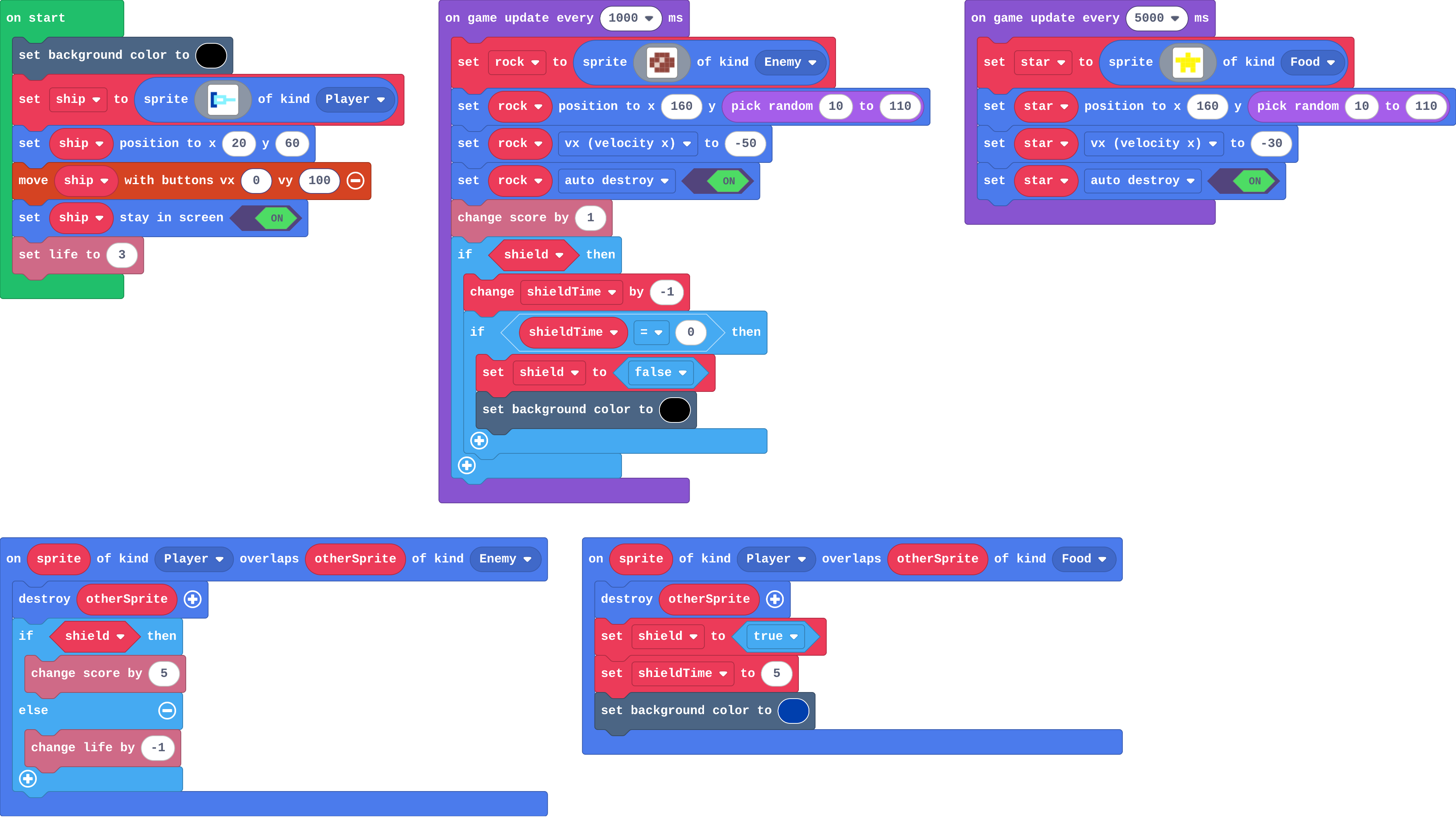
A variable that remembers it (shield), an event that changes it (catching a star sets it to true), and a rule that uses it (if shield, a rock costs no life).

A power-up has three parts:

  1. a variable that remembers it: shield is true while it is on,
  2. an event that changes it: catching a star sets it to true,
  3. a rule that uses it: if shield, a rock costs no life.

A timer counts shieldTime down every second; at 0 the shield is set back to false.

The program as blocks
Show as code
let rock: Sprite = null
let star: Sprite = null
let shield = false
let shieldTime = 0
sprites.onOverlap(SpriteKind.Player, SpriteKind.Enemy, function (sprite, otherSprite) {
    otherSprite.destroy()
    if (shield) {
        info.changeScoreBy(5)
    } else {
        info.changeLifeBy(-1)
    }
})
sprites.onOverlap(SpriteKind.Player, SpriteKind.Food, function (sprite, otherSprite) {
    otherSprite.destroy()
    shield = true
    shieldTime = 5
    scene.setBackgroundColor(8)
})
scene.setBackgroundColor(15)
let ship = sprites.create(img`
    8 8 . . . . . .
    8 9 9 9 9 . . .
    8 9 1 1 9 9 9 9
    8 9 9 9 9 . . .
    8 8 . . . . . .
    `, SpriteKind.Player)
ship.setPosition(20, 60)
controller.moveSprite(ship, 0, 100)
ship.setStayInScreen(true)
info.setLife(3)
game.onUpdateInterval(1000, function () {
    rock = sprites.create(img`
        . e e e .
        e e d e e
        e d e e e
        . e e e .
        `, SpriteKind.Enemy)
    rock.setPosition(160, randint(10, 110))
    rock.vx = -50
    rock.setFlag(SpriteFlag.AutoDestroy, true)
    info.changeScoreBy(1)
    if (shield) {
        shieldTime += -1
        if (shieldTime == 0) {
            shield = false
            scene.setBackgroundColor(15)
        }
    }
})
game.onUpdateInterval(5000, function () {
    star = sprites.create(img`
        . . 5 . .
        5 5 5 5 5
        . 5 5 5 .
        . 5 . 5 .
        `, SpriteKind.Food)
    star.setPosition(160, randint(10, 110))
    star.vx = -30
    star.setFlag(SpriteFlag.AutoDestroy, true)
})
The example, as blocks
What this program shows in the game simulator
What it makes (a moment from the game)
A power-up has three parts · Sound on for the voiceover
Open the lesson →

11. Will it work in Arcade?

Try firstName one game Arcade is built for and one that is not a good fit, with a reason for each.

Check your answer

For example: a space shooter is built for it (projectiles, kinds and lives are built-in blocks); Angry Birds is not a good fit (sprites do not push or topple; there is no physics engine).

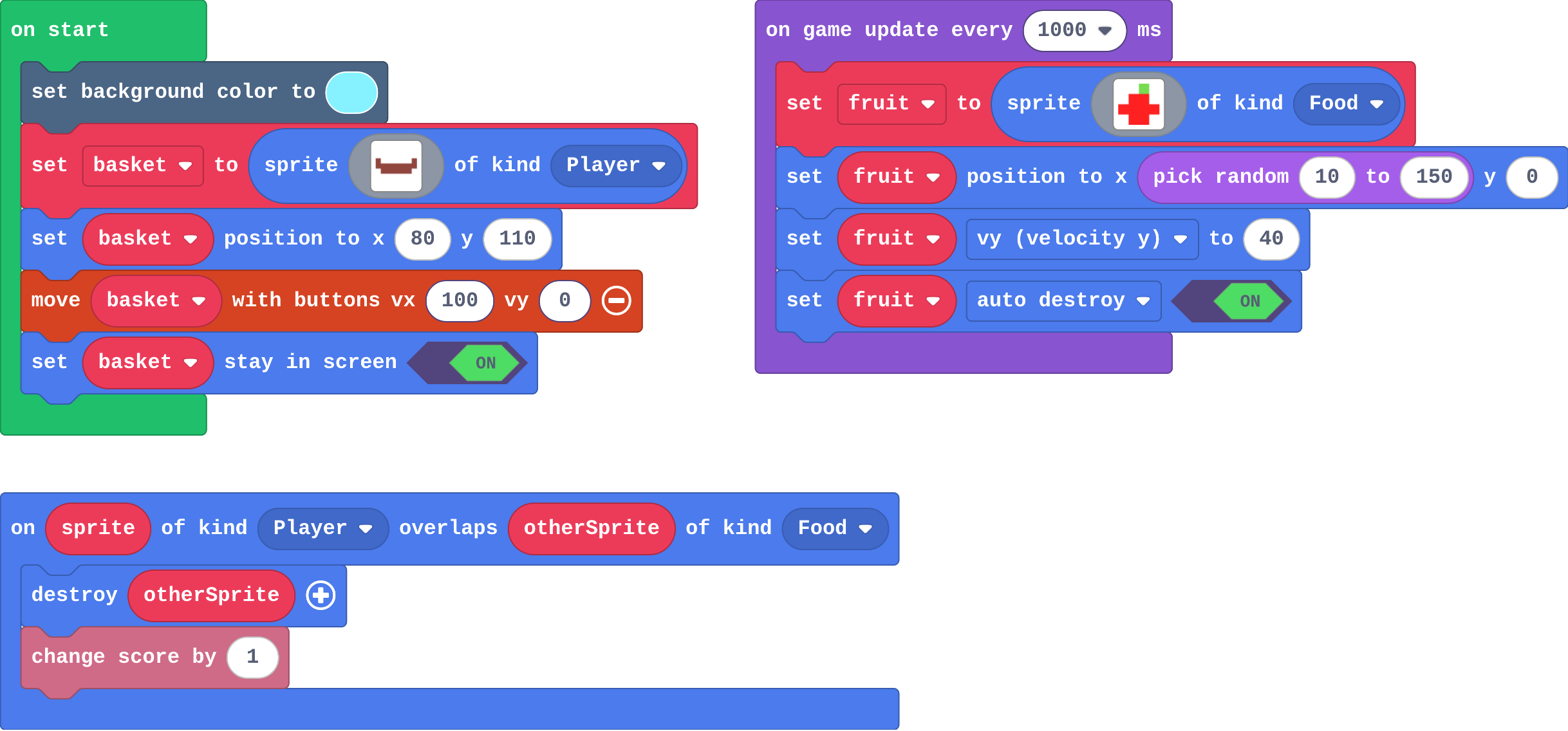
A game suits Arcade when it is made from the engine's building blocks:

  1. Built for it: catch, dodge, shooters, runners, mazes, platformers, pong. Every part is a block.
  2. Possible with work: card games, quizzes, turning cars. You build the missing part from blocks.
  3. Not a good fit: 3D, real physics, detailed art. The engine has nothing to build them from.

Sprites pass through each other: an overlap is only an event, so your blocks decide what happens.

The program as blocks
Show as code
let fruit: Sprite = null
scene.setBackgroundColor(9)
let basket = sprites.create(img`
    e . . . . . . e
    e e e e e e e e
    . e e e e e e .
    `, SpriteKind.Player)
basket.setPosition(80, 110)
controller.moveSprite(basket, 100, 0)
basket.setStayInScreen(true)
game.onUpdateInterval(1000, function () {
    fruit = sprites.create(img`
    . . 7 .
    . 2 2 .
    2 2 2 2
    . 2 2 .
    `, SpriteKind.Food)
    fruit.setPosition(randint(10, 150), 0)
    fruit.vy = 40
    fruit.setFlag(SpriteFlag.AutoDestroy, true)
})
sprites.onOverlap(SpriteKind.Player, SpriteKind.Food, function (sprite, otherSprite) {
    otherSprite.destroy()
    info.changeScoreBy(1)
})
The example, as blocks
What this program shows in the game simulator
What it makes (a moment from the game)
Which games suit Arcade? · Sound on for the voiceover
Open the lesson →