Send and receive
Send a number by radio, and react on another micro:bit when it arrives.
Wireless doorbells, car keys and walkie-talkies all send small radio messages to a receiver tuned to the same channel.
Micro:bits can talk to each other by radio. One sends a message; every micro:bit nearby in the same group (like a walkie-talkie channel) receives it. You find radio blocks in Radio.
As soon as your program uses radio, the simulator shows two micro:bits. Both run the same program, so you can press a button on one and watch the other.
- Predict: Read the code and say what it will do before you run anything. A wrong guess is fine: it shows you what to look for.
- Run: Run it and compare the result with your prediction.
- Investigate: Trace how each line of code connects to what you see.
- Modify: Change the code on purpose and check the result.
- Make: Build something new using what you have learned. Expect a few tries; that is normal.
Make your prediction first. Help opens once you've locked it in.
Predict
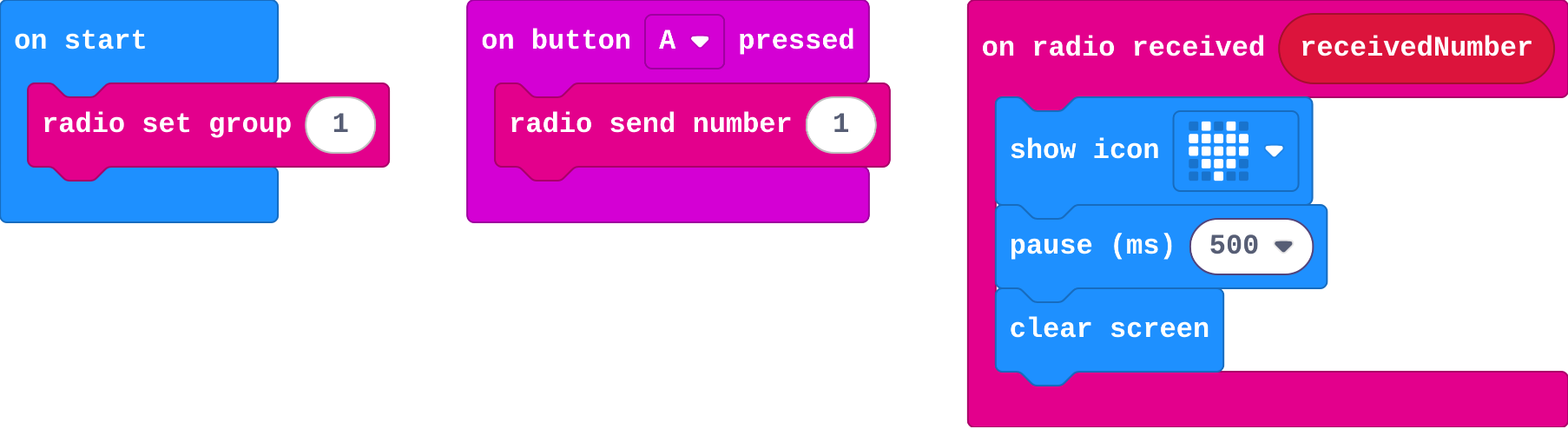
Show as code
radio.setGroup(1)
input.onButtonPressed(Button.A, function () {
    radio.sendNumber(1)
})
radio.onReceivedNumber(function (receivedNumber) {
    basic.showIcon(IconNames.Heart)
    basic.pause(500)
    basic.clearScreen()
})
send number sends; on radio received waits for a message to arrive.
Run
Press A on the first micro:bit, then on the second.
Show as code
radio.setGroup(1)
input.onButtonPressed(Button.A, function () {
    radio.sendNumber(1)
})
radio.onReceivedNumber(function (receivedNumber) {
    basic.showIcon(IconNames.Heart)
    basic.pause(500)
    basic.clearScreen()
})
Investigate
Show as code
radio.setGroup(1)
input.onButtonPressed(Button.A, function () {
    radio.sendNumber(1)
})
radio.onReceivedNumber(function (receivedNumber) {
    basic.showIcon(IconNames.Heart)
    basic.pause(500)
    basic.clearScreen()
})
Match each radio block with its job.
Ella's two micro:bits are set to different groups.
radio.set_group(1)
def on_button_pressed_a():
    radio.send_number(1)
input.on_button_pressed(Button.A, on_button_pressed_a)
def on_received_number(receivedNumber):
    basic.show_icon(IconNames.HEART)
    basic.pause(500)
    basic.clear_screen()
radio.on_received_number(on_received_number)
Like a button, a radio message is an event: the micro:bit calls a function each time one arrives.
Match each block with what it does.
The same program in Python. Match each line with what it does.
Modify
Make a shake send a message too. Shake one micro:bit and watch the other.
Need a hint?
Drag in on shake from Input.
Another hint
Put radio send number inside it.
In a classroom full of micro:bits, everyone on group 1 hears everyone else. Choose your own group number (0 to 255) and agree it with your partner.
Make a shake send a message too, so the heart also shows on the other micro:bit.
This ticks by itself when your blocks do what is asked.
Mix it up
A function from last lesson, with no radio in it.

Show as code
function flash () {
    basic.showIcon(IconNames.Heart)
    basic.pause(200)
    basic.clearScreen()
    basic.pause(200)
}
input.onButtonPressed(Button.A, function () {
    flash()
    flash()
})
input.onGesture(Gesture.Shake, function () {
    flash()
})
flash is called twice from A and once from shake. You press A, then shake. How many flashes in all?
Make
Make a doorbell. Pressing A on the front door's micro:bit sends a number. The micro:bit inside calls a function, ring, that flashes a bell or a face (your choice).
Need a hint?
Make a function ring that flashes a picture, and call it from on radio received.
Another hint
On the sender: on button A pressed, radio send number 1.
A doorbell: A sends a number, and the other micro:bit calls a function of yours when it arrives.
This ticks by itself when your blocks do what is asked.
Change a quiet signal
A teacher presses A, and every student's micro:bit shows a raised hand: time to listen. Choose your own picture and group, then make B send the signal too.
For teachers
Students send a number by radio and react on another micro:bit when it arrives, and see that only micro:bits in the same group hear each other. About 40 minutes.
Open the teacher guide: answers, solutions, slides and a worksheet.
Students will be able to
- I can send a number from one micro:bit to another.
- I can react when a radio message arrives.
- I can say why both micro:bits need the same group.
Before class
Radio sends short messages between micro:bits. radio set group chooses a channel (0 to 255); only micro:bits in the same group hear each other. send number sends to every other micro:bit in the group (never to itself). on radio received is an event: it runs each time a message arrives. In the simulator, a second micro:bit appears once the program uses radio; both run the same program. Using the number that arrived (receivedNumber) is next lesson. With real micro:bits in a classroom, pairs must choose their own group number or they will hear everyone.
Running the lesson
- Predict: many students say 'on both'. Ask: who is listening, and who is talking? Or: does a walkie-talkie play your own voice back to you?
- Run: press A on each micro:bit in turn. The heart always shows on the other one.
- Investigate: Ella's groups are the most common real-classroom problem. The Python peek shows radio received as one more function the micro:bit calls.
- Modify: any event can send. Then each pair picks a group.
- Mix it up: counting function calls, from last lesson.
- Make: the doorbell calls a function from on radio received.
The hard part (on purpose)
Two micro:bits, one group, and a micro:bit never hears itself. When nothing arrives, ask which one is sending and which group each is in.
When students get stuck
- Nothing arrives. Ask: Are both micro:bits in the same group? Are you pressing on the sender? Fix: Check radio set group on both, and press on one while watching the other.
- The heart shows on the micro:bit that was pressed. Ask: Is there a show icon inside the button event as well? Fix: Keep the button event for sending only; showing belongs in on radio received.
- The second micro:bit is missing from the simulator. Ask: Is there a radio block in the program? Fix: The second micro:bit appears once any radio block is used.
Stretch and support
Stretch: Make the doorbell ring differently for a shake (a knock) and for A (the bell). How does the receiver know which? (Next lesson.)
Support: Give students the ring function already made, and ask them to add the sender and the receiver.
Where it leads
Next lesson: the number that arrives can say which message it was, so one receiver does different things. Class idea: a relay where a message passes around the room micro:bit to micro:bit.
What each step is for
- Investigate: send number reaches every other micro:bit in the same group, and on radio received is an event that runs each time a message arrives.
- Modify: Any event can send a message, and a group number of your own keeps your micro:bits to themselves.
- Mix it up: A function runs once for each call, wherever the call is.
- Send a number from one micro:bit to another.
- React when a radio message arrives.
- Say why both micro:bits need the same group.