Name a job
Name some blocks once as a function, then call it by name wherever you need it.
A recipe says 'make the sauce' and the sauce is written once, on another page. Programs name their jobs the same way.
When the same blocks are needed in several places, you can name them once as a function, then call it by name wherever you need it. Make one in Advanced › Functions › Make a Function. The call block then appears in the same place.
- Predict: Read the code and say what it will do before you run anything. A wrong guess is fine: it shows you what to look for.
- Run: Run it and compare the result with your prediction.
- Investigate: Trace how each line of code connects to what you see.
- Modify: Change the code on purpose and check the result.
- Make: Build something new using what you have learned. Expect a few tries; that is normal.
Make your prediction first. Help opens once you've locked it in.
Predict
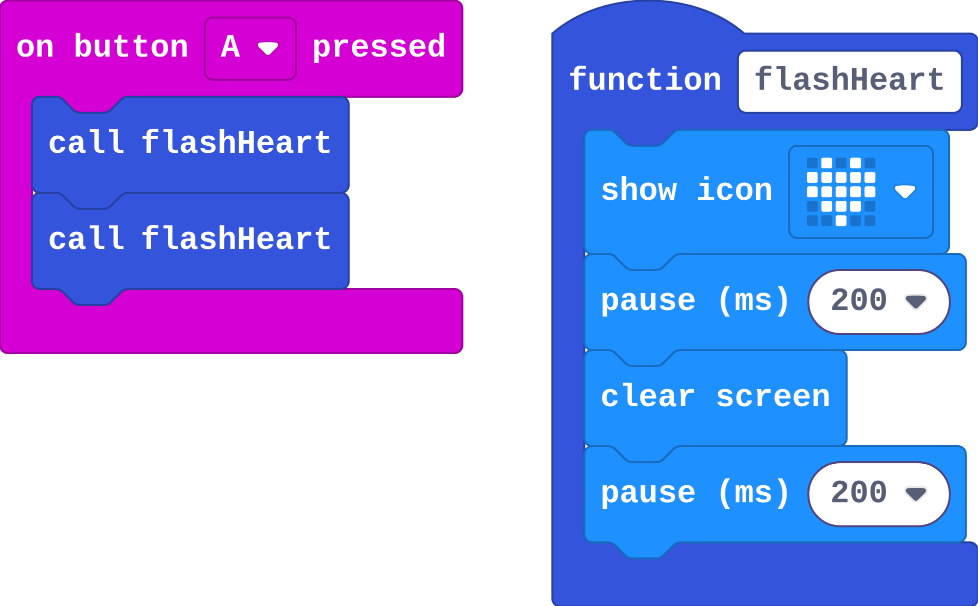
Show as code
function flashHeart () {
    basic.showIcon(IconNames.Heart)
    basic.pause(200)
    basic.clearScreen()
    basic.pause(200)
}
input.onButtonPressed(Button.A, function () {
    flashHeart()
    flashHeart()
})
function flashHeart holds the blocks for one flash. They only run when something calls flashHeart.
Run
Press A and count the flashes.
Show as code
function flashHeart () {
    basic.showIcon(IconNames.Heart)
    basic.pause(200)
    basic.clearScreen()
    basic.pause(200)
}
input.onButtonPressed(Button.A, function () {
    flashHeart()
    flashHeart()
})
Investigate
Show as code
function flashHeart () {
    basic.showIcon(IconNames.Heart)
    basic.pause(200)
    basic.clearScreen()
    basic.pause(200)
}
input.onButtonPressed(Button.A, function () {
    flashHeart()
    flashHeart()
})
Noah's program:

Show as code
function flashHeart () {
    basic.showIcon(IconNames.Heart)
    basic.pause(200)
    basic.clearScreen()
    basic.pause(200)
}
input.onButtonPressed(Button.A, function () {
})
MakeCode can show every program in Python. Here is this one:
def flash_heart():
    basic.show_icon(IconNames.HEART)
    basic.pause(200)
    basic.clear_screen()
    basic.pause(200)
def on_button_pressed_a():
    flash_heart()
    flash_heart()
input.on_button_pressed(Button.A, on_button_pressed_a)
Look at what Python did with on button A pressed: the blocks inside became a function, and the micro:bit calls it on each press.
This is the same program in Python (press Python at the top of the editor). Match each Python line with what it does.
Modify
Make B flash the heart three times. Use the function: do not copy the blocks.
Need a hint?
Drag in on button B pressed, then three call flashHeart blocks from Functions.
Make a function flashSad that flashes a sad face. Call it when the micro:bit is shaken.
Need a hint?
Make a Function called flashSad, with show icon sad face, pause, clear screen, pause.
Another hint
Then call it from on shake.
Make B flash the heart three times, using the function.
This ticks by itself when your blocks do what is asked.
Make a second function, flashSad, and call it from a shake.
This ticks by itself when your blocks do what is asked.
Mix it up
Sol's team picker, from the last course.

Show as code
let names = ["Ava", "Ben", "Chloe", "Dev", "Eve"]
input.onButtonPressed(Button.A, function () {
    basic.showString(names[randint(0, 3)])
})
Make
Make a stick-figure dance. Make two dance moves as functions (for example wave and jump), each with two or more pictures. Then choreograph: A and B each call a move, and a shake calls a routine of both.
Need a hint?
Make two functions, such as wave and jump. Each has two or more show leds pictures.
Another hint
A calls one, B calls the other, and shake calls both, one after the other.
A dance: two functions of your own, each a short animation, called from the buttons.
This ticks by itself when your blocks do what is asked.
Change an alarm
This alarm beeps and flashes three times when A is pressed, using one function. Make the function's beep higher or lower, then make B sound a longer alarm (more calls).
For teachers
Students name a job as a function and call it from several places, and see in Python that every event block is a function the micro:bit calls. About 45 minutes.
Open the teacher guide: answers, solutions, slides and a worksheet.
Students will be able to
- I can make a function and call it from more than one place.
- I can say why a function is better than copied blocks.
- I can explain that an event block is a function the micro:bit calls for me.
Before class
A function is a named job: some blocks with a name, made once in Advanced › Functions. Making it does not run it. It runs when a call block calls it, once per call. One copy serves every call, so a change to the function reaches every place at once; copied blocks have to be changed in every copy. The Python button at the top of the editor shows the same program as text: every event block (on button A pressed) becomes a function, handed to the micro:bit to call. Students only read the Python. Functions with inputs (parameters) come later, in Secret messages.
Running the lesson
- Predict: some students expect one flash per press. Point at the two call blocks.
- Run: count together. Each call runs the whole function once.
- Investigate: Noah's mistake (making but never calling) and the two copies are this lesson's ideas. Then switch the editor to Python together before the match.
- Say it plainly: an event block is a function. You make it; the micro:bit calls it on each press.
- Modify: three flashes means three calls, not copied blocks.
- Mix it up: a random pick that misses an item, from the last course.
- Make: two dance moves as functions, then a routine. Let students perform their dance for the class.
The hard part (on purpose)
Making a function does nothing until it is called. When a press does nothing, ask which block calls the function.
When students get stuck
- Nothing happens when the button is pressed. Ask: Which block calls your function? Fix: Add a call block (from Functions) inside the button event.
- The call block is missing from the toolbox. Ask: Have you made the function yet? Fix: Make the function first; its call block then appears under Functions.
- The student copied the flash blocks instead of calling. Ask: If you change the picture, how many places must you change? Fix: Delete the copy and call the function instead.
Stretch and support
Stretch: Make a third move and a routine of all three, called from A+B.
Support: Give students the two dance functions already made with one picture each, and ask them to add a second picture and the calls.
Where it leads
Next unit: radio. on radio received is one more event block, so one more function the micro:bit calls. Class idea: a class dance where each group writes one move as a function.
What each step is for
- Investigate: A function's blocks run only when it is called, once per call, so one copy serves every place that calls it. Every event block is a function too.
- Modify: Calling a function more times reuses it for free, and a second function names a second job.
- Mix it up: A random place must reach from 0 to length − 1, or some items never come up.
- Make a function and call it from more than one place.
- Say why a function is better than copied blocks.
- Explain that an event block is a function the micro:bit calls for me.