True or false
Use a variable that holds true or false to remember what is happening now, so each event can check it.
A lift only opens its doors when it has stopped, and a ticket gate only lets you through once per ticket. Each one remembers a single yes-or-no fact.
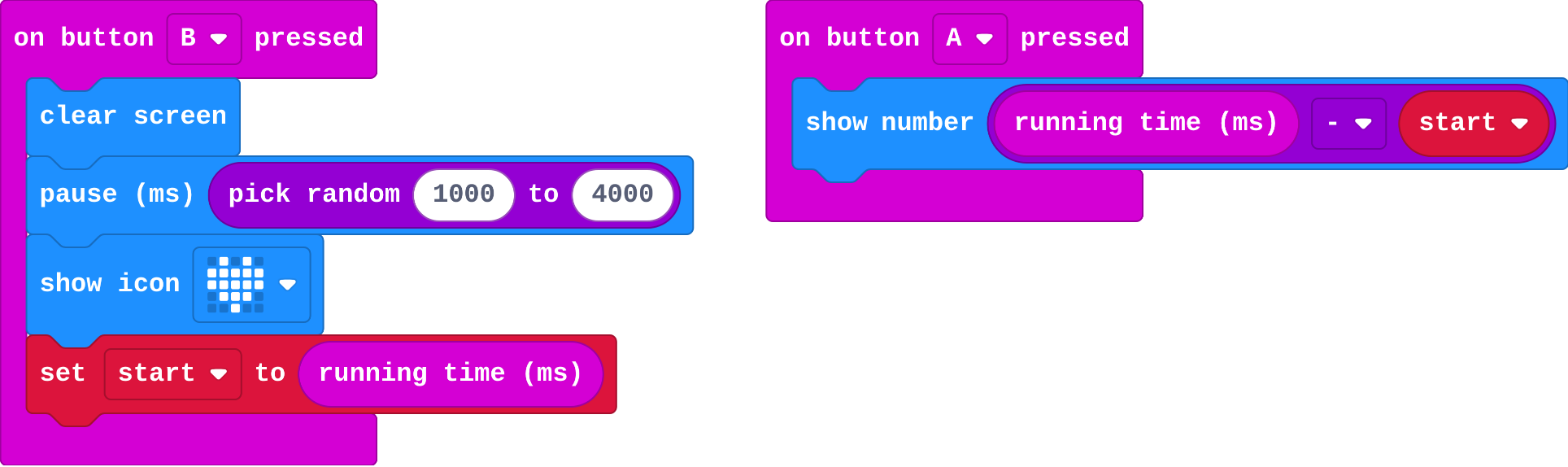
Last lesson's reaction tester has a cheat: press A before the heart and you still get a time. To fix it, the micro:bit must remember whether the heart is showing. A variable can hold true or false (in Logic), and an if can ask about it.
- Predict: Read the code and say what it will do before you run anything. A wrong guess is fine: it shows you what to look for.
- Run: Run it and compare the result with your prediction.
- Investigate: Trace how each line of code connects to what you see.
- Modify: Change the code on purpose and check the result.
- Make: Build something new using what you have learned. Expect a few tries; that is normal.
Make your prediction first. Help opens once you've locked it in.
Predict
Show as code
let start = 0
input.onButtonPressed(Button.B, function () {
basic.clearScreen()
basic.pause(randint(1000, 4000))
basic.showIcon(IconNames.Heart)
start = input.runningTime()
})
input.onButtonPressed(Button.A, function () {
basic.showNumber(input.runningTime() - start)
})
This is last lesson's reaction tester.
Run
Press B, then press A straight away, before the heart.
Show as code
let start = 0
input.onButtonPressed(Button.B, function () {
basic.clearScreen()
basic.pause(randint(1000, 4000))
basic.showIcon(IconNames.Heart)
start = input.runningTime()
})
input.onButtonPressed(Button.A, function () {
basic.showNumber(input.runningTime() - start)
})
Investigate
Show as code
let waiting = false
let start = 0
input.onButtonPressed(Button.B, function () {
    waiting = false
    basic.clearScreen()
    basic.pause(randint(1000, 4000))
    basic.showIcon(IconNames.Heart)
    start = input.runningTime()
    waiting = true
})
input.onButtonPressed(Button.A, function () {
    if (waiting) {
        waiting = false
        basic.showNumber(input.runningTime() - start)
    } else {
        basic.showIcon(IconNames.No)
    }
})
def on_button_pressed_a():
    global waiting
    if waiting:
        waiting = False
        basic.show_number(input.running_time() - start)
    else:
        basic.show_icon(IconNames.NO)
input.on_button_pressed(Button.A, on_button_pressed_a)
global waiting lets the function change the waiting made outside it. Blocks do this for you.
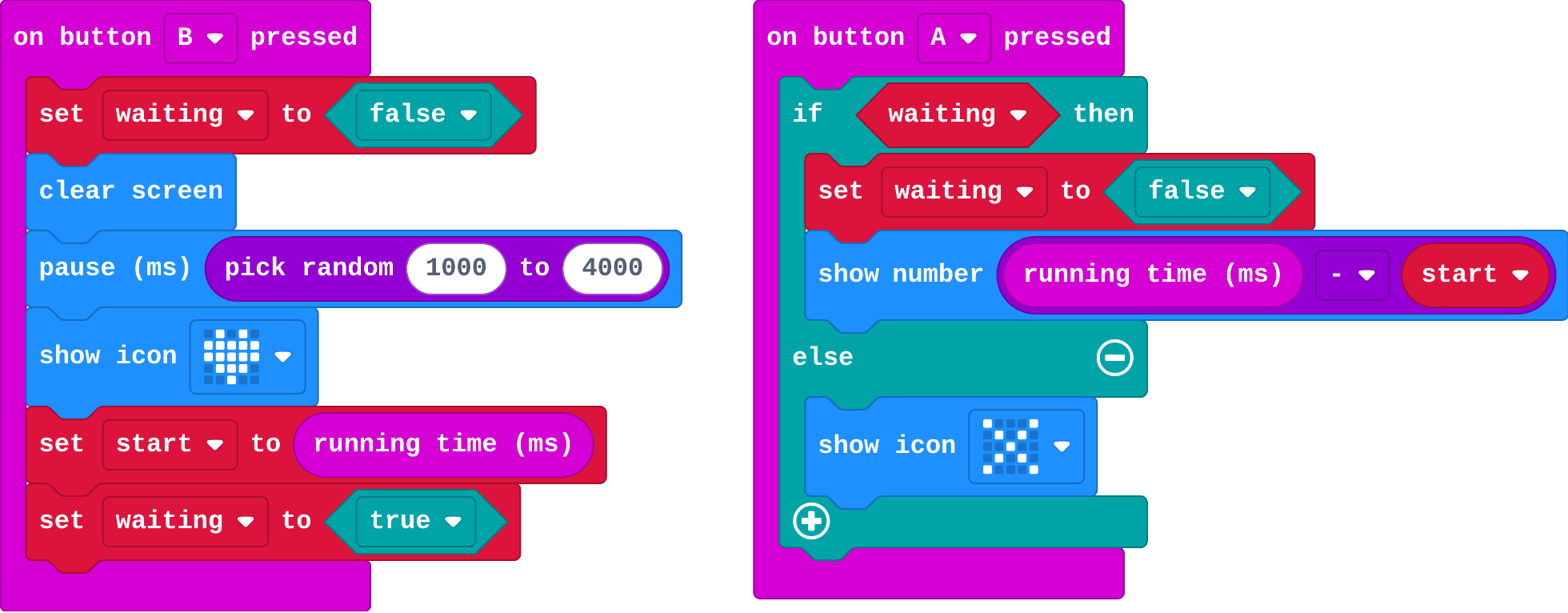
This version remembers whether the heart is showing in waiting. Fill in waiting after each event, and what A shows.
| event | waiting after | shows |
|---|---|---|
| B pressed | false | nothing |
| A pressed too early | ||
| heart appears | heart | |
| A pressed | ||
| A pressed again |
The same program in Python. Match each line with what it does.
Modify
The variable on is made for you. Make A switch the light on when it is off, and off when it is on.
Need a hint?
In on button A pressed: if on, clear the screen and set on to false.
Another hint
else: show the lights and set on to true. Then delete the B event.
Make a shake show whether the light is on.
Need a hint?
In on shake: if on, show a tick; else show a cross.
Make A alone switch the light on and off, using on.
This ticks by itself when your blocks do what is asked.
Make a shake show a tick if the light is on, and a cross if it is off.
This ticks by itself when your blocks do what is asked.
Mix it up
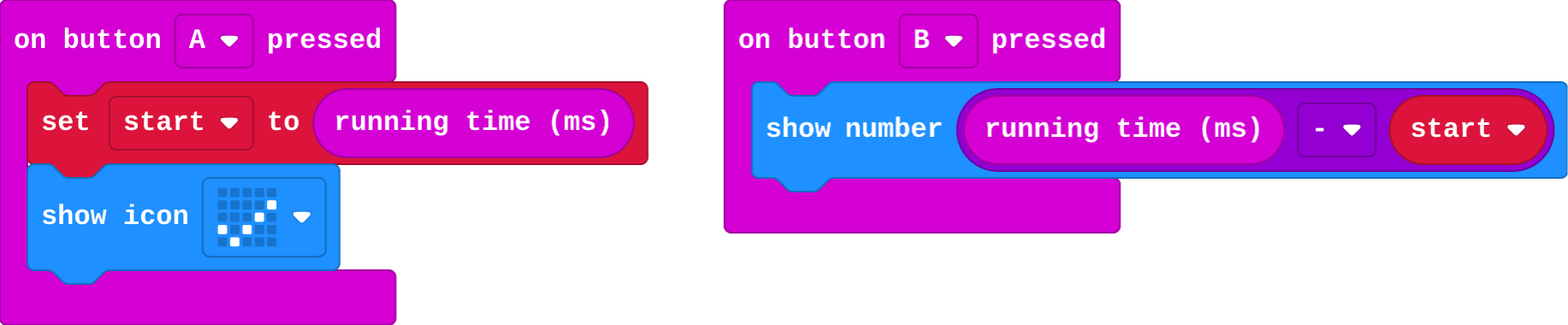
A stopwatch from last lesson.
Show as code
let start = 0
input.onButtonPressed(Button.A, function () {
    start = input.runningTime()
    basic.showIcon(IconNames.Yes)
})
input.onButtonPressed(Button.B, function () {
    basic.showNumber(input.runningTime() - start)
})
A stores start; B shows running time − start. Fill in what B shows.
| press | running time | B shows |
|---|---|---|
| A | 1000 | (start) |
| B | 1600 | |
| B | 2500 |
Make
Fix the cheat. waiting is made for you.
- At the start of B, set
waitingto false. - When the heart appears, set
waitingto true. - In A: if waiting, set it to false and show the time; else show a cross (too early).
Need a hint?
At the start of B, set waiting to false. When the heart appears, set waiting to true.
Another hint
In A: if waiting, set it to false and show the time; else show a cross.
No cheating: only a press while the heart is showing counts; an early press shows a cross.
This ticks by itself when your blocks do what is asked.
Change a class vote
Each micro:bit can vote yes once with A; after that, it shows a cross. Make B vote no, also only once (one vote each, yes or no).
For teachers
Students use a variable that holds true or false to remember what is happening now, and fix a cheat in a reaction tester. About 40 minutes.
Open the teacher guide: answers, solutions, slides and a worksheet.
Students will be able to
- I can use a true/false variable to remember what is happening.
- I can check a true/false variable with if.
- I can say why it must be set back.
Before class
A variable can hold true or false (Logic). It remembers one yes-or-no fact, such as is the heart showing? Each event either sets it (the heart appears: true) or asks about it with if. The usual bug is forgetting to set it back, so it keeps saying true and every later press counts. if waiting asks "is waiting true?"; there is no need to write = true.
Running the lesson
- Predict: an early press still gets a time. Let students find the cheat.
- Investigate: the trace follows waiting through five events. Raj's bug is this lesson's misconception.
- Modify: a light switch with one button: the same idea, a different fact.
- Mix it up: the stopwatch from last lesson, with two B presses.
- Make: this fixes the cheat; it is the core of the final challenge.
The hard part (on purpose)
Knowing where to set it and where to ask. Ask: when does this fact become true, and when does it stop being true?
When students get stuck
- Every press shows a cross. Ask: Where is waiting set to true? Fix: Set waiting to true after the heart appears.
- A second press still gives a time. Ask: Where is waiting set back to false? Fix: Set waiting to false inside the if, straight after the press is counted.
- The if will not take waiting. Ask: Is waiting a variable from Variables? Fix: Drag the waiting variable straight into the if's hexagon slot.
Stretch and support
Stretch: Make the light switch remember how many times it was switched on, and show it on A+B.
Support: Give students the if … else in A already built, and ask them only to set waiting in the right places.
Where it leads
Next: the final challenge. Build the reaction timer from scratch, then race a friend over radio.
What each step is for
- Investigate: A true/false variable remembers what is happening now. Each event sets it or asks about it, and it must be set back, or it keeps saying true.
- Modify: A true/false variable can remember any fact, such as whether a light is on, and flip it each time.
- Mix it up: Each time is one running time minus the same start, until start is set again.
- Use a true/false variable to remember what is happening.
- Check a true/false variable with if.
- Say why it must be set back.