Reaction timer
Build a reaction game from scratch, using everything so far. Wait for the heart, press A as fast as you can, and beat your best.
Sprinters, racing drivers and goalkeepers train their reactions with timers like this. You already know every idea it needs.
Press B to start. After a random wait, a heart appears: press A as fast as you can, and the micro:bit shows how many milliseconds you took. You have met every part of this game. Now you build it from almost nothing, in three milestones, with less help each time.
- Predict: Read the code and say what it will do before you run anything. A wrong guess is fine: it shows you what to look for.
- Run: Run it and compare the result with your prediction.
- Investigate: Trace how each line of code connects to what you see.
- Modify: Change the code on purpose and check the result.
- Make: Build something new using what you have learned. Expect a few tries; that is normal.
Make your prediction first. Help opens once you've locked it in.
Predict
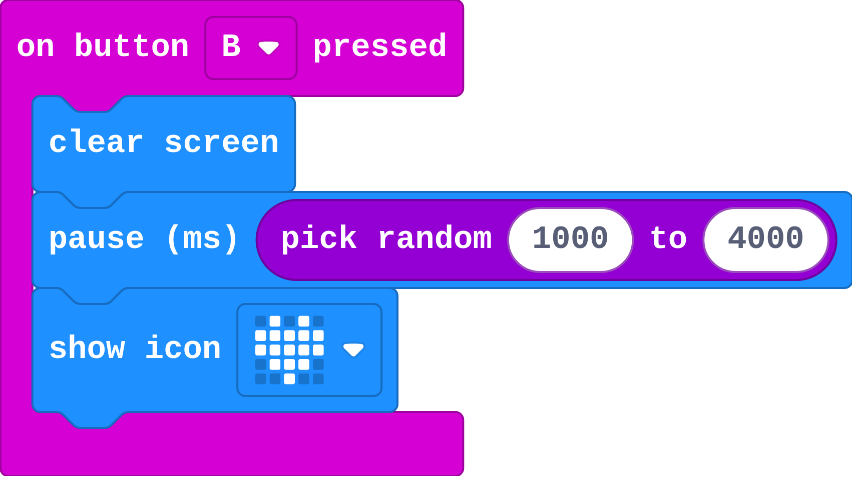
Show as code
input.onButtonPressed(Button.B, function () {
basic.clearScreen()
basic.pause(randint(1000, 4000))
basic.showIcon(IconNames.Heart)
})
Run
Press B a few times. Can you guess when the heart will appear?
Show as code
input.onButtonPressed(Button.B, function () {
basic.clearScreen()
basic.pause(randint(1000, 4000))
basic.showIcon(IconNames.Heart)
})
Investigate
Read the finished game before you build your own.

Show as code
let reaction = 0
let waiting = false
let start = 0
let best = 99999
input.onButtonPressed(Button.B, function () {
    waiting = false
    basic.clearScreen()
    basic.pause(randint(1000, 4000))
    basic.showIcon(IconNames.Heart)
    start = input.runningTime()
    waiting = true
})
input.onButtonPressed(Button.A, function () {
    if (waiting) {
        waiting = false
        reaction = input.runningTime() - start
        basic.showNumber(reaction)
        if (reaction < best) {
            best = reaction
            basic.showIcon(IconNames.Happy)
        }
    } else {
        basic.showIcon(IconNames.No)
    }
})
input.onButtonPressed(Button.AB, function () {
    basic.showString("Best")
    basic.showNumber(best)
})
This is the finished game. Match each job with the blocks that do it.
start is set when the heart appears. Fill in the number shown when A is pressed.
| start (heart appears) | running time when A is pressed | number shown |
|---|---|---|
| 5200 | 5450 | |
| 8000 | 8320 |
Milestone 1: time the press
The variable start is made for you, and B clears the screen. Build the rest:
- B: wait a random time, show the heart, and store the time in
start. - A: show how long it took.
Need a hint?
In B: pause pick random 1000 to 4000, show the heart, then set start to running time.
Another hint
In A: show number running time − start.
B waits a random time and shows the heart; A shows the reaction time.
This ticks by itself when your blocks do what is asked.
Milestone 2: no cheating
Make an early press show a cross, using the variable waiting. Set it, ask about it, and set it back.
Only count a press while the heart is showing; an early press shows a cross.
This ticks by itself when your blocks do what is asked.
Milestone 3: beat your best
Keep a best time:
- A new variable
bestremembers your fastest time. - When you beat it, the micro:bit celebrates.
- A+B shows your best.
Keep your best time, celebrate a new best, and show it on A+B.
This ticks by itself when your blocks do what is asked.
Why random?
Play this version a few times. What do you notice?

Show as code
let waiting = false
let start = 0
input.onButtonPressed(Button.B, function () {
    waiting = false
    basic.clearScreen()
    basic.pause(2000)
    basic.showIcon(IconNames.Heart)
    start = input.runningTime()
    waiting = true
})
input.onButtonPressed(Button.A, function () {
    if (waiting) {
        waiting = false
        basic.showNumber(input.runningTime() - start)
    } else {
        basic.showIcon(IconNames.No)
    }
})
For teachers
Students build a reaction game from an almost empty starter in three milestones, using a random wait, running time, a true/false variable, decisions and a best score. About 55 minutes.
Open the teacher guide: answers, solutions, slides and a worksheet.
Students will be able to
- I can build a timing game from blocks I know.
- I can use a true/false variable to stop early presses.
- I can keep a best score with an if.
Before class
This challenge adds nothing new: every part was taught earlier in the course. Time between gave the timing (store running time in start, then running time − start); True or false gave waiting, the flag that catches early presses. The milestones fade the help: Milestone 1 lists the steps, Milestone 2 gives only the goal, Milestone 3 only goals. Play it yourself first; good times are 200 to 400 ms, and the simulator adds a little delay.
Running the lesson
- Predict and Run: the random wait is what makes it a reaction game. Let students try to guess and fail.
- Investigate: matching jobs to blocks is the plan for the milestones.
- Milestone 1: if times look huge, start was never set.
- Milestone 2: waiting is true only while the heart shows. Read the A event aloud: 'if we are waiting for a press, time it; else, too early'.
- Milestone 3: starting best at 99999 means any first time beats it.
- Why random: a fixed wait can be counted, so it stops measuring reactions.
The hard part (on purpose)
Putting the parts in the right events. Ask which event each job belongs in: B or A.
When students get stuck
- The time shown is huge, like 15000. Ask: When is start set? Fix: Set start to running time straight after the heart is shown.
- Every press shows a cross. Ask: Where is waiting set to true? Fix: Set waiting to true after the heart appears (after start is set).
- The best time never changes, or is always the latest time. Ask: What is best at the start, and which way round is your comparison? Fix: Start best at 99999, and use if reaction < best.
Stretch and support
Stretch: Show a rating after each time: under 250 a happy face, under 400 a meh face, otherwise a sad face (if, else if, else).
Support: Give students last lesson's no-cheating program as their Milestone 1 starter, and focus on Milestone 3.
Where it leads
Next: Radio duel, the same game for two players over radio. Class ideas: a class reaction leaderboard on the board; does reaction time change after exercise? (a quick science investigation with real micro:bits).
What each step is for
- Investigate: Each job of the game has its own home: the random wait and start in B, the timing and the early-press check in A, the best time in a variable.
- Milestone 1: time the press: Timing is two readings of running time: one stored when the heart appears, one taken at the press.
- Milestone 2: no cheating: A true/false variable remembers whether the heart is showing, so each event can check it.
- Milestone 3: beat your best: Combining a variable, a comparison and an event into a rule shows whether a student can put the course's ideas together.
- Build a timing game from blocks I know.
- Use a true/false variable to stop early presses.
- Keep a best score with an if.