Time between
Store the running time at one moment and take it away from a later one, to measure how long something took.
A stopwatch, a lap timer and a game's reaction score all do one subtraction: the time now, take away the time it started.
The micro:bit keeps count of time. running time (in Input › more) gives the number of milliseconds since the micro:bit switched on. 1000 ms is one second. On its own it is a very big number; the trick is to take one reading away from another.
- Predict: Read the code and say what it will do before you run anything. A wrong guess is fine: it shows you what to look for.
- Run: Run it and compare the result with your prediction.
- Investigate: Trace how each line of code connects to what you see.
- Modify: Change the code on purpose and check the result.
- Make: Build something new using what you have learned. Expect a few tries; that is normal.
Make your prediction first. Help opens once you've locked it in.
Predict
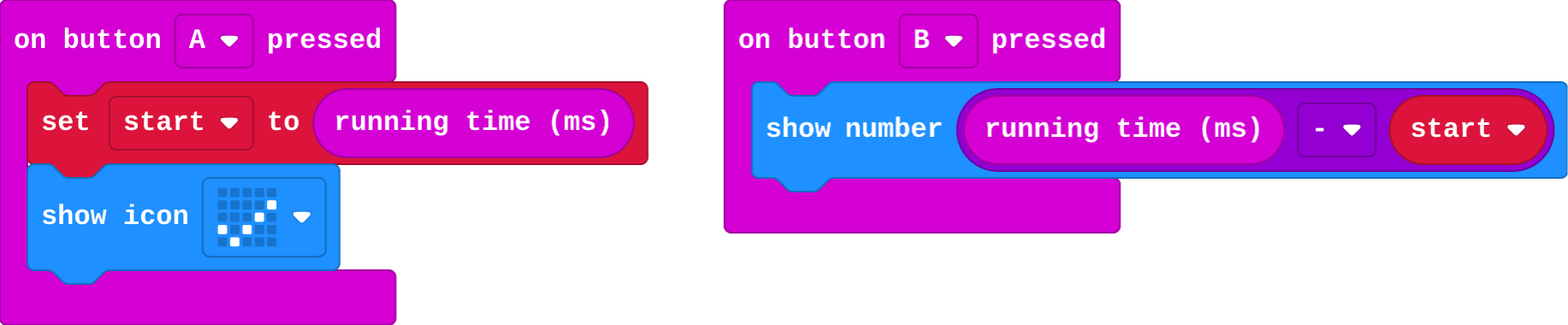
Show as code
let start = 0
input.onButtonPressed(Button.A, function () {
    start = input.runningTime()
    basic.showIcon(IconNames.Yes)
})
input.onButtonPressed(Button.B, function () {
    basic.showNumber(input.runningTime() - start)
})
A stores the running time in start. B shows the running time take away start.
Run
Press A, count to three in your head, then press B. Is the number close to 3000?
Show as code
let start = 0
input.onButtonPressed(Button.A, function () {
    start = input.runningTime()
    basic.showIcon(IconNames.Yes)
})
input.onButtonPressed(Button.B, function () {
    basic.showNumber(input.runningTime() - start)
})
Investigate
Show as code
let start = 0
input.onButtonPressed(Button.A, function () {
    start = input.runningTime()
    basic.showIcon(IconNames.Yes)
})
input.onButtonPressed(Button.B, function () {
    basic.showNumber(input.runningTime() - start)
})
Fill in the number B shows.
| start (A pressed) | running time when B is pressed | B shows |
|---|---|---|
| 5200 | 5450 | |
| 8000 | 11000 | |
| 12000 | 12180 |
B shows 2500. How many seconds is that?
Modify
Make B show seconds, not milliseconds.
Need a hint?
Drag the division block from Math into show number.
Another hint
Put running time − start on the left and 1000 on the right.
Make a shake start the stopwatch as well as A.
Need a hint?
Drag in on shake, with set start to running time inside.
Make B show the time in seconds, by dividing by 1000.
This ticks by itself when your blocks do what is asked.
Make a shake start the stopwatch too.
This ticks by itself when your blocks do what is asked.
Mix it up
Show as code
input.onButtonPressed(Button.B, function () {
    basic.clearScreen()
    basic.pause(randint(1000, 4000))
    basic.showIcon(IconNames.Heart)
})
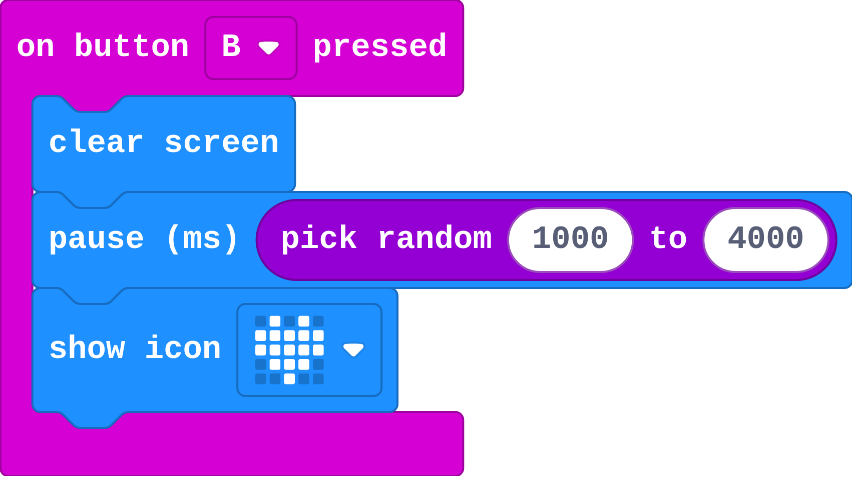
B clears the screen, pauses for pick random 1000 to 4000, then shows the heart. What is the longest the heart can take to appear, in milliseconds?
Make
Press B and a heart appears after a random wait. Make A show how many milliseconds you took to press it.
- When the heart appears, set
startto running time. - When A is pressed, show running time − start.
Need a hint?
When the heart appears, set start to running time.
Another hint
In on button A pressed: show number running time − start.
Time a reaction: store the time when the heart appears, and show how long until A is pressed.
This ticks by itself when your blocks do what is asked.
Change an egg timer
This timer starts when the micro:bit switches on, and again whenever A is pressed. It shows a small square until 5 seconds have passed, then an alarm face. Make it a 3-minute timer (180000 ms), and choose your own pictures.
For teachers
Students store the running time at one moment and take it away from a later reading, to measure how long something took. About 40 minutes.
Open the teacher guide: answers, solutions, slides and a worksheet.
Students will be able to
- I can measure how long something took with running time.
- I can say why running time on its own is a big number.
- I can turn milliseconds into seconds.
Before class
running time (Input › more) is the number of milliseconds since the micro:bit switched on. It never restarts at a press, so on its own it is a big number. Timing is a subtraction: store running time in a variable at the start (start), then later show running time − start. 1000 ms is one second; dividing by 1000 gives seconds with a decimal. In the simulator, timings are a little longer than on a real micro:bit.
Running the lesson
- Predict: some students choose 7500, the running time itself. Ask what start holds.
- Run: press A, count three, press B. Close to 3000?
- Investigate: Zara's stopwatch is this lesson's misconception: running time is not a stopwatch that starts at the press.
- Modify: seconds by dividing; a second event can start the timing.
- Mix it up: a random wait, from Pick from a list and the forever lesson's pause.
- Make: this is the heart of the reaction timer in the final challenge.
The hard part (on purpose)
Seeing why the subtraction is needed. Ask what running time was when the micro:bit started, and what it is now.
When students get stuck
- The time shown is huge, like 15000. Ask: Is start set before the time is shown? Fix: Set start to running time at the moment the timing begins.
- The time shown is negative. Ask: Which way round is the subtraction? Fix: running time − start: the later reading first.
- B shows 0 every time. Ask: Is start set in the same event that shows the time? Fix: Set start in A (or when the heart appears), and show the time in B.
Stretch and support
Stretch: Make a lap timer: B shows the time since the last B, not since A (set start again after showing).
Support: Give students the make with start already set when the heart appears, and ask them only to build the subtraction in A.
Where it leads
Next lesson: a true/false variable, so an early press does not count. Class idea: time how long the class takes to go silent after the quiet signal.
What each step is for
- Investigate: running time counts from when the micro:bit started, so a time between two moments is one reading taken away from another.
- Modify: The time between can be turned into seconds, and any event can be the start.
- Mix it up: pick random gives any whole number from the first to the second, so a pause can be different every time.
- Measure how long something took with running time.
- Say why running time on its own is a big number.
- Turn milliseconds into seconds.