True or false
Students use a variable that holds true or false to remember what is happening now, and fix a cheat in a reaction tester.
Classroom resources
Load these into Waypoints Prepare: choose Load URL and paste the copied address, or download the file and import it. In Prepare, the worksheet's Teacher edition shows the answers; the student copy hides them.
Students will be able to
- I can use a true/false variable to remember what is happening.
- I can check a true/false variable with if.
- I can say why it must be set back.
Timing
Predict and Run 6 min · Investigate 12 min · Modify 8 min · Mix it up 3 min · Make 8 min · Class vote 3 min
Before class
A variable can hold true or false (Logic). It remembers one yes-or-no fact, such as is the heart showing? Each event either sets it (the heart appears: true) or asks about it with if. The usual bug is forgetting to set it back, so it keeps saying true and every later press counts. if waiting asks "is waiting true?"; there is no need to write = true.
Running the lesson
- Predict: an early press still gets a time. Let students find the cheat.
- Investigate: the trace follows waiting through five events. Raj's bug is this lesson's misconception.
- Modify: a light switch with one button: the same idea, a different fact.
- Mix it up: the stopwatch from last lesson, with two B presses.
- Make: this fixes the cheat; it is the core of the final challenge.
In class
On the slides at these points. Students can do the whole lesson on their own; these are for the room. In the deck, the Run, Modify and Make slides have the live playground in them (the tutorial link is the backup), and the notes above are in each slide's speaker notes.
- Hold the flag (investigate, 4 min)
One student holds a flag up only while the heart is 'showing' (the teacher holds up a heart card). Others clap: a clap counts only if the flag is up, and the first counted clap lowers it.
Forget to lower the flag and every clap counts: Raj's bug.
- Try to cheat (end, 3 min)
Swap with the next pair and try to cheat their reaction tester.
The hard part (on purpose)
Knowing where to set it and where to ask. Ask: when does this fact become true, and when does it stop being true?
When students get stuck
| What you will see | A question to ask | The fix |
|---|---|---|
| Every press shows a cross. | Where is waiting set to true? | Set waiting to true after the heart appears. |
| A second press still gives a time. | Where is waiting set back to false? | Set waiting to false inside the if, straight after the press is counted. |
| The if will not take waiting. | Is waiting a variable from Variables? | Drag the waiting variable straight into the if's hexagon slot. |
Answers to the checks
- Predict: You press B, then press A before the heart appears. What does A show?
A number. A always shows running time − start, so an early press still gets a time. Nothing in the program knows whether the heart is showing. - Follow waiting: This version remembers whether the heart is showing in waiting. Fill in waiting after each event, and what A shows.
false, cross, true, false, the time, false, cross
waiting is true only from the heart until the first A. A sets it back to false, so a second press is too early again. - Raj's second press: Raj sets waiting to true when the heart appears, but never sets it back to false. He presses A once and gets a time. What does a second press of A show?
Another time, a bigger one
waiting is still true, so the if says yes again and shows running time − start, which has grown. Set waiting to false after the first press. - In Python: The same program in Python. Match each line with what it does.
waiting = True → B. remembers that the heart is showing; if waiting: → C. asks: is the heart showing?; else: → A. the heart is not showing: too early - Mix it up: A stores start; B shows running time − start. Fill in what B shows.
600, 1500
B does not change start, so both times are measured from the A press at 1000: 600, then 1500.
Solutions
One possible solution for each task. Other correct programs are fine.
Modify › One button
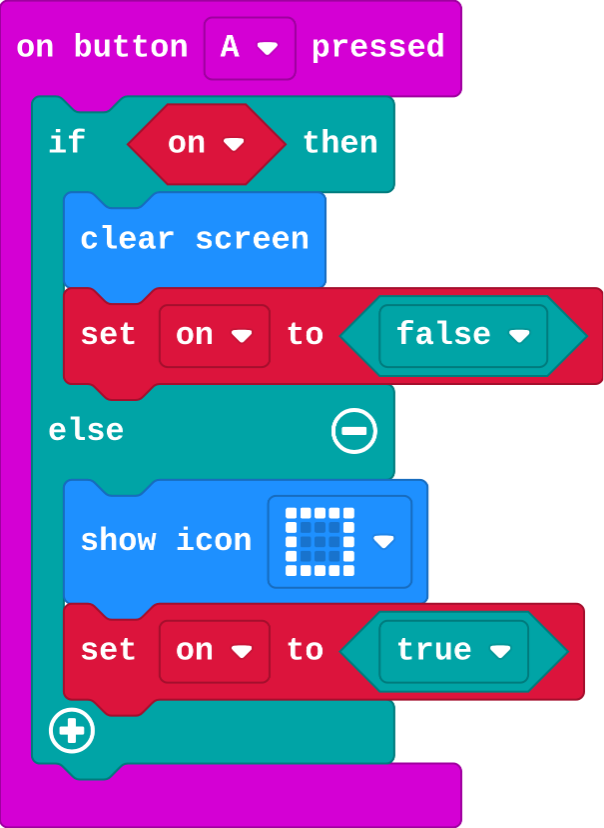
Show as code
let on = false
input.onButtonPressed(Button.A, function () {
    if (on) {
        basic.clearScreen()
        on = false
    } else {
        basic.showIcon(IconNames.Square)
        on = true
    }
})
Modify › Is it on?
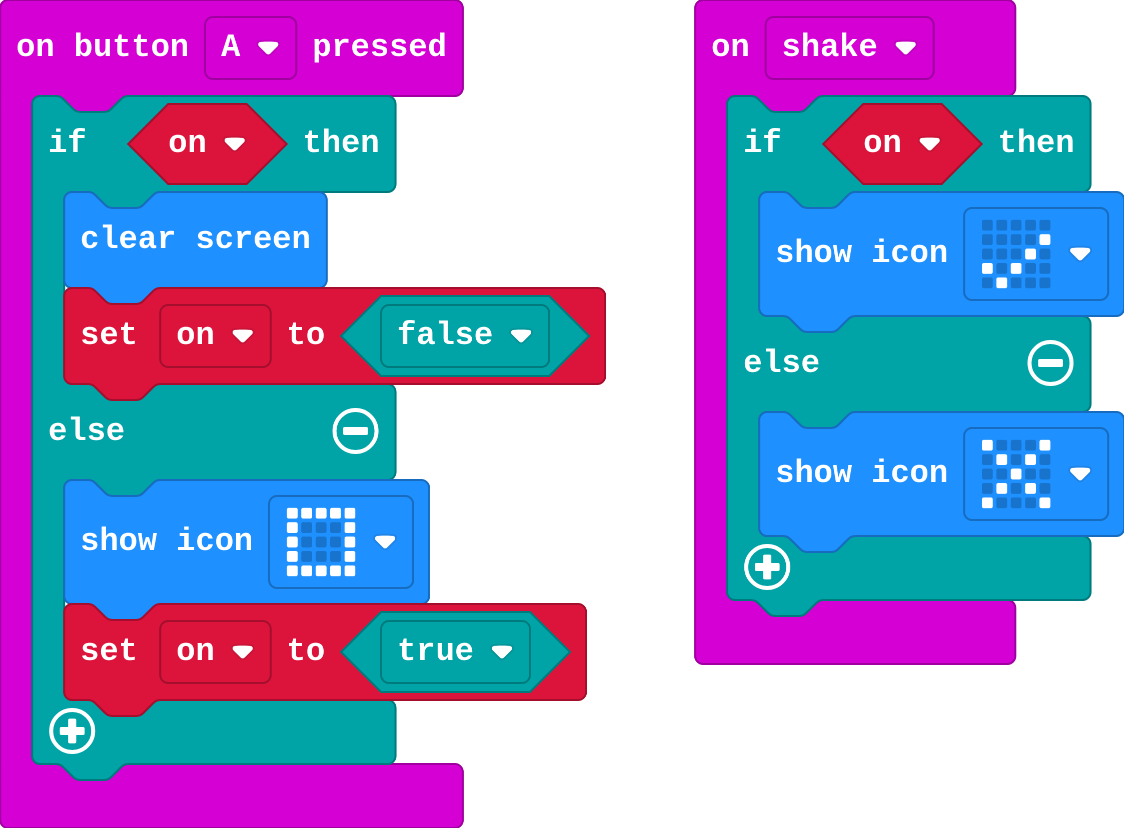
Show as code
let on = false
input.onButtonPressed(Button.A, function () {
    if (on) {
        basic.clearScreen()
        on = false
    } else {
        basic.showIcon(IconNames.Square)
        on = true
    }
})
input.onGesture(Gesture.Shake, function () {
    if (on) {
        basic.showIcon(IconNames.Yes)
    } else {
        basic.showIcon(IconNames.No)
    }
})
Make
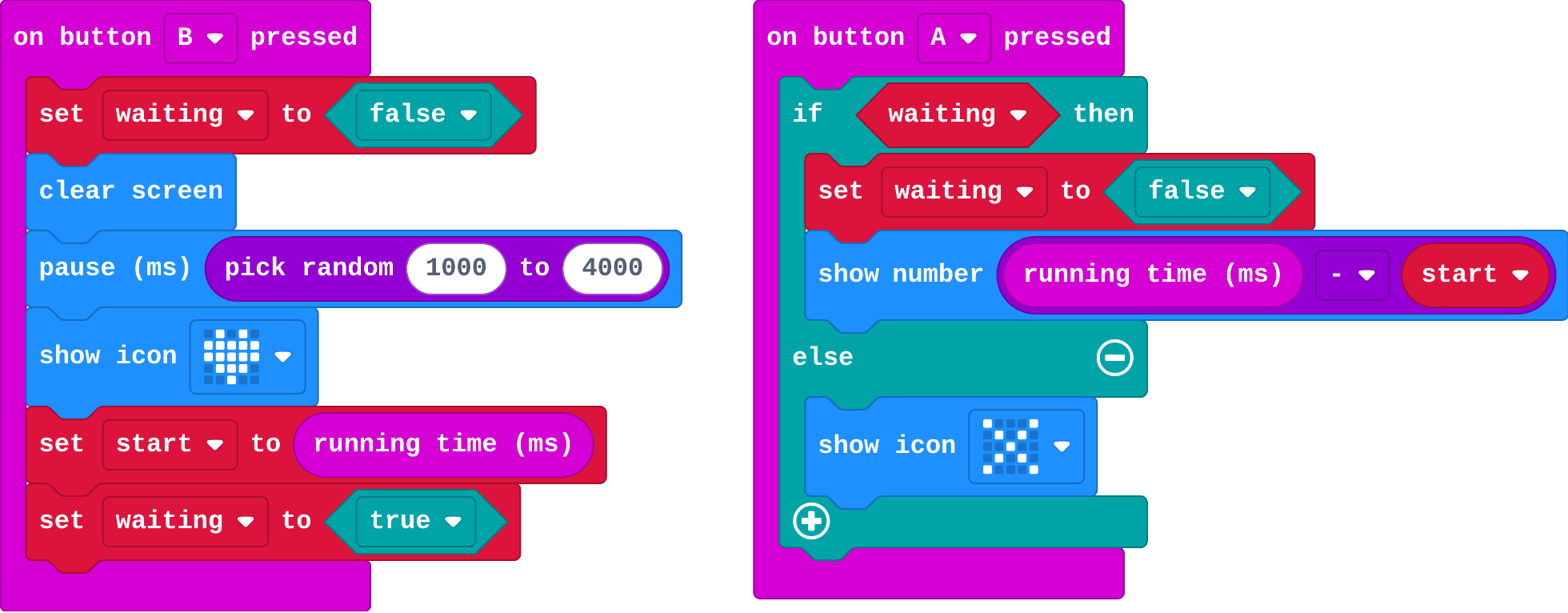
Show as code
let waiting = false
let start = 0
input.onButtonPressed(Button.B, function () {
    waiting = false
    basic.clearScreen()
    basic.pause(randint(1000, 4000))
    basic.showIcon(IconNames.Heart)
    start = input.runningTime()
    waiting = true
})
input.onButtonPressed(Button.A, function () {
    if (waiting) {
        waiting = false
        basic.showNumber(input.runningTime() - start)
    } else {
        basic.showIcon(IconNames.No)
    }
})
Change a class vote
Open task: any program that does what the step asks.
Stretch and support
Stretch: Make the light switch remember how many times it was switched on, and show it on A+B.
Support: Give students the if … else in A already built, and ask them only to set waiting in the right places.
Exit ticket
A program sets waiting to true when the heart appears, and never to false. What goes wrong?
Every press after the heart counts, not only the first, because waiting stays true.
What each step is for
- Investigate: A true/false variable remembers what is happening now. Each event sets it or asks about it, and it must be set back, or it keeps saying true.
- Modify: A true/false variable can remember any fact, such as whether a light is on, and flip it each time.
- Mix it up: Each time is one running time minus the same start, until start is set again.
Where it leads
Next: the final challenge. Build the reaction timer from scratch, then race a friend over radio.