Send and receive
Students send a number by radio and react on another micro:bit when it arrives, and see that only micro:bits in the same group hear each other.
Classroom resources
Load these into Waypoints Prepare: choose Load URL and paste the copied address, or download the file and import it. In Prepare, the worksheet's Teacher edition shows the answers; the student copy hides them.
Students will be able to
- I can send a number from one micro:bit to another.
- I can react when a radio message arrives.
- I can say why both micro:bits need the same group.
Timing
Predict and Run 8 min · Investigate 10 min · Modify 6 min · Mix it up 3 min · Make 9 min · Quiet signal 4 min
Before class
Radio sends short messages between micro:bits. radio set group chooses a channel (0 to 255); only micro:bits in the same group hear each other. send number sends to every other micro:bit in the group (never to itself). on radio received is an event: it runs each time a message arrives. In the simulator, a second micro:bit appears once the program uses radio; both run the same program. Using the number that arrived (receivedNumber) is next lesson. With real micro:bits in a classroom, pairs must choose their own group number or they will hear everyone.
Running the lesson
- Predict: many students say 'on both'. Ask: who is listening, and who is talking? Or: does a walkie-talkie play your own voice back to you?
- Run: press A on each micro:bit in turn. The heart always shows on the other one.
- Investigate: Ella's groups are the most common real-classroom problem. The Python peek shows radio received as one more function the micro:bit calls.
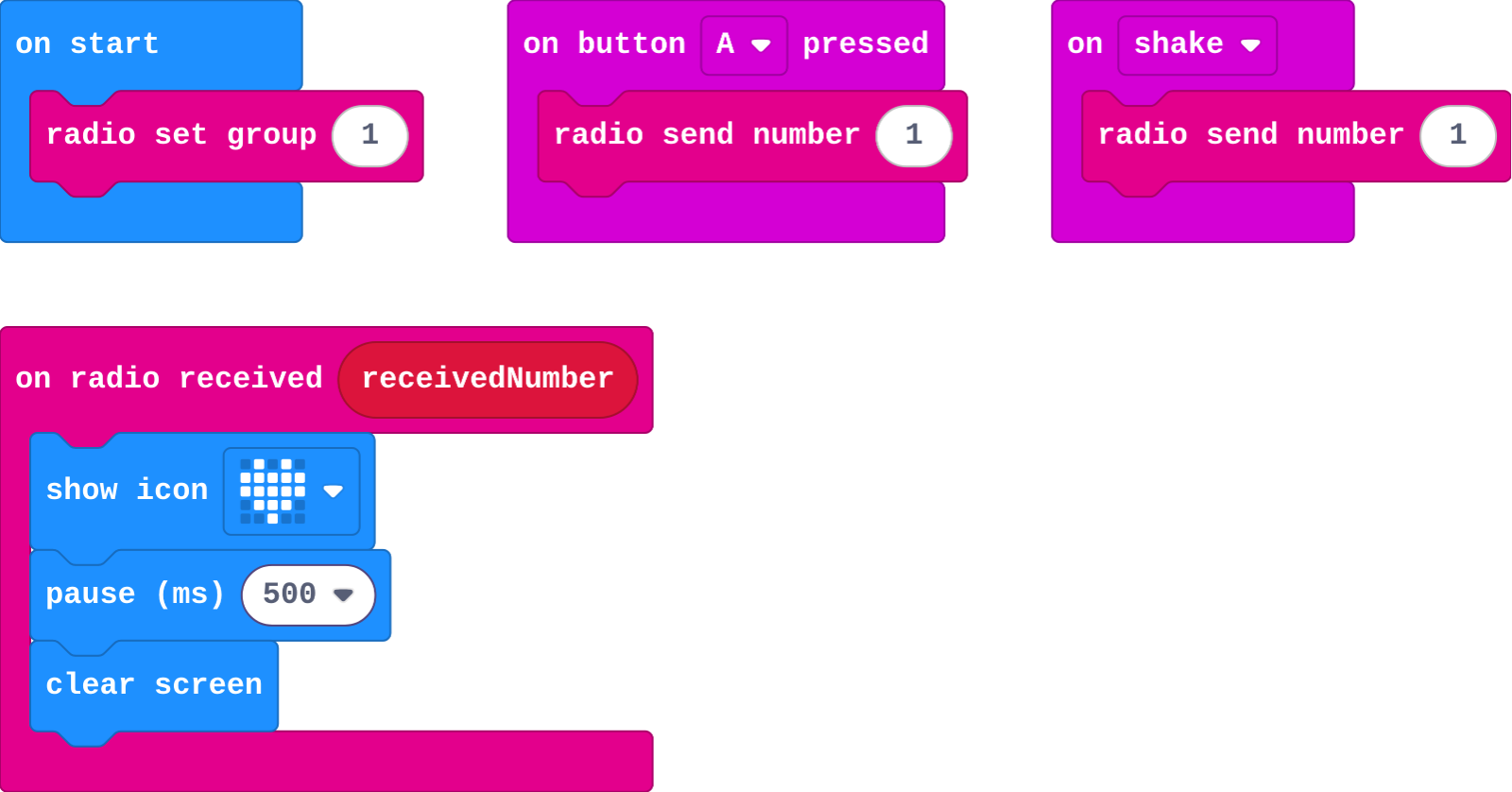
- Modify: any event can send. Then each pair picks a group.
- Mix it up: counting function calls, from last lesson.
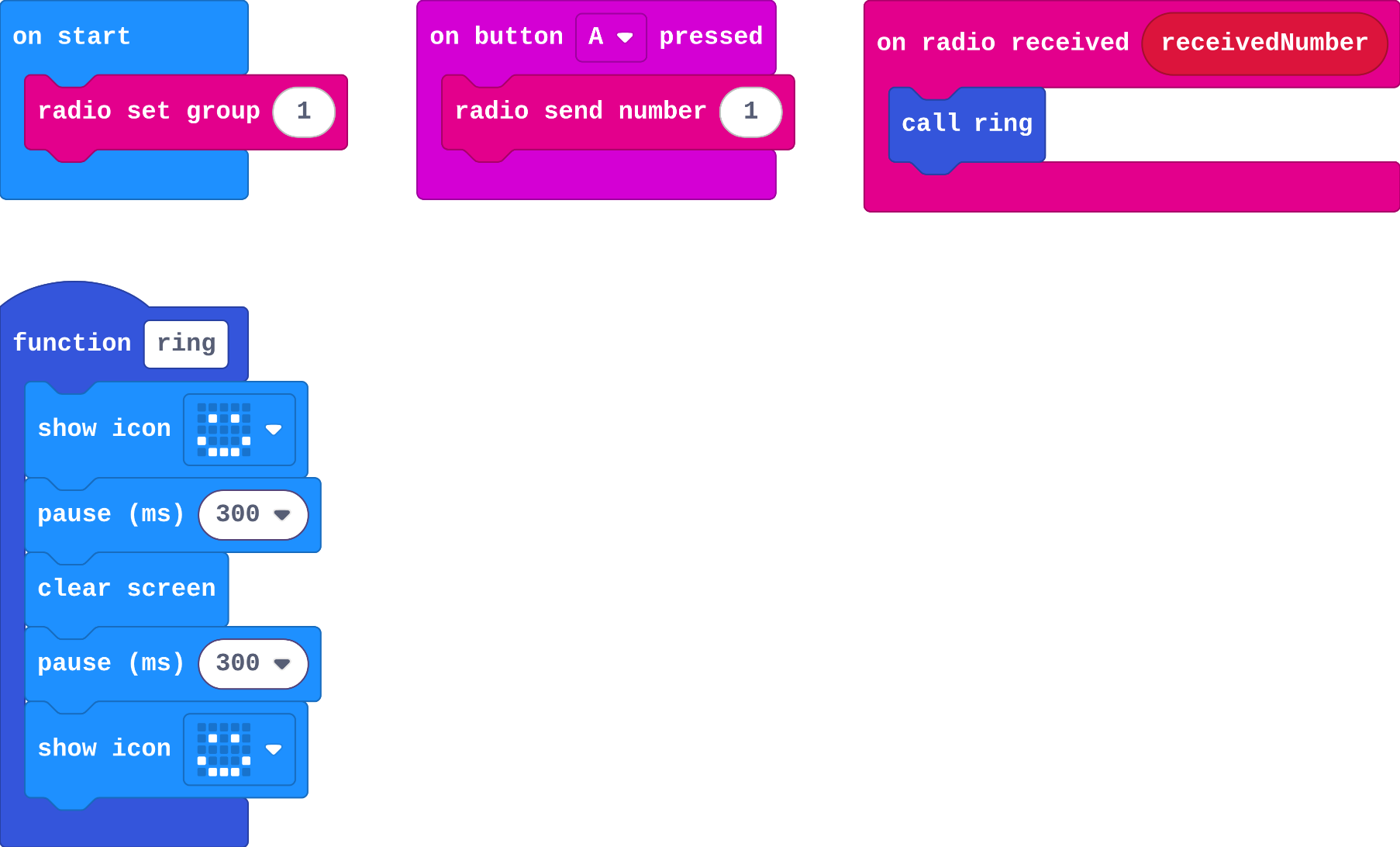
- Make: the doorbell calls a function from on radio received.
In class
On the slides at these points. Students can do the whole lesson on their own; these are for the room. In the deck, the Run, Modify and Make slides have the live playground in them (the tutorial link is the backup), and the notes above are in each slide's speaker notes.
- Channels (investigate, 4 min)
Students hold a group number card. One student whispers a message to their group number; only students with the same card may react.
Swap one student's card: they miss everything. That is Ella's bug.
- Ring the bell (end, 3 min)
Pair up with real micro:bits (or two simulators). Agree a group, then ring each other's doorbell.
The hard part (on purpose)
Two micro:bits, one group, and a micro:bit never hears itself. When nothing arrives, ask which one is sending and which group each is in.
When students get stuck
| What you will see | A question to ask | The fix |
|---|---|---|
| Nothing arrives. | Are both micro:bits in the same group? Are you pressing on the sender? | Check radio set group on both, and press on one while watching the other. |
| The heart shows on the micro:bit that was pressed. | Is there a show icon inside the button event as well? | Keep the button event for sending only; showing belongs in on radio received. |
| The second micro:bit is missing from the simulator. | Is there a radio block in the program? | The second micro:bit appears once any radio block is used. |
Answers to the checks
- Predict: There are two micro:bits running this program. You press A on the first one. What happens?
The heart shows on the second micro:bit. The first one sends the message; the others in group 1 receive it. A micro:bit does not receive its own message. - What each block does: Match each block with what it does.
radio set group 1 → B. tunes in to channel 1, so only group 1 messages arrive; radio send number 1 → C. sends 1 to every other micro:bit in the group; on radio received → A. runs each time a message arrives - Ella's micro:bits: Ella loads the program onto two real micro:bits. Pressing A on either does nothing. She changed one to radio set group 2. Why does nothing arrive?
The two micro:bits are in different groups, so neither hears the other
A micro:bit only receives messages sent to its own group. One is on channel 1 and one on channel 2, so every message goes unheard. - The same program in Python: The same program in Python. Match each line with what it does.
radio.send_number(1) → C. sends the number 1; def on_received_number(receivedNumber): → B. makes the function that runs when a number arrives; radio.on_received_number(on_received_number) → A. hands that function to the micro:bit to call for each message - Mix it up: flash is called twice from A and once from shake. You press A, then shake. How many flashes in all?
3
A calls flash twice and shake calls it once: 2 + 1 = 3 flashes.
Solutions
One possible solution for each task. Other correct programs are fine.
Modify › Shake to send
Show as code
radio.setGroup(1)
input.onButtonPressed(Button.A, function () {
    radio.sendNumber(1)
})
input.onGesture(Gesture.Shake, function () {
    radio.sendNumber(1)
})
radio.onReceivedNumber(function (receivedNumber) {
    basic.showIcon(IconNames.Heart)
    basic.pause(500)
    basic.clearScreen()
})
Modify › Your own channel
Open task: any program that does what the step asks.
Make
Show as code
function ring () {
    basic.showIcon(IconNames.Happy)
    basic.pause(300)
    basic.clearScreen()
    basic.pause(300)
    basic.showIcon(IconNames.Happy)
}
radio.setGroup(1)
input.onButtonPressed(Button.A, function () {
    radio.sendNumber(1)
})
radio.onReceivedNumber(function (receivedNumber) {
    ring()
})
Change a quiet signal
Open task: any program that does what the step asks.
Stretch and support
Stretch: Make the doorbell ring differently for a shake (a knock) and for A (the bell). How does the receiver know which? (Next lesson.)
Support: Give students the ring function already made, and ask them to add the sender and the receiver.
Exit ticket
Two micro:bits run the same radio program, but one is in group 3 and one in group 4. What happens when A is pressed on either?
Nothing arrives: each only hears messages sent to its own group.
What each step is for
- Investigate: send number reaches every other micro:bit in the same group, and on radio received is an event that runs each time a message arrives.
- Modify: Any event can send a message, and a group number of your own keeps your micro:bits to themselves.
- Mix it up: A function runs once for each call, wherever the call is.
Where it leads
Next lesson: the number that arrives can say which message it was, so one receiver does different things. Class idea: a relay where a message passes around the room micro:bit to micro:bit.