Read a game
Read a whole game, find the blocks that do each job, and change just the part you need.
Game makers spend more time reading code than writing it: to fix a bug or add a feature, you first find the blocks that do that job.
This is a whole game: Garden defender. Bugs fall on the garden; you move the gardener along the bottom and spray them with water. Every block in it is something you have already learned. Today you read it, find the blocks that do each job, and change the game without breaking it.
- Predict: Read the code and say what it will do before you run anything. A wrong guess is fine: it shows you what to look for.
- Run: Run it and compare the result with your prediction.
- Investigate: Trace how each line of code connects to what you see.
- Modify: Change the code on purpose and check the result.
- Make: Build something new using what you have learned. Expect a few tries; that is normal.
Make your prediction first. Help opens once you've locked it in.
Predict
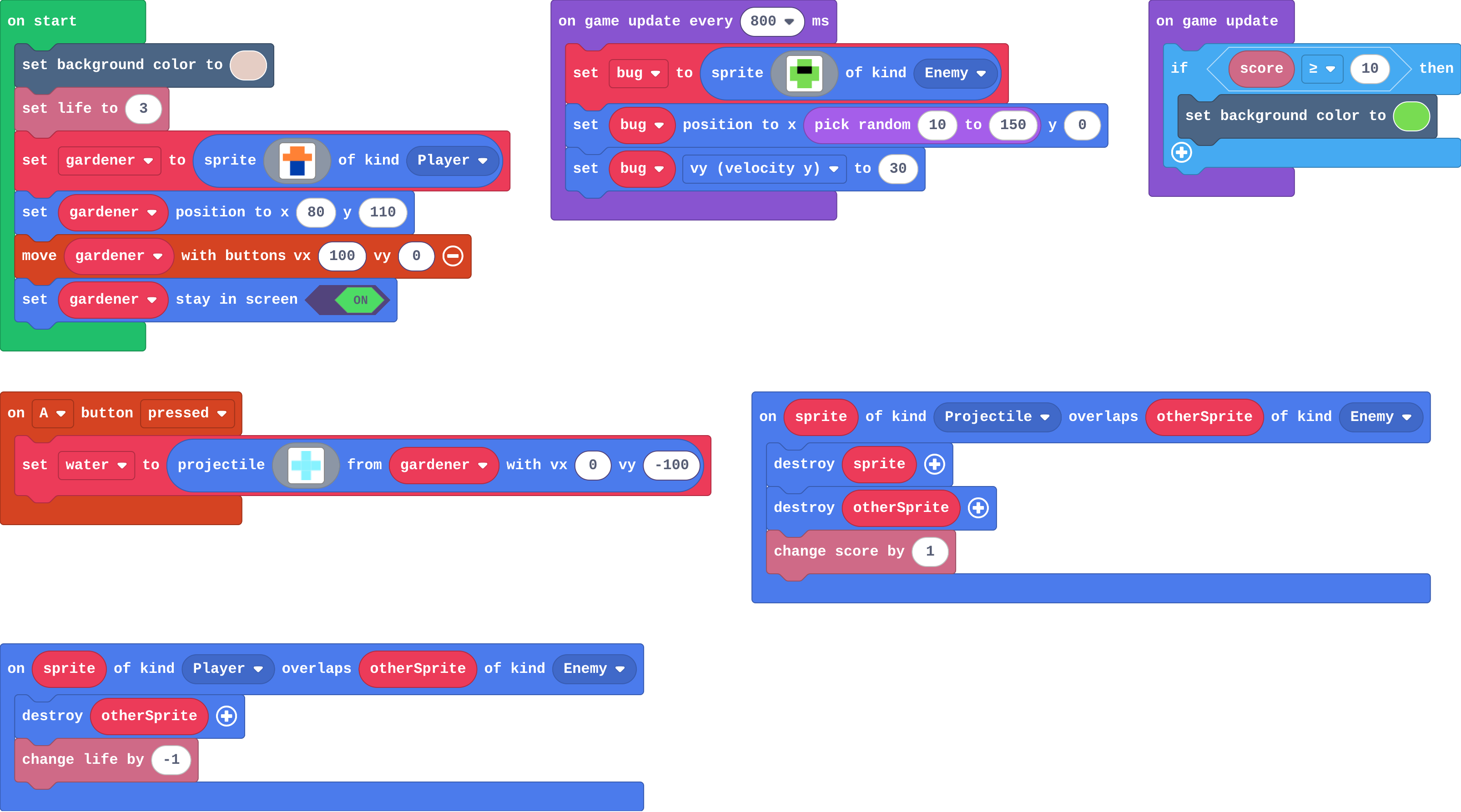
Show as code
let bug: Sprite = null
scene.setBackgroundColor(13)
info.setLife(3)
let gardener = sprites.create(img`
    . 4 4 .
    4 4 4 4
    . 8 8 .
    . 8 8 .
    `, SpriteKind.Player)
gardener.setPosition(80, 110)
controller.moveSprite(gardener, 100, 0)
gardener.setStayInScreen(true)
controller.A.onEvent(ControllerButtonEvent.Pressed, function () {
    let water = sprites.createProjectileFromSprite(img`
        . 9 .
        9 9 9
        . 9 .
        `, gardener, 0, -100)
})
game.onUpdateInterval(800, function () {
    bug = sprites.create(img`
        . 7 7 .
        7 f f 7
        7 7 7 7
        . 7 7 .
        `, SpriteKind.Enemy)
    bug.setPosition(randint(10, 150), 0)
    bug.vy = 30
})
sprites.onOverlap(SpriteKind.Projectile, SpriteKind.Enemy, function (sprite, otherSprite) {
    sprite.destroy()
    otherSprite.destroy()
    info.changeScoreBy(1)
})
sprites.onOverlap(SpriteKind.Player, SpriteKind.Enemy, function (sprite, otherSprite) {
    otherSprite.destroy()
    info.changeLifeBy(-1)
})
game.onUpdate(function () {
    if (info.score() >= 10) {
        scene.setBackgroundColor(7)
    }
})
Read the blocks before you play.
Run
Move with the left and right arrows. Fire with A (space).
Show as code
let bug: Sprite = null
scene.setBackgroundColor(13)
info.setLife(3)
let gardener = sprites.create(img`
    . 4 4 .
    4 4 4 4
    . 8 8 .
    . 8 8 .
    `, SpriteKind.Player)
gardener.setPosition(80, 110)
controller.moveSprite(gardener, 100, 0)
gardener.setStayInScreen(true)
controller.A.onEvent(ControllerButtonEvent.Pressed, function () {
    let water = sprites.createProjectileFromSprite(img`
        . 9 .
        9 9 9
        . 9 .
        `, gardener, 0, -100)
})
game.onUpdateInterval(800, function () {
    bug = sprites.create(img`
        . 7 7 .
        7 f f 7
        7 7 7 7
        . 7 7 .
        `, SpriteKind.Enemy)
    bug.setPosition(randint(10, 150), 0)
    bug.vy = 30
})
sprites.onOverlap(SpriteKind.Projectile, SpriteKind.Enemy, function (sprite, otherSprite) {
    sprite.destroy()
    otherSprite.destroy()
    info.changeScoreBy(1)
})
sprites.onOverlap(SpriteKind.Player, SpriteKind.Enemy, function (sprite, otherSprite) {
    otherSprite.destroy()
    info.changeLifeBy(-1)
})
game.onUpdate(function () {
    if (info.score() >= 10) {
        scene.setBackgroundColor(7)
    }
})
Investigate
Show as code
let bug: Sprite = null
scene.setBackgroundColor(13)
info.setLife(3)
let gardener = sprites.create(img`
    . 4 4 .
    4 4 4 4
    . 8 8 .
    . 8 8 .
    `, SpriteKind.Player)
gardener.setPosition(80, 110)
controller.moveSprite(gardener, 100, 0)
gardener.setStayInScreen(true)
controller.A.onEvent(ControllerButtonEvent.Pressed, function () {
    let water = sprites.createProjectileFromSprite(img`
        . 9 .
        9 9 9
        . 9 .
        `, gardener, 0, -100)
})
game.onUpdateInterval(800, function () {
    bug = sprites.create(img`
        . 7 7 .
        7 f f 7
        7 7 7 7
        . 7 7 .
        `, SpriteKind.Enemy)
    bug.setPosition(randint(10, 150), 0)
    bug.vy = 30
})
sprites.onOverlap(SpriteKind.Projectile, SpriteKind.Enemy, function (sprite, otherSprite) {
    sprite.destroy()
    otherSprite.destroy()
    info.changeScoreBy(1)
})
sprites.onOverlap(SpriteKind.Player, SpriteKind.Enemy, function (sprite, otherSprite) {
    otherSprite.destroy()
    info.changeLifeBy(-1)
})
game.onUpdate(function () {
    if (info.score() >= 10) {
        scene.setBackgroundColor(7)
    }
})
Match each job with the blocks that do it.
The game starts with 3 lives and a score of 0. Fill in the score and lives after each thing happens.
| what happens | score | lives |
|---|---|---|
| (start) | 0 | 3 |
| water hits a bug | ||
| a bug lands on the gardener | ||
| a bug falls past, off the bottom |
Modify
Make the bugs come twice as often.
Need a hint?
The timer's number sets how often. Half of 800 is 400.
Make a bug that lands on the gardener cost 2 lives.
Need a hint?
Find the event for a bug landing on the gardener. Change the -1.
Make the bugs come twice as often.
This ticks by itself when your blocks do what is asked.
Make a bug that lands on the gardener cost 2 lives.
This ticks by itself when your blocks do what is asked.
Make
Add one new job to the game: an apple falls every few seconds, and catching it gives the gardener a life. Find where each part belongs: making it, moving it, and what a catch means.
Need a hint?
A second timer, on game update every 3000 ms: an apple of kind Food at a random x at the top, falling with vy.
Another hint
A new overlap: Player and Food. Inside: change life by 1, destroy otherSprite.
Add a new job: an apple falls every few seconds, and catching it gives a life.
This ticks by itself when your blocks do what is asked.
For teachers
Students read a whole game, match each job to its blocks, and change rules without breaking the game: a review of the course before the final challenge. About 40 minutes.
Open the teacher guide: answers, solutions, slides and a worksheet.
Students will be able to
- I can find the blocks that do a job in a game.
- I can change one rule without breaking the rest.
- I can add a new job in the right places.
Before class
This lesson adds nothing new. Garden defender uses every idea in the course: sprites and positions, the controller, velocity, kinds and overlaps, lives, a timer with pick random, an if in on game update, and projectiles. The skill is reading: find the blocks that do one job, then change only those. It prepares students for Space dodger, where they build a game in milestones.
Running the lesson
- Predict: the if in on game update, from lesson 7. Ask which block answers it.
- Investigate: the match is the map of the game. Keep it on the board for the rest of the lesson.
- The 'faster bugs' question separates how often (the timer) from how fast (vy): a common confusion.
- Modify: each rule is one number in one block.
- Make: a new job touches three places: a timer to make apples, a velocity to move them, an overlap for the catch.
The hard part (on purpose)
Finding the right block in a longer program. Ask them to name the job first, then point to its block.
When students get stuck
- The student changes the wrong block. Ask: Which job does that block do? Find it in the match. Fix: Use the map of jobs to find the block for the rule you want to change.
- Apples appear but catching one does nothing. Ask: What kind are the apples, and which overlap did you add? Fix: Apples are Food; the overlap must be Player and Food.
- Catching an apple gives many lives. Ask: What happens to the apple after the catch? Fix: Destroy it in the overlap, or the event runs every frame.
Stretch and support
Stretch: Add a second timer that sends a fast bug every 5 seconds. Where does each part of it go?
Support: Give students the apple's timer already made, and ask them only to add the Player–Food overlap.
Where it leads
Next: Space dodger, the final challenge, built in milestones with less help each time.
What each step is for
- Investigate: A game is a set of jobs, each done by its own blocks: find the blocks for a job before changing anything.
- Modify: Each rule lives in one place, so changing a rule means changing one or two blocks.
- Find the blocks that do a job in a game.
- Change one rule without breaking the rest.
- Add a new job in the right places.