← micro:bit: talk and play

micro:bit: talk and play: recap

Answer each question in your head or on paper first, then check it.

Name a job

1. Name a job

Try firstYou make a function, but never call it. What happens when the program runs?

Check your answer

Nothing from that function: its blocks only run when something calls it.

A function is a named job. Making it does not run it: a call block runs it, once per call.

One copy serves every call, so changing the function changes every place that calls it. Copied blocks have to be changed one by one.

Press Python in the editor: every event block is a function too. The micro:bit calls it for you each time the event happens.
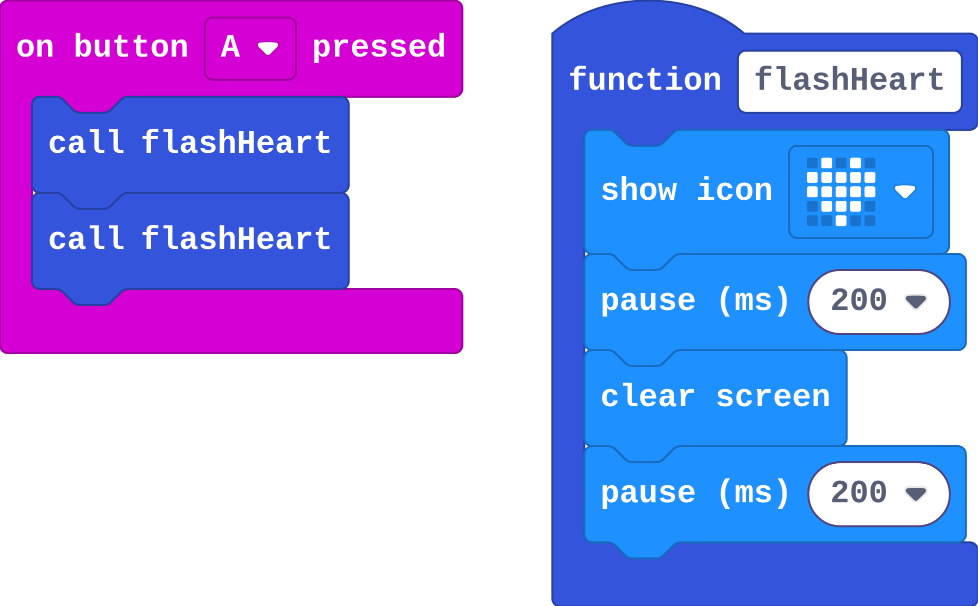
The program as blocks
Show as code
function flashHeart () {
    basic.showIcon(IconNames.Heart)
    basic.pause(200)
    basic.clearScreen()
    basic.pause(200)
}
input.onButtonPressed(Button.A, function () {
    flashHeart()
    flashHeart()
})
The example, as blocks
What this program shows in the micro:bit simulator
What it makes
A function is a named job · Sound on for the voiceover
Open the lesson →

Talk

2. Send and receive

Try firstTwo micro:bits run the same radio program, but one is in group 3 and one in group 4. What happens when A is pressed on either?

Check your answer

Nothing arrives: each only hears messages sent to its own group.

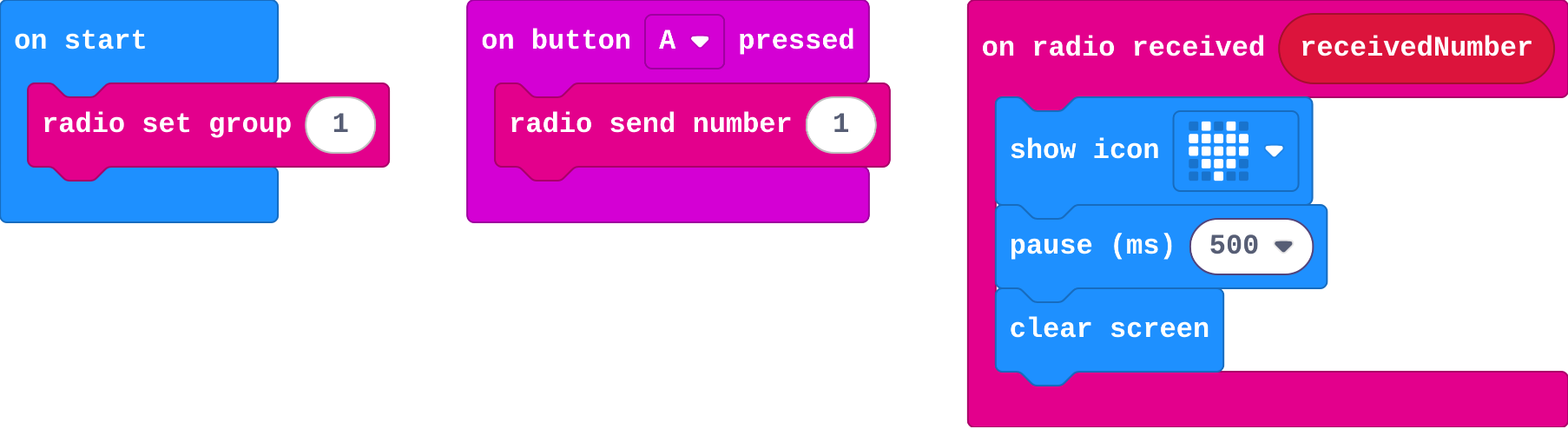
radio set group picks a channel. Only micro:bits in the same group hear each other.

send number sends to every other micro:bit in the group (not to itself).

on radio received is an event: it runs each time a message arrives.

The program as blocks
Show as code
radio.setGroup(1)
input.onButtonPressed(Button.A, function () {
    radio.sendNumber(1)
})
radio.onReceivedNumber(function (receivedNumber) {
    basic.showIcon(IconNames.Heart)
    basic.pause(500)
    basic.clearScreen()
})
The example, as blocks
What this program shows in the micro:bit simulator
What it makes
Radio sends messages between micro:bits · Sound on for the voiceover
Open the lesson →

3. Which message?

Try firstA receiver checks if receivedNumber = 1 and else if receivedNumber = 2. What happens when 3 arrives?

Check your answer

Nothing. Both questions are false and there is no else.

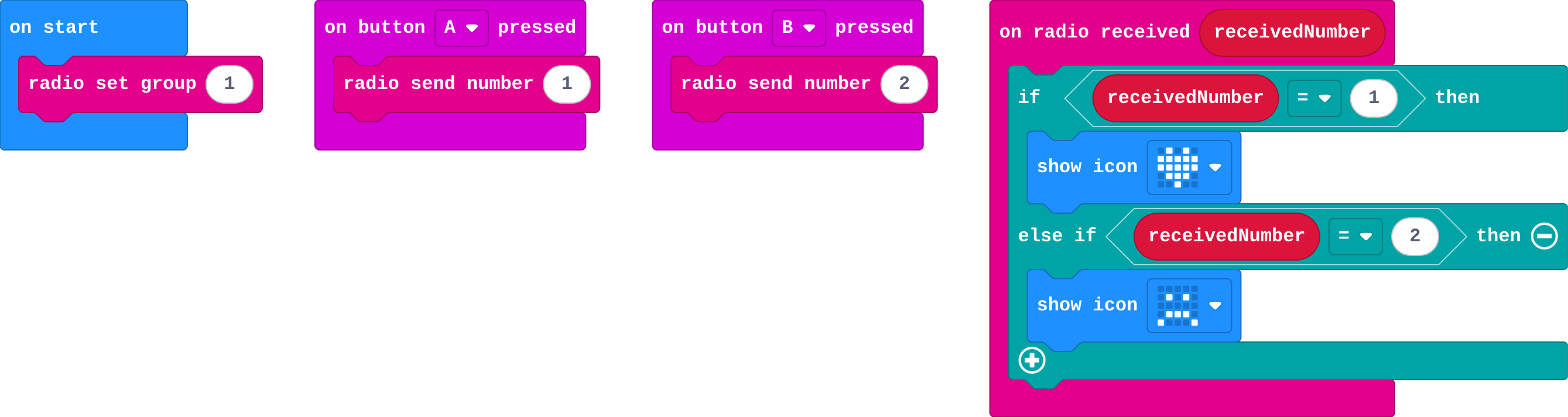
on radio received runs for every message. receivedNumber holds the number that arrived.

So one receiver can do something different for each message: if receivedNumber = 1, else if receivedNumber = 2.

send string sends a word, and receivedString holds the word that arrived.

The program as blocks
Show as code
radio.setGroup(1)
input.onButtonPressed(Button.A, function () {
    radio.sendNumber(1)
})
input.onButtonPressed(Button.B, function () {
    radio.sendNumber(2)
})
radio.onReceivedNumber(function (receivedNumber) {
    if (receivedNumber == 1) {
        basic.showIcon(IconNames.Heart)
    } else if (receivedNumber == 2) {
        basic.showIcon(IconNames.Sad)
    }
})
The example, as blocks
What this program shows in the micro:bit simulator
What it makes
receivedNumber holds the number that arrived · Sound on for the voiceover
Open the lesson →

4. A shared code

Try firstYour micro:bit sends 1. Your list is Hi, Yes, No. Your partner's list is Yes, No, Hi. What does your partner's micro:bit show, and why?

Check your answer

No. Only the place number travels, and place 1 in your partner's list is No.

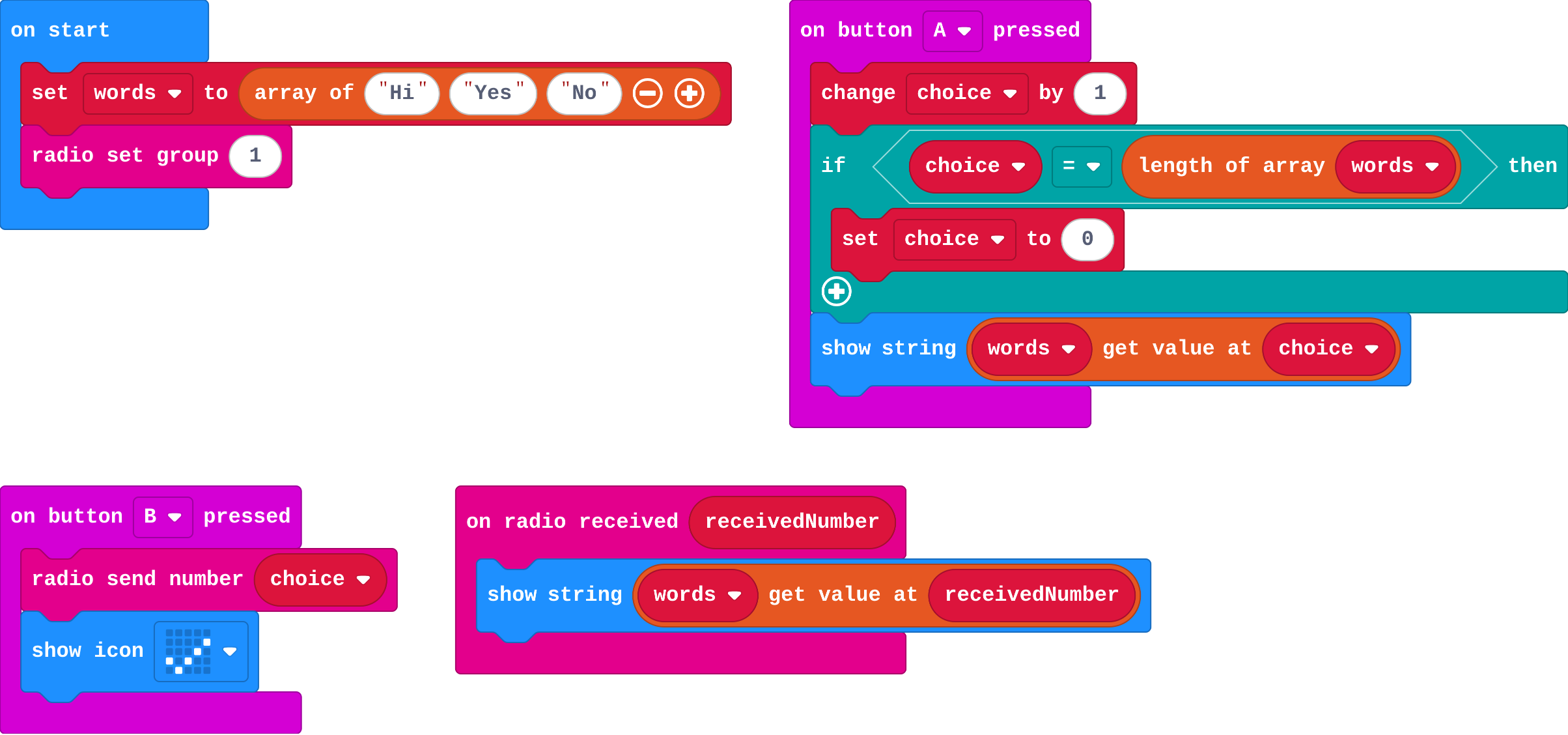
If both micro:bits have the same list, a place number is all you need to send. The receiver shows the word at that place: get value at receivedNumber.

The shared list is a code. It only works if both sides use the same words in the same order.

The program as blocks
Show as code
let words = ["Hi", "Yes", "No"]
let choice = 0
radio.setGroup(1)
input.onButtonPressed(Button.A, function () {
    choice += 1
    if (choice == words.length) {
        choice = 0
    }
    basic.showString(words[choice])
})
input.onButtonPressed(Button.B, function () {
    radio.sendNumber(choice)
    basic.showIcon(IconNames.Yes)
})
radio.onReceivedNumber(function (receivedNumber) {
    basic.showString(words[receivedNumber])
})
The example, as blocks
What this program shows in the micro:bit simulator
What it makes
A shared list is a code · Sound on for the voiceover
Open the lesson →

Time

5. Time between

Try firststart is 3000. Running time is 3750 when B is pressed. What does running time − start show, and what does it mean?

Check your answer

750: 750 milliseconds passed between storing start and pressing B.

running time counts the milliseconds since the micro:bit switched on. 1000 ms is one second.

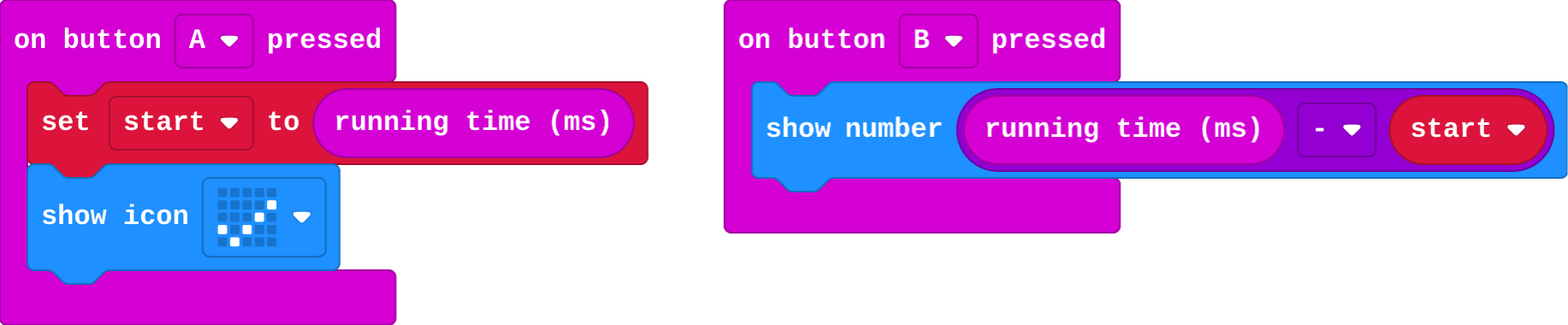
To time something, store running time in a variable at the start (start). Later, running time − start is how long it took.

The program as blocks
Show as code
let start = 0
input.onButtonPressed(Button.A, function () {
    start = input.runningTime()
    basic.showIcon(IconNames.Yes)
})
input.onButtonPressed(Button.B, function () {
    basic.showNumber(input.runningTime() - start)
})
The example, as blocks
What this program shows in the micro:bit simulator
What it makes
running time counts milliseconds since switch-on · Sound on for the voiceover
Open the lesson →

6. True or false

Try firstA program sets waiting to true when the heart appears, and never to false. What goes wrong?

Check your answer

Every press after the heart counts, not only the first, because waiting stays true.

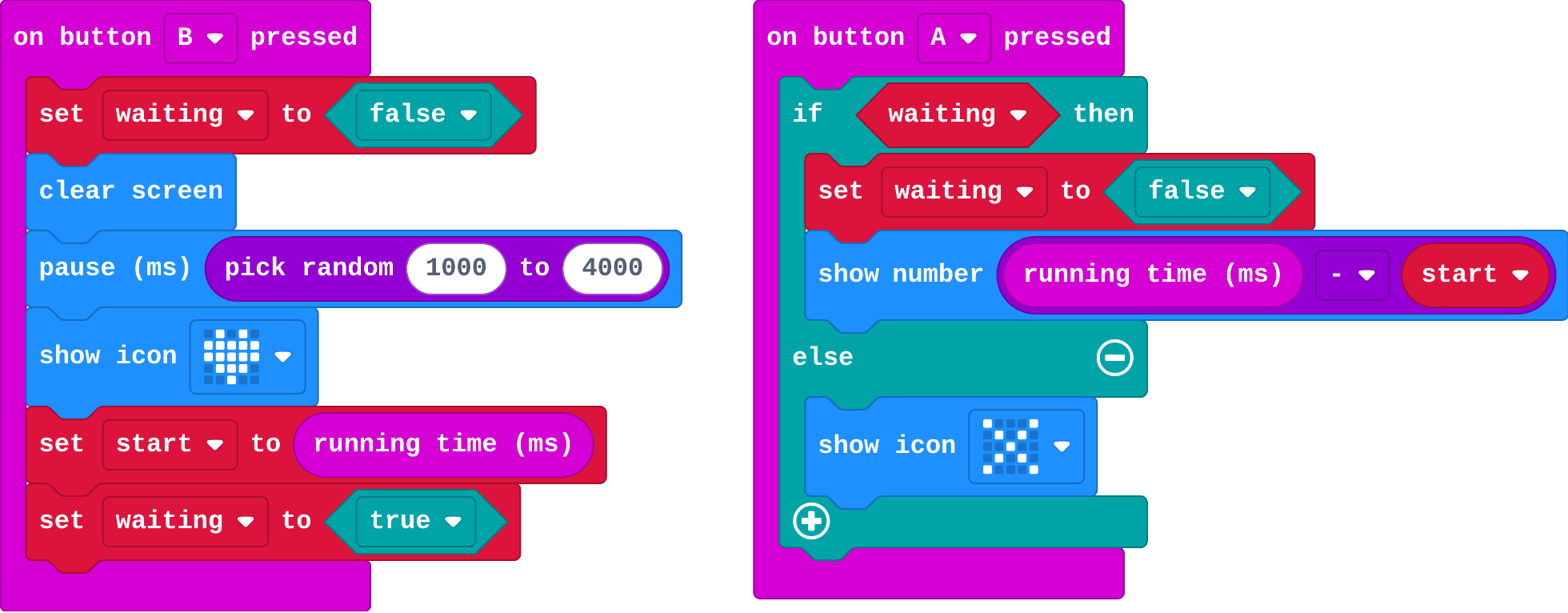
A variable can hold true or false. It remembers one fact about what is happening now.

  • Set it when things change: the heart appears, so waiting is true.
  • Ask about it with if: if waiting, count the press; else, too early.
  • Set it back, or it keeps saying true.
The program as blocks
Show as code
let waiting = false
let start = 0
input.onButtonPressed(Button.B, function () {
    waiting = false
    basic.clearScreen()
    basic.pause(randint(1000, 4000))
    basic.showIcon(IconNames.Heart)
    start = input.runningTime()
    waiting = true
})
input.onButtonPressed(Button.A, function () {
    if (waiting) {
        waiting = false
        basic.showNumber(input.runningTime() - start)
    } else {
        basic.showIcon(IconNames.No)
    }
})
The example, as blocks
What this program shows in the micro:bit simulator
What it makes
A variable can hold true or false · Sound on for the voiceover
Open the lesson →

Final challenge: Reaction duel

7. Reaction timer

Try firstWhy does the game need waiting? What would happen without it?

Check your answer

Without it, pressing A before the heart still shows a number, so players could cheat by pressing early.

running time is how many milliseconds since the micro:bit switched on. Store it when the heart appears (start), then at the press, running time − start is your reaction time.

waiting is a true/false variable: true only while the heart is showing, so an early press can be caught.

best keeps your fastest time: if reaction < best, set best to reaction.

The program as blocks
Show as code
let reaction = 0
let waiting = false
let start = 0
let best = 99999
input.onButtonPressed(Button.B, function () {
    waiting = false
    basic.clearScreen()
    basic.pause(randint(1000, 4000))
    basic.showIcon(IconNames.Heart)
    start = input.runningTime()
    waiting = true
})
input.onButtonPressed(Button.A, function () {
    if (waiting) {
        waiting = false
        reaction = input.runningTime() - start
        basic.showNumber(reaction)
        if (reaction < best) {
            best = reaction
            basic.showIcon(IconNames.Happy)
        }
    } else {
        basic.showIcon(IconNames.No)
    }
})
input.onButtonPressed(Button.AB, function () {
    basic.showString("Best")
    basic.showNumber(best)
})
The example, as blocks
What this program shows in the micro:bit simulator
What it makes
A reaction game is a few ideas working together · Sound on for the voiceover
Open the lesson →

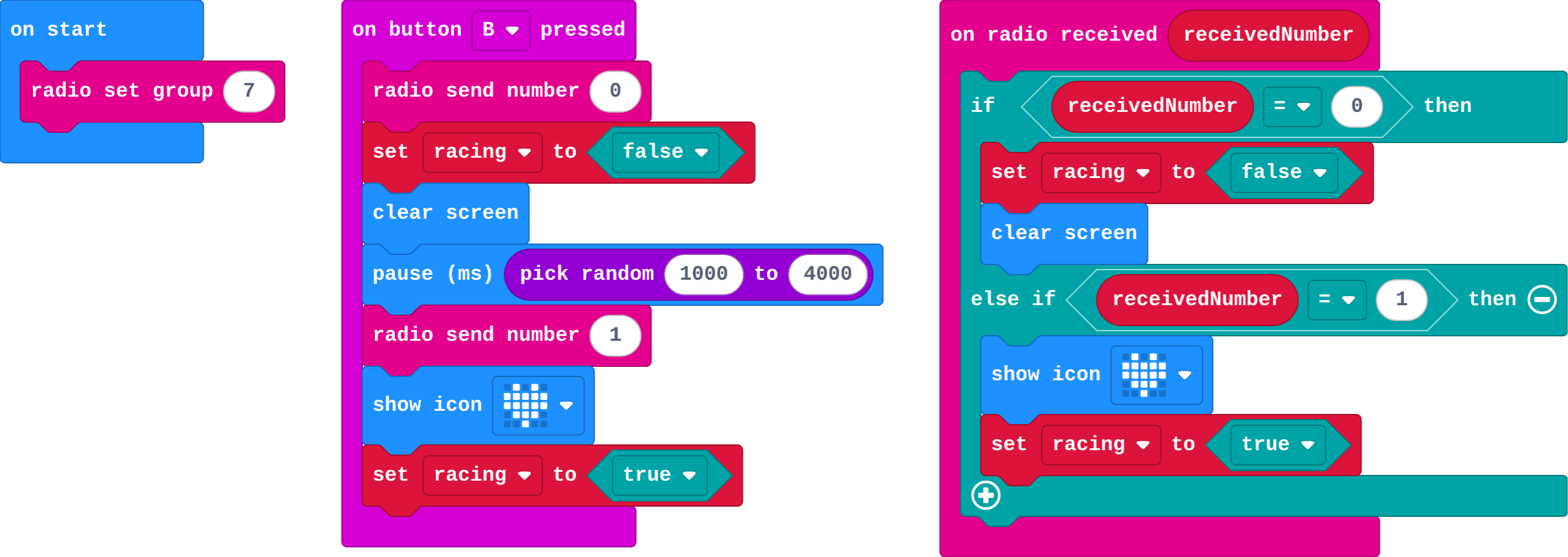
8. Radio duel

Try firstIn a duel, the first micro:bit radios 1 just before it shows a heart, and the second shows a heart when 1 arrives. Why do the two hearts appear at almost the same time?

Check your answer

The first sends message 1 just before showing its heart, and the second shows its heart as soon as 1 arrives.

Both micro:bits run the same program and agree a code: 0 get ready, 1 go, 2 I pressed first.

racing is true only while a round is on, so only the first press counts.

The function go keeps one copy of "show the heart, start racing", so both players always see the same signal.

The program as blocks
Show as code
let racing = false
radio.setGroup(7)
input.onButtonPressed(Button.B, function () {
    radio.sendNumber(0)
    racing = false
    basic.clearScreen()
    basic.pause(randint(1000, 4000))
    radio.sendNumber(1)
    basic.showIcon(IconNames.Heart)
    racing = true
})
radio.onReceivedNumber(function (receivedNumber) {
    if (receivedNumber == 0) {
        racing = false
        basic.clearScreen()
    } else if (receivedNumber == 1) {
        basic.showIcon(IconNames.Heart)
        racing = true
    }
})
The example, as blocks
What this program shows in the micro:bit simulator
What it makes
Both micro:bits agree a code · Sound on for the voiceover
Open the lesson →