Tables
Put data in a table by writing it one row at a time, with the same number of cells in every row.
Timetables, sports results, price lists and school reports are tables: data in rows and columns.
Some information is a grid: rows going across, columns going down. HTML has no tag for a column. You write the table one row at a time and the columns appear.
- Predict: Read the code and say what it will do before you run anything. A wrong guess is fine: it shows you what to look for.
- Run: Run it and compare the result with your prediction.
- Investigate: Trace how each line of code connects to what you see.
- Modify: Change the code on purpose and check the result.
- Make: Build something new using what you have learned. Expect a few tries; that is normal.
Make your prediction first. Help opens once you've locked it in.
Predict
<table>
  <tr>
    <th>House</th>
    <th>Points</th>
    <th>Wins</th>
  </tr>
  <tr>
    <td>Owls</td>
    <td>12</td>
    <td>4</td>
  </tr>
</table>
Read the code. <table> holds the table, and <tr> and <th> and <td> are new. How will the six words be arranged?
Run
Compare the page with your prediction. Boxes is on, so each row and each cell shows as a box. Switch it off when you are done.
| Code | What it does | Why |
|---|---|---|
<table> … </table> |
Holds the whole table | Everything in a table sits between these two tags |
<tr> … </tr> |
Makes one row, going across | tr is "table row". You write the table a row at a time |
<th>House</th> |
Makes a heading cell | th is "table heading". The browser makes it bold and centred |
<td>Owls</td> |
Makes an ordinary cell | td is "table data". The tag says what it is; the look is the browser's |
| three cells in each row | Make three columns | There is no column tag. A column is the cells in the same place in each row, so every row needs the same number of cells |
| no lines around the cells | The table has no grid | The browser draws none. Colours and text styles come from rules, as for any other tag |
<table>
  <tr>
    <th>House</th>
    <th>Points</th>
    <th>Wins</th>
  </tr>
  <tr>
    <td>Owls</td>
    <td>12</td>
    <td>4</td>
  </tr>
</table>
Investigate
Put the scrambled lines in order.
Sam wrote the table a column at a time.
<table>
  <tr><td>Owls</td></tr>
  <tr><td>Hawks</td></tr>
  <tr><td>12</td></tr>
  <tr><td>9</td></tr>
</table>
One row in this table is broken.
Put the lines in order to make one row for the Kestrels: 7 points and 2 wins. One line is not needed.
The Hawks have no points, and their row is shorter than the others. Click the line that causes it.
Modify
Add the Kestrels, with 7 points.
Need a hint?
Copy a whole row, from <tr> to </tr>, then change the words.
Show the expected result
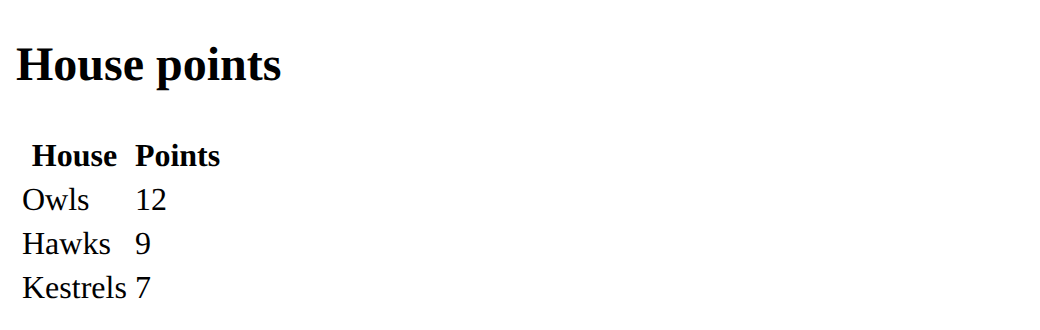
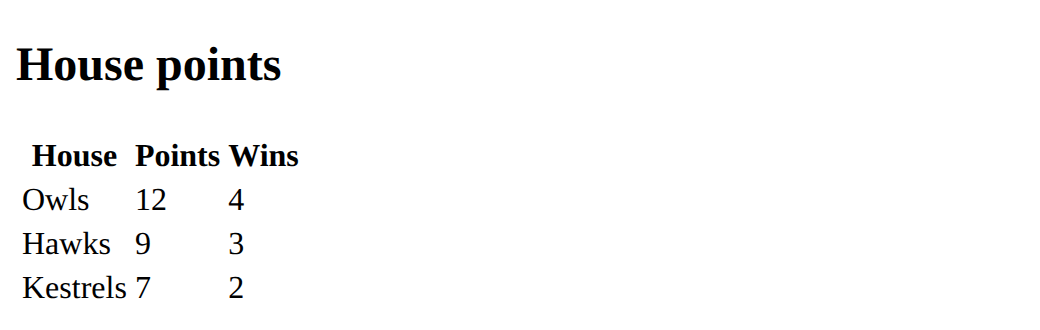
Add a Wins column: the Owls have 4, the Hawks 3 and the Kestrels 2.
Need a hint?
A new column needs a heading cell in the first row.
Another hint
Then every other row needs one more <td>.
Show the expected result
Add a row for the Kestrels.
This ticks when your page has all of the above.
Add a Wins column.
This ticks when your page has all of the above.
Mix it up
The Owls row is already gold and linked.
<style>
  th {
    background-color: navy;
    color: white;
  }
  .winner {
    background-color: gold;
  }
</style>
<table>
  <tr>
    <th>House</th>
    <th>Points</th>
  </tr>
  <tr class="winner">
    <td><a href="https://example.com/owls">Owls</a></td>
    <td>12</td>
  </tr>
  <tr>
    <td>Hawks</td>
    <td>9</td>
  </tr>
</table>
Make
Make a table of your own: a timetable for two days, your sports results, or a list of games with their ratings. Give it a heading row and at least two rows of data.
Need a hint?
Plan it first: what are the column headings? How many rows?
Another hint
Build the heading row with <th>, then one row at a time with <td>. Count the cells in each row.
Show the expected result

Make a table with a heading row and at least two rows of data.
This ticks when your page has all of the above.
For teachers
Students build tables one row at a time with table, tr, th and td, and learn that every row needs the same number of cells. About 45 minutes.
Open the teacher guide: answers, solutions, slides and a worksheet.
Students will be able to
- I can build a table from rows (<tr>) of cells (<th> and <td>).
- I can explain why a table is written a row at a time and every row needs the same number of cells.
- I can add a row and a column to a table.
Before class
Do the Make task yourself (about 5 minutes).
A table is built row by row: <tr> is a table row, <th> a heading cell and <td> an ordinary cell ("table data"). Columns are not written anywhere: they appear because every row has its cells in the same order. Students who think in columns, or in spreadsheets, often write all of one column first. Tables are for data; the look (lines, colours) comes from rules, and page layout is a later course.
Running the lesson
- Predict: the tempting wrong answer is 3 rows of 2 words, reading each `<tr>` as a column. Run it with **Boxes** on to see each row as a box going across.
- Investigate: the row-building task and Sam's table are the same idea from two sides: the cells of one house belong in one `<tr>`. The short row is the quiet failure: the browser shows it without complaint, so count cells per row.
- Modify: adding a column is the hard part. It needs a `<th>` in the heading row and a `<td>` in every other row.
- Mix it up: the row takes the class and the name's cell holds the link. Ask where each piece goes before they answer.
The hard part (on purpose)
Building a table row by row with the same number of cells in each. Have them count the cells per row before they look at the page.
When students get stuck
- One row is shorter than the others, or a value sits in the wrong column. Ask: Does every row have the same number of cells, in the same order? Fix: Add the missing <td> so each row has a cell for every column.
- Text appears above the table instead of inside it. Ask: Is that text inside a <td> or <th>? Fix: All text in a table goes inside cells; a title goes above the <table> in an <h2>.
- The new column only has a heading. Ask: Which rows have a cell for the new column? Fix: Add one <td> to every data row, in the same position.
Stretch and support
Stretch: Add a caption with <caption>House points</caption> just after <table>, and a totals row at the bottom. Style the heading cells with a th rule.
Support: Give students the Modify starter and ask them only to copy the Hawks row and change it to the Kestrels.
Where it leads
Next lesson names the parts of a page with header, nav, main and footer. Tables also lead to data work: the same rows and columns are a spreadsheet, a CSV file, and later a list of lists in Python. Class idea: collect class data (favourite sport, pets) and publish it as a table.
What each step is for
- Predict: Students who think in columns write a table a column at a time; committing to a layout first shows what a row is.
- Run: A table is written row by row, and the browser lines the cells up into columns.
- Investigate: A table is rows of cells: build a row, read a table written the wrong way round, and spot the short row.
- Modify: Adding a row is one new <tr>; adding a column touches every row.
- Mix it up: A row can carry a class and hold a link: one cell to read, one row to colour.
- Build a table from rows (<tr>) of cells (<th> and <td>).
- Explain why a table is written a row at a time and every row needs the same number of cells.
- Add a row and a column to a table.