Tags inside tags
Put one tag inside another, close the last one opened first, and find out that the browser guesses when you get it wrong.
A news page puts a link inside a headline inside a box inside a page. Tags inside tags are how every page is built.
Last lesson each tag stood on its own. A tag can also go inside another tag. Two new ones to try: <strong> marks important words (the browser makes them bold) and <em> marks stressed words (the browser slants them).
- Predict: Read the code and say what it will do before you run anything. A wrong guess is fine: it shows you what to look for.
- Run: Run it and compare the result with your prediction.
- Investigate: Trace how each line of code connects to what you see.
- Modify: Change the code on purpose and check the result.
- Make: Build something new using what you have learned. Expect a few tries; that is normal.
Make your prediction first. Help opens once you've locked it in.
Predict
<h1>Sports day</h1>
<p>Bring <strong>a hat, <em>water</em> and sunscreen</strong> on Friday.</p>
Read the code. The <em> sits inside the <strong>. Which words will look both bold and slanted?
Run
Compare the page with your prediction. The Boxes view draws each tag as a box: <em> sits inside <strong>, which sits inside <p>. Then wrap the word Friday in <em> and </em> yourself.
| Code | What it does | Why |
|---|---|---|
<strong>a hat</strong> |
Marks important words | The tag says the words matter; the browser picks bold |
<em>water</em> |
Marks stressed words | The browser picks slanted text |
<strong>a hat, <em>water</em> and sunscreen</strong> |
One tag inside another | The tag opened last closes first, like boxes inside boxes: </em>, then </strong>, then </p> |
<strong>a <em>hat</strong></em> |
Tags that cross | No error message appears. The browser makes its best guess, which may not be what you meant, so check the page |
<!-- a note --> |
A comment | The browser ignores it, so it is a note to yourself in the code |
<h1>Sports day</h1>
<p>Bring <strong>a hat, <em>water</em> and sunscreen</strong> on Friday.</p>
Investigate
<h1>Sports day</h1>
<p>Bring <strong>a hat and
<em>water</strong> on Friday</em>.</p>
The tags cross in one line.
A closing tag is missing from this page.
<p>Bring a <strong>hat.</p>
<p>Wear sunscreen.</p>
<p>Races start at 9 am.</p>
Sam wants a hat and water bold, with water also slanted. The end of the paragraph looks wrong, but nothing reports an error. Click the line where the tags cross.
The first paragraph is missing its </strong>. Fill in whether each line of text looks bold.
| text | bold? |
|---|---|
| Bring a | no |
| hat. | yes |
| Wear sunscreen. | |
| Races start at 9 am. |
Modify
Swap the closing tags so the last one opened closes first.
Need a hint?
<em> was opened last, so it must close first.
Another hint
Swap the two closing tags after water: </em></strong>.
Show the expected result

Make the word Friday important and stressed, with <strong> outside and <em> inside.
Need a hint?
Put one tag outside and the other inside, and close them in the reverse order.
Another hint
Close them in reverse order.
Show the expected result

Close the tags in the right order.
This ticks when your page has all of the above.
Make Friday both important and stressed.
This ticks when your page has all of the above.
Make
Finish this school trip notice. Mark the most important words with <strong>, and one word inside them with <em>, closing </em> right before </strong>.
Need a hint?
Pick the words that matter most and wrap them in <strong> and </strong>.
Another hint
Inside those words, wrap one word in <em> and </em>. Close </em> before </strong>.
Another hint
Turn on Boxes: every <em> box should sit fully inside a <strong> box.
Show the expected result
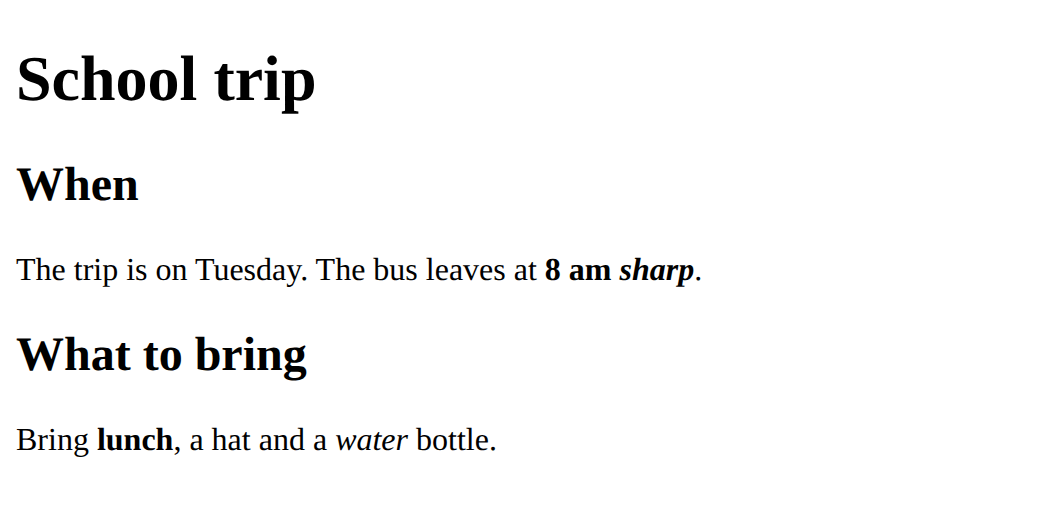
Mark important words with <strong>, and one stressed word with <em> inside them.
This ticks when your page has all of the above.
For teachers
Students put one tag inside another, close the last one opened first, and find out that the browser guesses silently when tags are missing or cross. About 40 minutes.
Open the teacher guide: answers, solutions, slides and a worksheet.
Students will be able to
- I can put one tag inside another, such as <em> inside <strong>.
- I can close tags in the right order: the last one opened closes first.
- I can explain that the browser shows no error for a wrong closing tag, only a best guess.
Before class
Read the unit primer "HTML structure in 5 minutes" first, then do the Make task yourself in the playground (about 5 minutes).
The idea: nesting. Tags go inside other tags like boxes inside boxes, so the tag opened last must be closed first. Turn on Boxes in the playground and every tag becomes a box, which shows the nesting.
Unlike Python, HTML never stops with an error. A missing or crossed tag gives a page that looks wrong, and the browser says nothing.
Running the lesson
- Predict and Run: many students think only water changes, or that the inner tag cancels the outer one. Turn on Boxes and ask which boxes water sits in. Ask the pairs who chose option 3 why they think the inner tag cancels the outer one.
- Investigate: the crossing is on one line. Ask which tag was opened last and whether it closed first. The missing `</strong>` trace is the surprise: the bold runs on into the next paragraphs and no message appears.
- Modify and Make: one change at a time, check the page each time. In Boxes, a correct page has every box fully inside another.
The hard part (on purpose)
Closing tags in the right order. Turn on Boxes and ask which box is inside which, rather than correcting the tags.
When students get stuck
- Everything after one word is bold or slanted. Ask: Which closing tag is missing? Fix: Add the missing </strong> or </em> straight after the words it should cover.
- Bold and slanted words stop in the wrong places. Ask: Which tag did you open last, and did it close first? Fix: Close in reverse order of opening, </em> then </strong>.
- A tag shows on the page as text. Ask: Does it have both < and >, and a slash if it is a closing tag? Fix: Every tag needs both brackets, and a closing tag needs the slash.
Stretch and support
Stretch: Put <em> inside <strong> inside <p> inside nothing else, then draw the boxes on paper. Add a comment above each paragraph with <!-- -->.
Support: Give students the Modify starter and ask only for the first task: swap two closing tags. Use Boxes to show the boxes cross.
Where it leads
Next lesson adds CSS: a rule can style every tag of one kind at once, and nesting is what lets it colour just the important words. Class idea: show a news website with the page source open and spot tags inside tags.
What each step is for
- Predict: Students expect an inner tag to replace the outer one, or not to work; a nested tag adds its look to the outer one.
- Run: A tag inside a tag adds to it, and the tag opened last must close first.
- Investigate: Nesting means the last tag opened closes first; when it does not, the browser guesses and says nothing.
- Modify: Fixing the order of closing tags, then nesting two tags yourself.
- Put one tag inside another, such as <em> inside <strong>.
- Close tags in the right order: the last one opened closes first.
- Explain that the browser shows no error for a wrong closing tag, only a best guess.