Which rule wins
Find out that an element takes every rule that matches it, and that a class beats a tag. A comma list shares one rule, as a handy extra.
A real stylesheet has hundreds of rules, and the browser settles every clash between them the same way you are about to learn.
A page can have many rules, and one element can match more than one of them. You already know that p { } styles every paragraph and .note { } styles the ones marked note. What happens to a paragraph that is both?
- Predict: Read the code and say what it will do before you run anything. A wrong guess is fine: it shows you what to look for.
- Run: Run it and compare the result with your prediction.
- Investigate: Trace how each line of code connects to what you see.
- Modify: Change the code on purpose and check the result.
- Make: Build something new using what you have learned. Expect a few tries; that is normal.
Make your prediction first. Help opens once you've locked it in.
Predict
<style>
  .note {
    color: crimson;
    font-size: 24px;
  }
  p {
    color: teal;
  }
</style>
<h1>Sports day</h1>
<p>Sports day is on Friday.</p>
<p class="note">Bring a hat.</p>
Read the code. Bring a hat. is a p and it has class="note", so both rules match it. What will it look like?
Run
Compare the page with your prediction. Then move the .note rule below the p rule: nothing changes. Last, change p { to h1, p { and watch the heading turn teal too.
| Code | What it does | Why |
|---|---|---|
.note { color: crimson; font-size: 24px; } |
Styles every element marked note |
The colour and the size both apply to Bring a hat. |
p { color: teal; } |
Styles every paragraph | The same paragraph matches this rule too, so it takes both rules. Nothing is thrown away |
color on Bring a hat. |
Crimson, not teal | Both rules set the colour, and a class is a more exact pick than a tag, so the class wins, whichever rule is written first |
font-size on Bring a hat. |
24px | Only .note sets the size, so nothing competes with it |
| two rules equally exact | The one written later wins | If two tag rules both set color on p, the browser takes the lower one |
h1, p { color: teal; } |
One rule for the heading and the paragraphs | The comma means "and". It is the same as two rules, written once |
<style>
  .note {
    color: crimson;
    font-size: 24px;
  }
  p {
    color: teal;
  }
</style>
<h1>Sports day</h1>
<p>Sports day is on Friday.</p>
<p class="note">Bring a hat.</p>
Investigate
<style>
  h1, p {
    color: navy;
    font-size: 18px;
  }
  .note {
    color: crimson;
  }
  .big {
    font-size: 30px;
  }
</style>
<h1>Sports day</h1>
<p>Bring a hat.</p>
<p class="note">Bring water.</p>
<p class="note big">Races start at 9 am.</p>
Each line may match several rules.
Both rules are equally exact.
The class rule should win here, but the page stays teal.
Fill in the colour and the size of each line. Read every rule that matches it.
| line | colour | size (px) |
|---|---|---|
| the heading | ||
| Bring a hat. | ||
| Bring water. | ||
| Races start at 9 am. |
Bring a hat. should be crimson, but it is teal, and there is no error. Click the line that causes it.
Modify
The heading and the paragraphs have the same rule, written twice.
Need a hint?
The two rules are the same, so they can share one.
Another hint
List both selectors with a comma, then delete the other rule: h1, p {
Show the expected result

Mark the second paragraph with a class and write its rule above the group rule. Is it crimson or navy?
Need a hint?
A class needs two parts that match: a name on the paragraph, and a rule for that name.
Another hint
In the HTML: <p class="alert">. In the CSS: .alert { color: crimson; }.
Another hint
Write the .alert rule above the group rule, on purpose.
Show the expected result

Join the h1 and p rules into one rule.
This ticks when your page has all of the above.
Give the second paragraph the class alert, with a crimson rule above the group rule.
This ticks when your page has all of the above.
Make
Restyle the club notice. Write one group rule such as h1, h2, p that gives the heading and the paragraphs a colour and a font. Give the last paragraph the class signup and a .signup rule with a different colour and a bigger size.
Need a hint?
Start with one group rule for the headings and paragraphs: colour and font in one place.
Another hint
Mark the sign-up line <p class="signup"> and write a .signup rule that sets a different colour.
Another hint
The .signup rule wins wherever it is written. Put it above the group rule to see it still does.
Show the expected result
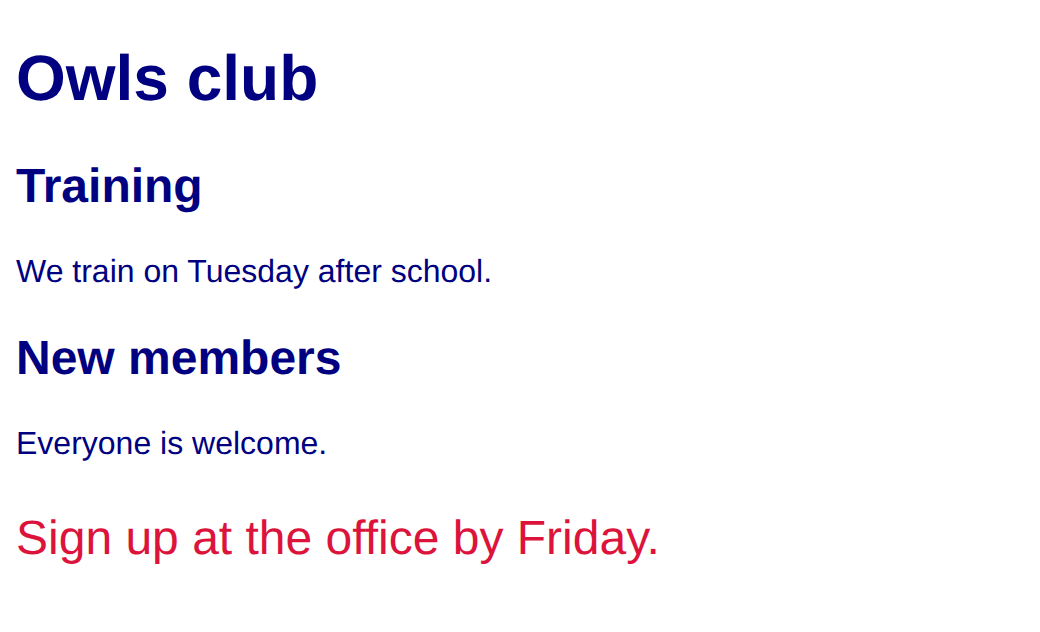
Style the club notice with one group rule and a signup class that overrides it.
This ticks when your page has all of the above.
For teachers
Students find out that an element takes every rule that matches it, that a class beats a tag and a later rule beats an equal one, and that a comma shares one rule between selectors. About 40 minutes.
Open the teacher guide: answers, solutions, slides and a worksheet.
Students will be able to
- I can say which properties an element takes when more than one rule matches it.
- I can say which rule wins when two set the same property.
- I can write one rule for several selectors with a comma.
Before class
Read the unit primer "Layout and components" first, then do the Make task yourself in the playground (about 5 minutes).
Students have written rules and classes in Course A, but always one at a time. The new idea is that an element can match several rules at once. The browser keeps every property from every matching rule. Only where two rules set the same property does it pick: a class beats a tag, and between rules equally exact the later one wins. A group selector is a comma list, h1, p { }, one rule for several kinds of element.
Running the lesson
- Predict and Run: the common answers are the last rule or the first rule alone. Let them move `.note` below the `p` rule and see that nothing changes. Then make the comma edit. Ask someone who chose the last rule to say what happens to the size. The idea to land: every matching rule applies.
- Investigate: the trace has three matching rules on the last line. Ask them to find each rule that matches before they write a value. The tie question separates a class from an equal tag rule.
- Modify and Make: the check ticks on the group rule and the class. Look at the page for the crimson sign-up line.
The hard part (on purpose)
Believing only one rule applies to an element. Ask the student to list every rule that matches the line before they say what it looks like.
When students get stuck
- A class rule does nothing and the page shows the tag rule. Ask: Does the class name in the rule match the one in the tag, capitals too? Fix: Make the two names identical and keep the dot only in the CSS.
- The group rule only styles the first selector. Ask: Is there a comma between the selectors, and a brace after the last one? Fix: Write h1, p { with a comma between the selectors and no comma after the last.
- A student thinks the class must be written last. Ask: Move the class rule to the top. What changes? Fix: Nothing changes. A class beats a tag wherever it is written.
Stretch and support
Stretch: Add a second class, `big`, that sets only the font size, and put both classes on one paragraph: class="signup big". Which properties come from which class?
Support: Give students the Modify starter and ask them only to join the two rules with a comma, then mark one paragraph with a class.
Where it leads
Next lesson picks only the links inside a menu, with a space between two selectors. Class idea: look at the stylesheet of a real school page and find two rules that must both apply to one heading.
What each step is for
- Predict: Students expect one rule to apply, the first or the last; an element takes every rule that matches it, and a class beats a tag where they clash.
- Run: Every matching rule applies; a class beats a tag, and a comma gives several selectors one rule.
- Investigate: An element keeps the properties of every rule that matches it, so read each rule for each line; the class is what wins a clash, and a selector that matches nothing leaves the other rules showing.
- Modify: Group selectors join equal rules into one, and a class rule wins whichever side of the group rule it is written.
- Say which properties an element takes when more than one rule matches it.
- Say which rule wins when two set the same property.
- Write one rule for several selectors with a comma.