Lists and choices: v-for and v-if
Make one tag for each item in a list with v-for, show a tag only when it is needed with v-if, and watch both keep up as the list changes.
A chat, a playlist and a search page are all lists that change. v-for keeps the page in step with the list.
In the DOM course, a list on the page took a loop, createElement and append, and the page changed only when you made or removed elements. In Vue you write the tag once:
<li v-for="name in players">{{ name }}</li>
v-for makes one <li> for each item in players, with name standing for the item each time. Change the list, and Vue adds or removes <li> tags to match.
v-if shows a tag only while something is true:
<p v-if="players.length === 0">No players yet.</p>
- Predict: Read the code and say what it will do before you run anything. A wrong guess is fine: it shows you what to look for.
- Run: Run it and compare the result with your prediction.
- Investigate: Trace how each line of code connects to what you see.
- Modify: Change the code on purpose and check the result.
- Make: Build something new using what you have learned. Expect a few tries; that is normal.
Make your prediction first. Help opens once you've locked it in.
Predict
<div id="app">
  <ul>
    <li v-for="name in players">{{ name }}</li>
  </ul>
  <button @click="players.push('Kai')">Add Kai</button>
</div>

<script src="vue.js"></script>
<script>
  const { createApp, ref } = Vue;
  createApp({
    setup() {
      const players = ref(["Ada", "Sam", "Lin"]);
      return { players };
    }
  }).mount("#app");
</script>
In the DOM course, pushing to an array did not change the page. What about here?
Run
Press Run. Add Kai, then remove players until none are left, and watch the message.
<div id="app">
  <h1>Chess team</h1>
  <ul>
    <li v-for="name in players">{{ name }}</li>
  </ul>
  <p v-if="players.length === 0">No players yet.</p>
  <button @click="players.push('Kai')">Add Kai</button>
  <button @click="players.pop()">Remove the last</button>
</div>

<script src="vue.js"></script>
<script>
  const { createApp, ref } = Vue;
  createApp({
    setup() {
      const players = ref(["Ada", "Sam", "Lin"]);
      return { players };
    }
  }).mount("#app");
</script>
Investigate
<div id="app">
  <h1>Chess team</h1>
  <ul>
    <li v-for="name in players">{{ name }}</li>
  </ul>
  <p v-if="players.length === 0">No players yet.</p>
  <button @click="players.push('Kai')">Add Kai</button>
  <button @click="players.pop()">Remove the last</button>
</div>

<script src="vue.js"></script>
<script>
  const { createApp, ref } = Vue;
  createApp({
    setup() {
      const players = ref(["Ada", "Sam", "Lin"]);
      return { players };
    }
  }).mount("#app");
</script>
Count the tags.
v-for, v-if and the item.
Three lists instead of one.
Start with Ada, Sam and Lin. Fill in the page after each click.
| after | li tags on the page | No players yet shows? |
|---|---|---|
| the start | 3 | no |
| Add Kai | ||
| Remove the last, four times | ||
| Add Kai |
Match each part with what it does.
The page shows three separate lists, each with one name. There is no error. Click the line that is wrong.
Modify
One button, an empty list.
Need a hint?
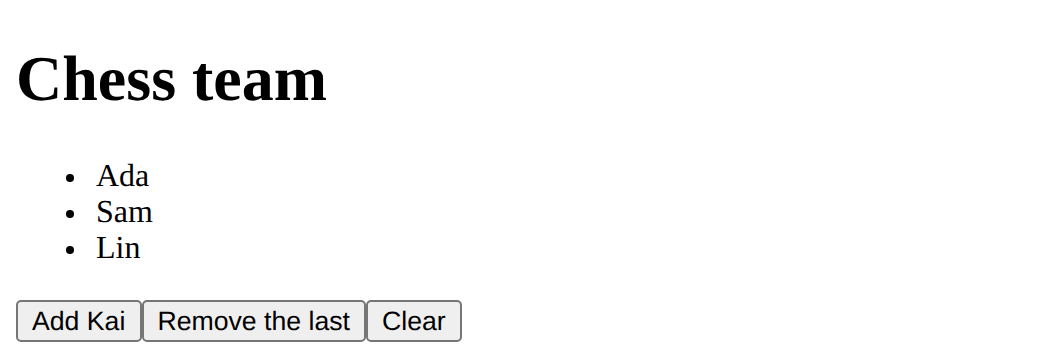
Emptying the list means giving players a new, empty list.
Another hint
<button @click="players = []">Clear</button>
Show the expected result
A second v-if.
Need a hint?
A second v-if can look for a different number.
Another hint
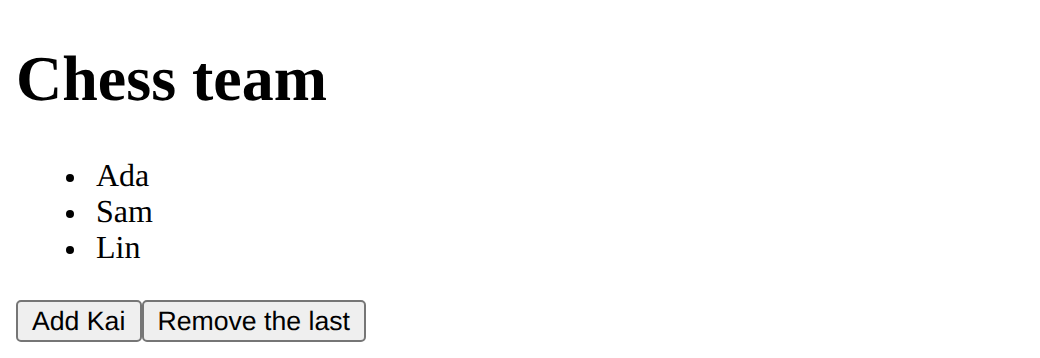
<p v-if="players.length >= 5">Team full!</p>
Show the expected result
Add a Clear button that empties the list.
This ticks when your page has all of the above.
Show Team full! when there are 5 or more players.
This ticks when your page has all of the above.
A playlist
Show the songs as a list with v-for, a message with v-if when there are none, and buttons that add a song and remove one (push, pop, or shift, which takes the first).
Show the songs with v-for, a message with v-if when there are none, and buttons that change the list.
This ticks when your page has all of the above.
Where this leads
Next: events and inputs: functions on clicks, and boxes joined to data.
For teachers
Students predict that pushing to a list adds a tag, trace the page as the list changes, find v-for on the wrong tag, add a Clear button and a Team full message, and make a playlist. About 50 minutes.
Open the teacher guide: answers, solutions, slides and a worksheet.
Students will be able to
- I can make a tag for each item in a list with v-for.
- I can show a tag only when something is true with v-if.
- I can change a list and watch the page keep up.
Before class
Read the unit primer first. v-for="name in players" on a tag makes one copy of that tag per item; inside it, name is the item for that copy. v-if="…" adds the tag while the condition is true and removes it otherwise. Both are attributes on the tag they control, which is why the planted bug (v-for on the ul) makes three lists.
This reverses the DOM course's lesson on lists, where changing an array did not change the page ("list-is-live"). In Vue it does, because the list is a ref. Say so explicitly to students who did the DOM course; it is a good moment to name what Vue is doing for them.
Real Vue code adds :key to v-for tags (:key="name") so Vue can tell items apart when they move; it does not change what students see here, so the course leaves it to the stretch. players = [] inside @click works because the page unwraps refs for you (lesson 3 shows the script side).
Running the lesson
- Predict: ask DOM-course students what happened when they pushed to an array there.
- Run: empty the list and ask what made the message appear.
- Investigate: do the trace on paper first, then check it by clicking.
- Modify: for Team full, ask which number to compare and with which sign.
- Make: ask each student to say which tag v-for repeats.
The hard part (on purpose)
Students put v-for on the container because "it's the list". Ask "which tag do you want more of?" and let them move it themselves.
When students get stuck
- Several lists, each with one item. Ask: Which tag has the v-for? Fix: Put v-for on the li, not the ul or ol.
- The message never shows or never goes. Ask: What does the v-if compare, and is it === ? Fix: v-if="players.length === 0"; a single = sets a value instead of comparing.
- The names show as {{ name }}. Ask: Is the li inside the div with id app? Fix: Keep everything Vue should handle inside #app.
Stretch and support
Stretch: Add :key="song" to the v-for. Number the items with v-for="(song, i) in songs" and {{ i + 1 }}. Add v-else after a v-if.
Support: Give the ul with v-for already written; students add only the v-if message.
Where it leads
Next lesson: functions for events and v-model for inputs, so the list can take any name. Class idea: find three lists on a website and say what each item's data would be.
Sources
- Vue.js: List rendering (v-for) (checked 12 October 2026)
- Vue.js: Conditional rendering (v-if) (checked 12 October 2026)
What each step is for
- Predict: Students from the DOM course expect a changed array not to change the page; in Vue it does, which is the point of v-for.
- Investigate: v-for repeats the tag it is on, once per item; v-if adds or removes its tag as its condition changes; both follow the data.
- Modify: A new button changes the list; a new v-if reacts to a new condition.
- a playlist: Goals only: a v-for list, a v-if message, and buttons that change the list.
- Make a tag for each item in a list with v-for.
- Show a tag only when something is true with v-if.
- Change a list and watch the page keep up.