Components and props
Make a tag of your own once with app.component, use it many times, and pass each copy its own data with props and :name="value".
A feed of posts, a shop of products and a ladder of players are each one card used many times, with different data.
A component is a tag of your own. You write it once, then use it as often as you like:
app.component("player-card", {
  props: ["name", "wins"],
  template: `<div><h2>{{ name }}</h2><p>Wins: {{ wins }}</p></div>`
});
props lists the data each copy is given; the template (between back-ticks) is its HTML. Using it looks like any tag:
<player-card v-for="p in players" :name="p.name" :wins="p.wins"></player-card>
The colon in :name="p.name" means "the value of": without it, the component is given the words p.name. Component names have a dash, and their tags need a closing tag.
The app is now made in three steps: createApp(...), then app.component(...), then app.mount("#app").
- Predict: Read the code and say what it will do before you run anything. A wrong guess is fine: it shows you what to look for.
- Run: Run it and compare the result with your prediction.
- Investigate: Trace how each line of code connects to what you see.
- Modify: Change the code on purpose and check the result.
- Make: Build something new using what you have learned. Expect a few tries; that is normal.
Make your prediction first. Help opens once you've locked it in.
Predict
<div id="app">
  <player-card name="Ada"></player-card>
  <player-card name="Sam"></player-card>
  <player-card name="Lin"></player-card>
</div>

<script src="vue.js"></script>
<script>
  const { createApp } = Vue;
  const app = createApp({});
  app.component("player-card", {
    props: ["name"],
    template: `<p style="border: 2px solid teal; padding: 8px;">Player: {{ name }}</p>`
  });
  app.mount("#app");
</script>
There is no tag called player-card in HTML. Vue has been told about one.
Run
Press Run. Change Sam's wins to 9 in the list and run again.
<div id="app">
  <h1>Chess ladder</h1>
  <player-card v-for="p in players" :name="p.name" :wins="p.wins"></player-card>
</div>

<script src="vue.js"></script>
<script>
  const { createApp, ref } = Vue;
  const app = createApp({
    setup() {
      const players = ref([
        { name: "Ada", wins: 5 },
        { name: "Sam", wins: 4 },
        { name: "Lin", wins: 2 }
      ]);
      return { players };
    }
  });
  app.component("player-card", {
    props: ["name", "wins"],
    template: `
      <div style="border: 2px solid teal; padding: 8px; margin: 8px 0;">
        <h2>{{ name }}</h2>
        <p>Wins: {{ wins }}</p>
      </div>`
  });
  app.mount("#app");
</script>
Investigate
<div id="app">
  <h1>Chess ladder</h1>
  <player-card v-for="p in players" :name="p.name" :wins="p.wins"></player-card>
</div>

<script src="vue.js"></script>
<script>
  const { createApp, ref } = Vue;
  const app = createApp({
    setup() {
      const players = ref([
        { name: "Ada", wins: 5 },
        { name: "Sam", wins: 4 },
        { name: "Lin", wins: 2 }
      ]);
      return { players };
    }
  });
  app.component("player-card", {
    props: ["name", "wins"],
    template: `
      <div style="border: 2px solid teal; padding: 8px; margin: 8px 0;">
        <h2>{{ name }}</h2>
        <p>Wins: {{ wins }}</p>
      </div>`
  });
  app.mount("#app");
</script>
Component, props and template.
Follow it in.
Words instead of numbers.
Match each part with what it does.
Each card says p.wins wins instead of a number. There is no error. Click the line that is wrong.
Modify
Every card, one change.
Need a hint?
The template is the HTML for every card. A v-if in it can use the wins prop.
Another hint
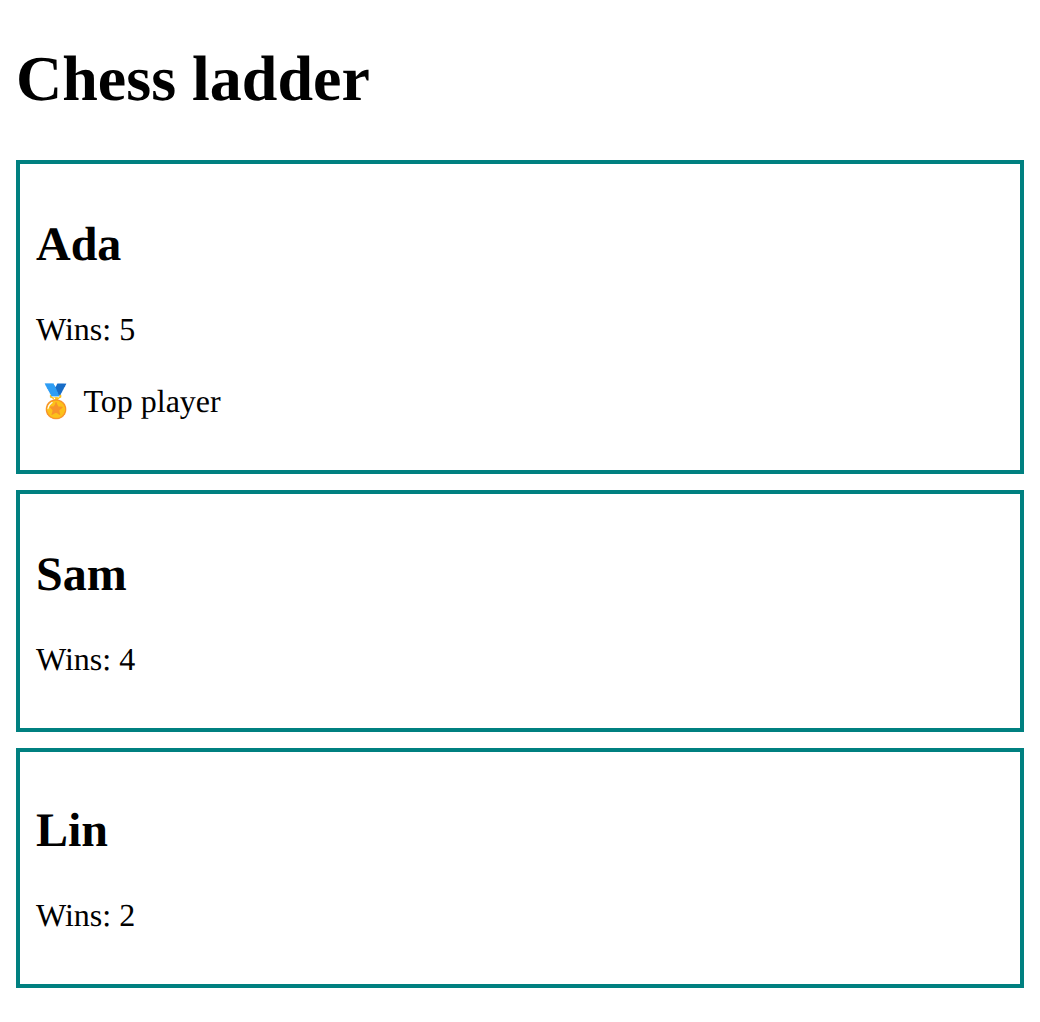
<p v-if="wins >= 5">🏅 Top player</p> inside the template's div.
Show the expected result
Data, not HTML.
Need a hint?
Each card comes from one item in the players list.
Another hint
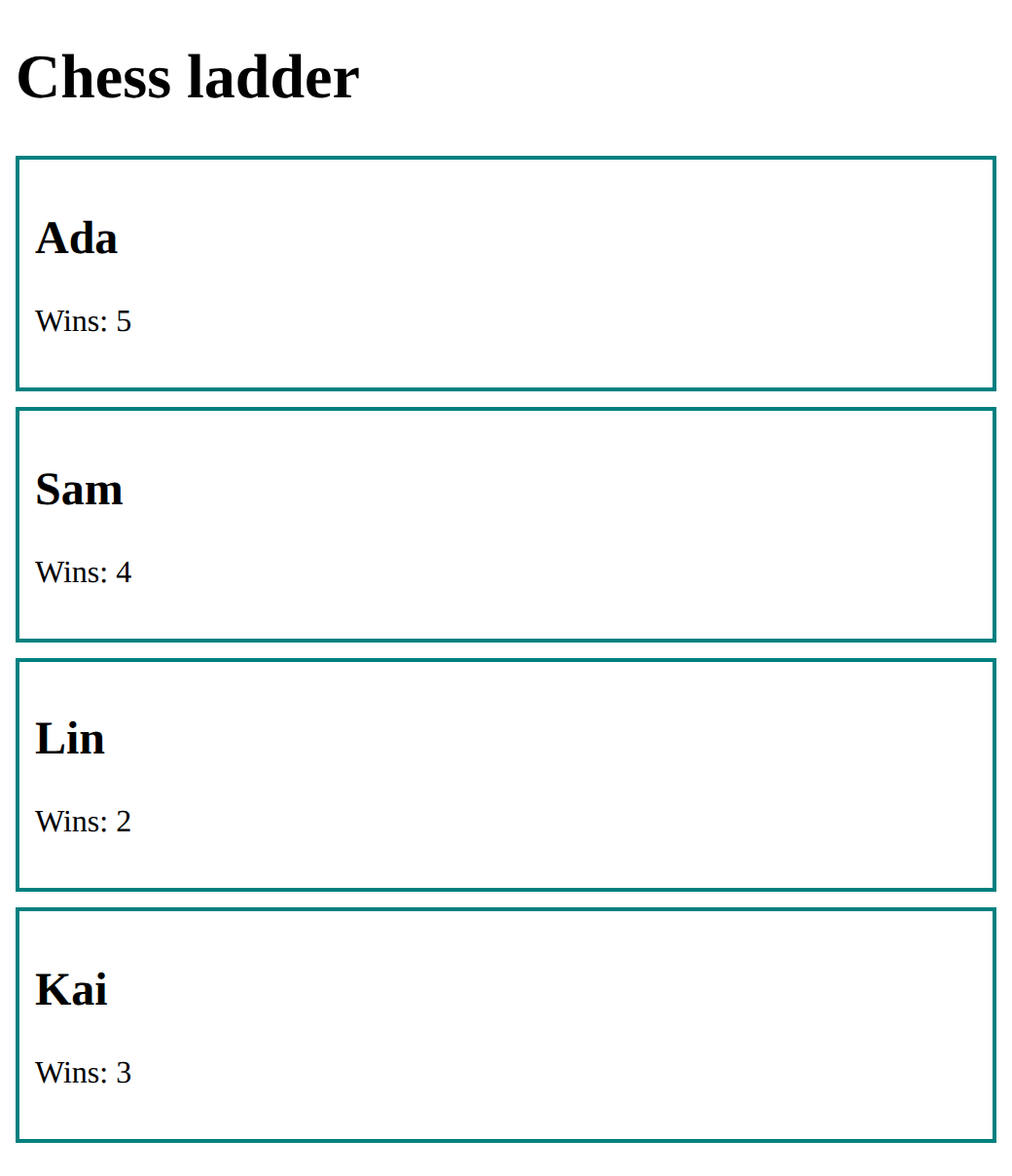
Add { name: "Kai", wins: 3 } to the list.
Show the expected result
Show 🏅 Top player on the cards of players with 5 or more wins.
This ticks when your page has all of the above.
Add Kai, with 3 wins, to the ladder.
This ticks when your page has all of the above.
Pet cards
Make a pet-card component with two props (name and kind) and a template of your own design, then show every pet with v-for.
Make a pet-card component with two props and show every pet with v-for.
This ticks when your page has all of the above.
Where this leads
Next: the final challenge, a to-do app.
For teachers
Students predict what a made-up tag shows, make cards from a list with a component and props, find a prop passed without its colon, add a medal to every card and a player to the data, and make pet cards. About 55 minutes.
Open the teacher guide: answers, solutions, slides and a worksheet.
Students will be able to
- I can make a tag of my own with app.component.
- I can pass each copy its own data with props and :name="value".
- I can show one component for each item in a list.
Before class
Read the unit primer first. app.component("player-card", { props: [...], template: ... }) registers a new tag; every <player-card> on the page becomes a copy of the template. Props are its inputs: the tag that uses it hands them in. :wins="p.wins" (with a colon, short for v-bind:) passes the value of p.wins; wins="p.wins" passes the words, which is the planted bug.
Two rules come from writing the page straight into HTML, without a build step: component names need a dash, and their tags need a separate closing tag (<player-card></player-card>, not <player-card />). The template is a JavaScript string between back-ticks, so it can span lines.
Props flow one way: a card should not change its own props (Vue warns if it tries). Changing data happens in the parent; sending messages up from a component (emit) is left out of this course.
Running the lesson
- Predict: ask what the browser normally does with a tag it does not know (it ignores it).
- Run: change one player's data and ask why only one card changed.
- Investigate: draw the data flowing from the list, through v-for, into each card's props.
- Modify: ask whether the medal goes in the data or the template, and why.
- Make: ask students to name their two props before writing the template.
The hard part (on purpose)
Students try to read the players list inside the component. Ask "what has this card been given?" and point to props.
When students get stuck
- Cards show words like p.name. Ask: Is there a colon before the prop? Fix: :name="p.name" passes the value.
- Nothing shows, and the console warns about failing to resolve a component. Ask: Is app.component before app.mount, with the same name as the tag? Fix: Register it before mount; the tag and the name must match, dash included.
- A prop is blank on every card. Ask: Is it in the props list? Fix: props: ["name", "kind"]
Stretch and support
Stretch: Give player-card a computed of its own (setup(props) { … }) that shows a rating from the wins. Make the cards sit in a row with Flexbox.
Support: Give the pet-card component written out; students add the v-for tag only.
Where it leads
Next: the final challenge, a to-do app built in milestones, with an optional lesson that builds the same app in three frameworks. Class idea: open a shopping site and count the cards made from one component.
Sources
- Vue.js: Components basics (checked 12 October 2026)
- Vue.js: Props (checked 12 October 2026)
What each step is for
- Predict: Students doubt that a made-up tag works at all; seeing three cards, each with its own name, shows that a component is a reusable tag and props give each copy its data.
- Investigate: app.component makes the tag; props are its inputs; :prop="value" passes a value in, and v-for makes one copy per item.
- Modify: Changing the template changes every copy; changing the data adds a copy.
- pet cards: Goals only: a component of their own with two props, used with v-for.
- Make a tag of my own with app.component.
- Pass each copy its own data with props and :name="value".
- Show one component for each item in a list.