Values worked out from data: computed
Work a value out from other data with computed, so it is worked out again whenever that data changes, and see why a plain calculation goes stale.
A basket total, a score out of ten, the number of unread messages: each is worked out from other data, and must never go stale.
Some values are not data of their own: they are worked out from other data. A ticket total comes from the numbers of adults and children. If the numbers change, the total must be worked out again.
const total = computed(() => adults.value * 12 + children.value * 5);
computed takes a little function that works the value out. Vue runs it again whenever adults or children changes, so {{ total }} is always right. () => … is a short way to write a function that gives back what follows the arrow.
The hard part: a plain calculation, const total = adults.value * 12 + …, is worked out once, when the page starts, and then never again.
- Predict: Read the code and say what it will do before you run anything. A wrong guess is fine: it shows you what to look for.
- Run: Run it and compare the result with your prediction.
- Investigate: Trace how each line of code connects to what you see.
- Modify: Change the code on purpose and check the result.
- Make: Build something new using what you have learned. Expect a few tries; that is normal.
Make your prediction first. Help opens once you've locked it in.
Predict
<div id="app">
  <p>Adults ($12): {{ adults }} <button @click="adults++">+</button></p>
  <p>Children ($5): {{ children }}</p>
  <p>Total: ${{ total }}</p>
</div>

<script src="vue.js"></script>
<script>
  const { createApp, ref, computed } = Vue;
  createApp({
    setup() {
      const adults = ref(2);
      const children = ref(1);
      const total = computed(() => adults.value * 12 + children.value * 5);
      return { adults, children, total };
    }
  }).mount("#app");
</script>
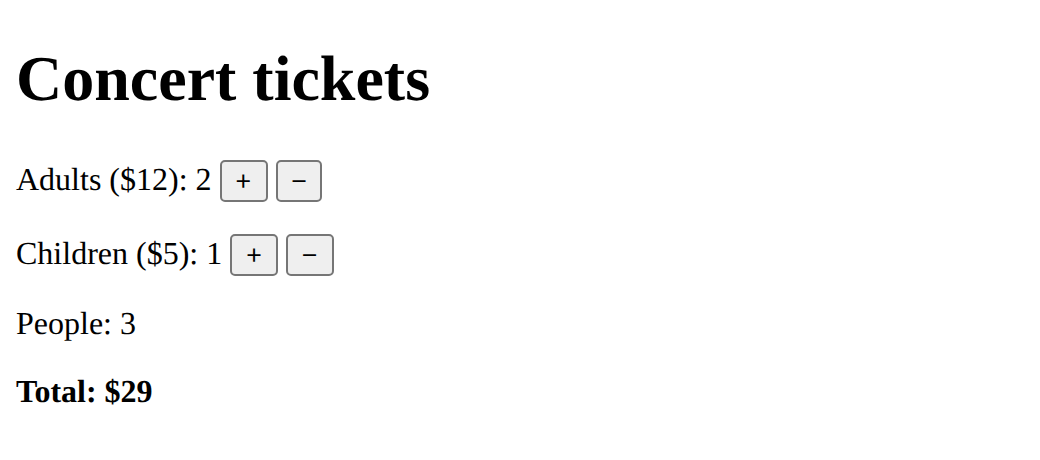
The page starts at 2 adults and 1 child: $29.
Run
Press Run and change the numbers. Watch the total, and the message that appears at $50.
<div id="app">
  <h1>Concert tickets</h1>
  <p>Adults ($12): {{ adults }}
    <button @click="adults++">+</button> <button @click="adults--">−</button></p>
  <p>Children ($5): {{ children }}
    <button @click="children++">+</button> <button @click="children--">−</button></p>
  <p><b>Total: ${{ total }}</b></p>
  <p v-if="total >= 50">A free programme comes with your tickets!</p>
</div>

<script src="vue.js"></script>
<script>
  const { createApp, ref, computed } = Vue;
  createApp({
    setup() {
      const adults = ref(2);
      const children = ref(1);
      const total = computed(() => adults.value * 12 + children.value * 5);
      return { adults, children, total };
    }
  }).mount("#app");
</script>
Investigate
<div id="app">
  <h1>Concert tickets</h1>
  <p>Adults ($12): {{ adults }}
    <button @click="adults++">+</button> <button @click="adults--">−</button></p>
  <p>Children ($5): {{ children }}
    <button @click="children++">+</button> <button @click="children--">−</button></p>
  <p><b>Total: ${{ total }}</b></p>
  <p v-if="total >= 50">A free programme comes with your tickets!</p>
</div>

<script src="vue.js"></script>
<script>
  const { createApp, ref, computed } = Vue;
  createApp({
    setup() {
      const adults = ref(2);
      const children = ref(1);
      const total = computed(() => adults.value * 12 + children.value * 5);
      return { adults, children, total };
    }
  }).mount("#app");
</script>
The total after each click.
Worked out, not set.
The total goes stale.
Start with 2 adults and 1 child. Fill in the page after each click.
| after | adults | children | total ($) | free programme? |
|---|---|---|---|---|
| the start | 2 | 1 | 29 | no |
| Adults + | ||||
| Children + | ||||
| Adults + |
Clicking Adults + changes the number of adults, but the total stays at $29. There is no error. Click the line that is wrong.
Modify
A second computed.
Need a hint?
The number of people is worked out from adults and children.
Another hint
const people = computed(() => adults.value + children.value); then return it and show {{ people }}.
Show the expected result
An if inside computed.
Need a hint?
A computed can have several lines, as long as it returns the value at the end.
Another hint
Inside computed(() => { … }): let sum = the old total; if 6 or more people, take 10 away; return sum;
Show the expected result

Show the number of people, worked out with computed.
This ticks when your page has all of the above.
Groups of 6 or more people get $10 off the total.
This ticks when your page has all of the above.
A recipe scaler
One pancake needs 25 g of flour and 40 ml of milk. Show how much of each you need for any number of pancakes, each with computed. Add eggs too if you like (one for every four pancakes: Math.ceil(pancakes.value / 4)).
Show at least two ingredients, each worked out from the number of pancakes with computed.
This ticks when your page has all of the above.
Where this leads
Next: components, tags of your own.
For teachers
Students predict a ticket total after two clicks, trace the total and a v-if message, find a plain calculation that goes stale, add a people count and a group deal, and make a recipe scaler. About 50 minutes.
Open the teacher guide: answers, solutions, slides and a worksheet.
Students will be able to
- I can work a value out from other data with computed.
- I can explain why a plain calculation in setup goes stale.
- I can use a computed value on the page and in a v-if.
Before class
Read the unit primer first. computed(() => adults.value * 12 + children.value * 5) gives a value Vue works out again whenever the refs it reads change. On the page it is used like a ref ({{ total }}, v-if="total >= 50"). The arrow () => is a short function that gives back what follows it; students do not need more about arrow functions than that.
The planted bug is the idea the course names as hard: a value derived from data must be computed, or it is worked out once when setup runs and then goes stale. The page shows no error. A useful contrast: a ref is data you set; a computed is data you never set, only work out.
Prices are invented for the example.
Running the lesson
- Predict: ask students to say how the total is worked out before they choose.
- Run: ask what makes the free programme message appear and disappear.
- Investigate: trace on paper first, then check by clicking.
- Modify: for the group deal, ask where the if goes (inside the computed) and what it must give back.
- Make: ask which data everything else is worked out from.
The hard part (on purpose)
Students make the total a ref and update it in every button. Ask "what is the total worked out from?" and "what if someone adds a button and forgets?"
When students get stuck
- The total never changes. Ask: Is it wrapped in computed? Fix: const total = computed(() => …);
- A red error: computed is not defined. Ask: Is computed in the line that takes things from Vue? Fix: const { createApp, ref, computed } = Vue;
- The total shows NaN or [object Object]. Ask: Inside computed, did every ref get its .value? Fix: adults.value * 12, not adults * 12.
- A computed with an if shows nothing. Ask: Does the function return the value at the end? Fix: Finish with return sum;
Stretch and support
Stretch: Stop the numbers going below 0 (a computed can't do that: change the buttons, or use Math.max). Add a computed message that says how far from $50 the order is.
Support: Give the people computed written out; students only return and show it.
Where it leads
Next lesson: components with props. Class idea: name three values on a shopping site that are computed (total, item count, delivery cost).
Sources
- Vue.js: Computed properties (checked 12 October 2026)
What each step is for
- Predict: Predicting the new total makes students say how it is worked out, and that it must be worked out again after each click.
- Investigate: computed values follow the data they use; a v-if can test a computed value; a plain calculation in setup is worked out once and goes stale.
- Modify: A new computed is one line plus a return and a {{ }}; a computed can hold an if, as long as it returns the value.
- a recipe scaler: Goals only: several computed values that all follow one piece of data.
- Work a value out from other data with computed.
- Explain why a plain calculation in setup goes stale.
- Use a computed value on the page and in a v-if.