Pick from a list
Pick an item from a list at random, so it works however long the list grows.
A magic 8-ball, a game that deals a random card, a playlist on shuffle: each picks a place at random, then takes the item at that place.
Last lesson you took an item out of a list by its place. Now the micro:bit chooses the place. pick random (in Math) gives a whole number between two numbers, a different one each time. length of list (in Arrays) counts the items in a list.
- Predict: Read the code and say what it will do before you run anything. A wrong guess is fine: it shows you what to look for.
- Run: Run it and compare the result with your prediction.
- Investigate: Trace how each line of code connects to what you see.
- Modify: Change the code on purpose and check the result.
- Make: Build something new using what you have learned. Expect a few tries; that is normal.
Make your prediction first. Help opens once you've locked it in.
Predict

Show as code
let answers = ["Yes", "No", "Maybe"]
input.onGesture(Gesture.Shake, function () {
    basic.showString(answers[randint(0, answers.length - 1)])
})
pick random 0 to length of answers − 1 chooses a place. get value at takes the item at that place.
Run
Click SHAKE several times. Does an answer ever come up twice in a row?
Show as code
let answers = ["Yes", "No", "Maybe"]
input.onGesture(Gesture.Shake, function () {
    basic.showString(answers[randint(0, answers.length - 1)])
})
Investigate
Show as code
let answers = ["Yes", "No", "Maybe"]
input.onGesture(Gesture.Shake, function () {
    basic.showString(answers[randint(0, answers.length - 1)])
})
Kai's program:

Show as code
let answers = ["Yes", "No", "Maybe"]
input.onGesture(Gesture.Shake, function () {
    basic.showString(answers[randint(1, 3)])
})
Ana's program is in the next step's editor.
Modify
Fix Ana's 8-ball with length of list, so all five answers can come up. Shake to check.
Need a hint?
length of array is in Arrays. Drag it into the second number of pick random.
Another hint
Then take 1 away from it with the minus block from Math.
Make A show how many answers are in the list.
Need a hint?
Drag in on button A pressed, with show number length of array answers.
Fix Ana's 8-ball so every answer can come up, using the length of the list.
This ticks by itself when your blocks do what is asked.
Make A show how many answers there are.
This ticks by itself when your blocks do what is asked.
Mix it up
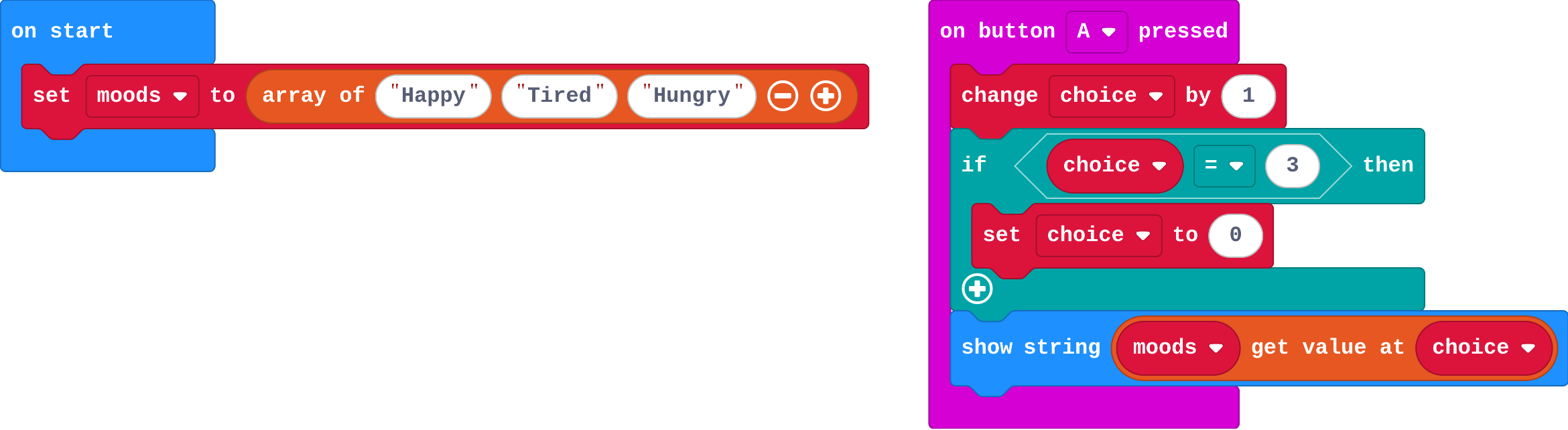
Show as code
let moods = ["Happy", "Tired", "Hungry"]
let choice = 0
input.onButtonPressed(Button.A, function () {
    choice += 1
    if (choice == 3) {
        choice = 0
    }
    basic.showString(moods[choice])
})
Make
Make rock, paper, scissors. Each shake shows Rock, Paper or Scissors, picked at random from a list. Play against a friend with their own micro:bit (or the simulator).
Need a hint?
Make a list with Rock, Paper and Scissors.
Another hint
In on shake: show string get value at pick random 0 to length of list − 1.
Rock, paper, scissors: shaking picks one of three choices from a list.
This ticks by itself when your blocks do what is asked.
Change a team picker
This picks a name at random from a class list. Put in names from your class, then make B show how many names there are.
For teachers
Students pick an item from a list at random with pick random 0 to length − 1, so every item can come up however long the list grows. About 40 minutes.
Open the teacher guide: answers, solutions, slides and a worksheet.
Students will be able to
- I can pick a random item from a list.
- I can say why the range is 0 to length − 1.
- I can add items to a list without changing the random part.
Before class
pick random (Math) gives a whole number between two numbers. length of array (Arrays) counts the items. A random item is get value at (pick random 0 to length − 1): the length is one more than the last place, because places start at 0. Using the length means new items are included without changing anything else.
Running the lesson
- Predict: some students think it cycles through or never repeats. Random has no memory.
- Run: shake several times. Repeats happen.
- Investigate: Kai counts from 1; Ana's range stays fixed when her list grows. Both are fixed by 0 to length − 1.
- Modify: students fix Ana's 8-ball with length, then show the length.
- Mix it up: last lesson's chooser, traced by hand.
- Make: rock, paper, scissors is the same pattern with new items.
The hard part (on purpose)
Why it is length − 1. Ask them to count the places of a 3-item list aloud from 0.
When students get stuck
- One item never comes up. Ask: Which places can pick random choose from? Fix: Pick from 0 to length − 1, not from 1 and not a fixed number.
- The minus block will not fit. Ask: Is it the round number minus block from Math? Fix: Drag Math's 0 − 0 block into the slot, then put length of array on its left and 1 on its right.
- A number shows instead of the word. Ask: Is the random number inside get value at? Fix: pick random gives the place; get value at turns the place into the item.
Stretch and support
Stretch: Make a dice: a list of six show leds pictures is hard to make, so use show number pick random 1 to 6 instead, and say why this one starts at 1.
Support: Give students the list and the on shake block with show string already in, and ask them only to build get value at with pick random.
Where it leads
Next: the final challenge, a pocket pet that uses everything in this course.
What each step is for
- Investigate: pick random 0 to length − 1 gives any place in the list, so every item can come up, and new items are included without changing anything else.
- Modify: Using the list's length means the program still works when the list grows.
- Mix it up: A variable can be the place: change it, and get value at takes out a different item.
- Pick a random item from a list.
- Say why the range is 0 to length − 1.
- Add items to a list without changing the random part.