Lists
Keep many values in one list, and pick one by its place, counted from 0.
A playlist, a lunch menu, a class roll: each is a list of things in order, and you pick one by its place.
A variable holds one value. A list holds many, in order, under one name, such as answers. Each item has a place number (an index), and the micro:bit counts places from 0. You find list blocks in Advanced › Arrays (an array is another name for a list).
- Predict: Read the code and say what it will do before you run anything. A wrong guess is fine: it shows you what to look for.
- Run: Run it and compare the result with your prediction.
- Investigate: Trace how each line of code connects to what you see.
- Modify: Change the code on purpose and check the result.
- Make: Build something new using what you have learned. Expect a few tries; that is normal.
Make your prediction first. Help opens once you've locked it in.
Predict

Show as code
let answers = ["Yes", "No", "Maybe"]
input.onButtonPressed(Button.A, function () {
    basic.showString(answers[1])
})
get value at 1 takes one item out of the list, by its place.
Run
Press A and read the word as it scrolls.
Show as code
let answers = ["Yes", "No", "Maybe"]
input.onButtonPressed(Button.A, function () {
    basic.showString(answers[1])
})
Investigate
Show as code
let answers = ["Yes", "No", "Maybe"]
input.onButtonPressed(Button.A, function () {
    basic.showString(answers[1])
})
Fill in the item at each place.
Work out the last place of a longer list.
The list is Yes, No, Maybe. What is at each place?
| place | item |
|---|---|
| 0 | |
| 1 | |
| 2 |
A list has 5 items. What is the place number of the last one?
Modify
Add a fourth word, Later. Which place is it at? Make B show it.
Need a hint?
Click + on the list block to add a place, and type Later.
Another hint
Drag in on button B pressed, with show string get value at 3.
Make A+B show the first word.
Need a hint?
Drag in on button A+B pressed. The first word is at place 0.
Add a fourth word, Later, and make B show it.
This ticks by itself when your blocks do what is asked.
Make A+B show the first word in the list.
This ticks by itself when your blocks do what is asked.
Mix it up
A tilt meter from the Decide unit.
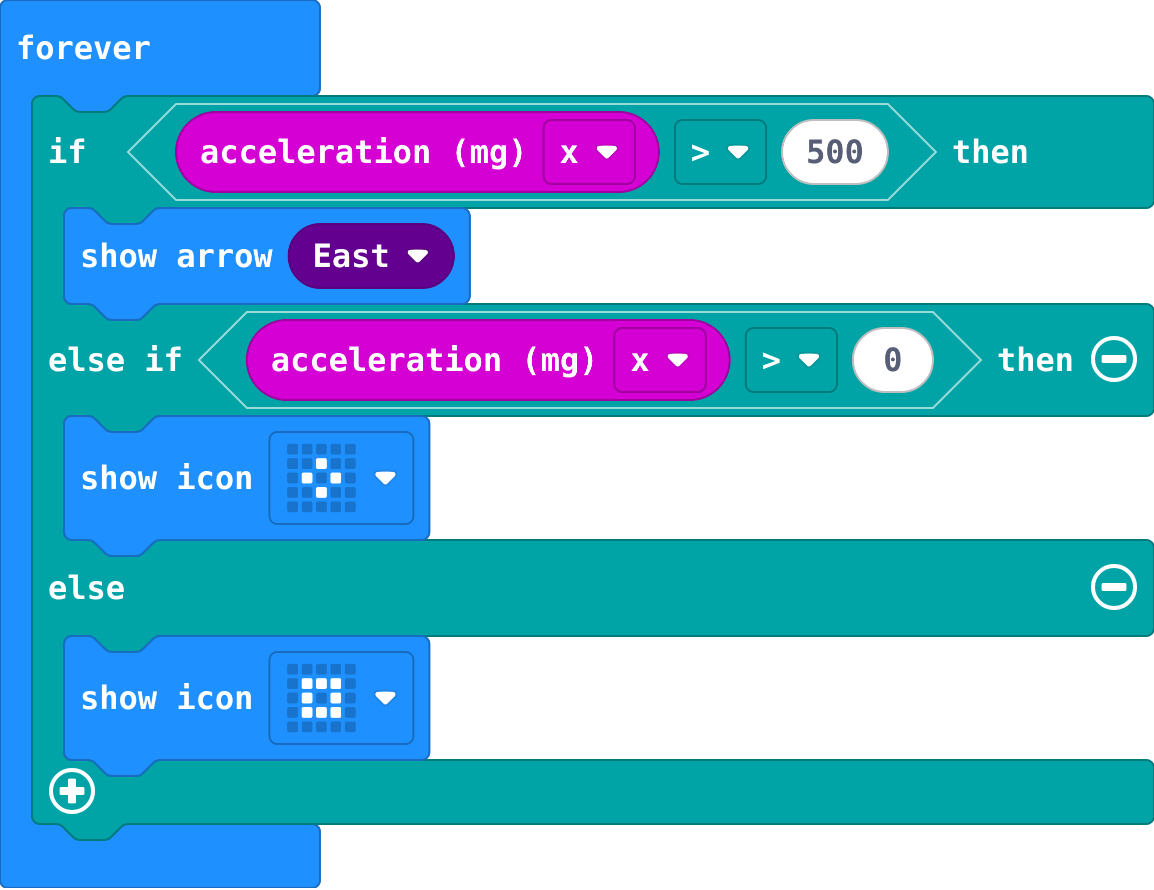
Show as code
basic.forever(function () {
    if (input.acceleration(Dimension.X) > 500) {
        basic.showArrow(ArrowNames.East)
    } else if (input.acceleration(Dimension.X) > 0) {
        basic.showIcon(IconNames.SmallDiamond)
    } else {
        basic.showIcon(IconNames.SmallSquare)
    }
})
A tilt meter: what shows for each value of acceleration x?
| acceleration x | shows |
|---|---|
| 600 | |
| 200 | |
| -50 |
Make
Make a mood chooser. The list of moods and the variable choice are made for you. Each press of A shows the next mood: Happy, then Tired, then Hungry, then back to Happy.
Need a hint?
In on button A pressed: change choice by 1, then show string get value at choice.
Another hint
There are only places 0, 1 and 2. If choice is 3, set it back to 0, before you show the word.
A mood chooser: each press of A shows the next mood in the list, and goes back to the first after the last.
This ticks by itself when your blocks do what is asked.
Change a lunch menu
This menu has a lunch for each school day, Monday first. A shows Monday's. Put in your canteen's lunches, then make B show Friday's.
For teachers
Students keep many values in one list and take one out by its place, counted from 0. About 40 minutes.
Open the teacher guide: answers, solutions, slides and a worksheet.
Students will be able to
- I can make a list and get an item by its place.
- I can say why the first item is at place 0.
- I can step through a list with a variable.
Before class
A list (MakeCode calls it an array, in Advanced › Arrays) holds many values in order under one name. Each item has a place (an index), counted from 0: in Yes, No, Maybe, Yes is at place 0. So a list of 3 has places 0, 1 and 2, and the last place is one less than the number of items. get value at takes out the item at a place. Picking at random is next lesson.
Running the lesson
- Predict: most students say Yes. Ask: which place does the micro:bit start counting from? Or: where does a ruler start?
- Run: No. Say it plainly: lists count from 0, like a ruler starts at 0.
- Investigate: the last-place question is where counting from 0 bites.
- Modify: adding Later and asking for place 3 makes students count.
- Mix it up: a tilt meter from the Decide unit, read from the top.
- Make: the chooser uses a variable as the place, and an if to go back to 0.
The hard part (on purpose)
Counting places from 0. Ask them to point at each item and count aloud from zero.
When students get stuck
- The list block has only one or two places. Ask: Where is the + on the list block? Fix: Click + on the list block to add places.
- The chooser shows nothing after the third press. Ask: What is choice after three presses, and is there a place with that number? Fix: There is no place 3. When choice reaches 3, set it back to 0.
- A number shows instead of the word. Ask: Is it show string or show number? Fix: Words need show string, from Basic.
Stretch and support
Stretch: Make B step backwards through the moods, going round to the last one after the first.
Support: Give students the A event with change and show already in, and ask them only to add the if that goes back to 0.
Where it leads
Next lesson: pick an item at random, however long the list is. Class idea: a list of the week's homework, one item per day.
What each step is for
- Investigate: A list keeps items in order, counted from 0, so the first item is at place 0 and the last place is one less than the number of items.
- Modify: Every item has a place, and get value at takes out any one of them.
- Mix it up: The first true question wins, so the bigger tilt is asked about first.
- Make a list and get an item by its place.
- Say why the first item is at place 0.
- Step through a list with a variable.