Data from the web: fetch
Load JSON data with fetch, wait for it with await, show it on the page, and fall back to a saved copy when the network fails.
Weather apps, maps and live scores all ask a server for data while the page is open, then show it.
So far every page had its data written in it. fetch asks for data from a file or a server while the page is open. The reply takes time to arrive, so the code waits for it:
async function load() {
  const response = await fetch("weather.json");   // ask, and wait for the reply
  const data = await response.json();             // turn the reply into data, and wait
  // now use data
}
load();
- JSON is data written as text, with the same
{ }objects and[ ]arrays as JavaScript.weather.jsonsits beside the page here: a saved forecast for Canberra from Open-Meteo. awaitwaits for something slow; it only works inside a function markedasync.try { … } catch (error) { … }runs a plan B when something intryfails, such as no network.
This is the same idea as Data detective's weather lesson in Python, if you have done it.
- Predict: Read the code and say what it will do before you run anything. A wrong guess is fine: it shows you what to look for.
- Run: Run it and compare the result with your prediction.
- Investigate: Trace how each line of code connects to what you see.
- Modify: Change the code on purpose and check the result.
- Make: Build something new using what you have learned. Expect a few tries; that is normal.
Make your prediction first. Help opens once you've locked it in.
Predict
<h1>Canberra this week</h1>
<p id="out">Loading…</p>

<script>
  async function load() {
    const response = await fetch("weather.json");
    const data = await response.json();
    document.querySelector("#out").textContent = "Top on the first day: " + data.daily.temperature_2m_max[0] + " °C";
  }
  load();
</script>
weather.json holds a week of temperatures. The page starts with Loading….
Run
Press Run. The list is made with the createElement and append you already know, one item per day.
<h1>Canberra this week</h1>
<p id="status">Loading…</p>
<ul id="days"></ul>
<p><small>Weather data by Open-Meteo.com (CC BY 4.0)</small></p>

<script>
  async function load() {
    const response = await fetch("weather.json");
    const data = await response.json();
    const days = data.daily;
    for (let i = 0; i < days.time.length; i++) {
      const li = document.createElement("li");
      li.textContent = days.time[i] + ": " + days.temperature_2m_min[i] + " to " + days.temperature_2m_max[i] + " °C";
      document.querySelector("#days").append(li);
    }
    document.querySelector("#status").textContent = "The saved forecast";
  }
  load();
</script>
Investigate
<h1>Canberra this week</h1>
<p id="status">Loading…</p>
<ul id="days"></ul>
<p><small>Weather data by Open-Meteo.com (CC BY 4.0)</small></p>

<script>
  async function load() {
    const response = await fetch("weather.json");
    const data = await response.json();
    const days = data.daily;
    for (let i = 0; i < days.time.length; i++) {
      const li = document.createElement("li");
      li.textContent = days.time[i] + ": " + days.temperature_2m_min[i] + " to " + days.temperature_2m_max[i] + " °C";
      document.querySelector("#days").append(li);
    }
    document.querySelector("#status").textContent = "The saved forecast";
  }
  load();
</script>
Ask, turn into data, show.
Things that take time.
Data that has not arrived.
Put the lines in order: ask for the file, turn the reply into data, then show the first day.
The page stays on Loading… and shows a red error: Cannot read properties of undefined. Click the line that is wrong.
Modify
The live forecast comes from Open-Meteo, a free weather service with no sign-up. If your school's network blocks it, the page should still work: that is what the saved copy is for.
<script>
  try {
    // fetch the live forecast from URL
  } catch (error) {
    // plan B: fetch the saved copy, weather.json
  }
</script>
One more list from the data.
Need a hint?
weather.json has a third list beside the temperatures: precipitation_sum, the rain in mm.
Another hint
Add + ", rain " + days.precipitation_sum[i] + " mm" to the end of each line's text.
Show the expected result
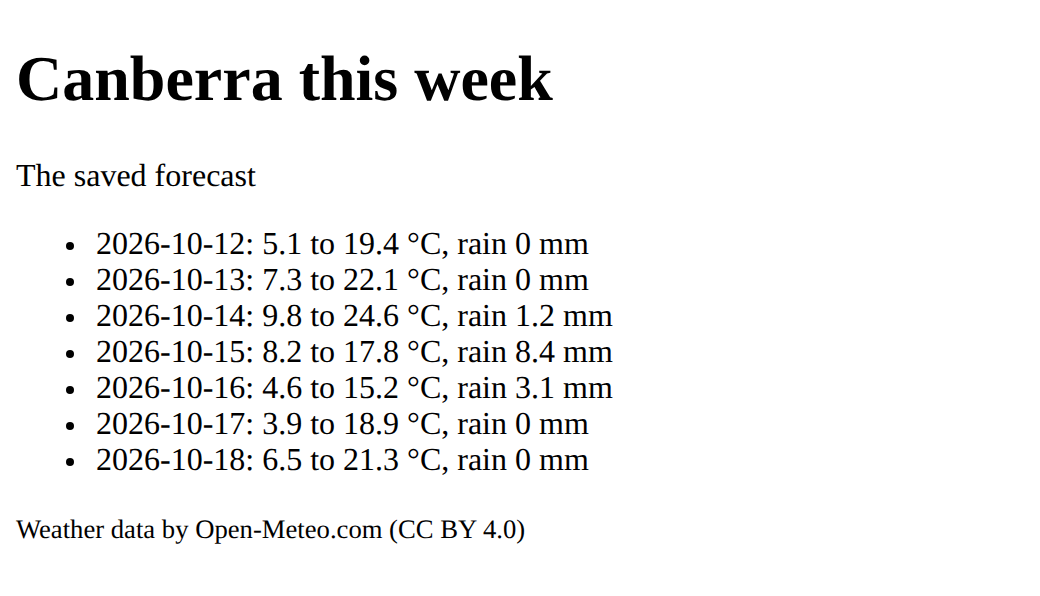
Try, and catch.
Need a hint?
Wrap the live fetch in try. In catch, fetch weather.json instead. Either way, data ends up holding the forecast.
Another hint
let data; try { const response = await fetch(URL); data = await response.json(); } catch (error) { … the same two lines with "weather.json" … }
Show each day's rain too.
This ticks when your page has all of the above.
Load the live forecast from URL, and fall back to weather.json when that fails.
This ticks when your page has all of the above.
The hottest day
Find the hottest day in the data (a loop that remembers the best so far, and an if that checks each day against it) and show it in the status line, with its date and temperature.
Show the hottest day of the week, found with a loop and an if.
This ticks when your page has all of the above.
Where this leads
You can now load data while the page is open. Apps with Vue builds pages that follow their data; Data detective does the same in Python.
For teachers
Students predict that a page shows Loading before fetched data arrives, order the lines that load JSON, find a missing await, add rain to the forecast, load the live forecast with a saved copy as plan B, and find the week's hottest day. About 55 minutes.
Open the teacher guide: answers, solutions, slides and a worksheet.
Students will be able to
- I can load JSON data with fetch and show it on the page.
- I can explain why fetch needs await inside an async function.
- I can fall back to a saved copy with try and catch when the network fails.
Before class
An optional lesson at the end of the DOM course. fetch("weather.json") asks for a file (or a web address) and gives back a promise, a value that arrives later. await waits for it, and only works inside an async function. The reply is text; await response.json() turns it into JavaScript objects and arrays. Forgetting the second await is the planted bug: data is then a promise, so data.daily is undefined.
weather.json is a saved week of Canberra temperatures from Open-Meteo, the same file as Data detective's weather lesson in Python (dates are when it was saved). The live task asks Open-Meteo, a free service with no account or key. try … catch loads the saved copy when the live request fails, which is also what happens if the school network blocks the site, so check it before class with the Check your school page.
Weather data by Open-Meteo.com, licensed CC BY 4.0: the credit line stays on the page.
Running the lesson
- Predict: ask what the page could show while the data is on its way.
- Run: point out that the list code is the DOM list lesson's, unchanged.
- Investigate: before the bug, ask students to say what each await waits for.
- Modify: for the live task, turn the Wi-Fi off (or use a wrong URL) to see plan B work.
- Make: ask what the loop must remember as it goes (the best day so far).
The hard part (on purpose)
The order of events is the hard part: the rest of the page runs before the data arrives. Ask "has the data arrived yet at this line?" rather than fixing their awaits for them.
When students get stuck
- Red error: Cannot read properties of undefined. Ask: Is there an await before fetch and before response.json()? Fix: Both need await, inside an async function.
- await is only valid in async functions. Ask: Does the function have async in front? Fix: async function load() { … }
- The live forecast never shows, only the saved one. Ask: Is the network or the site blocked here? Fix: That is plan B working; try at home, or check the URL is exactly the one given.
Stretch and support
Stretch: Show the forecast as bars with widths from the temperatures; add a Refresh button that calls load() again; load a different town by changing the latitude and longitude in the URL.
Support: Give the try and catch written out; students change only what the status line says.
Where it leads
Apps with Vue: a fetch in a setup function that sets a ref. Data detective does the same in Python with requests. Class idea: list apps on a phone that fetch data, and what each would show with no connection.
Sources
- Open-Meteo: Weather Forecast API (checked 12 October 2026)
- Open-Meteo: Terms and licence (CC BY 4.0) (checked 12 October 2026)
What each step is for
- Predict: Students expect a page to have its data at once; seeing Loading first shows that fetched data arrives later.
- Investigate: Ask with fetch, wait with await, turn the reply into data with .json(), and only then use the data; each step waits for the one before.
- Modify: More of the data is one more name from the JSON; a live source needs a plan B, so try the live one and catch the failure.
- the hottest day: Goals only: use the loaded data with a loop and an if.
- Load JSON data with fetch and show it on the page.
- Explain why fetch needs await inside an async function.
- Fall back to a saved copy with try and catch when the network fails.