Code with ML blocks
The Machine Learning blocks run code when the model's estimated action changes. on ML start runs once when an action begins, not again while it carries on, and unknown means no action is sure enough.
A fitness band buzzes when you've been sitting for an hour and counts each rep at the gym. Its model says what you're doing; its program decides what to do about it.
CreateAI's Edit in MakeCode button opens your model in MakeCode with a Machine Learning blocks category. The blocks run your code when the model's estimated action changes.
Here, the editor has practice actions (still, walking, running, jumping, waving, clapping) instead of a trained model. In the simulator, a panel beside the micro:bit lets you choose the action the model "sees". On a real micro:bit, you put the same code into the project CreateAI opens for your own model.
- Predict: Read the code and say what it will do before you run anything. A wrong guess is fine: it shows you what to look for.
- Run: Run it and compare the result with your prediction.
- Investigate: Trace how each line of code connects to what you see.
- Modify: Change the code on purpose and check the result.
- Make: Build something new using what you have learned. Expect a few tries; that is normal.
Make your prediction first. Help opens once you've locked it in.
Predict
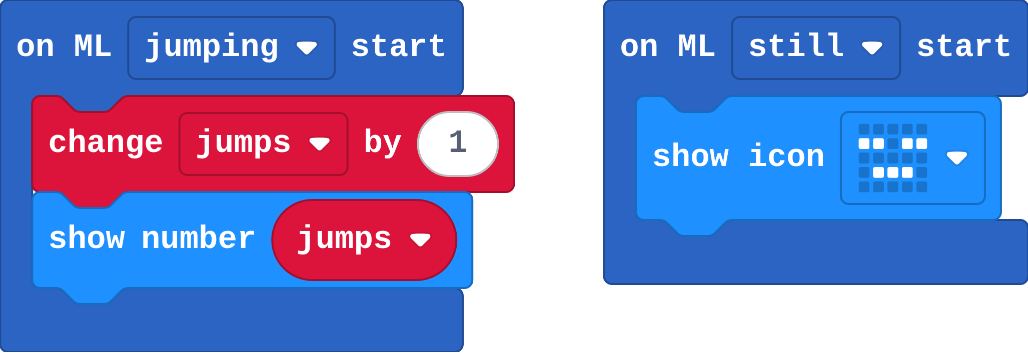
Show as code
ml.onStart(ml.event.Jumping, function () {
    jumps += 1
    basic.showNumber(jumps)
})
ml.onStart(ml.event.Still, function () {
    basic.showIcon(IconNames.Asleep)
})
let jumps = 0
Run
In the ML panel beside the simulator, choose jumping, then still, then jumping again. When does the count go up?
Show as code
ml.onStart(ml.event.Jumping, function () {
    jumps += 1
    basic.showNumber(jumps)
})
ml.onStart(ml.event.Still, function () {
    basic.showIcon(IconNames.Asleep)
})
let jumps = 0
Investigate
Show as code
ml.onStart(ml.event.Jumping, function () {
    jumps += 1
    basic.showNumber(jumps)
})
ml.onStart(ml.event.Still, function () {
    basic.showIcon(IconNames.Asleep)
})
let jumps = 0
Modify
Keep a total of running time and show it in seconds when A is pressed. Test it: choose running, wait, then still.
Need a hint?
on ML stop (with duration) is in Machine Learning. Choose running.
Another hint
Inside it: change running by duration. On button A: show number running ÷ 1000 (rounded).
Show ? when the model isn't sure of any action (unknown).
Need a hint?
on ML start, then choose unknown in the dropdown: show string ?
Keep a total of running time, and show it in seconds when A is pressed.
This ticks by itself when your blocks do what is asked.
Show ? when the model isn't sure of any action.
This ticks by itself when your blocks do what is asked.
Make
Make an activity tracker: a picture for still, walking and running, a jump count, a blank screen for unknown, total running time, and button A sends the jumps and running seconds to the computer (as in Send data to the computer).
Need a hint?
One on ML start for each action: still, walking, running, jumping, and unknown.
Another hint
Jumps and running time from earlier. Button A: serial write value jumps, and running (in seconds).
An activity tracker: an icon for still, walking and running, a jump count, a clear screen for unknown, total running time, and A sends jumps and running to the computer.
This ticks by itself when your blocks do what is asked.
On your own model
- Open your model from last lesson in CreateAI and click Edit in MakeCode. Your actions are named as you trained them, so choose them in the dropdowns.
- Copy your tracker's blocks across (or rebuild them), Download to a V2 micro:bit, unplug it, add the battery pack: it runs with no computer.
- Plug it back in and press A with the board from Send data to the computer open to see the totals.
For teachers
Students code with CreateAI's Machine Learning blocks (in the simulator with practice actions, then on their own model) to build an activity tracker. About 45 minutes.
Open the teacher guide: answers, solutions, slides and a worksheet.
Students will be able to
- I can run code when a model's estimated action starts or stops.
- I can explain why on ML start runs once per stretch of an action.
- I can handle unknown, when no action is certain enough.
Before class
The idea: the model estimates an action several times a second. on ML … start runs when the estimate changes to that action (once per stretch, not once per jump); on ML … stop runs when it changes away, with how long it lasted; unknown is the estimate when no action reaches its recognition point (CreateAI's word for the confidence threshold). is ML … detected and certainty are there for programs that check in forever.
Practice actions: a trained model only exists inside the project CreateAI makes, so this lesson's editor loads the Machine Learning blocks with six practice actions (from this site's own small extension) and the simulator's ML panel lets students choose the action. Real models use the same blocks with the actions students trained. Running the model on a micro:bit needs a V2.
This lesson has not yet been tried in the live MakeCode editor: check the ML panel appears beside the simulator before class.
Running the lesson
- Predict: many say 3. Ask: how many times did the estimate change?
- Run: choose actions in the ML panel; count aloud.
- Investigate: the counting-jumps question is the subtle one; link unknown to Unsure in AI robots.
- Make: the tracker reuses serial write value from the first unit.
The hard part (on purpose)
Start and stop events, and a sensible response to unknown. Ask what the program should do when the model isn't sure.
When students get stuck
- There is no ML panel. Ask: Is the editor full screen? Is the simulator running? Fix: Open the editor full screen and restart the simulator.
- The count goes up only once. Ask: Did the action change between jumps? Fix: Choose another action (still) in between.
- Running time stays 0. Ask: Did running stop? The stop event runs when the estimate changes away. Fix: Choose running, then still, then press A.
Stretch and support
Stretch: Use certainty (%) ML jumping in forever to show a bar of how sure the model is.
Support: Give the jump count; students add the other actions.
Where it leads
Next: the capstone, your own AI sorter. Real world: fitness trackers, fall detection, sports coaching sensors.
What each step is for
- Investigate: Start and stop events mark changes in the estimated action; unknown is what the model says when no action reaches its recognition point, and it needs a sensible response too.
- Modify: Stop events with a duration turn a stream of estimates into totals; handling unknown makes the display honest.
- Run code when a model's estimated action starts or stops.
- Explain why on ML start runs once per stretch of an action.
- Handle unknown, when no action is certain enough.