One robot, many jobs
Students use a mode variable to give one robot several jobs (go, follow, stop); buttons change the mode and forever does the job, then they add explore and guard modes.
Classroom resources
Load these into Waypoints Prepare: choose Load URL and paste the copied address, or download the file and import it. In Prepare, the worksheet's Teacher edition shows the answers; the student copy hides them.
Students will be able to
- I can use a variable to remember which job (mode) the robot is doing.
- I can change the mode with buttons, and make forever do the job for the current mode.
- I can add a new mode to a program.
Timing
Predict and Run 8 min · Investigate 10 min · Modify 15 min · Make 12 min · Real robot 5 min (optional)
Before class
This is the state pattern (in the curriculum, a variable that keeps track of what the program is doing). A variable called mode holds a word: "go", "follow" or "stop". The buttons only change the mode; forever checks the mode every time round and does that job. So a button press has a lasting effect, even though the button event itself is over in an instant.
The mode values are words (strings) so programs read clearly: if mode = "follow". In blocks, compare words with the = block from Logic and the text block from Text. followLine is lesson 5's program moved into a function, which keeps forever short.
Ruby's robot is the reset-in-loop slip from micro:bit Foundations (Counting): a starting value set inside forever wipes every change. The logo (micro:bit V2 only) appears in the simulator; on a V1 micro:bit, use shake instead. MOVE Motor classes can use the same pattern with Kitronik blocks.
Running the lesson
- Predict: the key question is why the robot keeps following after the button is let go.
- Run: drag the robot onto the line before pressing B.
- Investigate: act it out. One student holds a card with the mode word; another (forever) keeps reading it and acting. A third presses buttons by changing the card.
- Modify: a new mode needs three things: a name, something that sets it, and a branch in forever. Write the three on the board.
- Make: guard mode reuses lesson 3's distance question. robot play tone is in Robot.
- Real robot (optional): discuss why real devices often cycle modes with one button (lesson 7 and beyond).
The hard part (on purpose)
Buttons only change the mode; forever does the job. When a mode never runs, ask them to compare the word in the button with the word in forever.
When students get stuck
| What you will see | A question to ask | The fix |
|---|---|---|
| Pressing a button does nothing. | Is set mode inside forever as well as in the button? | Set the starting mode once, in on start. Only buttons change it after that. |
| The new mode never runs. | Is the word in the button exactly the same as the word in forever? | Spell it the same way in both places (explore, not Explore). |
| Guard mode beeps all the time. | Is anything within 20 cm? Is the tone inside the if? | Move the box away; keep the tone inside the if. |
Answers to the checks
- Predict: The robot is on the line. You press B, wait, then press A+B. What happens?
It follows the line until you press A+B. B sets mode to follow, and forever keeps following while mode stays follow. A+B sets mode to stop. - Still following: You pressed B a while ago and let go. Why does the robot keep following the line?
mode still says follow, and forever checks it again every time round
Pressing B ran one block: set mode to follow. The variable keeps that value, so every time forever checks, it finds follow and calls followLine. - Ruby's robot: Ruby's robot never moves, even when she presses A. Which part is wrong?
forever sets mode to stop every time round, wiping out the A press straight away
Setting mode to stop belongs in on start, once. Inside forever, it runs again every time round, so mode is stop again before the robot can move.
Solutions
One possible solution for each task. Other correct programs are fine.
Modify › Which mode?
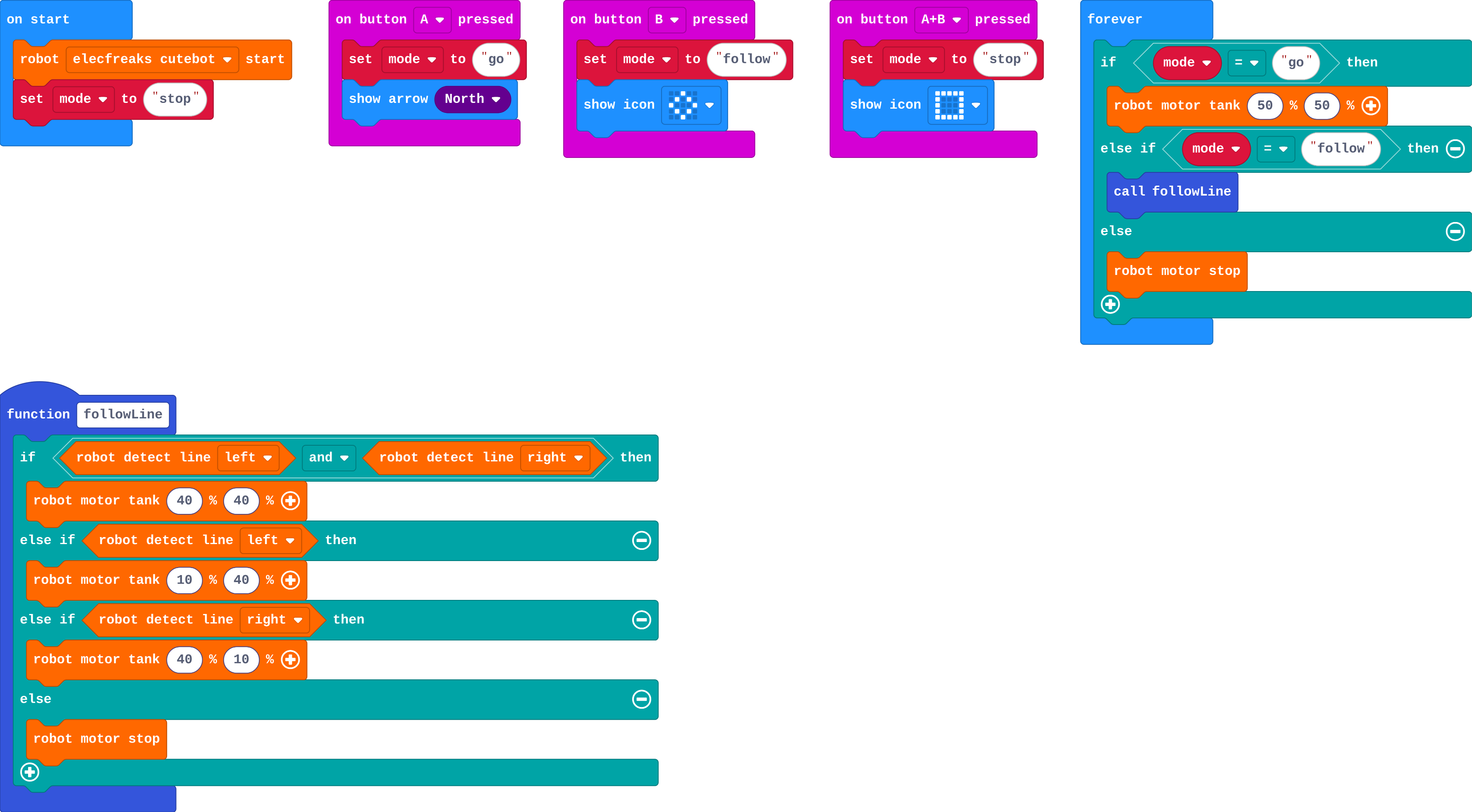
Show as code
function followLine () {
    if (robot.detectLine(RobotLineDetector.Left) && robot.detectLine(RobotLineDetector.Right)) {
        robot.motorTank(40, 40)
    } else if (robot.detectLine(RobotLineDetector.Left)) {
        robot.motorTank(10, 40)
    } else if (robot.detectLine(RobotLineDetector.Right)) {
        robot.motorTank(40, 10)
    } else {
        robot.motorStop()
    }
}
input.onButtonPressed(Button.A, function () {
    mode = "go"
    basic.showArrow(ArrowNames.North)
})
input.onButtonPressed(Button.B, function () {
    mode = "follow"
    basic.showIcon(IconNames.Diamond)
})
input.onButtonPressed(Button.AB, function () {
    mode = "stop"
    basic.showIcon(IconNames.Square)
})
let mode = ""
robot.elecfreaksCuteBot.start()
mode = "stop"
basic.forever(function () {
    if (mode == "go") {
        robot.motorTank(50, 50)
    } else if (mode == "follow") {
        followLine()
    } else {
        robot.motorStop()
    }
})
Modify › Explore mode
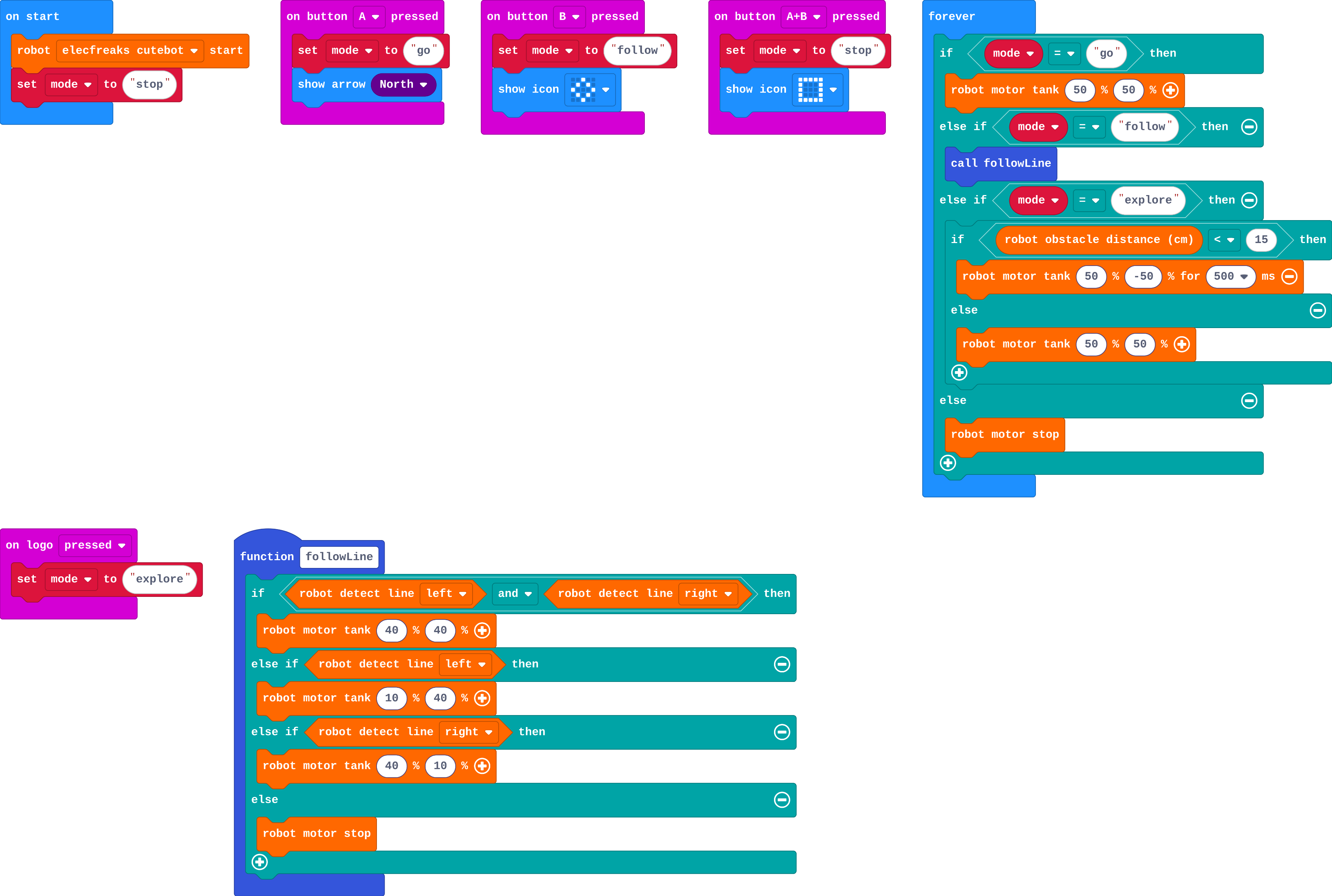
Show as code
function followLine () {
    if (robot.detectLine(RobotLineDetector.Left) && robot.detectLine(RobotLineDetector.Right)) {
        robot.motorTank(40, 40)
    } else if (robot.detectLine(RobotLineDetector.Left)) {
        robot.motorTank(10, 40)
    } else if (robot.detectLine(RobotLineDetector.Right)) {
        robot.motorTank(40, 10)
    } else {
        robot.motorStop()
    }
}
input.onButtonPressed(Button.A, function () {
    mode = "go"
    basic.showArrow(ArrowNames.North)
})
input.onButtonPressed(Button.B, function () {
    mode = "follow"
    basic.showIcon(IconNames.Diamond)
})
input.onButtonPressed(Button.AB, function () {
    mode = "stop"
    basic.showIcon(IconNames.Square)
})
input.onLogoEvent(TouchButtonEvent.Pressed, function () {
    mode = "explore"
})
let mode = ""
robot.elecfreaksCuteBot.start()
mode = "stop"
basic.forever(function () {
    if (mode == "go") {
        robot.motorTank(50, 50)
    } else if (mode == "follow") {
        followLine()
    } else if (mode == "explore") {
        if (robot.obstacleDistance() < 15) {
            robot.motorTank(50, -50, 500)
        } else {
            robot.motorTank(50, 50)
        }
    } else {
        robot.motorStop()
    }
})
Make
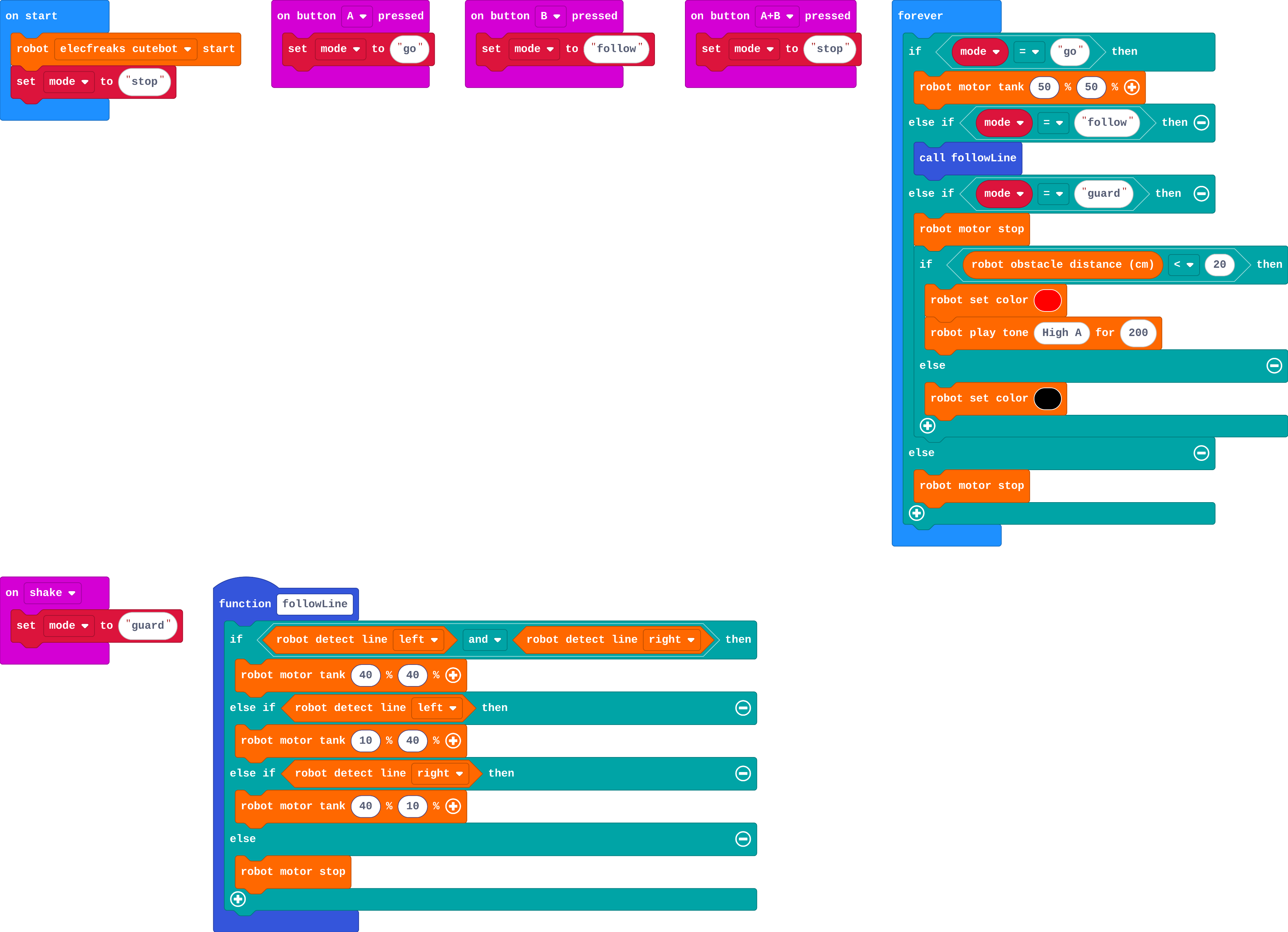
Show as code
function followLine () {
    if (robot.detectLine(RobotLineDetector.Left) && robot.detectLine(RobotLineDetector.Right)) {
        robot.motorTank(40, 40)
    } else if (robot.detectLine(RobotLineDetector.Left)) {
        robot.motorTank(10, 40)
    } else if (robot.detectLine(RobotLineDetector.Right)) {
        robot.motorTank(40, 10)
    } else {
        robot.motorStop()
    }
}
input.onButtonPressed(Button.A, function () {
    mode = "go"
})
input.onButtonPressed(Button.B, function () {
    mode = "follow"
})
input.onButtonPressed(Button.AB, function () {
    mode = "stop"
})
input.onGesture(Gesture.Shake, function () {
    mode = "guard"
})
let mode = ""
robot.elecfreaksCuteBot.start()
mode = "stop"
basic.forever(function () {
    if (mode == "go") {
        robot.motorTank(50, 50)
    } else if (mode == "follow") {
        followLine()
    } else if (mode == "guard") {
        robot.motorStop()
        if (robot.obstacleDistance() < 20) {
            robot.setColor(0xff0000)
            robot.playTone(880, 200)
        } else {
            robot.setColor(0x000000)
        }
    } else {
        robot.motorStop()
    }
})
Stretch and support
Stretch: Make one button cycle through the modes: A sets mode to the next one in a list (go, follow, explore, stop). Or count how many times guard mode was triggered.
Support: Give the guard branch's else if with its question; students add the stop, the distance if and the lights.
Exit ticket
Why does the robot keep following the line after you let go of B?
B set the mode variable to follow. The variable keeps that value, and forever checks it every time round, so it keeps calling followLine.
What each step is for
- Investigate: A button only changes the mode. forever reads the mode every time round and does that job, so the robot keeps doing it until the mode changes.
- Modify: Adding a job means a new mode name, something that sets it, and a branch in forever that does it.
Where it leads
Next unit: Talk. The buttons move to a second micro:bit, which becomes a remote control. Real-world links: lawn-mower and vacuum modes, a lift's modes (going up, going down, doors open), traffic lights.