Else and chasing
Students build an enemy that chases the player with if … else by comparing positions, then meet the follow block that does the same steering for them.
Classroom resources
Load these into Waypoints Prepare: choose Load URL and paste the copied address, or download the file and import it. In Prepare, the worksheet's Teacher edition shows the answers; the student copy hides them.
Students will be able to
- I can use if … else so exactly one of two things happens.
- I can compare two sprites' positions to decide which way one should move.
- I can use else if to choose between more than two options.
- I can explain what the follow block does, because I have built it myself.
Timing
Predict and Run 8 min · Investigate 12 min · Modify 15 min · Make 10 min · Sheepdog 5 min
Before class
if … else has two parts and exactly one runs: the first when the question is true, the else part when it is false. else if adds another question, asked only when the ones above were false.
The chaser asks is cat x < mouse x? If yes, the mouse is to the right of the cat, so the cat's vx (speed across) must be positive. Otherwise it is negative (go left). Up and down works the same with y and vy; y counts down, so a mouse lower on the screen has a bigger y and the cat needs a positive vy.
The planted misconception (Zoe's cat) is a swapped sign: the cat runs away. It is easy to make, because "less than" and "go right" do not sound alike. Read it aloud: "if the mouse is to my right, go right."
After students have built the chaser, they meet follow (Sprites), which does the steering in one block. This is "build it yourself, then meet the real tool": they now know what the block does inside. The Make (a patrolling guard) uses else if with no else, so the guard keeps walking in the middle.
Running the lesson
- Predict: most say the cat walks right. Ask what happens when it reaches the mouse (it wobbles: at equal x, else runs). Ask: which way is the mouse from the cat? Which way is vx set?
- Run: let students run around. The cat only follows left and right: it ignores up and down. That is the first Modify.
- Investigate: the trace has one trap (80 and 80: not less than, so else). Zoe's cat: load it, run it, then fix it by swapping the two speeds.
- Modify: up and down is a copy of the first if … else with y and vy. Then the overlap ends the game. Then follow: one block replaces both ifs, and it moves diagonally.
- Make: the guard changes direction only at the ends. Without else, in the middle nothing changes, so it keeps walking.
- Sheepdog: the sheep runs away on purpose (signs swapped). Adding y is a copy of the x part.
In class
On the slides at these points. Students can do the whole lesson on their own; these are for the room. In the deck, the Run, Modify and Make slides have the live playground in them (the tutorial link is the backup), and the notes above are in each slide's speaker notes.
- Hot and cold (investigate, 4 min)
One student is the cat with eyes closed. The class calls "left" or "right" every second, depending on which side the mouse is.
Exactly one word each time: that is if … else.
- Test the guard (end, 3 min)
Show your patrolling guard to the next pair. Does it turn at both ends?
The hard part (on purpose)
Choosing the sign of vx from two positions. Ask them to say in words which side the player is on before choosing positive or negative.
When students get stuck
| What you will see | A question to ask | The fix |
|---|---|---|
| The enemy runs away from the player. | If the player is to the enemy's right, should vx be positive or negative? | Positive. Swap the two speeds in the if … else. |
| The guard stops or shakes at one end. | What does each part set vx to, and which way is the guard going when it gets there? | Past 140 it must walk left (negative vx); past 20, right (positive vx). Check both questions use the right edge. |
| The cat only chases across, never up or down. | Which blocks set the cat's vy? | None yet. Add a second if … else that compares cat y with mouse y and sets vy. |
Answers to the checks
- Predict: The cat starts at x 20, the mouse at x 140. Nobody touches the keys. What does the cat do?
It walks right, towards the mouse. Its x (20) is less than the mouse's x (140), so its vx is set to 30. When it reaches the mouse it wobbles on the spot: each frame the answer flips between yes and no. - Which way?: For each position, which way does the if … else set the cat's vx?
30, -30, 30, -30
When cat x is less than mouse x the first part runs (30, go right); otherwise the else part runs (-30, go left). At 80 and 80, 80 is not less than 80, so else runs: that is why the cat wobbles when it reaches the mouse. - How many run?: Each frame, how many of the two set vx blocks run?
Exactly one: the first when the answer is yes, the else part when it is no
if … else always runs exactly one part. So the cat always has a direction: there is no frame where it forgets. - Zoe's cat: Zoe built her own cat (the playground has her version). The cat runs away from the mouse, then stops at the edge of the screen. Which part is wrong?
The speeds are the wrong way round: when the mouse is to the right, the cat's vx is set to a negative number
When the cat's x is less than the mouse's x, the mouse is to the right, so the cat needs a positive vx (go right). Zoe's cat gets -30 and goes left. Swap the two speeds (or the < and >, but not both). - Meet the real tool: This cat has no if blocks at all, just one block: set cat follow mouse with speed 30. What does follow do?
Steers the cat towards the mouse every frame, like your if … else blocks, in every direction
follow does the steering for you: every frame the engine turns the cat towards the mouse. It even goes diagonally. You built the same idea yourself, so now you know what the block does inside. - Mix it up: This safe zone asks 'hero y < 30' inside on game update. You fly the hero up to y 20. When does the background change?
Straight away: the question is asked every frame
on game update runs about 30 times a second, so the if notices within a frame that y is less than 30.
Solutions
One possible solution for each task. Other correct programs are fine.
Modify › Up and down
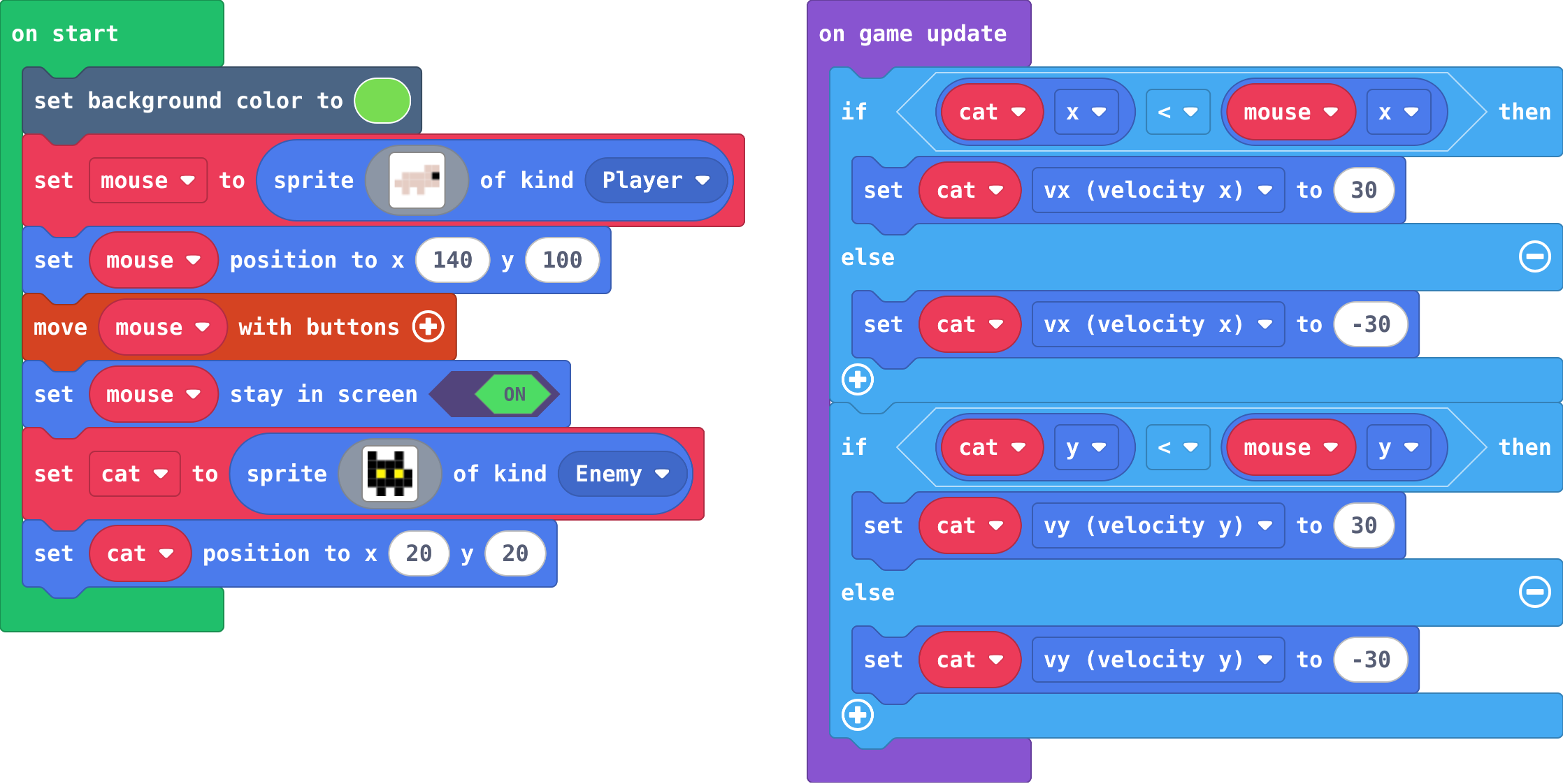
Show as code
scene.setBackgroundColor(7)
let mouse = sprites.create(img`
    . . . . d d
    . d d d d f
    d d d d d d
    . d . d . .
    `, SpriteKind.Player)
mouse.setPosition(140, 100)
controller.moveSprite(mouse)
mouse.setStayInScreen(true)
let cat = sprites.create(img`
    f . . f .
    f f f f .
    f 5 f 5 f
    f f f f f
    . f . f .
    `, SpriteKind.Enemy)
cat.setPosition(20, 20)
game.onUpdate(function () {
    if (cat.x < mouse.x) {
        cat.vx = 30
    } else {
        cat.vx = -30
    }
    if (cat.y < mouse.y) {
        cat.vy = 30
    } else {
        cat.vy = -30
    }
})
Modify › Caught!
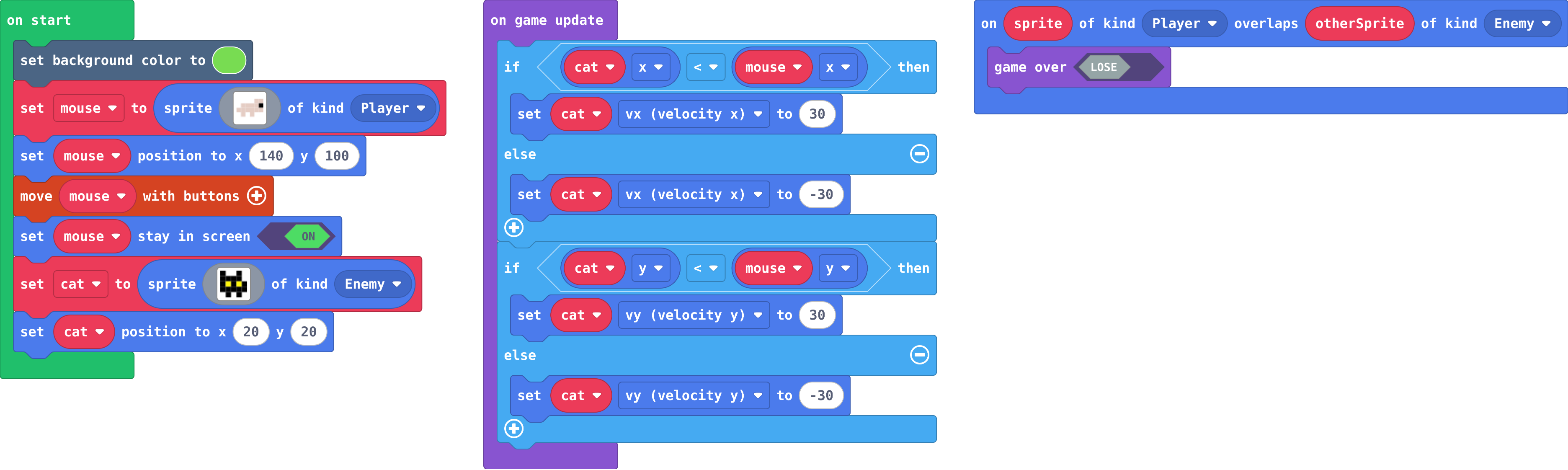
Show as code
scene.setBackgroundColor(7)
let mouse = sprites.create(img`
    . . . . d d
    . d d d d f
    d d d d d d
    . d . d . .
    `, SpriteKind.Player)
mouse.setPosition(140, 100)
controller.moveSprite(mouse)
mouse.setStayInScreen(true)
let cat = sprites.create(img`
    f . . f .
    f f f f .
    f 5 f 5 f
    f f f f f
    . f . f .
    `, SpriteKind.Enemy)
cat.setPosition(20, 20)
game.onUpdate(function () {
    if (cat.x < mouse.x) {
        cat.vx = 30
    } else {
        cat.vx = -30
    }
    if (cat.y < mouse.y) {
        cat.vy = 30
    } else {
        cat.vy = -30
    }
})
sprites.onOverlap(SpriteKind.Player, SpriteKind.Enemy, function (sprite, otherSprite) {
    game.gameOver(false)
})
Modify › Meet the real tool
Open task: any program that does what the step asks.
Make
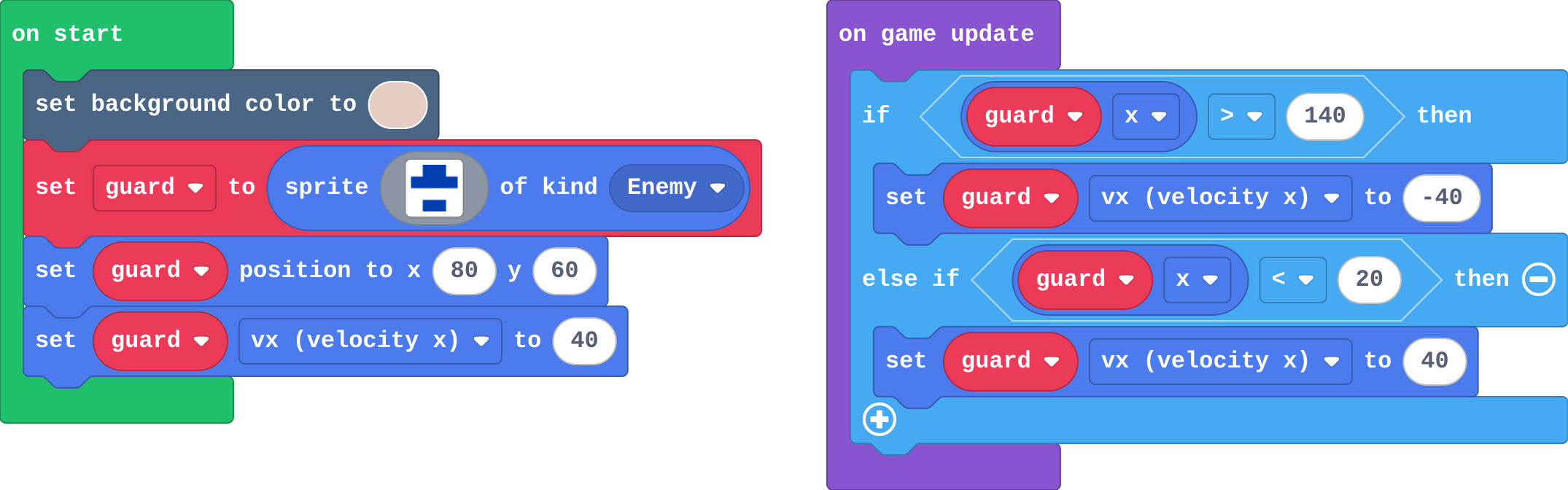
Show as code
scene.setBackgroundColor(13)
let guard = sprites.create(img`
    . 8 8 .
    8 8 8 8
    . 1 1 .
    . 8 8 .
    `, SpriteKind.Enemy)
guard.setPosition(80, 60)
guard.vx = 40
game.onUpdate(function () {
    if (guard.x > 140) {
        guard.vx = -40
    } else if (guard.x < 20) {
        guard.vx = 40
    }
})
Change a sheepdog
Open task: any program that does what the step asks.
Stretch and support
Stretch: Make two guards that patrol at different speeds and heights, and make the game end if either touches the player. Or make a cat that only chases when the mouse is close (an if around the chase).
Support: Give students the first if … else ready-made and ask them to copy it for y. For the guard, give the if and else if with empty questions.
Exit ticket
An enemy is at x 100 and the player is at x 30. Should the enemy's vx be positive or negative to chase? Why?
Negative. The player has a smaller x, so it is to the left, and a negative vx moves the enemy left.
What each step is for
- Investigate: Comparing two positions tells a sprite which way to go: if my x is less than yours, you are to my right. if … else picks exactly one direction every frame, and the sign of vx decides which way that is.
- Modify: Up and down is the same question asked about y; and once you have built a chaser yourself, follow is the engine's ready-made version of the same steering.
- Mix it up: An if inside on game update is asked every frame, so it acts as soon as its question becomes true.
Where it leads
Next unit: projectiles and lists, so the player can fight back. Class ideas: a chase game with a cat that speeds up over time; a 'follow the leader' line of ducks using follow; discuss how ghosts in Pac-Man each chase differently.