---
marp: true
theme: default
html: true
---

# Else and chasing

Arcade Foundations · Decide

<!-- Speaker note: Students build an enemy that chases the player with if … else by comparing positions, then meet the follow block that does the same steering for them. About 50 minutes (Predict and Run 8 min · Investigate 12 min · Modify 15 min · Make 10 min · Sheepdog 5 min). -->

---

## Today

**We are learning to** compare two positions to steer an enemy towards the player with if … else, then meet the follow block that does it for you.

- I can use if … else so exactly one of two things happens.
- I can compare two sprites' positions to decide which way one should move.
- I can use else if to choose between more than two options.
- I can explain what the follow block does, because I have built it myself.

<!-- Speaker note: Before class: **if … else** has two parts and **exactly one** runs: the first when the question is true, the **else** part when it is false. **else if** adds another question, asked only when the ones above were false. The chaser asks *is cat x < mouse x?* If yes, the mouse is to the **right** of the cat, so the cat's **vx** (speed across) must be **positive**. Otherwise it is negative (go left). Up and down works the same with **y** and **vy**; y counts down, so a mouse lower on the screen has a bigger y and the cat needs a positive vy. The planted misconception (Zoe's cat) is a swapped sign: the cat runs away. It is easy to make, because "less than" and "go right" do not sound alike. Read it aloud: "if the mouse is to my right, go right." After students have built the chaser, they meet **follow** (Sprites), which does the steering in one block. This is "build it yourself, then meet the real tool": they now know what the block does inside. The Make (a patrolling guard) uses **else if** with no else, so the guard keeps walking in the middle. Teacher: Sheepdog: the sheep runs away on purpose (signs swapped). Adding y is a copy of the x part. -->

---

## Why it matters

> The ghosts in Pac-Man, the zombies in Plants vs. Zombies, a guard walking up and down in a stealth game: each one asks 'where is the player?' and turns that way.

<!-- Speaker note: Last lesson an **if** in **on game update** kept asking a question. Now the enemy will ask a question about the **player**: *is my x less than the player's x?* If yes, the player is to the right, so go right. **Otherwise** (**else**), go left. An **if … else** block has two parts, and **exactly one** of them runs: the first when the answer is yes, the else part when it is no. Click the **+** at the bottom of an if block to add **else**. -->

---

<span style="background:#dbeafe; color:#1a1a1a; border:1.5px solid #3b82f6; padding:6px 18px; border-radius:8px; font-size:1em; font-weight:500;">💬 Discussion</span>

## Predict

![h:360](https://studio.learningwaypoints.com/tutorials/_pictures/makecode/code/d1c84a204fa7.png?v=3680f4e17d805c7d)

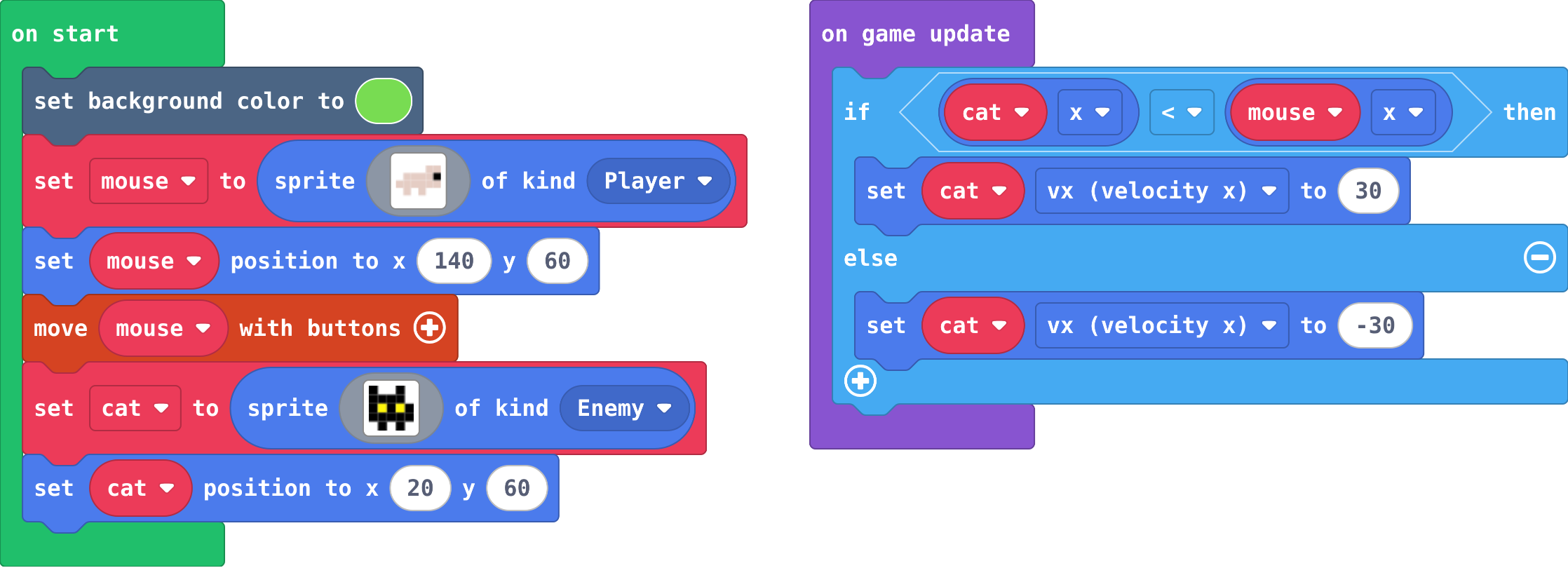
**The cat starts at x 20, the mouse at x 140. Nobody touches the keys. What does the cat do?**

- Walks right, towards the mouse
- Walks right, past the mouse and off the screen
- Stays where it is
- Walks left, off the screen

<!-- Speaker note: What happens: It walks right, towards the mouse. Its x (20) is less than the mouse's x (140), so its vx is set to 30. When it reaches the mouse it wobbles on the spot: each frame the answer flips between yes and no. Take two or three predictions before anyone runs it. -->

<!-- Speaker note: Teacher: most say the cat walks right. Ask what happens when it reaches the mouse (it wobbles: at equal x, else runs). Ask: which way is the mouse from the cat? Which way is vx set? -->

---

<span style="background:#dcfce7; color:#1a1a1a; border:1.5px solid #22c55e; padding:6px 18px; border-radius:8px; font-size:1em; font-weight:500;">✅ Check</span>

## What happened?

* It walks right, towards the mouse. Its x (20) is less than the mouse's x (140), so its vx is set to 30. When it reaches the mouse it wobbles on the spot: each frame the answer flips between yes and no.

<!-- Speaker note: Reveal after running. Ask who predicted it, and what made them think so. -->

---

<span style="background:#fef3c7; color:#1a1a1a; border:1.5px solid #f59e0b; padding:6px 18px; border-radius:8px; font-size:1em; font-weight:500;">✍️ Activity</span>

## Run it

Open the lesson at this step and try it together.

[studio.learningwaypoints.com/tutorials/code/arcade/arcade-chase/?full=step-2#step-2](https://studio.learningwaypoints.com/tutorials/code/arcade/arcade-chase/?full=step-2#step-2)

<!-- Speaker note: Now move the mouse with the arrow keys. Go left, right, up and down. What does the cat follow, and what does it ignore? Students should be able to say: I ran away from the cat with the arrow keys and compared what it did with my prediction. -->

<!-- Speaker note: Teacher: let students run around. The cat only follows left and right: it ignores up and down. That is the first Modify. -->

---

<span style="background:#dbeafe; color:#1a1a1a; border:1.5px solid #3b82f6; padding:6px 18px; border-radius:8px; font-size:1em; font-weight:500;">💬 Discussion</span>

## Investigate

![h:360](https://studio.learningwaypoints.com/tutorials/_pictures/makecode/code/d1c84a204fa7.png?v=3680f4e17d805c7d)

<!-- Speaker note: What this step is for: Comparing two positions tells a sprite which way to go: if my x is less than yours, you are to my right. if … else picks exactly one direction every frame, and the sign of vx decides which way that is. -->

<!-- Speaker note: Teacher: the trace has one trap (80 and 80: not less than, so else). Zoe's cat: load it, run it, then fix it by swapping the two speeds. -->

---

<span style="background:#dcfce7; color:#1a1a1a; border:1.5px solid #22c55e; padding:6px 18px; border-radius:8px; font-size:1em; font-weight:500;">✅ Check</span>

## Which way?

**For each position, which way does the if … else set the cat's vx?**

| cat x | mouse x | cat vx |
|---|---|---|
| 20 | 140 | ? |
| 120 | 50 | ? |
| 80 | 81 | ? |
| 80 | 80 | ? |

* Answer: 30, -30, 30, -30

<!-- Speaker note: When cat x is less than mouse x the first part runs (30, go right); otherwise the else part runs (-30, go left). At 80 and 80, 80 is not less than 80, so else runs: that is why the cat wobbles when it reaches the mouse. -->

<style scoped>pre, marp-pre { font-size: 0.5em; line-height: 1.25; } section { font-size: 26px; }</style>

---

<span style="background:#dcfce7; color:#1a1a1a; border:1.5px solid #22c55e; padding:6px 18px; border-radius:8px; font-size:1em; font-weight:500;">✅ Check</span>

## How many run?

**Each frame, how many of the two set vx blocks run?**

- Exactly one: the first when the answer is yes, the else part when it is no
- None, unless a button is pressed
- Both, one after the other
- Only the first one

* Answer: Exactly one: the first when the answer is yes, the else part when it is no

<!-- Speaker note: if … else always runs exactly one part. So the cat always has a direction: there is no frame where it forgets. -->

<style scoped>pre, marp-pre { font-size: 0.5em; line-height: 1.25; } section { font-size: 27px; }</style>

---

<span style="background:#dcfce7; color:#1a1a1a; border:1.5px solid #22c55e; padding:6px 18px; border-radius:8px; font-size:1em; font-weight:500;">✅ Check</span>

## Zoe's cat

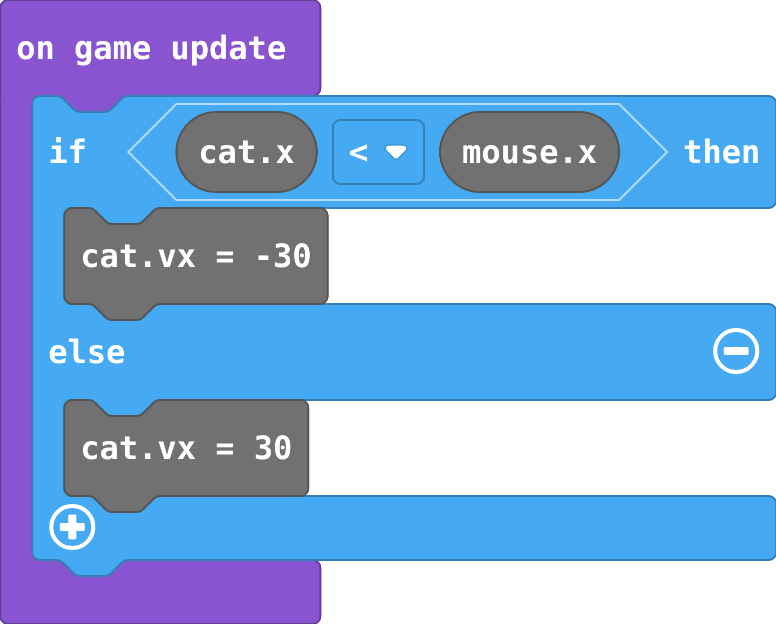
Zoe's blocks (load them in the playground and run them):
![h:312](https://studio.learningwaypoints.com/tutorials/_pictures/makecode/code/7e1990c4fb9e.png?v=4de52a048d97801f)

**Zoe built her own cat (the playground has her version). The cat runs away from the mouse, then stops at the edge of the screen. Which part is wrong?**

- 30 is too slow to catch the mouse
- The speeds are the wrong way round: when the mouse is to the right, the cat's vx is set to a negative number
- The &lt; should be &gt;, and the speeds are fine
- It needs to be in on start

* Answer: The speeds are the wrong way round: when the mouse is to the right, the cat's vx is set to a negative number

<!-- Speaker note: When the cat's x is less than the mouse's x, the mouse is to the right, so the cat needs a positive vx (go right). Zoe's cat gets -30 and goes left. Swap the two speeds (or the < and >, but not both). -->

<style scoped>pre, marp-pre { font-size: 0.5em; line-height: 1.25; } section { font-size: 20px; }</style>

---

<span style="background:#fef3c7; color:#1a1a1a; border:1.5px solid #f59e0b; padding:6px 18px; border-radius:8px; font-size:1em; font-weight:500;">✍️ Activity</span>

## Hot and cold <span style="font-size:.6em;color:#64748b">(4 min)</span>

One student is the cat with eyes closed. The class calls "left" or "right" every second, depending on which side the mouse is.

<!-- Speaker note: Exactly one word each time: that is if … else. -->

---

<span style="background:#fef3c7; color:#1a1a1a; border:1.5px solid #f59e0b; padding:6px 18px; border-radius:8px; font-size:1em; font-weight:500;">✍️ Activity</span>

## Modify


- **Up and down:** Your cat only chases across. Add a second **if … else** for up and down, using **y** and **vy**.
- **Caught!:** Make the game end when the cat touches the mouse.
- **Meet the real tool:** Load the **follow** version and run it. Arcade has a block (**follow**, in **Sprites**) that does your chasing in one block. Try a speed of 60.

[Open this step](https://studio.learningwaypoints.com/tutorials/code/arcade/arcade-chase/?full=step-4#step-4)

<!-- Speaker note: What this step is for: Up and down is the same question asked about y; and once you have built a chaser yourself, follow is the engine's ready-made version of the same steering. Hints, in order: Add a second if … else under the first one, inside on game update. / Ask 'cat y < mouse y'. y counts down, so if the mouse is lower, the cat needs a positive vy. / on overlap is in Sprites › Overlaps. Choose Player and Enemy. / game over is in Game. For students who need more support: Give students the first if … else ready-made and ask them to copy it for y. For the guard, give the if and else if with empty questions. For early finishers: Make two guards that patrol at different speeds and heights, and make the game end if either touches the player. Or make a cat that only chases when the mouse is close (an if around the chase). The hard part, on purpose: Choosing the sign of vx from two positions. Ask them to say in words which side the player is on before choosing positive or negative. When students get stuck: The enemy runs away from the player. Ask: If the player is to the enemy's right, should vx be positive or negative? Fix: Positive. Swap the two speeds in the if … else. / The guard stops or shakes at one end. Ask: What does each part set vx to, and which way is the guard going when it gets there? Fix: Past 140 it must walk left (negative vx); past 20, right (positive vx). Check both questions use the right edge. / The cat only chases across, never up or down. Ask: Which blocks set the cat's vy? Fix: None yet. Add a second if … else that compares cat y with mouse y and sets vy. -->

<!-- Speaker note: Teacher: up and down is a copy of the first if … else with y and vy. Then the overlap ends the game. Then follow: one block replaces both ifs, and it moves diagonally. -->

---

<span style="background:#dbeafe; color:#1a1a1a; border:1.5px solid #3b82f6; padding:6px 18px; border-radius:8px; font-size:1em; font-weight:500;">💬 Discussion</span>

## Investigate: Mix it up

![h:224](https://studio.learningwaypoints.com/tutorials/_pictures/makecode/code/9518997d0013.png?v=6146b78e76f5336c)

<!-- Speaker note: What this step is for: An if inside on game update is asked every frame, so it acts as soon as its question becomes true. -->

---

<span style="background:#dcfce7; color:#1a1a1a; border:1.5px solid #22c55e; padding:6px 18px; border-radius:8px; font-size:1em; font-weight:500;">✅ Check</span>

## Mix it up

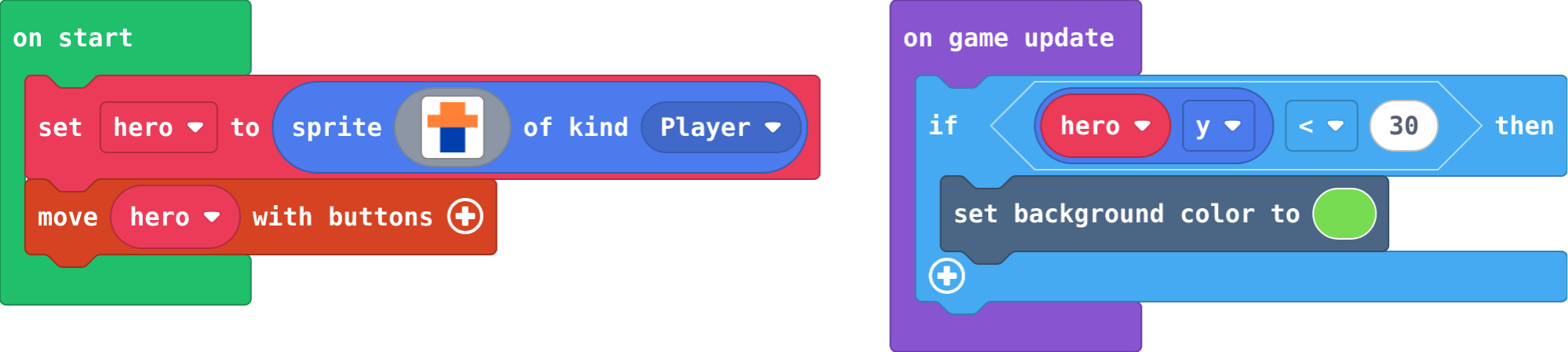
**This safe zone asks 'hero y &lt; 30' inside on game update. You fly the hero up to y 20. When does the background change?**

- After one second
- Only when the game starts
- Never: if only works in on start
- Straight away: the question is asked every frame

* Answer: Straight away: the question is asked every frame

<!-- Speaker note: on game update runs about 30 times a second, so the if notices within a frame that y is less than 30. What this step is for: An if inside on game update is asked every frame, so it acts as soon as its question becomes true. -->

---

<span style="background:#fef3c7; color:#1a1a1a; border:1.5px solid #f59e0b; padding:6px 18px; border-radius:8px; font-size:1em; font-weight:500;">✍️ Activity</span>

## Make

Make a **guard** that patrols. The guard already walks right. Make it:

- turn round and walk **left** when it gets past x **140**,
- turn round and walk **right** when it gets past x **20**,

for ever. Use one **if** with an **else if** (the **+** on the if block adds more parts; the **−** takes one away).

[Open this step](https://studio.learningwaypoints.com/tutorials/code/arcade/arcade-chase/?full=step-6#step-6)

<!-- Speaker note: Hints, in order: Use on game update and one if block with an else if: one question for each end of the walk. / If guard x > 140, set guard vx to -40 (walk left). Else if guard x < 20, set guard vx to 40. / There is no else: in the middle of the walk, the guard keeps going the way it was going. -->

<!-- Speaker note: Teacher: the guard changes direction only at the ends. Without else, in the middle nothing changes, so it keeps walking. -->

---

<span style="background:#fef3c7; color:#1a1a1a; border:1.5px solid #f59e0b; padding:6px 18px; border-radius:8px; font-size:1em; font-weight:500;">✍️ Activity</span>

## Change a sheepdog

Here the sheep runs **away** from the dog (you move the dog). Make the sheep run away up and down as well, and make it a bit slower than the dog so you can herd it.

[Open this step](https://studio.learningwaypoints.com/tutorials/code/arcade/arcade-chase/?full=step-7#step-7)

---

<span style="background:#fef3c7; color:#1a1a1a; border:1.5px solid #f59e0b; padding:6px 18px; border-radius:8px; font-size:1em; font-weight:500;">✍️ Activity</span>

## Test the guard <span style="font-size:.6em;color:#64748b">(3 min)</span>

Show your patrolling guard to the next pair. Does it turn at both ends?

---

<span style="background:#dcfce7; color:#1a1a1a; border:1.5px solid #22c55e; padding:6px 18px; border-radius:8px; font-size:1em; font-weight:500;">✅ Check</span>

## Exit ticket

**An enemy is at x 100 and the player is at x 30. Should the enemy's vx be positive or negative to chase? Why?**

* Negative. The player has a smaller x, so it is to the left, and a negative vx moves the enemy left.

<!-- Speaker note: Students answer on paper or a mini whiteboard before the reveal. Anyone who cannot answer needs the main idea again next lesson. Where this leads: Next unit: projectiles and lists, so the player can fight back. Class ideas: a chase game with a cat that speeds up over time; a 'follow the leader' line of ducks using follow; discuss how ghosts in Pac-Man each chase differently. -->