Every one of a kind
Students get a list of every sprite of a kind with array of sprites of kind, and use a for element loop to do something to each one.
Classroom resources
Load these into Waypoints Prepare: choose Load URL and paste the copied address, or download the file and import it. In Prepare, the worksheet's Teacher edition shows the answers; the student copy hides them.
Students will be able to
- I can do something to every sprite of a kind with one press.
- I can say how many times a for element loop runs.
- I can put blocks inside a loop when they should happen for each sprite.
Timing
Predict and Run 7 min · Investigate 10 min · Modify 8 min · Mix it up 3 min · Make 8 min · Fireworks 4 min
Before class
A list (an array in MakeCode) is many values in order under one name. array of sprites of kind Enemy (Sprites) is a list of every enemy in the game right now. A for element loop (Loops; MakeCode calls it "for element value of list") runs its blocks once for each item, with value standing for that item each time. That is how one button press can reach sprites that have no names. Blocks inside the loop run once per sprite; blocks after it run once.
Running the lesson
- Predict: some students expect only one alien to stop, or none, because the aliens have no names. Ask the 'no names' group how a teacher could tell every student to sit without naming them.
- Investigate: Mia's smart bomb is the inside-or-after slip: the score goes up once.
- Modify: anything you can do to one sprite goes inside the loop.
- Mix it up: projectiles, from the last course.
- Make: destroy and change score both go inside the loop.
In class
On the slides at these points. Students can do the whole lesson on their own; these are for the room. In the deck, the Run, Modify and Make slides have the live playground in them (the tutorial link is the backup), and the notes above are in each slide's speaker notes.
- Everyone wearing blue (investigate, 3 min)
The teacher says "for each student wearing blue: stand up and clap". Then "for each student wearing blue: stand up. Then clap once."
The first claps once per student; the second claps once in all. Inside the loop, and after it.
The hard part (on purpose)
Which blocks go inside the loop. Ask: should this happen once, or once for each alien?
When students get stuck
| What you will see | A question to ask | The fix |
|---|---|---|
| The smart bomb only scores 1, however many aliens there were. | Is change score inside the loop, or after it? | Inside the loop it runs once per alien. Drag it inside, under destroy value. |
| Nothing happens when B is pressed. | Which kind does array of sprites of kind name? | Choose Enemy in its dropdown. |
| The loop's value block is missing. | Where does value come from? | Drag value out of the for element block itself. |
Answers to the checks
- Predict: There are 6 aliens falling. You press B. What happens?
All 6 stop. array of sprites of kind Enemy is a list of all 6, and the for element loop runs set value vy to 0 once for each, with value as that alien. - How many times?: There are 4 aliens on the screen when you press B. How many times does set value vy to 0 run?
4
The list has 4 aliens, and the loop runs its blocks once for each one. - Mia's smart bomb: Mia's smart bomb has change score by 1 after the loop, not inside it. There are 5 aliens. She presses B. How much does the score go up?
1
Only the blocks inside the loop run once per alien. A block after the loop runs once, when the loop has finished. - In Python: The loop in Python. Match each part with what it does.
sprites.all_of_kind(SpriteKind.enemy) → B. a list of every enemy right now; for value in …: → C. runs the indented lines once for each item; value.vy = 0 → A. stops this one alien - Mix it up: A shot is fired, misses, and flies off the top of the screen. What happens to it?
The engine removes it
The engine removes a projectile as soon as it leaves the screen.
Solutions
One possible solution for each task. Other correct programs are fine.
Modify › Back to the top
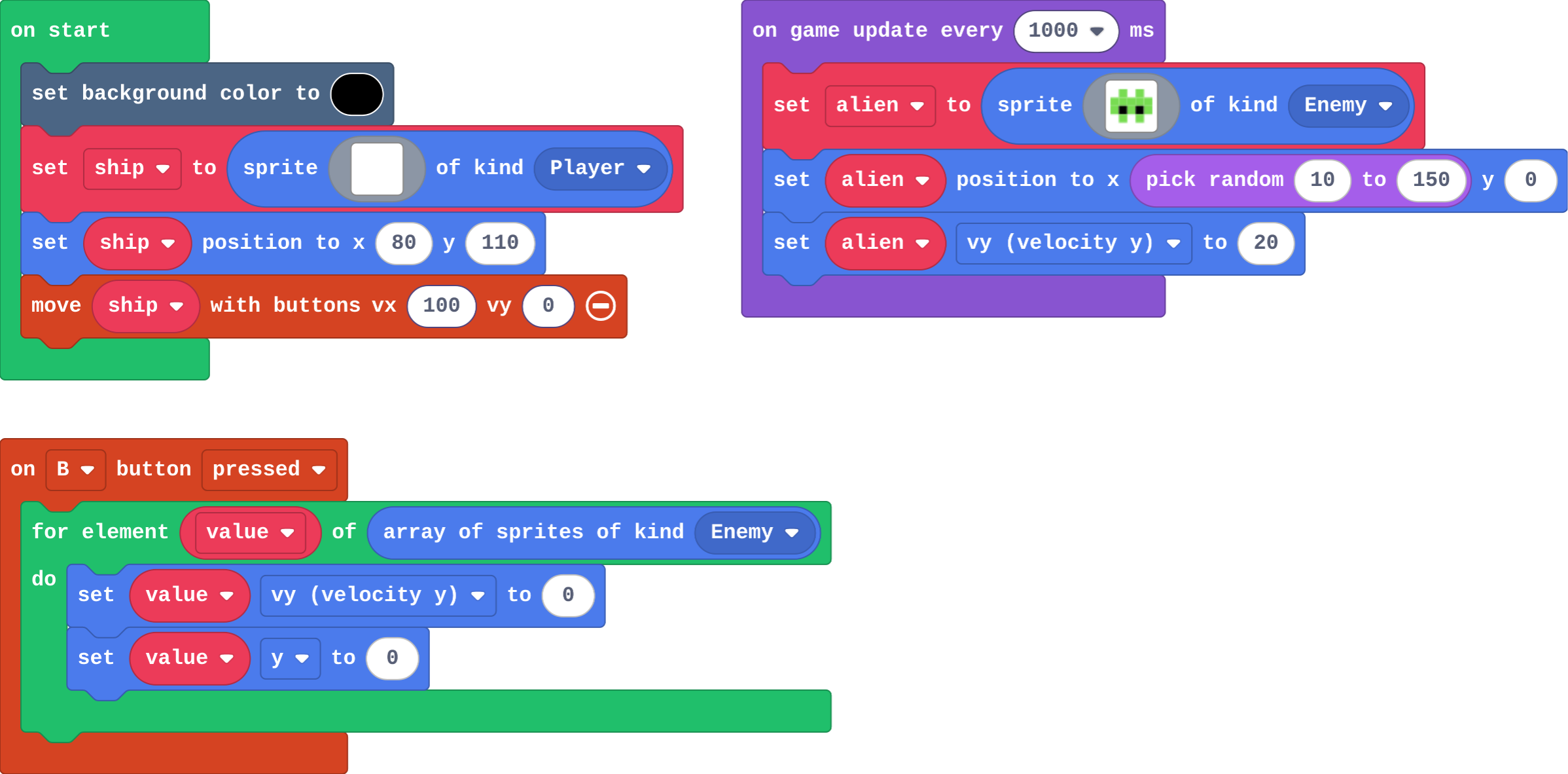
Show as code
scene.setBackgroundColor(15)
let ship = sprites.create(img`
    . . 1 . .
    . 1 1 1 .
    1 1 1 1 1
    `, SpriteKind.Player)
ship.setPosition(80, 110)
controller.moveSprite(ship, 100, 0)
game.onUpdateInterval(1000, function () {
    let alien = sprites.create(img`
        . 7 . 7 .
        7 7 7 7 7
        7 f 7 f 7
        . 7 . 7 .
        `, SpriteKind.Enemy)
    alien.setPosition(randint(10, 150), 0)
    alien.vy = 20
})
controller.B.onEvent(ControllerButtonEvent.Pressed, function () {
    for (let value of sprites.allOfKind(SpriteKind.Enemy)) {
        value.vy = 0
        value.y = 0
    }
})
Modify › Speed up
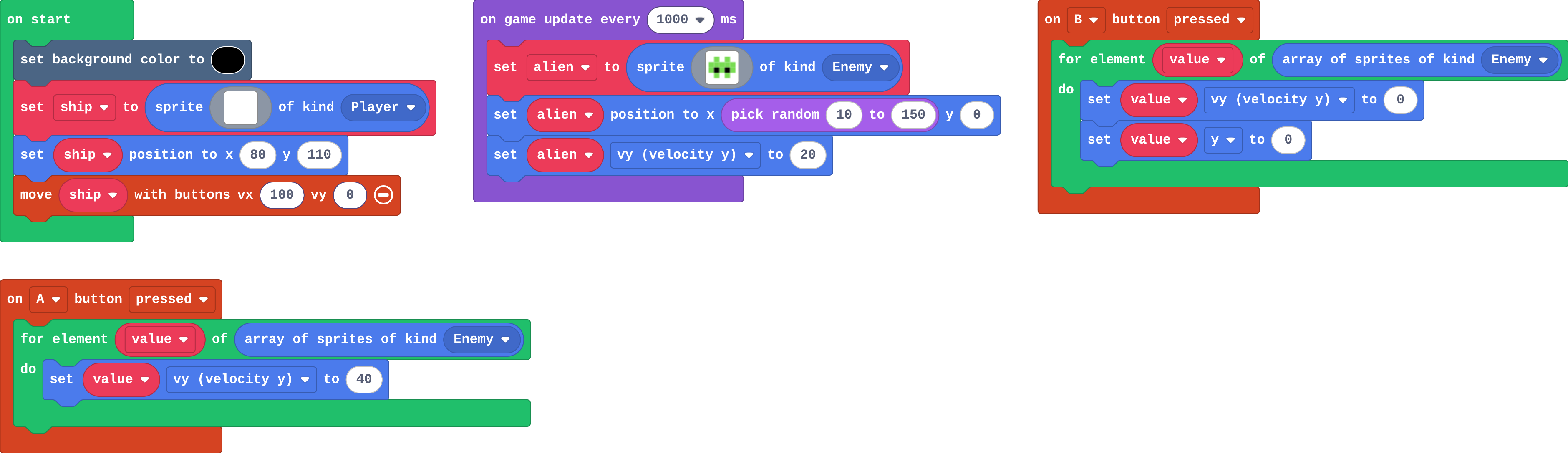
Show as code
scene.setBackgroundColor(15)
let ship = sprites.create(img`
    . . 1 . .
    . 1 1 1 .
    1 1 1 1 1
    `, SpriteKind.Player)
ship.setPosition(80, 110)
controller.moveSprite(ship, 100, 0)
game.onUpdateInterval(1000, function () {
    let alien = sprites.create(img`
        . 7 . 7 .
        7 7 7 7 7
        7 f 7 f 7
        . 7 . 7 .
        `, SpriteKind.Enemy)
    alien.setPosition(randint(10, 150), 0)
    alien.vy = 20
})
controller.B.onEvent(ControllerButtonEvent.Pressed, function () {
    for (let value of sprites.allOfKind(SpriteKind.Enemy)) {
        value.vy = 0
        value.y = 0
    }
})
controller.A.onEvent(ControllerButtonEvent.Pressed, function () {
    for (let value of sprites.allOfKind(SpriteKind.Enemy)) {
        value.vy = 40
    }
})
Make
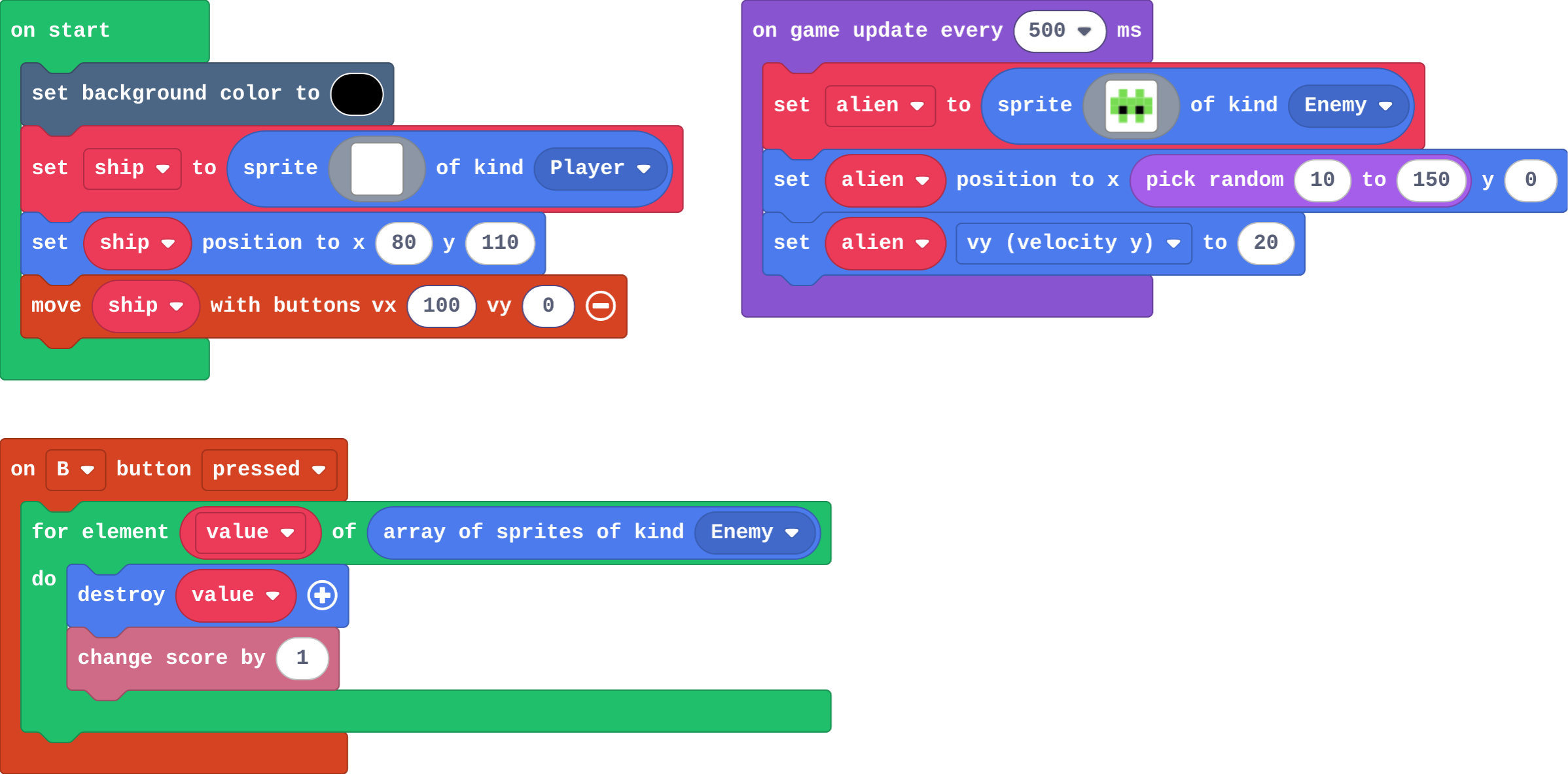
Show as code
scene.setBackgroundColor(15)
let ship = sprites.create(img`
    . . 1 . .
    . 1 1 1 .
    1 1 1 1 1
    `, SpriteKind.Player)
ship.setPosition(80, 110)
controller.moveSprite(ship, 100, 0)
game.onUpdateInterval(500, function () {
    let alien = sprites.create(img`
        . 7 . 7 .
        7 7 7 7 7
        7 f 7 f 7
        . 7 . 7 .
        `, SpriteKind.Enemy)
    alien.setPosition(randint(10, 150), 0)
    alien.vy = 20
})
controller.B.onEvent(ControllerButtonEvent.Pressed, function () {
    for (let value of sprites.allOfKind(SpriteKind.Enemy)) {
        value.destroy()
        info.changeScoreBy(1)
    }
})
Change a firework show
Open task: any program that does what the step asks.
Stretch and support
Stretch: Make a magnet on A+B: every Food sprite flies towards the player (set value vx and vy, or use follow).
Support: Give students the on B pressed block with an empty for element loop already in it, and ask them only to choose the list and fill the loop.
Exit ticket
There are 5 enemies on the screen. A for element loop over array of sprites of kind Enemy contains change score by 1. How much does the score go up?
By 5. The list has 5 enemies, and the loop runs its blocks once for each one.
What each step is for
- Investigate: array of sprites of kind gives a list of every sprite of a kind right now, and a for element loop runs its blocks once for each one, with value as that sprite.
- Modify: Anything you can do to one sprite, the loop can do to every sprite of a kind.
- Mix it up: A projectile is its own kind, and the engine removes it when it leaves the screen.
Where it leads
Next lesson: functions, which name a job such as 'make an enemy' so it can be used in many places. Skillmap: Save the Galaxy (arcade.makecode.com/skillmaps) is a Galaga-style shooter that practises projectiles and enemies.