---
marp: true
theme: default
html: true
---

# Every one of a kind

Arcade advanced skills · Many sprites

<!-- Speaker note: Students get a list of every sprite of a kind with array of sprites of kind, and use a for element loop to do something to each one. About 40 minutes (Predict and Run 7 min · Investigate 10 min · Modify 8 min · Mix it up 3 min · Make 8 min · Fireworks 4 min). -->

---

## Today

**We are learning to** get a list of every sprite of a kind, and use a for element loop to do something to each one.

- I can do something to every sprite of a kind with one press.
- I can say how many times a for element loop runs.
- I can put blocks inside a loop when they should happen for each sprite.

<!-- Speaker note: Before class: A **list** (an **array** in MakeCode) is many values in order under one name. **array of sprites of kind Enemy** (Sprites) is a list of every enemy in the game right now. A **for element** loop (Loops; MakeCode calls it "for element value of list") runs its blocks once for each item, with **value** standing for that item each time. That is how one button press can reach sprites that have no names. Blocks inside the loop run once per sprite; blocks after it run once. Teacher: Mix it up: projectiles, from the last course. -->

---

## Why it matters

> A smart bomb clears the screen, a freeze spell stops every enemy, a magnet pulls in every coin: one press, every sprite of a kind.

<!-- Speaker note: In a shooter, aliens are made by a timer and have no names of their own. How can one button do something to **all** of them? **array of sprites of kind** (in **Sprites**) gives a **list**: every sprite of that kind in the game right now. A **for element** loop (in **Loops**) runs its blocks once for each item in the list, with **value** standing for that item. -->

---

<span style="background:#dbeafe; color:#1a1a1a; border:1.5px solid #3b82f6; padding:6px 18px; border-radius:8px; font-size:1em; font-weight:500;">💬 Discussion</span>

## Predict

![h:360](https://studio.learningwaypoints.com/tutorials/_pictures/makecode/code/4dbf2ceced67.png?v=d6a8014dda547b08)

**There are 6 aliens falling. You press B. What happens?**

- Nothing: the aliens have no names
- All 6 aliens stop
- Only the newest alien stops
- Only one alien stops: the loop runs once

<!-- Speaker note: What happens: All 6 stop. array of sprites of kind Enemy is a list of all 6, and the for element loop runs set value vy to 0 once for each, with value as that alien. Take two or three predictions before anyone runs it. -->

<!-- Speaker note: Teacher: some students expect only one alien to stop, or none, because the aliens have no names. Ask the 'no names' group how a teacher could tell every student to sit without naming them. -->

---

<span style="background:#dcfce7; color:#1a1a1a; border:1.5px solid #22c55e; padding:6px 18px; border-radius:8px; font-size:1em; font-weight:500;">✅ Check</span>

## What happened?

* All 6 stop. array of sprites of kind Enemy is a list of all 6, and the for element loop runs set value vy to 0 once for each, with value as that alien.

<!-- Speaker note: Reveal after running. Ask who predicted it, and what made them think so. -->

---

<span style="background:#fef3c7; color:#1a1a1a; border:1.5px solid #f59e0b; padding:6px 18px; border-radius:8px; font-size:1em; font-weight:500;">✍️ Activity</span>

## Run it

Open the lesson at this step and try it together.

[studio.learningwaypoints.com/tutorials/code/arcade-advanced/arcade-every-one/?full=step-2#step-2](https://studio.learningwaypoints.com/tutorials/code/arcade-advanced/arcade-every-one/?full=step-2#step-2)

<!-- Speaker note: Wait for a few aliens, then press **B**. Students should be able to say: I pressed B with several aliens on the screen and compared what happened with my prediction. -->

---

<span style="background:#dbeafe; color:#1a1a1a; border:1.5px solid #3b82f6; padding:6px 18px; border-radius:8px; font-size:1em; font-weight:500;">💬 Discussion</span>

## Investigate

![h:360](https://studio.learningwaypoints.com/tutorials/_pictures/makecode/code/4dbf2ceced67.png?v=d6a8014dda547b08)

<!-- Speaker note: What this step is for: array of sprites of kind gives a list of every sprite of a kind right now, and a for element loop runs its blocks once for each one, with value as that sprite. -->

<!-- Speaker note: Teacher: Mia's smart bomb is the inside-or-after slip: the score goes up once. -->

---

<span style="background:#dcfce7; color:#1a1a1a; border:1.5px solid #22c55e; padding:6px 18px; border-radius:8px; font-size:1em; font-weight:500;">✅ Check</span>

## How many times?

**There are 4 aliens on the screen when you press B. How many times does set value vy to 0 run?**

* Answer: 4

<!-- Speaker note: The list has 4 aliens, and the loop runs its blocks once for each one. -->

---

<span style="background:#dcfce7; color:#1a1a1a; border:1.5px solid #22c55e; padding:6px 18px; border-radius:8px; font-size:1em; font-weight:500;">✅ Check</span>

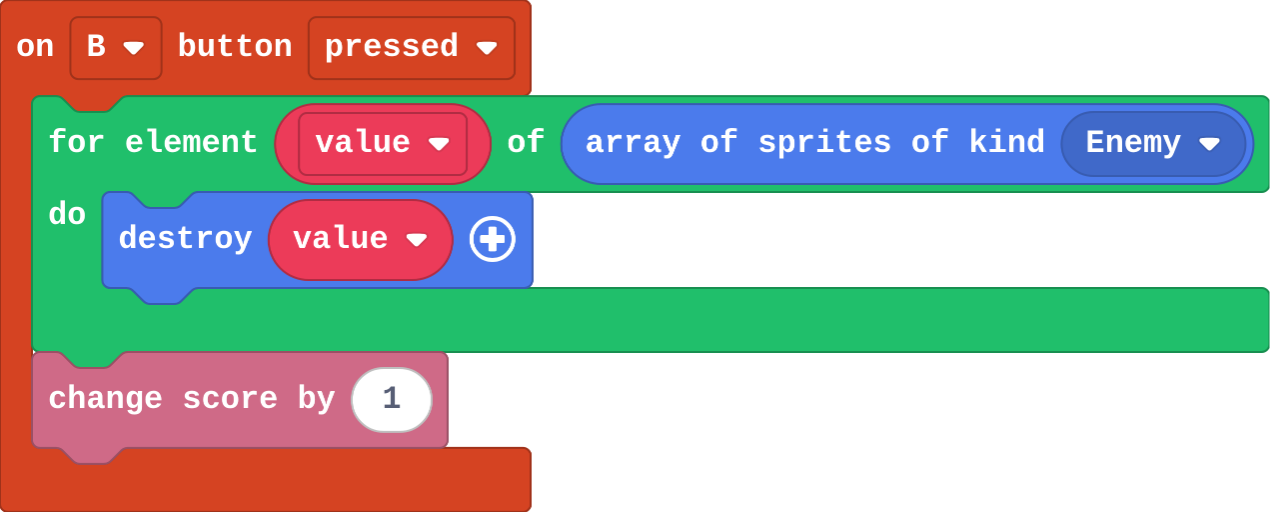
## Mia's smart bomb

Mia's B event:

![h:256](https://studio.learningwaypoints.com/tutorials/_pictures/makecode/code/ecafa7b7968d.png?v=314ca7509a155868)

**Mia's smart bomb has change score by 1 after the loop, not inside it. There are 5 aliens. She presses B. How much does the score go up?**

- 0
- 1
- 5
- 6

* Answer: 1

<!-- Speaker note: Only the blocks inside the loop run once per alien. A block after the loop runs once, when the loop has finished. -->

<style scoped>pre, marp-pre { font-size: 0.5em; line-height: 1.25; } section { font-size: 22px; }</style>

---

<span style="background:#dcfce7; color:#1a1a1a; border:1.5px solid #22c55e; padding:6px 18px; border-radius:8px; font-size:1em; font-weight:500;">✅ Check</span>

## In Python

```python
def on_b_pressed():
    for value in sprites.all_of_kind(SpriteKind.enemy):
        value.vy = 0
controller.B.on_event(ControllerButtonEvent.PRESSED, on_b_pressed)
```

**The loop in Python. Match each part with what it does.**

| | |
|---|---|
| `sprites.all_of_kind(SpriteKind.enemy)` | A. a list of every enemy right now |
| `for value in …:` | B. runs the indented lines once for each item |
| `value.vy = 0` | C. stops this one alien |

* Answer: sprites.all_of_kind(SpriteKind.enemy) → A. a list of every enemy right now; for value in …: → B. runs the indented lines once for each item; value.vy = 0 → C. stops this one alien

<!-- Speaker note:  -->

<style scoped>pre, marp-pre { font-size: 0.5em; line-height: 1.25; } section { font-size: 19px; }</style>

---

<span style="background:#fef3c7; color:#1a1a1a; border:1.5px solid #f59e0b; padding:6px 18px; border-radius:8px; font-size:1em; font-weight:500;">✍️ Activity</span>

## Everyone wearing blue <span style="font-size:.6em;color:#64748b">(3 min)</span>

The teacher says "for each student wearing blue: stand up and clap". Then "for each student wearing blue: stand up. Then clap once."

<!-- Speaker note: The first claps once per student; the second claps once in all. Inside the loop, and after it. -->

---

<span style="background:#fef3c7; color:#1a1a1a; border:1.5px solid #f59e0b; padding:6px 18px; border-radius:8px; font-size:1em; font-weight:500;">✍️ Activity</span>

## Modify


- **Back to the top:** Make **B** send every alien back to the top as it freezes them.
- **Speed up:** Make **A** speed every alien up.

[Open this step](https://studio.learningwaypoints.com/tutorials/code/arcade-advanced/arcade-every-one/?full=step-4#step-4)

<!-- Speaker note: What this step is for: Anything you can do to one sprite, the loop can do to every sprite of a kind. Hints, in order: Inside the loop, add set value y to 0 (Sprites). / Drag in on A button pressed. Put another for element loop over array of sprites of kind Enemy inside it. / Inside the loop: set value vy to 40. For students who need more support: Give students the on B pressed block with an empty for element loop already in it, and ask them only to choose the list and fill the loop. For early finishers: Make a magnet on A+B: every Food sprite flies towards the player (set value vx and vy, or use follow). The hard part, on purpose: Which blocks go inside the loop. Ask: should this happen once, or once for each alien? When students get stuck: The smart bomb only scores 1, however many aliens there were. Ask: Is change score inside the loop, or after it? Fix: Inside the loop it runs once per alien. Drag it inside, under destroy value. / Nothing happens when B is pressed. Ask: Which kind does array of sprites of kind name? Fix: Choose Enemy in its dropdown. / The loop's value block is missing. Ask: Where does value come from? Fix: Drag value out of the for element block itself. -->

<!-- Speaker note: Teacher: anything you can do to one sprite goes inside the loop. -->

---

<span style="background:#dbeafe; color:#1a1a1a; border:1.5px solid #3b82f6; padding:6px 18px; border-radius:8px; font-size:1em; font-weight:500;">💬 Discussion</span>

## Investigate: Mix it up

![h:290](https://studio.learningwaypoints.com/tutorials/_pictures/makecode/code/70615f5cb486.png?v=d8fd8e6094d8334d)

<!-- Speaker note: What this step is for: A projectile is its own kind, and the engine removes it when it leaves the screen. -->

---

<span style="background:#dcfce7; color:#1a1a1a; border:1.5px solid #22c55e; padding:6px 18px; border-radius:8px; font-size:1em; font-weight:500;">✅ Check</span>

## Mix it up

**A shot is fired, misses, and flies off the top of the screen. What happens to it?**

- The engine removes it
- It becomes an alien
- It comes back at the bottom
- It stays above the screen for ever

* Answer: The engine removes it

<!-- Speaker note: The engine removes a projectile as soon as it leaves the screen. What this step is for: A projectile is its own kind, and the engine removes it when it leaves the screen. -->

---

<span style="background:#fef3c7; color:#1a1a1a; border:1.5px solid #f59e0b; padding:6px 18px; border-radius:8px; font-size:1em; font-weight:500;">✍️ Activity</span>

## Make

The aliens come twice as fast now. Make a **smart bomb** on the **B** button:

- every alien on the screen is destroyed,
- you score **one point for each** alien.

Count the aliens before you press B, and check the score goes up by that many.

[Open this step](https://studio.learningwaypoints.com/tutorials/code/arcade-advanced/arcade-every-one/?full=step-6#step-6)

<!-- Speaker note: Hints, in order: Start with on B pressed (in Controller). Inside it, a for element loop from Loops. / Drag array of sprites of kind (Sprites) into the loop's list slot, and choose Enemy. / Inside the loop: destroy value, and change score by 1. -->

<!-- Speaker note: Teacher: destroy and change score both go inside the loop. -->

---

<span style="background:#fef3c7; color:#1a1a1a; border:1.5px solid #f59e0b; padding:6px 18px; border-radius:8px; font-size:1em; font-weight:500;">✍️ Activity</span>

## Change a firework show

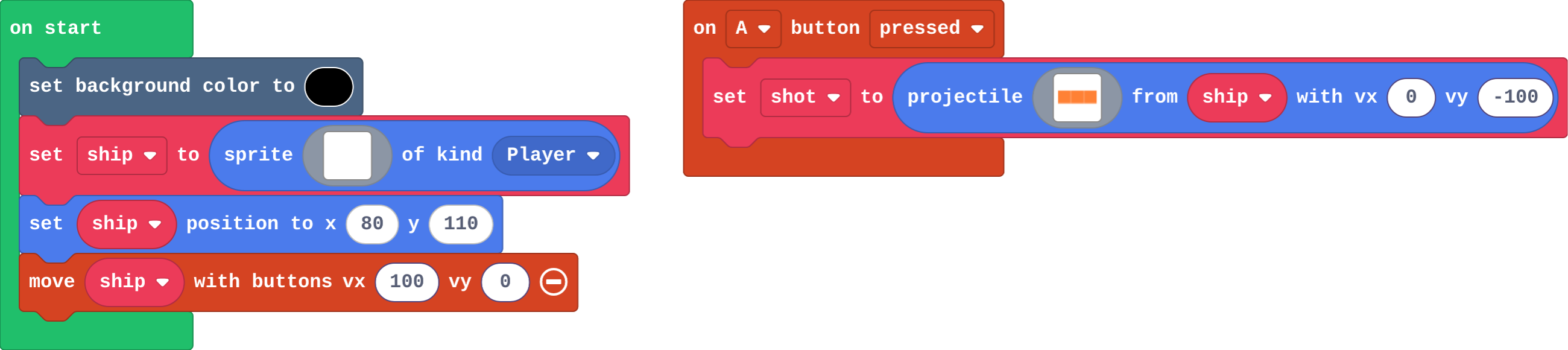
**A** launches a rocket; **B** makes every rocket in the sky burst off in a random direction. Make the rockets launch faster, and make **B** also change the background colour, so the sky flashes when they burst.

[Open this step](https://studio.learningwaypoints.com/tutorials/code/arcade-advanced/arcade-every-one/?full=step-7#step-7)

---

<span style="background:#dcfce7; color:#1a1a1a; border:1.5px solid #22c55e; padding:6px 18px; border-radius:8px; font-size:1em; font-weight:500;">✅ Check</span>

## Exit ticket

**There are 5 enemies on the screen. A for element loop over array of sprites of kind Enemy contains change score by 1. How much does the score go up?**

* By 5. The list has 5 enemies, and the loop runs its blocks once for each one.

<!-- Speaker note: Students answer on paper or a mini whiteboard before the reveal. Anyone who cannot answer needs the main idea again next lesson. Where this leads: Next lesson: functions, which name a job such as 'make an enemy' so it can be used in many places. Skillmap: Save the Galaxy (arcade.makecode.com/skillmaps) is a Galaga-style shooter that practises projectiles and enemies. -->