Shapes on a canvas
Draw circles, rectangles, triangles and lines on a canvas with p5.js, and find out where the corner (0, 0) is.
Every picture on a screen is shapes at places. In p5.js you say which shape, where, and what colour.
Builds on: Colour and images (Digital systems › Data representation) · Shapes as numbers (Digital systems › Data representation)
p5.js draws on a canvas: a rectangle of pixels you make with createCanvas(width, height). A shape is a command with numbers: circle(150, 100, 80) draws a circle with its middle 150 across and 100 down, and a width of 80.
Your code goes inside function setup() { ... }. It runs once, when the sketch starts. For now, copy that first line and the closing } as they are; the lessons after this one explain functions properly. JavaScript is fussy: every ( needs a ), every { needs a }, and capital letters matter. When something is wrong, the playground shows the line and a hint.
Where is (0, 0)? At the top left corner. x goes across to the right, and y goes down. That is the opposite way from the turtle's drawing page, and it catches almost everyone out once.
- Predict: Read the code and say what it will do before you run anything. A wrong guess is fine: it shows you what to look for.
- Run: Run it and compare the result with your prediction.
- Investigate: Trace how each line of code connects to what you see.
- Modify: Change the code on purpose and check the result.
- Make: Build something new using what you have learned. Expect a few tries; that is normal.
Make your prediction first. Help opens once you've locked it in.
Predict
function setup() {
  createCanvas(300, 200);
  background(240);
  fill(255, 200, 0);
  circle(150, 100, 80);
  rect(20, 20, 60, 40);
}
createCanvas(300, 200) makes a canvas 300 wide and 200 tall. Which corner is (0, 0)?
Run
Press Run and match each shape to its line. fill(r, g, b) sets the colour of the shapes drawn after it, with each number from 0 to 255. Change the numbers in circle(150, 100, 80) and run again.
function setup() {
  createCanvas(300, 200);
  background(20, 30, 60);
  noStroke();
  fill(255, 210, 0);
  circle(150, 100, 80);
  fill(255, 120, 160);
  rect(20, 20, 60, 40);
  fill(120, 220, 255);
  triangle(220, 160, 260, 90, 290, 160);
  stroke(255);
  line(0, 190, 300, 190);
}
Investigate
function setup() {
  createCanvas(300, 200);
  background(20, 30, 60);
  noStroke();
  fill(255, 210, 0);
  circle(150, 100, 80);
  fill(255, 120, 160);
  rect(20, 20, 60, 40);
  fill(120, 220, 255);
  triangle(220, 160, 260, 90, 290, 160);
  stroke(255);
  line(0, 190, 300, 190);
}
What each line does.
Which way is up?
A circle with the wrong colour.
Match each line with what it does.
This should draw a gold circle, but it is white. Click the line that is in the wrong place.
Modify
Move the big circle to the bottom-right corner of the canvas.
Need a hint?
The big circle's x and y are its middle. The canvas is 300 wide and 200 tall.
Another hint
Bigger x moves right and bigger y moves down. Try x near 250 and y near 160.
Show the expected result
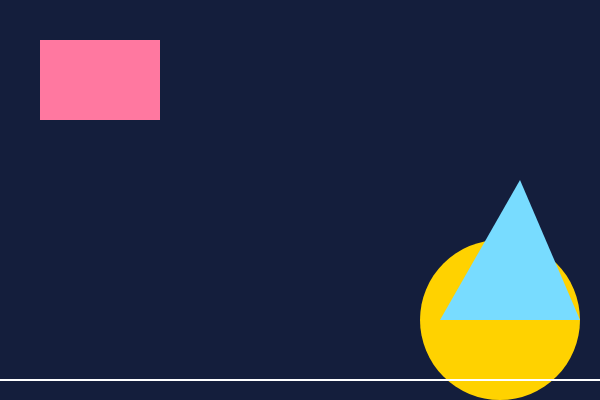
Add an oval (ellipse) to the picture.
Need a hint?
p5 has more shapes than the sketch uses. An oval is called ellipse, and it takes a width and a height.
Another hint
Change the pink rect(20, 20, 60, 40) to ellipse(60, 40, 90, 40): an ellipse's x and y are its middle.
Show the expected result
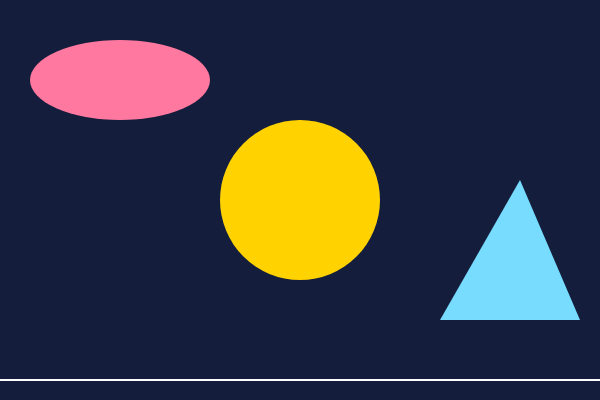
Draw an oval with ellipse.
Run your program. This ticks when your code does all of the above.
A picture of your own
Draw a picture of your own: a house, a face, a robot, a flag, a rocket. Use at least 5 shapes and 3 colours. Shapes are drawn in order, so draw the sky first and the sun after it. Other commands to try: noStroke() (no outlines), stroke(r, g, b) and strokeWeight(4) (outline colour and thickness), triangle(x1, y1, x2, y2, x3, y3).
Where this leads
Everything you draw is numbers: where, how big and what colour. Next lesson: change those numbers while the sketch runs, so things move.
For teachers
Students meet p5.js on its own playground, draw circles, rectangles, triangles and lines on a canvas, learn that (0, 0) is the top left and y counts down, fix a fill that comes after its shape, and draw a picture of their own. About 50 minutes.
Open the teacher guide: answers, solutions, slides and a worksheet.
Students will be able to
- I can draw shapes at places on a canvas with p5.js.
- I can say where (0, 0) is and which way y counts.
- I can colour shapes with fill, and know it affects shapes drawn after it.
Before class
Read the unit primer first. The playground is our own p5.js editor (p5.js is served from this site, so it works with no network beyond the school's own). Run starts the sketch, Stop ends it, and errors show the line and a hint. Students do not need to understand function setup() { ... } yet: it is a recipe for this lesson and the next explains it as the place that runs once. The hard part is that y counts down from the top-left: turtle and maths graphs count up. Expect "where did my shape go?" until students get this. Curly brackets, brackets and semicolons are copied as written; the hint under a red error says which is missing.
Running the lesson
- Predict: draw a 300 by 200 rectangle on the board and mark (0, 0) at the top left.
- Run: ask each student to point at the line that made the pink rectangle.
- Investigate: for the bug, say aloud what each line does in order: fill comes after the circle.
- Modify: encourage small changes and re-running often: Ctrl+Enter runs the sketch.
- Make: ask for 5 shapes and 3 colours, then swap screens and describe each other's picture.
The hard part (on purpose)
y counts down from the top-left. Ask students to predict which way a shape moves before they change a number.
When students get stuck
- A red line saying a name is not defined. Ask: Is the command spelled exactly as in the example, with the same capital letters? Fix: circle, not Circle; rect, not Rect.
- Nothing is drawn. Ask: Is the shape inside function setup() { ... }, between the curly brackets? Fix: Move the line inside the braces, before the closing }.
- The shape is in the wrong corner. Ask: Which way does y count, up or down? Fix: y counts down from the top, so a bigger y is lower on the canvas.
- The new shape is hidden. Ask: Was a bigger shape drawn after it in the same place? Fix: Draw it later in the code, so it lands on top.
Stretch and support
Stretch: Make the picture with only rect and circle commands that use arithmetic, such as circle(100 + 50, 100, 40), or draw a flag from a real country.
Support: Give students the finished picture's code and ask them to change colours and sizes first, then add one shape.
Where it leads
Next lesson: variables and draw(), so the picture changes while it runs.
What each step is for
- Investigate: A shape's numbers are its position and size, y counts down from the top, and colours apply to the shapes drawn after them.
- Modify: Moving a shape is changing its numbers; a new kind of shape is a new command with its own numbers.
- a picture of your own: Goals only: shapes at places, with colours, built up in order.
- Draw shapes at places on a canvas with p5.js.
- Say where (0, 0) is and which way y counts.
- Colour shapes with fill, and know it affects shapes drawn after it.