Functions of your own
Give a piece of code a name, hand it values with parameters, and get an answer back with return.
One flower took ten lines. A function turns those lines into a single word, so a whole garden is three short lines.
A function is code with a name. You write it once, then call it as often as you like: drawFlower(80, 100);.
The names in the brackets of the definition are parameters: function drawFlower(x, y) says "give me an x and a y". Each call fills them in, so one function draws flowers in many places.
A function can also hand an answer back with return, and you will write one in the Modify step.
The hard part is the name. drawFlower and drawflower are different names, and JavaScript will not guess. If you see "is not defined", compare the call with the definition letter by letter.
- Predict: Read the code and say what it will do before you run anything. A wrong guess is fine: it shows you what to look for.
- Run: Run it and compare the result with your prediction.
- Investigate: Trace how each line of code connects to what you see.
- Modify: Change the code on purpose and check the result.
- Make: Build something new using what you have learned. Expect a few tries; that is normal.
Make your prediction first. Help opens once you've locked it in.
Predict
function drawFlower(x, y) {
  fill(255, 120, 160);
  circle(x - 14, y, 18);
  circle(x + 14, y, 18);
  circle(x, y - 14, 18);
  circle(x, y + 14, 18);
  fill(255, 210, 0);
  circle(x, y, 18);
}

function setup() {
  createCanvas(300, 200);
  background(120, 200, 140);
  drawFlower(80, 100);
  drawFlower(200, 60);
}
Does the definition draw anything, or only the calls?
Run
The function now has a third parameter, size. Each call chooses where the flower goes and how big it is.
A function can hand an answer back with return. Here twice(4) is the number 8, so it can be used anywhere a number goes:
function twice(n) {
  return n * 2;
}
function drawFlower(x, y, size) {
  fill(255, 120, 160);
  circle(x - size, y, size);
  circle(x + size, y, size);
  circle(x, y - size, size);
  circle(x, y + size, size);
  fill(255, 210, 0);
  circle(x, y, size);
}

function setup() {
  createCanvas(300, 200);
  background(120, 200, 140);
  drawFlower(70, 100, 20);
  drawFlower(180, 60, 12);
  drawFlower(230, 140, 16);
}
Investigate
function drawFlower(x, y, size) {
  fill(255, 120, 160);
  circle(x - size, y, size);
  circle(x + size, y, size);
  circle(x, y - size, size);
  circle(x, y + size, size);
  fill(255, 210, 0);
  circle(x, y, size);
}

function setup() {
  createCanvas(300, 200);
  background(120, 200, 140);
  drawFlower(70, 100, 20);
  drawFlower(180, 60, 12);
  drawFlower(230, 140, 16);
}
Definition, call, parameter, return.
Where each number goes.
One letter of difference.
Match each piece with what it is.
This stops with an error: drawflower is not defined. Click the line that causes it.
Modify
Use a loop to draw five flowers with one call.
Need a hint?
Replace the three calls with a for loop that counts to 5.
Another hint
Use i in the call: drawFlower(40 + i * 55, 100, 14).
Show the expected result
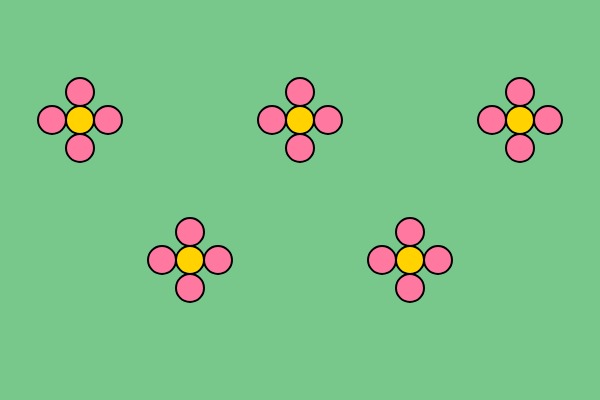
Make the flower say hello when the mouse is near it, using a function of your own that returns true or false.
Need a hint?
A function that answers true or false is used inside an if.
Another hint
Write function isNear(x1, y1, x2, y2) { return dist(x1, y1, x2, y2) < 30; } and use if (isNear(mouseX, mouseY, 150, 100)).
Draw five flowers with one call inside a loop.
Run your program. This ticks when your code does all of the above.
Write a function that returns whether the mouse is near the flower, and say hello when it is.
Run your program. This ticks when your code does all of the above.
Your own drawing function
Write a function that draws something of your own (a tree, a house, a robot, a face) with at least a position as parameters. Then call it three times. The sketch on this page draws trees of different heights.
Where this leads
You can now name your own code. Next: put lists, objects, decisions and functions together in a game.
For teachers
Students turn ten lines that draw a flower into a function with parameters, call it with different values, find a call whose capitals do not match, draw a garden with a loop, write a function that returns true or false, and make a drawing function of their own. About 55 minutes.
Open the teacher guide: answers, solutions, slides and a worksheet.
Students will be able to
- I can write a function and call it more than once.
- I can use parameters to make each call different.
- I can write a function that returns an answer and use it in an if.
Before class
Read the unit primer first. This is the Python functions, parameters and returns units in one lesson, in JavaScript, so go gently on the third idea: the Modify task on isNear is the first time students write return. Predict is the key idea (a definition draws nothing). Names must match exactly; the playground hint for "is not defined" mentions capitals. Parameters take values in order, so a call with the arguments swapped moves the flower, not the size.
Running the lesson
- Predict: ask 'does writing the recipe cook the meal?'
- Run: ask students to say each call aloud as 'a flower at x, y, this big'.
- Investigate: for the bug, read the call and the definition aloud next to each other.
- Modify: for isNear, ask what the function answers when the mouse is far away.
- Make: choose the drawing and list its parameters first.
The hard part (on purpose)
Names must match exactly, and parameters fill in order. Read the call and the definition aloud side by side.
When students get stuck
- A red line: drawflower is not defined. Ask: Does the call spell the name exactly like the definition? Fix: Match the capitals.
- The flower is in the wrong place or the wrong size. Ask: Are the values in the same order as the parameters? Fix: Put the arguments in the order x, y, size.
- isNear seems to do nothing. Ask: Does the function use return, and is it used inside an if? Fix: Add return before the comparison, and call it in the if brackets.
- Nothing is drawn. Ask: Is the function called anywhere? Fix: Add a call in setup() or draw().
Stretch and support
Stretch: Give the flower a colour parameter, or make drawFlower return the width it used.
Support: Give the definition of the drawing function and ask only for the three calls.
Where it leads
Next lesson: the final challenge puts lists, objects, decisions and functions together in a click-to-catch game.
What each step is for
- Investigate: A definition is a recipe and a call is cooking it; parameters carry the values from the call into the function.
- Modify: A loop can call a function many times; a function that returns a value can sit inside an if.
- your own drawing function: Goals only: a drawing of your own as a function with parameters, used at least three times.
- Write a function and call it more than once.
- Use parameters to make each call different.
- Write a function that returns an answer and use it in an if.