Defend the door lock
A radio door lock has three weaknesses. Find each one, name the tool from this course that fixes it, and build the fixes in milestones.
Security teams run 'red team, blue team' exercises. The blue team defends: they audit their own system, find where it is weak, and fix it before anyone else can find the same weakness.
This is the blue team challenge: you defend a system you own. Below is a radio door lock: the key micro:bit sends the door code, and the lock opens if the code is right.
It works. Your job is to audit it (find its weaknesses), then harden it with what you have built.
- Predict: Read the code and say what it will do before you run anything. A wrong guess is fine: it shows you what to look for.
- Run: Run it and compare the result with your prediction.
- Investigate: Trace how each line of code connects to what you see.
- Modify: Change the code on purpose and check the result.
- Make: Build something new using what you have learned. Expect a few tries; that is normal.
Make your prediction first. Help opens once you've locked it in.
Predict
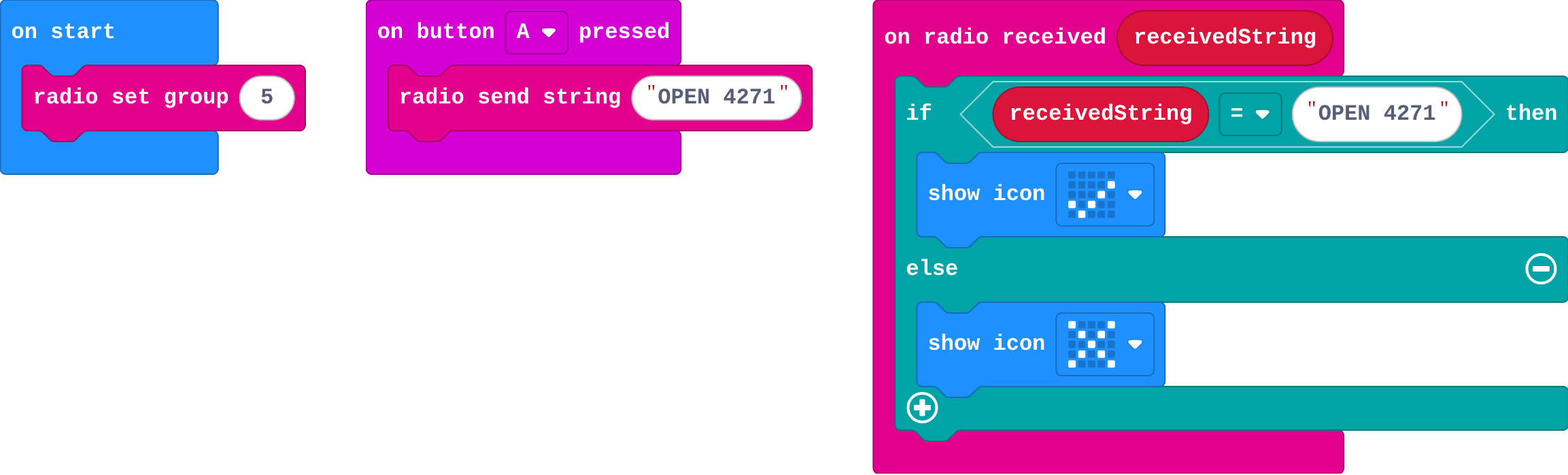
Show as code
radio.setGroup(5)
input.onButtonPressed(Button.A, function () {
    radio.sendString("OPEN 4271")
})
radio.onReceivedString(function (receivedString) {
    if (receivedString == "OPEN 4271") {
        basic.showIcon(IconNames.Yes)
    } else {
        basic.showIcon(IconNames.No)
    }
})
Run
Show as code
radio.setGroup(5)
input.onButtonPressed(Button.A, function () {
    radio.sendString("OPEN 4271")
})
radio.onReceivedString(function (receivedString) {
    if (receivedString == "OPEN 4271") {
        basic.showIcon(IconNames.Yes)
    } else {
        basic.showIcon(IconNames.No)
    }
})
Audit
Show as code
radio.setGroup(5)
input.onButtonPressed(Button.A, function () {
    radio.sendString("OPEN 4271")
})
radio.onReceivedString(function (receivedString) {
    if (receivedString == "OPEN 4271") {
        basic.showIcon(IconNames.Yes)
    } else {
        basic.showIcon(IconNames.No)
    }
})
Match each weakness of the door lock with the tool that fixes it.
Milestone 1: lock the code
Send the code locked with secretKey instead of as text, and have the lock unlock it before checking.
Need a hint?
A sends 4271 ^ secretKey as a number.
Another hint
On radio received number, open if received number ^ secretKey is 4271.
The code is locked with the shared key and the lock unlocks it before comparing.
This ticks by itself when your blocks do what is asked.
Milestones 2 and 3: harden it
Replace the locked code with a knock that carries a keyed checksum. The lock goes on only if the checksum matches.
Need a hint?
A sends the word KNOCK as a name with its checksum: radio send value (KNOCK, checksum(KNOCK)). The lock only goes on if the checksum matches.
Instead of a fixed code, the lock sends a random challenge; the key answers it, and the lock opens only on the right answer. The functions checksum and answer are already in the starter: you built them in earlier lessons.
Need a hint?
The lock picks randint(10, 99), sends it as CHALL, and the key micro:bit sends back answer(value) as ANSWER. The lock opens only if the answer is answer(challenge).
The knock carries a keyed checksum and the lock checks it.
This ticks by itself when your blocks do what is asked.
A new challenge each knock, answered with the secret key; the lock opens only on the right answer.
This ticks by itself when your blocks do what is asked.
Report
Every protection in your lock rests on one secret key. Security is the habit of asking "what could go wrong here?", then fixing each answer.
For teachers
Students audit a radio door lock, match each weakness to a tool from the course, and harden it in three milestones: a cipher, a keyed checksum and a challenge and response. About 60 minutes.
Open the teacher guide: answers, solutions, slides and a worksheet.
Students will be able to
- I can audit a system and name its weaknesses.
- I can match each weakness with a tool that fixes it.
- I can build a lock that is private, notices changes and cannot be reused.
Before class
The idea: the course's three tools answer three different questions: who can read it (a cipher), was it changed (a checksum with a key) and is this a fresh message from someone who has the key (challenge and response). A secure system usually needs all three.
Framing: this is the defender's job. Students audit and harden their own system. The lesson does not have them attack each other's locks. If students want to test each other, run it as 'pass the pair': swap pairs' final locks, and try the real key against the lock; the lock should open for the key and refuse everything else.
The final system: the key micro:bit knocks with a keyed checksum; the lock checks it, sends a random challenge, the key answers using the secret key, and the lock opens only on the right answer. The secret key never crosses the air.
Limits to say aloud: these are classroom versions. The XOR step reveals the key if someone knows both a locked and an unlocked value; the answer function is not a one-way function; keys have to be shared safely first (the key exchange lesson). Real systems use proven tools, not ones we invented.
Challenge milestones: Milestone 1 has most of the code; milestone 2 outlines; milestone 3 gives goals only. Students who finish quickly can add the lockout from the Challenge–response lesson.
Running the lesson
- Audit: ask students to say each weakness in their own words before they pick the tool.
- Milestone 3: students must see that the old 'OPEN' code is gone; the answer replaces it.
The hard part (on purpose)
Matching each weakness to its tool and keeping the keys the same on both sides. When the lock fails, ask them to name the weakness each milestone fixes.
When students get stuck
- The lock never opens. Ask: Do both micro:bits have the same secretKey? Is the answer function the same? Fix: Use one secretKey and one answer function in the same program on both.
- The lock opens for the wrong key. Ask: Do you compare the answer with answer(challenge) on the lock? Fix: Compare value with answer(challenge); keep challenge in a variable on the lock.
- Milestone 3 and the checksum work separately but not together. Ask: Which block handles each name (KNOCK, CHALL, ANSWER)? Fix: One on radio received value block with if, else if on the name.
Stretch and support
Stretch: Add the lockout after three wrong answers from the Challenge–response lesson.
Support: Share the milestone 2 code and ask students to explain it before they build milestone 3.
Where it leads
Where this leads: real systems use proven libraries, long keys, hash functions and certificates. The ideas here are the same.
What each step is for
- Audit: Each weakness has a matching tool: privacy needs a cipher, a changed message needs a checksum, and a reusable message needs a challenge and response.
- Milestone 1: lock the code: The first fix is the one from the XOR lesson: the lock and the key share a number, and the code travels locked with it.
- Audit a system and name its weaknesses.
- Match each weakness with a tool that fixes it.
- Build a lock that is private, notices changes and cannot be reused.