Make Bootstrap yours
Put your own CSS after the Bootstrap link so your rules win, compare Bootstrap with the page you built by hand, and meet the other ways of styling: Bulma, Tailwind, daisyUI and Pico.
Big sites often start from a framework, then add their own colours and fonts so they don't look like everyone else.
A Bootstrap page looks like every other Bootstrap page until you add rules of your own. When your rule and Bootstrap's match the same tag equally, the later one wins. So the order is:
<link rel="stylesheet" href="bootstrap.min.css">   <!-- Bootstrap first -->
<style>
  .card { border: 2px solid teal; }                 /* then yours */
</style>
- Predict: Read the code and say what it will do before you run anything. A wrong guess is fine: it shows you what to look for.
- Run: Run it and compare the result with your prediction.
- Investigate: Trace how each line of code connects to what you see.
- Modify: Change the code on purpose and check the result.
- Make: Build something new using what you have learned. Expect a few tries; that is normal.
Make your prediction first. Help opens once you've locked it in.
Predict
<link rel="stylesheet" href="bootstrap.min.css">
<style>
  .card { border-color: teal; }
</style>

<div class="card m-3">
  <div class="card-body">Beginners</div>
</div>
Both rules are for .card. Which one comes later?
Run
Compare with your prediction. Then move the whole <style> block above the <link> line and watch what changes. Put it back.
<link rel="stylesheet" href="bootstrap.min.css">
<style>
  body { font-family: Georgia, serif; }
  .navbar { background-color: lightblue; }
  .card { border: 2px solid teal; }
  .card-title { color: teal; }
</style>

<nav class="navbar navbar-expand">
  <div class="container">
    <a class="navbar-brand" href="#">Chess club</a>
  </div>
</nav>

<div class="container mt-3">
  <div class="row">
    <div class="col">
      <div class="card">
        <div class="card-body">
          <h5 class="card-title">Beginners</h5>
          <p class="card-text">Learn the moves.</p>
          <a class="btn btn-primary" href="#">Join</a>
        </div>
      </div>
    </div>
    <div class="col">
      <div class="card">
        <div class="card-body">
          <h5 class="card-title">Players</h5>
          <p class="card-text">Weekly games.</p>
          <a class="btn btn-primary" href="#">Join</a>
        </div>
      </div>
    </div>
  </div>
</div>
Investigate
<link rel="stylesheet" href="bootstrap.min.css">
<style>
  body { font-family: Georgia, serif; }
  .navbar { background-color: lightblue; }
  .card { border: 2px solid teal; }
  .card-title { color: teal; }
</style>

<nav class="navbar navbar-expand">
  <div class="container">
    <a class="navbar-brand" href="#">Chess club</a>
  </div>
</nav>

<div class="container mt-3">
  <div class="row">
    <div class="col">
      <div class="card">
        <div class="card-body">
          <h5 class="card-title">Beginners</h5>
          <p class="card-text">Learn the moves.</p>
          <a class="btn btn-primary" href="#">Join</a>
        </div>
      </div>
    </div>
    <div class="col">
      <div class="card">
        <div class="card-body">
          <h5 class="card-title">Players</h5>
          <p class="card-text">Weekly games.</p>
          <a class="btn btn-primary" href="#">Join</a>
        </div>
      </div>
    </div>
  </div>
</div>
Sort the jobs.
The heading stays black.
Which way of making the page suits each job better?
The heading should be teal, but it is black. There is no error. Click the line that is in the wrong place.
Other frameworks
The same Join button in other frameworks. Each page links a different stylesheet; Tailwind uses a script that writes the CSS for the classes the page uses (here, its version for trying things out).
Same idea, new names.
<link rel="stylesheet" href="bulma.min.css">
<button class="button is-primary">Join</button>

One class, one property.
<script src="tailwind.js"></script>
<button class="bg-blue-600 text-white px-4 py-2 rounded-lg">Join</button>

daisyUI (in the picture) puts whole-part names on top of Tailwind. Pico needs no class at all.
<link rel="stylesheet" href="daisyui.css">
<script src="tailwind.js"></script>
<button class="btn btn-primary">Join</button>
<link rel="stylesheet" href="pico.classless.min.css">
<button>Join</button>

Tailwind has no ready-made button. Match each of its classes with the one CSS property it sets.
Sort the frameworks by how they style a button.
Modify
A rule for one more class.
Need a hint?
The club's name has the class navbar-brand. A rule for that class, in your style block.
Another hint
.navbar-brand { color: white; font-weight: bold; } after the other rules.
Show the expected result
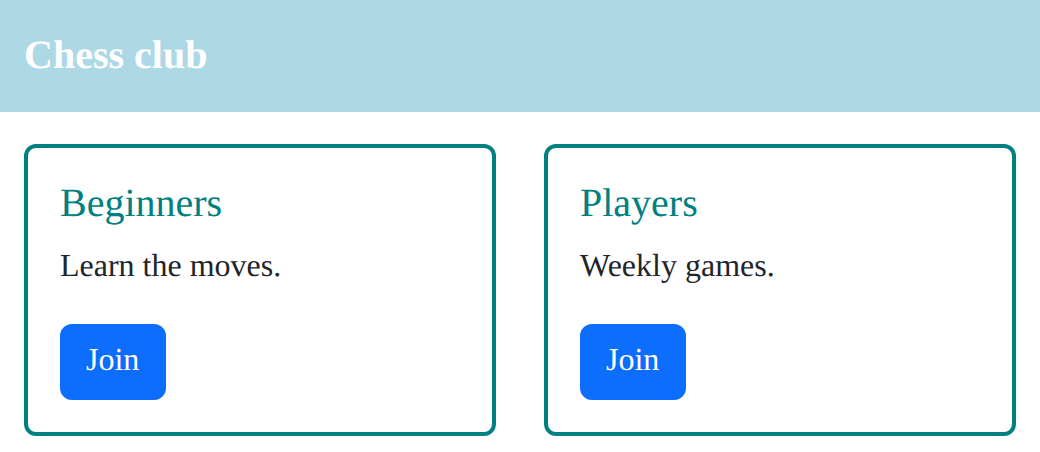
Change one of Bootstrap's choices.
Need a hint?
Bootstrap rounds a card's corners with border-radius. Your .card rule can set it again.
Another hint
Add border-radius: 0; to the .card rule.
Show the expected result
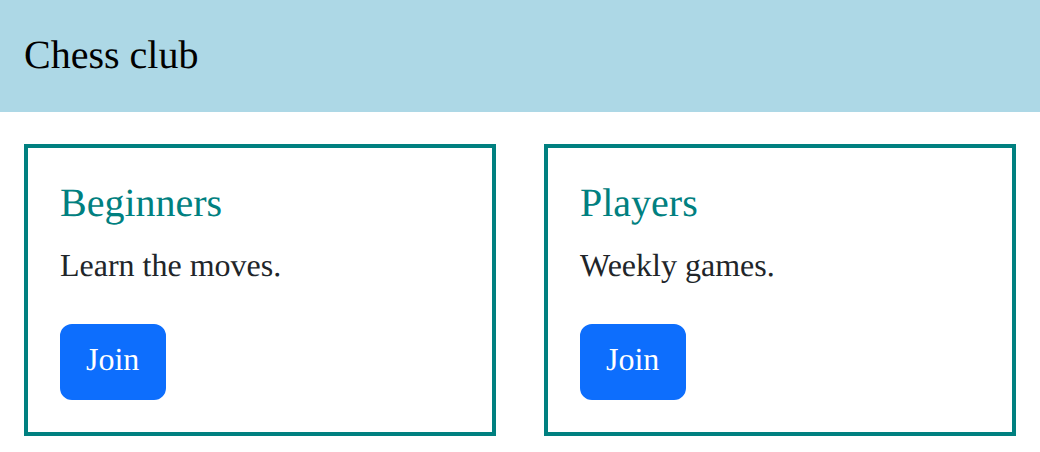
Its own class names.
Need a hint?
Bulma's colour classes start with is-: is-primary, is-success, is-danger. Sizes too.
Another hint
class="button is-success is-large"
Show the expected result

Make the club's name in the navbar white and bold.
This ticks when your page has all of the above.
Give the cards square corners.
This ticks when your page has all of the above.
In Bulma, make the button green and large.
This ticks when your page has all of the above.
Your own look
Make the page look like your club: at least three rules of your own, after the link (colours, a font, borders, the navbar). Keep Bootstrap's parts and grid. Finished early? Rebuild one card in Bulma or Tailwind.
Add your own style block after the link that changes at least three things.
This ticks when your page has all of the above.
Where this leads
You can now build pages from ready-made parts and make them your own. The DOM course makes pages react; Vue then does for JavaScript what Bootstrap does for CSS.
For teachers
Students put their own CSS after the Bootstrap link, predict that their later rule wins, sort jobs into Bootstrap or hand-built CSS, find a style block in the wrong place, meet Bulma, Tailwind, daisyUI and Pico, and give a Bootstrap club page a look of its own. About 55 minutes.
Open the teacher guide: answers, solutions, slides and a worksheet.
Students will be able to
- I can change Bootstrap's look with my own rules after the link.
- I can explain when Bootstrap suits a page better than my own CSS, and when it does not.
- I can tell component classes (Bootstrap, Bulma) from utility classes (Tailwind).
Before class
Read the unit primer first. The rule students need is the cascade they met in HTML & CSS: when two rules match a tag equally (same kind of selector), the later one wins. So the Bootstrap link goes first and the student's <style> block after it. The planted bug puts the style block first, and Bootstrap's h1 rule then wins.
Two catches you may meet. Bootstrap's spacing and colour utility classes (bg-body-tertiary, mt-3, text-center) are marked important and beat ordinary rules wherever they are, so the run page takes bg-body-tertiary off the navbar before giving it a colour. And a button's hover colour is a separate, stronger rule (.btn:hover), so restyling buttons is fiddly; the tasks avoid it on purpose.
Other frameworks. Bootstrap is one of many. Bulma works the same way with different names (button is-primary). Tailwind, very popular for new projects, has no ready-made parts: each class sets one CSS property (bg-blue-600, px-4), and a build tool writes CSS for just the classes a site uses. Here a browser version of Tailwind (tailwind.js) does that as the page loads; Tailwind's makers say it is for trying things, not real sites. daisyUI adds Bootstrap-style names (btn btn-primary) on top of Tailwind. Pico is classless: it styles plain tags, so a page needs no class names at all. Every one of them is served from this site.
Running the lesson
- Predict: ask "which rule comes later?" before anyone answers.
- Run: everyone moves the style block above the link, sees it lose, and moves it back.
- Investigate: the sort has no single right answer in real life; ask for a reason for each.
- Other frameworks: ask what Tailwind would need for a whole card (many classes) and why some people prefer that (everything is in the HTML).
- Modify: the Bulma task swaps the whole framework; ask what changed apart from the link (every class name).
- Make: ask each student to point to their three rules and say what each changed.
The hard part (on purpose)
When a rule does nothing, students add more rules. Ask "which rule is winning, and why?" and have them check the order before writing anything new.
When students get stuck
- A rule of their own does nothing. Ask: Is the style block after the link? Fix: Move the link line to the top.
- The navbar colour will not change. Ask: Does the navbar have a bg- class? Fix: Take the bg- class off; Bootstrap's utility classes beat ordinary rules.
- A button changes colour but goes back to blue when the mouse is over it. Ask: Which rule styles a button under the mouse? Fix: That is .btn:hover; use a Bootstrap colour class instead (btn-success), or leave buttons alone.
- Tailwind classes do nothing. Ask: Is the tailwind.js script on the page? Fix: Add script src="tailwind.js"; without it there is no Tailwind CSS at all.
Stretch and support
Stretch: Rebuild one club card in Tailwind using only utility classes, then in daisyUI with card and card-body. Which took fewer classes? Which would be easier to change across a whole site?
Support: Give students three rules on the board (a font, a navbar colour, a border) and ask them only to place and change them.
Where it leads
This is the end of the Bootstrap course. The DOM course makes pages react; Vue does for JavaScript what Bootstrap does for CSS, ready-made ways to build an app. Class discussion: a framework saves time and makes sites look alike; which matters more for a club page, and for a company?
Sources
- Bootstrap 5.3: Utilities and !important (checked 12 October 2026)
- Tailwind CSS: Play CDN (the browser build) (checked 12 October 2026)
- daisyUI: install with the CDN (checked 12 October 2026)
- Bulma: Button (checked 12 October 2026)
- Pico CSS: Class-less version (checked 12 October 2026)
What each step is for
- Predict: Students often think a framework's rules always win, or that theirs always do; predicting this case sets up the rule that order decides.
- Run: Own rules after the link change Bootstrap's look; the parts and the grid stay Bootstrap's.
- Investigate: Order decides between equal rules; and Bootstrap and hand-built CSS each suit some pages better.
- Other frameworks: Frameworks differ in one big way: component classes (one name for the whole button), utility classes (one class per CSS property), or no classes at all.
- Modify: Own rules change one thing each; swapping the link line swaps the whole framework, and the class names with it.
- your own look: Goals only: Bootstrap's parts with a look that belongs to the student's club.
- Change Bootstrap's look with my own rules after the link.
- Explain when Bootstrap suits a page better than my own CSS, and when it does not.
- Tell component classes (Bootstrap, Bulma) from utility classes (Tailwind).