Patrol and alert
The assistance challenge. Students build a patrol system in three milestones (the base starts and stops the robot by radio, the robot reports blockages once, then an alert log and status lights), combining line following, distance, modes, roles and two-way radio.
Classroom resources
Load these into Waypoints Prepare: choose Load URL and paste the copied address, or download the file and import it. In Prepare, the worksheet's Teacher edition shows the answers; the student copy hides them.
Students will be able to
- I can control a robot's mode from a base station by radio.
- I can make a robot report a problem once, and report when it is fixed.
- I can give a system a log and a visible status.
Timing
Predict, Run, Investigate 12 min · Milestone 1 15 min · Milestone 2 18 min · Milestone 3 12 min · Real robot 3 min (optional)
Before class
This is the assistance strand's challenge, using lessons 3 and 5 (distance and line), 6 (mode), 7 (radio commands) and 9 (roles and alert once). The key design rule: radio handlers only change the mode; forever drives the motors. A move made in a handler would be undone straight away by forever (or, like Jack's patrol, would only run once).
Both micro:bits run the same program; A+B makes one the base. The base's A sends "go", B sends "stop". The robot sends "blocked" (once, using alerted) and "clear". The milestones fade the help: Milestone 1 gives three numbered steps, Milestone 2 an outline, Milestone 3 goals only. Each starter is the previous milestone's solution. Showcase and Patrol and alert together mark the course Challenge complete.
The robots start near the line in the simulator; if one does not pick it up, drag it on. The logo needs a micro:bit V2 (shake works on V1).
Running the lesson
- Predict and Run: a recap of lessons 3 and 5. Make sure everyone can block and unblock the robot.
- Investigate: the sort shows the system's two halves. Jack's patrol is the run-once slip in a new place: a handler runs once per message.
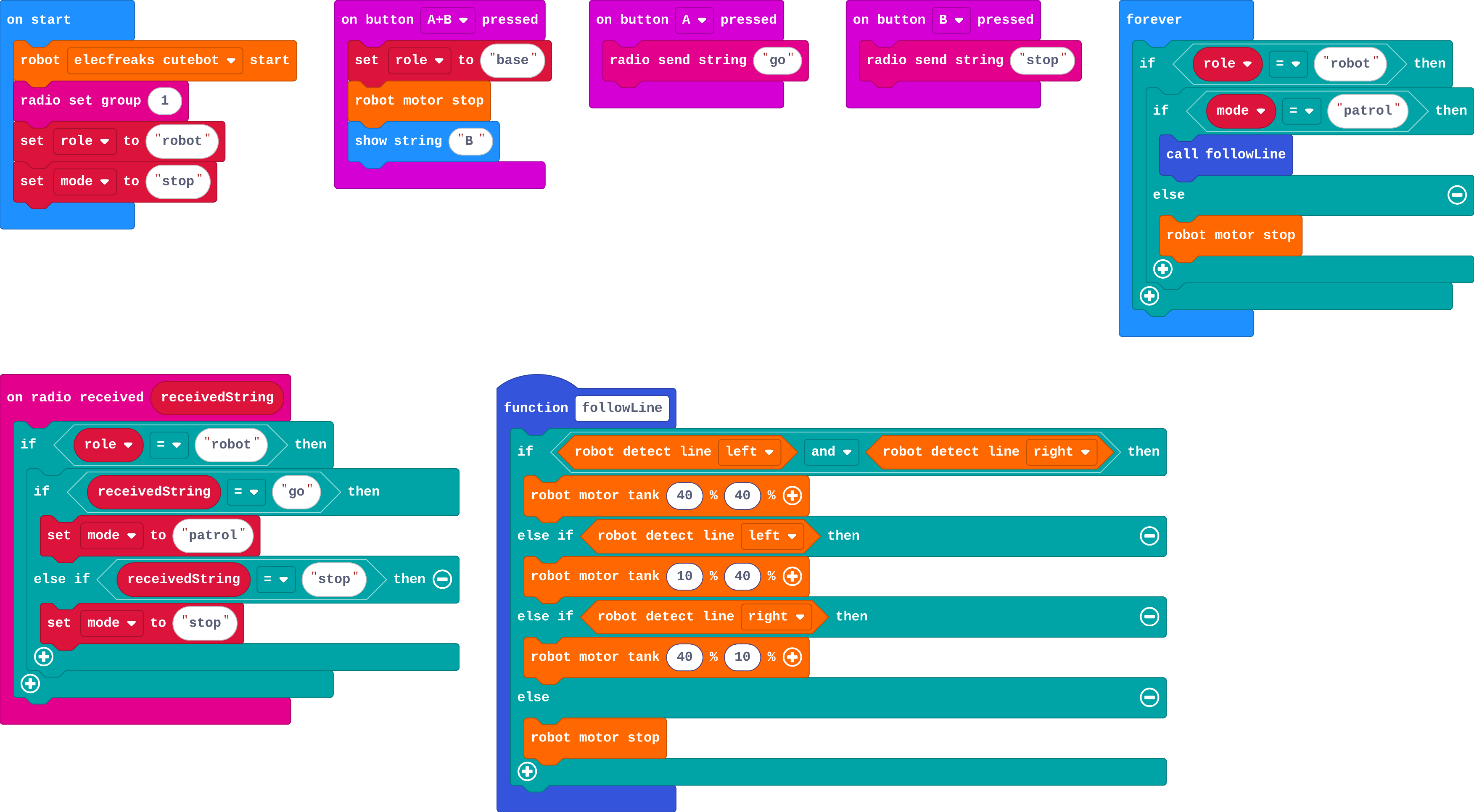
- Milestone 1: three steps on the board: send a word, set the mode, act on the mode.
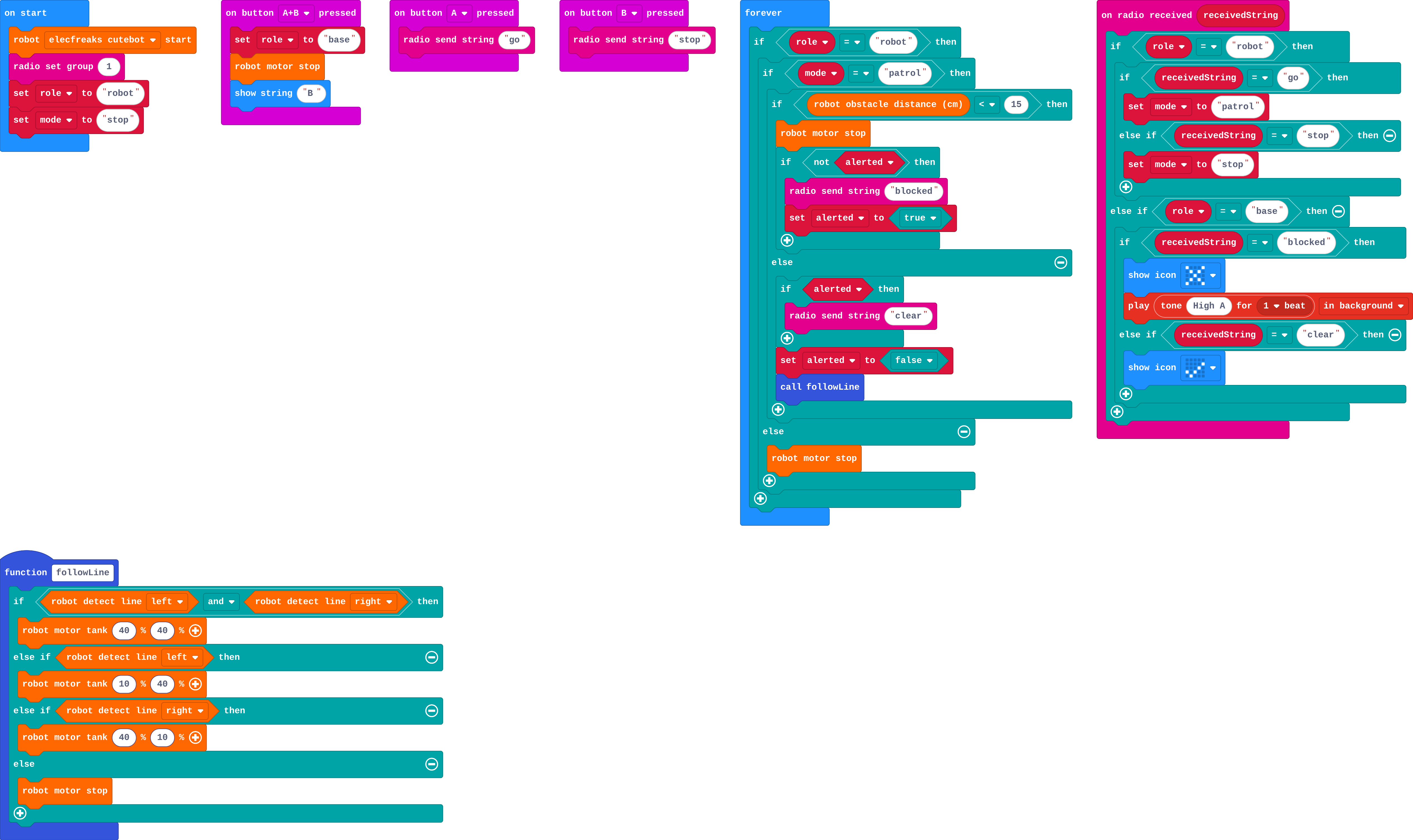
- Milestone 2: the alerted pattern from lesson 9, now with 'clear' too. Test by blocking and unblocking the patrolling robot.
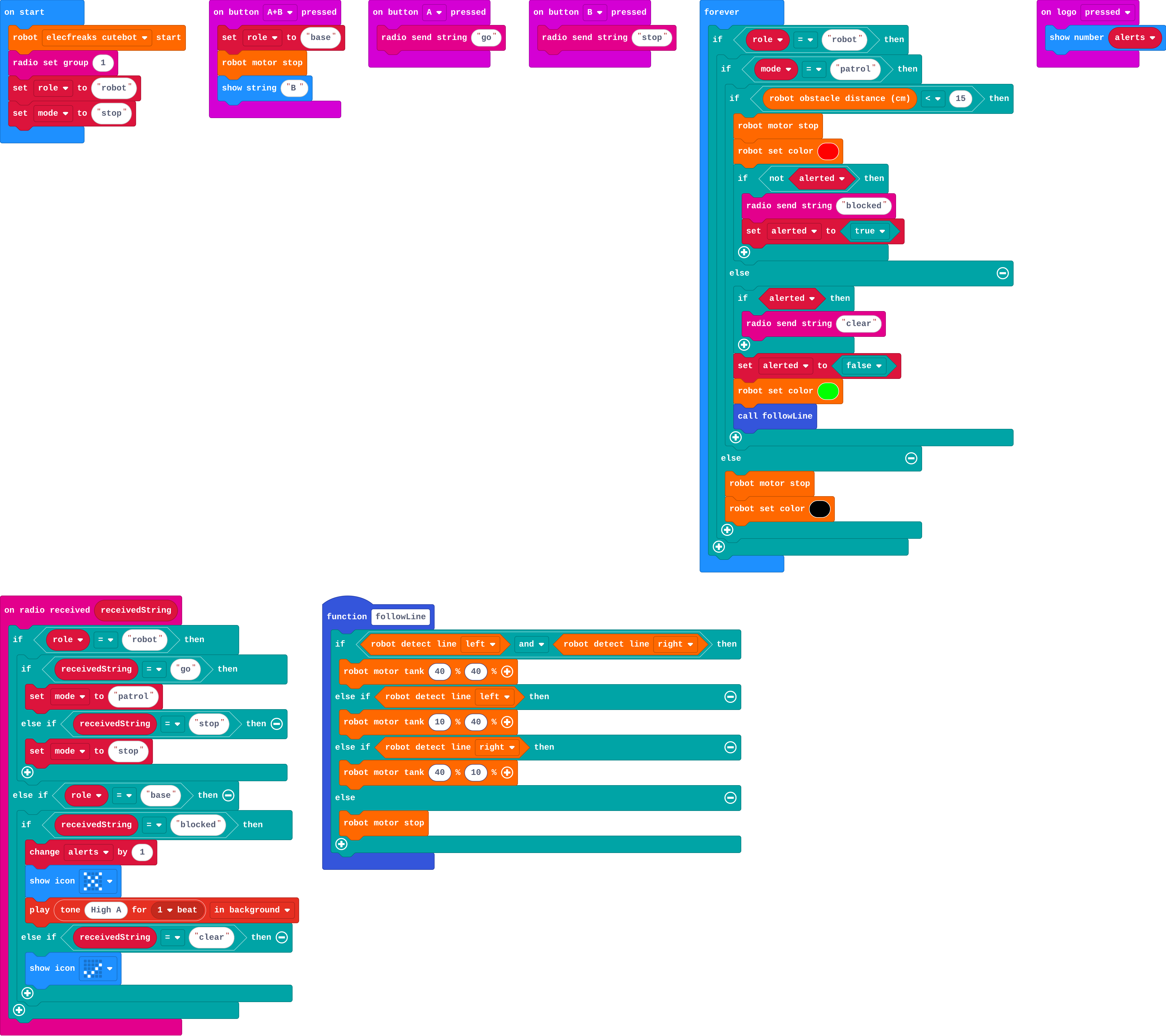
- Milestone 3: a log and status lights. Let groups choose a setting (hospital, farm, warehouse) and rename messages.
- Real robot (optional): one bare micro:bit as the base per team, each team its own radio group.
The hard part (on purpose)
Each side has its own job, and radio handlers only set the mode. Ask which part of the program drives the motors.
When students get stuck
| What you will see | A question to ask | The fix |
|---|---|---|
| The robot never moves after 'go'. | What is the robot's role? Does forever check the mode? | Only the robot's micro:bit sets mode; forever follows the line when mode = patrol. Press A on the base, not the robot. |
| The base beeps again and again. | Is 'blocked' sent only if not alerted? | Send it inside if not alerted, then set alerted to true. |
| The base and robot both react to the same message. | Does on radio received check the role? | Robot jobs inside if role = robot; base jobs inside else if role = base. |
Answers to the checks
- Predict: This is where the patrol starts: a robot on its own. You drag a box onto the line in front of it, then drag it away. What happens?
It stops, then carries on. forever asks about the distance first; while the box is close it stops, and once the way is clear, followLine takes over again. - Who does what?: In the full patrol system, which jobs belong to the robot, and which to the base?
Follow the line → Robot; Send 'go' and 'stop' → Base; Notice something in the way → Robot; Beep and show an X when told of a problem → Base; Send 'blocked' once → Robot - Jack's patrol: Jack's robot only twitches when the base sends 'go': it moves for a moment, then stops. Why?
He follows the line inside the radio handler, which runs once per message; nothing keeps the robot patrolling
A radio handler runs once, when the message arrives, so followLine runs once. The handler should only set mode to patrol; forever then calls followLine again and again.
Solutions
One possible solution for each task. Other correct programs are fine.
Milestone 1: start and stop from the base
Show as code
function followLine () {
    if (robot.detectLine(RobotLineDetector.Left) && robot.detectLine(RobotLineDetector.Right)) {
        robot.motorTank(40, 40)
    } else if (robot.detectLine(RobotLineDetector.Left)) {
        robot.motorTank(10, 40)
    } else if (robot.detectLine(RobotLineDetector.Right)) {
        robot.motorTank(40, 10)
    } else {
        robot.motorStop()
    }
}
input.onButtonPressed(Button.AB, function () {
    role = "base"
    robot.motorStop()
    basic.showString("B")
})
input.onButtonPressed(Button.A, function () {
    radio.sendString("go")
})
input.onButtonPressed(Button.B, function () {
    radio.sendString("stop")
})
radio.onReceivedString(function (receivedString) {
    if (role == "robot") {
        if (receivedString == "go") {
            mode = "patrol"
        } else if (receivedString == "stop") {
            mode = "stop"
        }
    }
})
let mode = ""
let role = ""
robot.elecfreaksCuteBot.start()
radio.setGroup(1)
role = "robot"
mode = "stop"
basic.forever(function () {
    if (role == "robot") {
        if (mode == "patrol") {
            followLine()
        } else {
            robot.motorStop()
        }
    }
})
Milestone 2: report back
Show as code
function followLine () {
    if (robot.detectLine(RobotLineDetector.Left) && robot.detectLine(RobotLineDetector.Right)) {
        robot.motorTank(40, 40)
    } else if (robot.detectLine(RobotLineDetector.Left)) {
        robot.motorTank(10, 40)
    } else if (robot.detectLine(RobotLineDetector.Right)) {
        robot.motorTank(40, 10)
    } else {
        robot.motorStop()
    }
}
input.onButtonPressed(Button.AB, function () {
    role = "base"
    robot.motorStop()
    basic.showString("B")
})
input.onButtonPressed(Button.A, function () {
    radio.sendString("go")
})
input.onButtonPressed(Button.B, function () {
    radio.sendString("stop")
})
radio.onReceivedString(function (receivedString) {
    if (role == "robot") {
        if (receivedString == "go") {
            mode = "patrol"
        } else if (receivedString == "stop") {
            mode = "stop"
        }
    } else if (role == "base") {
        if (receivedString == "blocked") {
            basic.showIcon(IconNames.No)
            music.play(music.tonePlayable(880, music.beat(BeatFraction.Whole)), music.PlaybackMode.InBackground)
        } else if (receivedString == "clear") {
            basic.showIcon(IconNames.Yes)
        }
    }
})
let alerted = false
let mode = ""
let role = ""
robot.elecfreaksCuteBot.start()
radio.setGroup(1)
role = "robot"
mode = "stop"
basic.forever(function () {
    if (role == "robot") {
        if (mode == "patrol") {
            if (robot.obstacleDistance() < 15) {
                robot.motorStop()
                if (!(alerted)) {
                    radio.sendString("blocked")
                    alerted = true
                }
            } else {
                if (alerted) {
                    radio.sendString("clear")
                }
                alerted = false
                followLine()
            }
        } else {
            robot.motorStop()
        }
    }
})
Milestone 3: a log and status lights
Show as code
function followLine () {
    if (robot.detectLine(RobotLineDetector.Left) && robot.detectLine(RobotLineDetector.Right)) {
        robot.motorTank(40, 40)
    } else if (robot.detectLine(RobotLineDetector.Left)) {
        robot.motorTank(10, 40)
    } else if (robot.detectLine(RobotLineDetector.Right)) {
        robot.motorTank(40, 10)
    } else {
        robot.motorStop()
    }
}
input.onButtonPressed(Button.AB, function () {
    role = "base"
    robot.motorStop()
    basic.showString("B")
})
input.onButtonPressed(Button.A, function () {
    radio.sendString("go")
})
input.onButtonPressed(Button.B, function () {
    radio.sendString("stop")
})
input.onLogoEvent(TouchButtonEvent.Pressed, function () {
    basic.showNumber(alerts)
})
radio.onReceivedString(function (receivedString) {
    if (role == "robot") {
        if (receivedString == "go") {
            mode = "patrol"
        } else if (receivedString == "stop") {
            mode = "stop"
        }
    } else if (role == "base") {
        if (receivedString == "blocked") {
            alerts += 1
            basic.showIcon(IconNames.No)
            music.play(music.tonePlayable(880, music.beat(BeatFraction.Whole)), music.PlaybackMode.InBackground)
        } else if (receivedString == "clear") {
            basic.showIcon(IconNames.Yes)
        }
    }
})
let alerts = 0
let alerted = false
let mode = ""
let role = ""
robot.elecfreaksCuteBot.start()
radio.setGroup(1)
role = "robot"
mode = "stop"
basic.forever(function () {
    if (role == "robot") {
        if (mode == "patrol") {
            if (robot.obstacleDistance() < 15) {
                robot.motorStop()
                robot.setColor(0xff0000)
                if (!(alerted)) {
                    radio.sendString("blocked")
                    alerted = true
                }
            } else {
                if (alerted) {
                    radio.sendString("clear")
                }
                alerted = false
                robot.setColor(0x00ff00)
                followLine()
            }
        } else {
            robot.motorStop()
            robot.setColor(0x000000)
        }
    }
})
Stretch and support
Stretch: Add a 'home' command: the base's logo sends 'home' and the robot turns round (a 'turn' mode that spins for 1.2 seconds, then goes back to patrol).
Support: Pair students for Milestone 2: one builds the robot side, one the base side, then they agree the words.
Exit ticket
Why does the robot's radio handler set the mode instead of driving the motors?
A handler runs once per message, and forever keeps driving the motors. Setting the mode lets forever do the job again and again until the mode changes.
What each step is for
- Investigate: In a two-way system each side has its own jobs. Radio handlers only change what the robot remembers (its mode); forever does the driving.
- Milestone 1: start and stop from the base: A message changes the mode; forever does the job for the mode.
- Milestone 2: report back: Two-way radio needs a few agreed words, each sent once, with each side knowing what they mean.
- Milestone 3: a log and status lights: A finished system tells people what is happening: a log of what went wrong, and a status you can see from across the room.
Where it leads
Real-world links: hospital delivery robots, farm fence checkers, warehouse robots, pipeline inspection. Discussion: what should the robot do when it cannot reach the base?