Follow the line
Students follow a line with one sensor (swinging along its edge), then two sensors (drive straight, steer towards the side that still sees the line), and combine line following with the distance sensor to make a delivery robot that stops when blocked.
Classroom resources
Load these into Waypoints Prepare: choose Load URL and paste the copied address, or download the file and import it. In Prepare, the worksheet's Teacher edition shows the answers; the student copy hides them.
Students will be able to
- I can read a line sensor as true or false.
- I can steer towards the side whose sensor still sees the line.
- I can combine two sensors, asking the most important question first.
Timing
Predict and Run 8 min · Investigate 12 min · Modify 10 min · Make 15 min · Real robot 5 min (optional)
Before class
The robot has two line sensors under its front. Each is true when it is over the dark line. With one sensor the robot can only swing back and forth along the line's edge. With two, it knows which way it drifted: if only the left sensor still sees the line, the line is to the left, so it steers left (right wheel faster: robot motor tank 10 40). Steering the wrong way is the common slip (Kai's robot).
The simulator's sensors are on/off only. Real sensors measure how much light comes back, which allows smooth steering; that is a good teacher-led extension on real robots. The simulator also adds a small "line assist": after the robot loses the line it slows down for a moment, which helps it find the line again.
The Make combines lessons 3 and 5: the distance question must come first, or the robot would follow the line straight into the box. If the robot does not start on the line, students drag it onto the line, facing along it. MOVE Motor classes can use Kitronik's line-sensor blocks on the real robot; they give a number, so steering on the difference between left and right is a natural extension.
Running the lesson
- Predict: the one-sensor swing surprises students. Ask why it follows the edge, not the middle.
- Run: look for the swinging. If the robot is not on the line, drag it on.
- Investigate: act it out. One student is the robot, two others are the sensors calling 'line!'. Kai's robot is the wrong-way slip.
- Modify: faster straights may make it overshoot the bends: that is the trade-off real robots tune.
- Make: ask which question goes first and why. Then drag a box onto the line to test.
- Real robot (optional): black electrical tape on light paper works best.
The hard part (on purpose)
Steering towards the sensor that still sees the line. Ask which side the line is on when only the left sensor sees it.
When students get stuck
| What you will see | A question to ask | The fix |
|---|---|---|
| The robot leaves the line at the first bend. | When only the left sensor sees the line, which way is the line? | Steer towards it: left sees the line, steer left (10 40). |
| The robot stops straight away. | Is it on the line? Which case is it in? | Drag it onto the line, facing along it. |
| It drives into the box on the line. | Which question does your if ask first? | Put the distance question first: the first true question wins. |
Answers to the checks
- Predict: This robot uses only its left sensor. It starts on the line. What does it do?
It follows the line by swinging: on the line, it steers left until the sensor slips off; off the line, it steers right until the sensor finds it again. It follows the left edge of the line. - What should it do?: Match what the sensors see with what the robot should do.
both see the line → C. drive straight; only the left sees the line → B. steer left; only the right sees the line → A. steer right; neither sees the line → D. stop: the line is lost - Kai's robot: Kai's robot runs off the loop at the first bend. Which part is wrong?
His turns are swapped: when only the left sensor sees the line, he steers right, away from it
When only the left sensor sees the line, the line is to the left, so the robot must steer left, towards it. Kai steers away, so the robot leaves the line.
Solutions
One possible solution for each task. Other correct programs are fine.
Modify › Faster on straights
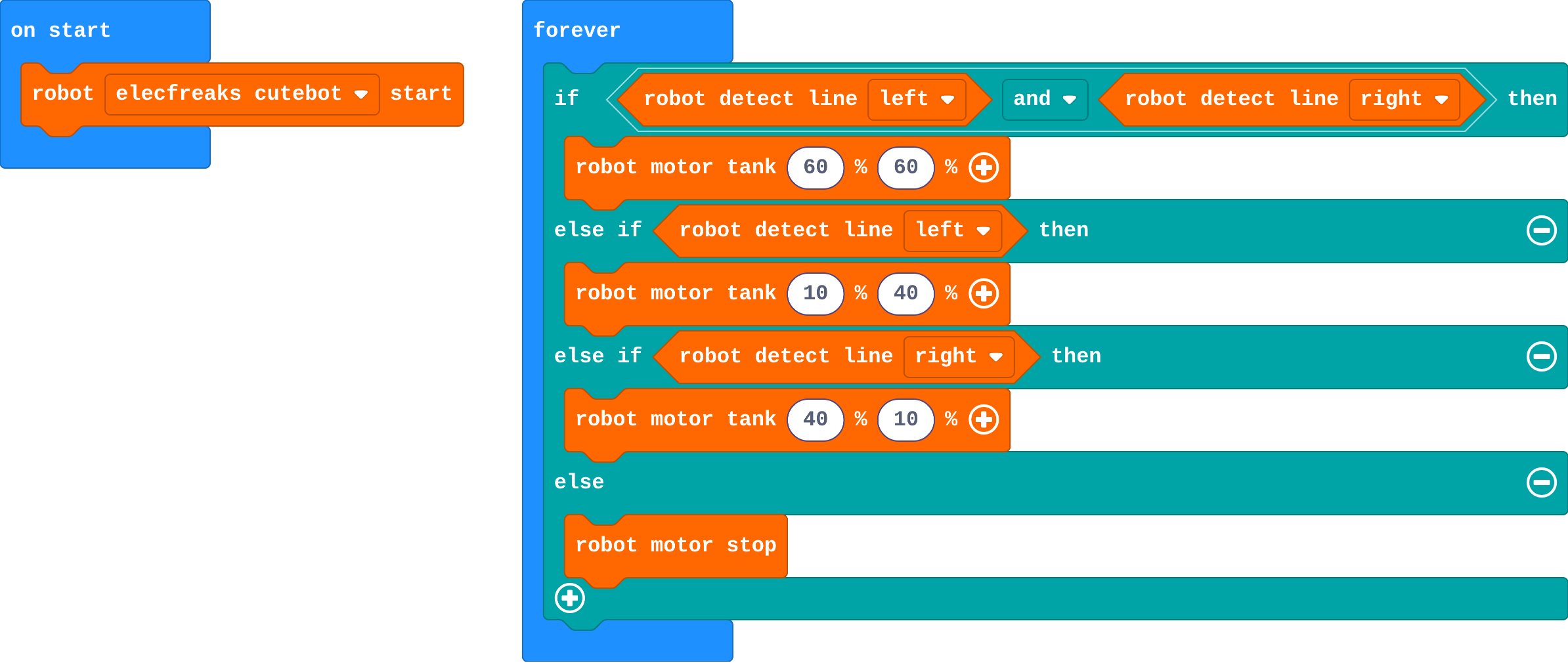
Show as code
robot.elecfreaksCuteBot.start()
basic.forever(function () {
    if (robot.detectLine(RobotLineDetector.Left) && robot.detectLine(RobotLineDetector.Right)) {
        robot.motorTank(60, 60)
    } else if (robot.detectLine(RobotLineDetector.Left)) {
        robot.motorTank(10, 40)
    } else if (robot.detectLine(RobotLineDetector.Right)) {
        robot.motorTank(40, 10)
    } else {
        robot.motorStop()
    }
})
Modify › Lost the line
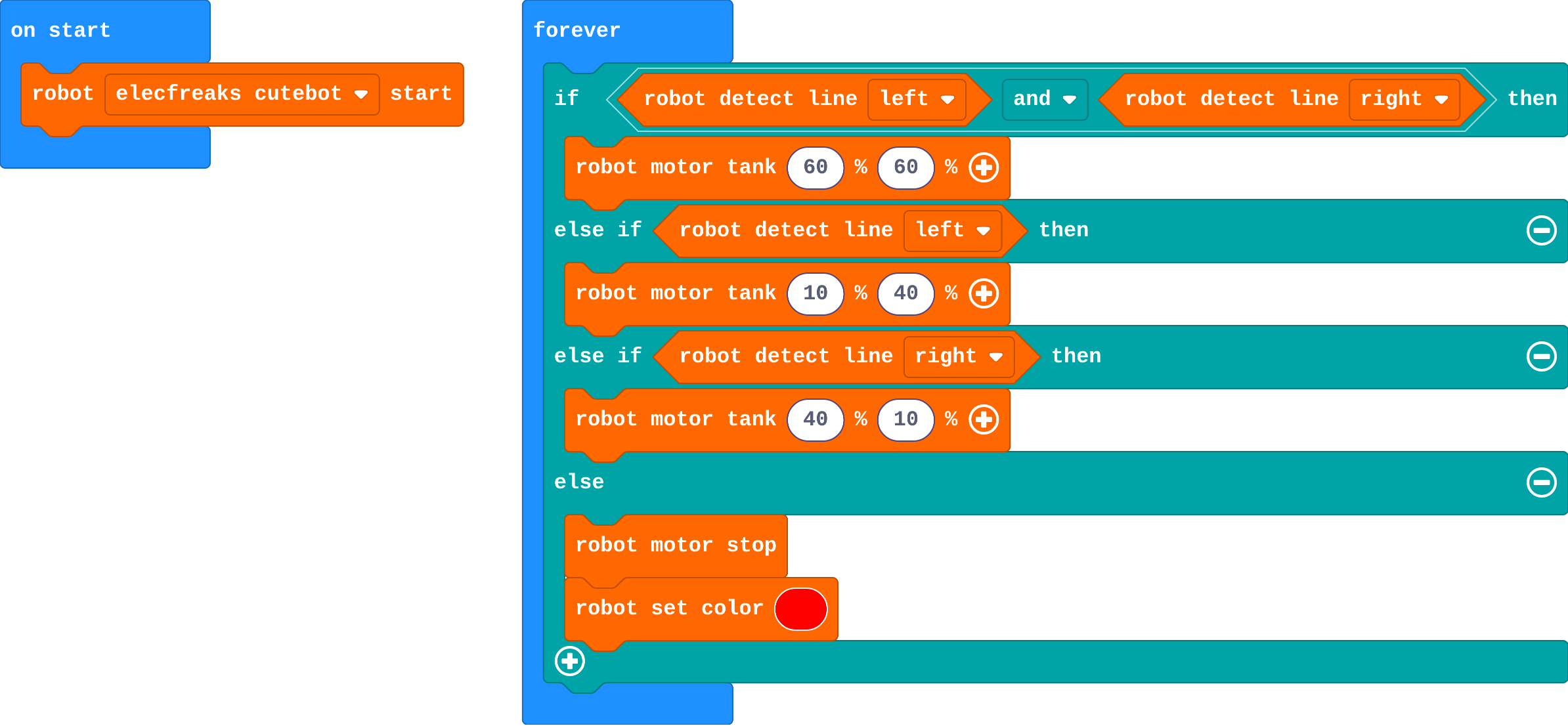
Show as code
robot.elecfreaksCuteBot.start()
basic.forever(function () {
    if (robot.detectLine(RobotLineDetector.Left) && robot.detectLine(RobotLineDetector.Right)) {
        robot.motorTank(60, 60)
    } else if (robot.detectLine(RobotLineDetector.Left)) {
        robot.motorTank(10, 40)
    } else if (robot.detectLine(RobotLineDetector.Right)) {
        robot.motorTank(40, 10)
    } else {
        robot.motorStop()
        robot.setColor(0xff0000)
    }
})
Make
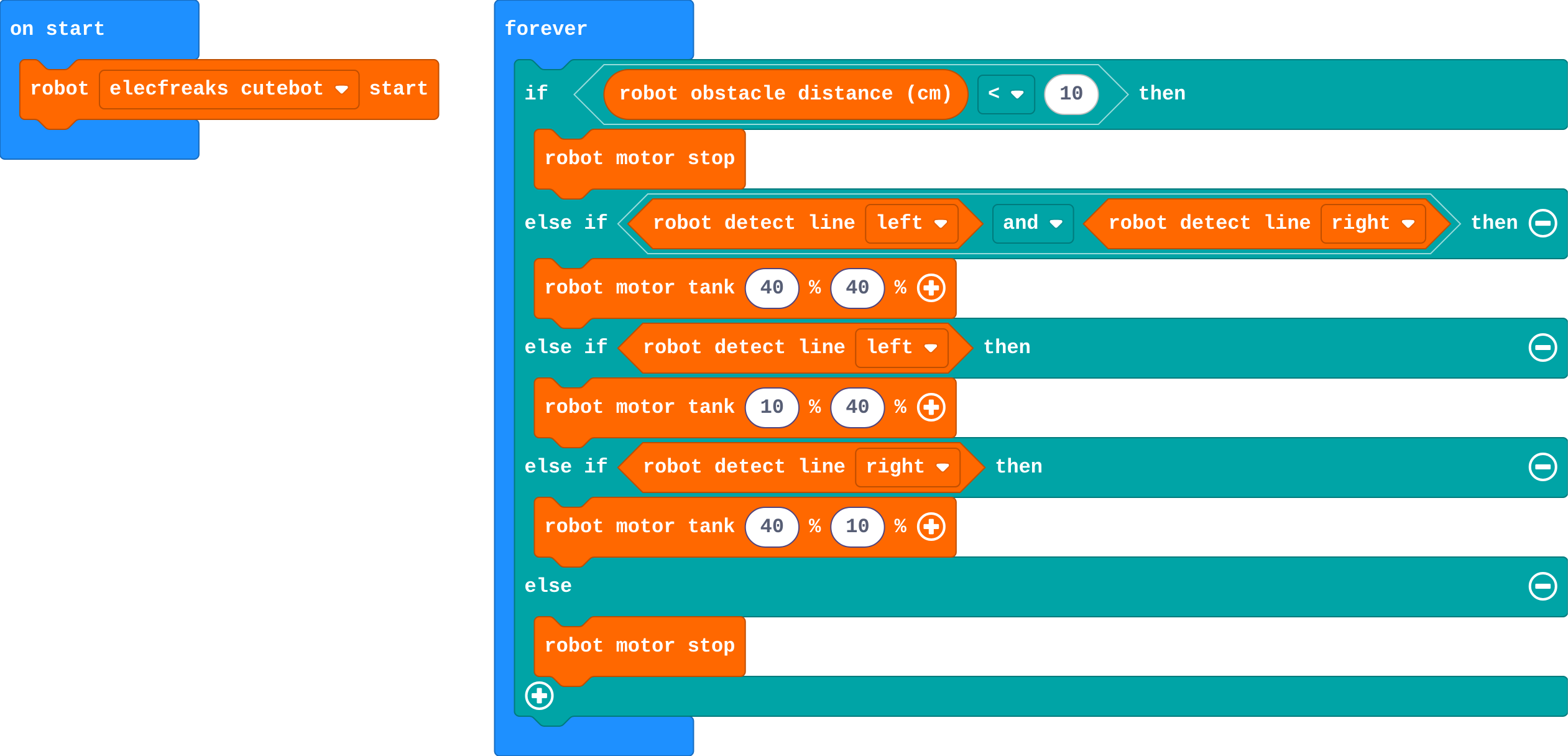
Show as code
robot.elecfreaksCuteBot.start()
basic.forever(function () {
    if (robot.obstacleDistance() < 10) {
        robot.motorStop()
    } else if (robot.detectLine(RobotLineDetector.Left) && robot.detectLine(RobotLineDetector.Right)) {
        robot.motorTank(40, 40)
    } else if (robot.detectLine(RobotLineDetector.Left)) {
        robot.motorTank(10, 40)
    } else if (robot.detectLine(RobotLineDetector.Right)) {
        robot.motorTank(40, 10)
    } else {
        robot.motorStop()
    }
})
Stretch and support
Stretch: Count laps: when both sensors lose the line for a moment at a gap, or each time a button is pressed, add 1 and show it. Or: drive the loop the other way.
Support: Give the two-sensor program with the turns removed from the middle branches; students choose the steering for each.
Exit ticket
Only the right sensor sees the line. Which way should the robot steer, and why?
Right: the line is on the right, so steering right brings the robot back over it.
What each step is for
- Investigate: Each line sensor says which side the line is on. Steer towards the side that still sees it; when both see it, drive straight.
- Modify: Each case can be tuned on its own: speed on straights, a warning when lost.
Where it leads
Next unit: Modes. One robot, many jobs: a variable chooses between stop, drive and follow. Real-world links: warehouse robots, hospital delivery robots, robot lawn mowers that follow a boundary wire.