---
marp: true
theme: default
html: true
---

# Follow the line

Robotics challenges · Sense

<!-- Speaker note: Students follow a line with one sensor (swinging along its edge), then two sensors (drive straight, steer towards the side that still sees the line), and combine line following with the distance sensor to make a delivery robot that stops when blocked. About 50 minutes (Predict and Run 8 min · Investigate 12 min · Modify 10 min · Make 15 min · Real robot 5 min (optional)). -->

---

## Today

**We are learning to** use the two line sensors to tell which side the line is on, and steer to stay on it.

- I can read a line sensor as true or false.
- I can steer towards the side whose sensor still sees the line.
- I can combine two sensors, asking the most important question first.

<!-- Speaker note: Before class: The robot has two **line sensors** under its front. Each is **true** when it is over the dark line. With one sensor the robot can only swing back and forth along the line's edge. With two, it knows **which way it drifted**: if only the left sensor still sees the line, the line is to the left, so it steers **left** (right wheel faster: robot motor tank 10 40). Steering the wrong way is the common slip (Kai's robot). The simulator's sensors are on/off only. Real sensors measure how much light comes back, which allows smooth steering; that is a good teacher-led extension on real robots. The simulator also adds a small "line assist": after the robot loses the line it slows down for a moment, which helps it find the line again. The Make combines lessons 3 and 5: the distance question must come **first**, or the robot would follow the line straight into the box. If the robot does not start on the line, students drag it onto the line, facing along it. MOVE Motor classes can use Kitronik's line-sensor blocks on the real robot; they give a number, so steering on the difference between left and right is a natural extension. Teacher: Real robot (optional): black electrical tape on light paper works best. -->

---

## Why it matters

> In many warehouses and hospitals, robots carry boxes and medicines along coloured lines on the floor. They do not know where they are; they only know whether each sensor still sees the line.

<!-- Speaker note: Under the front of the robot are two **line sensors**, a little to the left and a little to the right. Each one shines light at the floor and measures what bounces back: a dark line reflects less than the floor around it. In blocks, **robot detect line left** is **true** when the left sensor is over the line. You find it in **Robot**. The simulator's arena has a dark loop to follow. If the robot does not start on the line, drag it onto the line, facing along it. -->

---

<span style="background:#dbeafe; color:#1a1a1a; border:1.5px solid #3b82f6; padding:6px 18px; border-radius:8px; font-size:1em; font-weight:500;">💬 Discussion</span>

## Predict

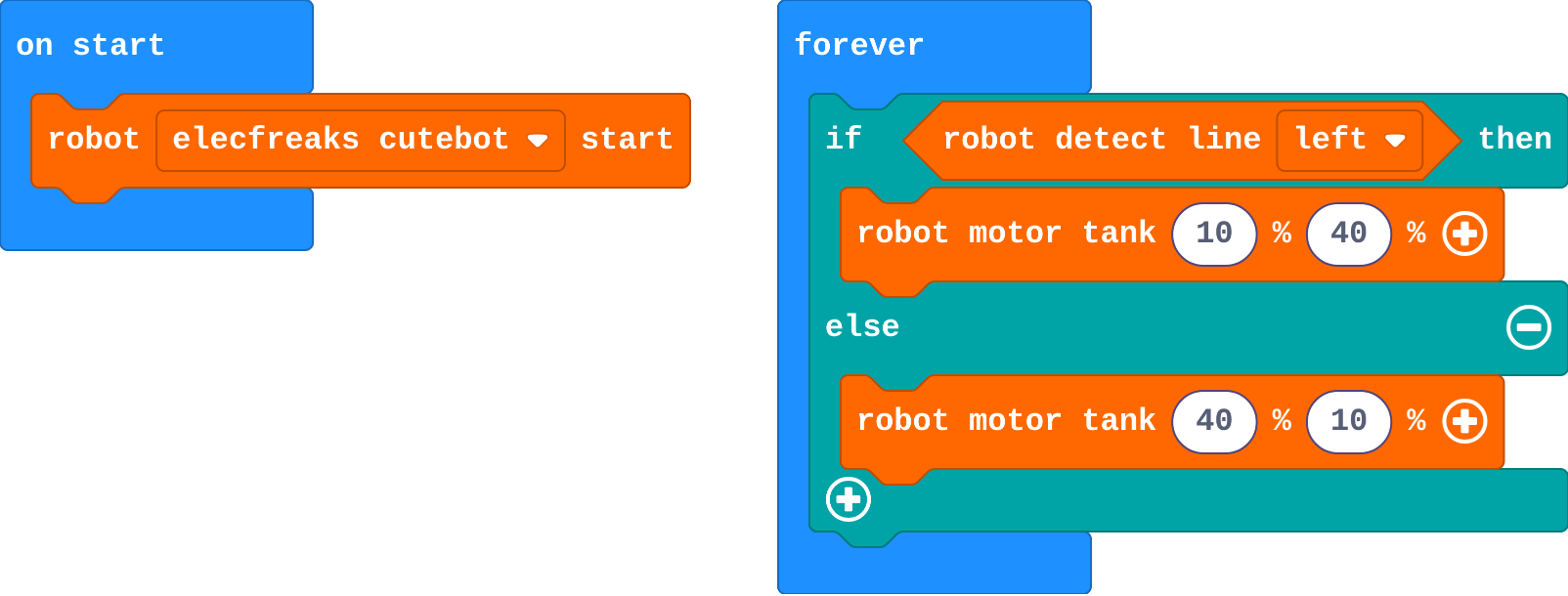
![h:304](https://studio.learningwaypoints.com/tutorials/_pictures/makecode/code/5ee84e07b9fd.png?v=ad680dacf51d4b18)

**This robot uses only its left sensor. It starts on the line. What does it do?**

- It drives straight off the line
- It stops, because one sensor is not enough
- It spins in a small circle
- It follows the line, swinging a little left and right as it goes

<!-- Speaker note: What happens: It follows the line by swinging: on the line, it steers left until the sensor slips off; off the line, it steers right until the sensor finds it again. It follows the left edge of the line. Take two or three predictions before anyone runs it. -->

<!-- Speaker note: Teacher: the one-sensor swing surprises students. Ask why it follows the edge, not the middle. -->

<style scoped>pre, marp-pre { font-size: 0.5em; line-height: 1.25; } section { font-size: 27px; }</style>

---

<span style="background:#dcfce7; color:#1a1a1a; border:1.5px solid #22c55e; padding:6px 18px; border-radius:8px; font-size:1em; font-weight:500;">✅ Check</span>

## What happened?

* It follows the line by swinging: on the line, it steers left until the sensor slips off; off the line, it steers right until the sensor finds it again. It follows the left edge of the line.

<!-- Speaker note: Reveal after running. Ask who predicted it, and what made them think so. -->

---

<span style="background:#fef3c7; color:#1a1a1a; border:1.5px solid #f59e0b; padding:6px 18px; border-radius:8px; font-size:1em; font-weight:500;">✍️ Activity</span>

## Run it

Open the lesson at this step and try it together.

[studio.learningwaypoints.com/tutorials/code/robotics/robot-line/?full=step-2#step-2](https://studio.learningwaypoints.com/tutorials/code/robotics/robot-line/?full=step-2#step-2)

<!-- Speaker note: Watch the robot go round the loop. Look closely at how it moves: smoothly, or in small swings? Students should be able to say: I watched the robot on the loop and compared it with my prediction. -->

<!-- Speaker note: Teacher: look for the swinging. If the robot is not on the line, drag it on. -->

---

<span style="background:#dbeafe; color:#1a1a1a; border:1.5px solid #3b82f6; padding:6px 18px; border-radius:8px; font-size:1em; font-weight:500;">💬 Discussion</span>

## Investigate

![h:360](https://studio.learningwaypoints.com/tutorials/_pictures/makecode/code/7ec392a12496.png?v=e28d816eb15630c1)

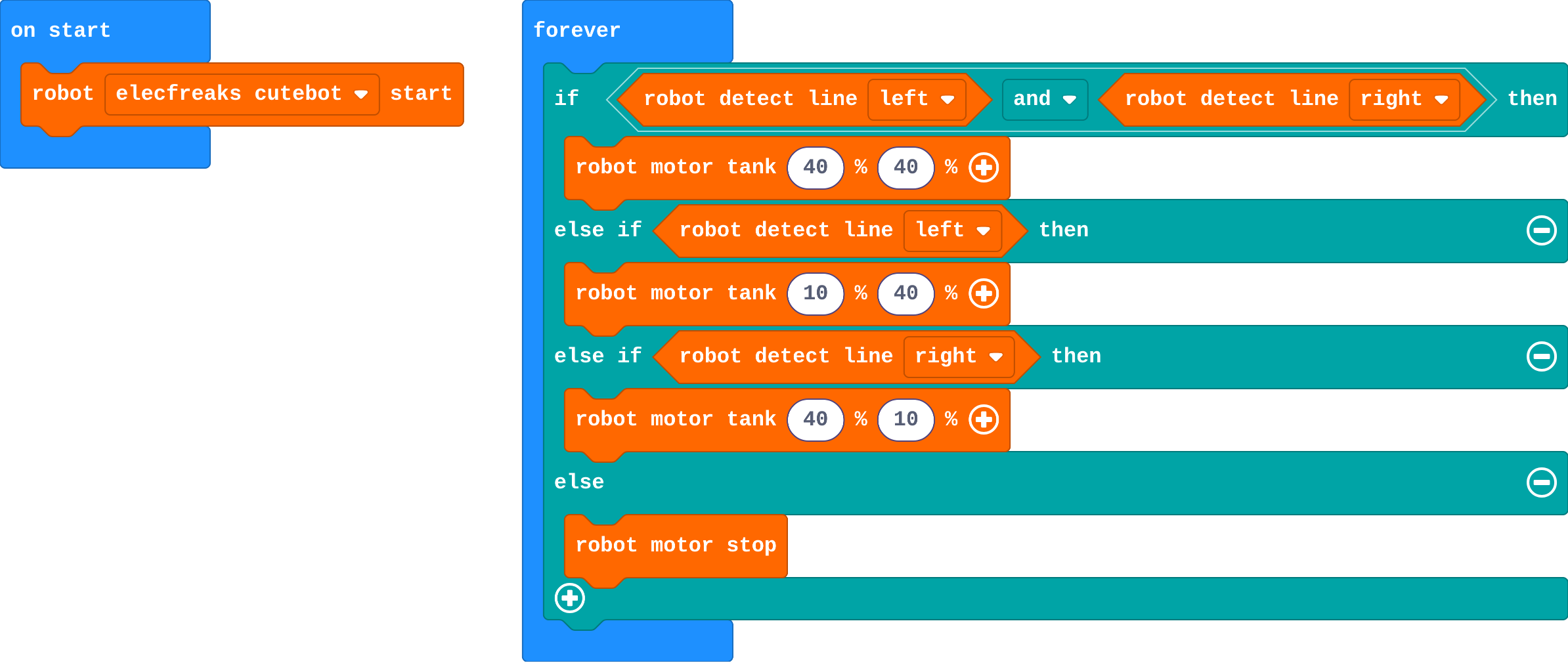
<!-- Speaker note: This version uses **both** sensors, so the robot knows which way it has drifted. It drives straight while both see the line, and steers only when one slips off. *Both see the line* is an **and** block (in **Logic**): it is true only when the question on each side is true. What this step is for: Each line sensor says which side the line is on. Steer towards the side that still sees it; when both see it, drive straight. -->

<!-- Speaker note: Teacher: act it out. One student is the robot, two others are the sensors calling 'line!'. Kai's robot is the wrong-way slip. -->

---

<span style="background:#dcfce7; color:#1a1a1a; border:1.5px solid #22c55e; padding:6px 18px; border-radius:8px; font-size:1em; font-weight:500;">✅ Check</span>

## What should it do?

**Match what the sensors see with what the robot should do.**

| | |
|---|---|
| `both see the line` | A. steer left |
| `only the left sees the line` | B. stop: the line is lost |
| `only the right sees the line` | C. steer right |
| `neither sees the line` | D. drive straight |

* Answer: both see the line → D. drive straight; only the left sees the line → A. steer left; only the right sees the line → C. steer right; neither sees the line → B. stop: the line is lost

<!-- Speaker note:  -->

<style scoped>pre, marp-pre { font-size: 0.5em; line-height: 1.25; } section { font-size: 23px; }</style>

---

<span style="background:#dcfce7; color:#1a1a1a; border:1.5px solid #22c55e; padding:6px 18px; border-radius:8px; font-size:1em; font-weight:500;">✅ Check</span>

## Kai's robot

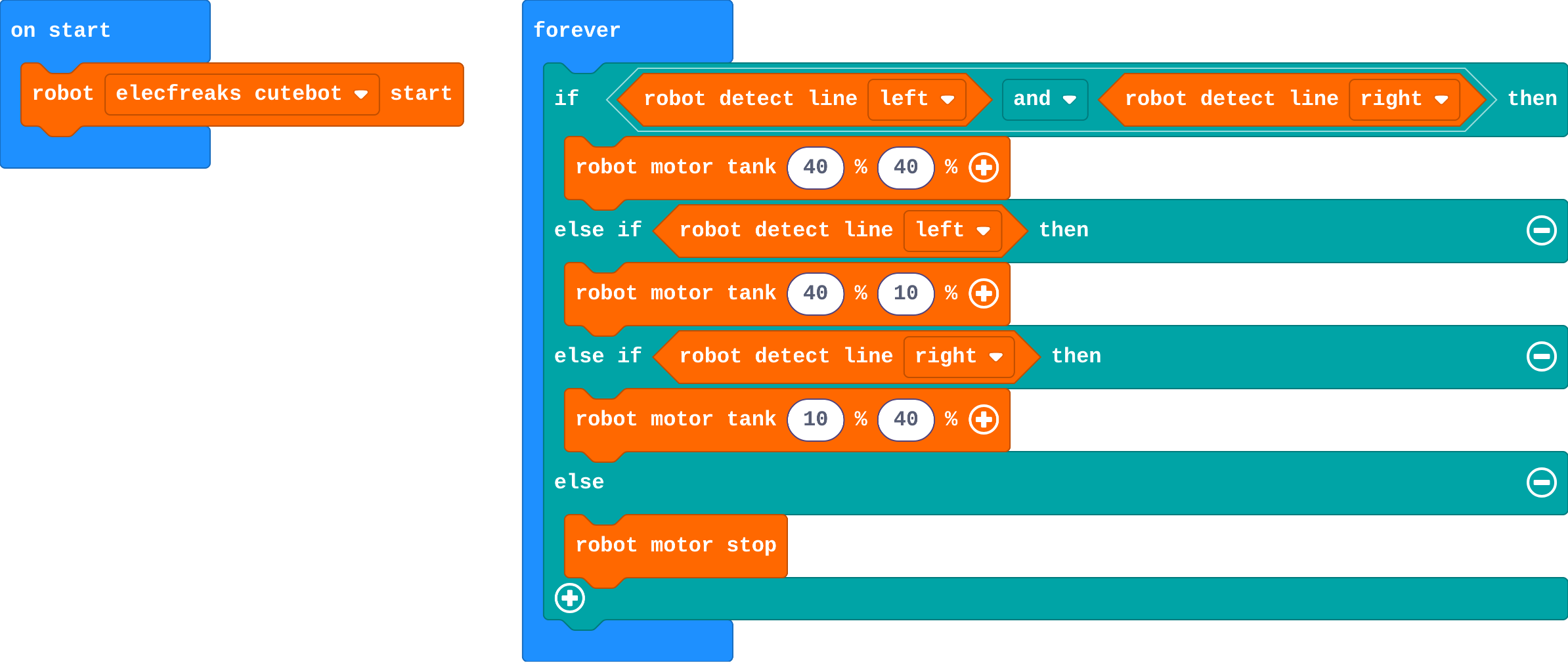
Kai's program:

![h:360](https://studio.learningwaypoints.com/tutorials/_pictures/makecode/code/b35801c28d14.png?v=91d4b67728b7665c)

**Kai's robot runs off the loop at the first bend. Which part is wrong?**

- Line sensors only work on straight lines
- His speeds are too slow
- He needs a forever block
- His turns are swapped: when only the left sensor sees the line, he steers right, away from it

* Answer: His turns are swapped: when only the left sensor sees the line, he steers right, away from it

<!-- Speaker note: When only the left sensor sees the line, the line is to the left, so the robot must steer left, towards it. Kai steers away, so the robot leaves the line. -->

<style scoped>pre, marp-pre { font-size: 0.5em; line-height: 1.25; } section { font-size: 21px; }</style>

---

<span style="background:#fef3c7; color:#1a1a1a; border:1.5px solid #f59e0b; padding:6px 18px; border-radius:8px; font-size:1em; font-weight:500;">✍️ Activity</span>

## Modify


- **Faster on straights:** Delivery robots go faster where the line is straight. Make the robot drive at **60** when both sensors see the line. Does it still get round the bends?
- **Lost the line:** When neither sensor sees the line, the robot stops. Make its lights turn **red** too, so a person knows it needs help.

[Open this step](https://studio.learningwaypoints.com/tutorials/code/robotics/robot-line/?full=step-4#step-4)

<!-- Speaker note: What this step is for: Each case can be tuned on its own: speed on straights, a warning when lost. Hints, in order: Change the first robot motor tank (both sensors see the line) to 60 60. / robot set color is in Robot. Put it in the last else, after robot motor stop, and choose red. For students who need more support: Give the two-sensor program with the turns removed from the middle branches; students choose the steering for each. For early finishers: Count laps: when both sensors lose the line for a moment at a gap, or each time a button is pressed, add 1 and show it. Or: drive the loop the other way. The hard part, on purpose: Steering towards the sensor that still sees the line. Ask which side the line is on when only the left sensor sees it. When students get stuck: The robot leaves the line at the first bend. Ask: When only the left sensor sees the line, which way is the line? Fix: Steer towards it: left sees the line, steer left (10 40). / The robot stops straight away. Ask: Is it on the line? Which case is it in? Fix: Drag it onto the line, facing along it. / It drives into the box on the line. Ask: Which question does your if ask first? Fix: Put the distance question first: the first true question wins. -->

<!-- Speaker note: Teacher: faster straights may make it overshoot the bends: that is the trade-off real robots tune. -->

---

<span style="background:#fef3c7; color:#1a1a1a; border:1.5px solid #f59e0b; padding:6px 18px; border-radius:8px; font-size:1em; font-weight:500;">✍️ Activity</span>

## Make

Make a **delivery robot**: it follows the loop, but if something is on the line ahead, it **stops** and waits until it is moved.

- Drag a box onto the line to test it, then drag the box away. Does the robot carry on?
- Which question should the robot ask **first**: the distance, or the line sensors? Why?

[Open this step](https://studio.learningwaypoints.com/tutorials/code/robotics/robot-line/?full=step-5#step-5)

<!-- Speaker note: Hints, in order: Add one more question at the very top of the if: robot obstacle distance < 10. Its move is robot motor stop. / Click + on the if to add another else if, then drag the questions so the distance one comes first. -->

<!-- Speaker note: Teacher: ask which question goes first and why. Then drag a box onto the line to test. -->

---

## On a real robot

For a real track, use black electrical tape (about 2 cm wide) on a light floor or a large sheet of paper. Things to notice:

- Real line sensors are not simply on or off: shiny floors, shadows and tape edges confuse them. If yours misbehaves, try a different surface.
- Sharp corners are hard. Slow down, or make the tape curve gently.
- Robots that read **how dark** the floor is (not just on or off) can steer smoothly, turning more the further they drift. That is how competition line followers work.

<style scoped>pre, marp-pre { font-size: 0.5em; line-height: 1.25; } section { font-size: 27px; }</style>

---

<span style="background:#dcfce7; color:#1a1a1a; border:1.5px solid #22c55e; padding:6px 18px; border-radius:8px; font-size:1em; font-weight:500;">✅ Check</span>

## Exit ticket

**Only the right sensor sees the line. Which way should the robot steer, and why?**

* Right: the line is on the right, so steering right brings the robot back over it.

<!-- Speaker note: Students answer on paper or a mini whiteboard before the reveal. Anyone who cannot answer needs the main idea again next lesson. Where this leads: Next unit: Modes. One robot, many jobs: a variable chooses between stop, drive and follow. Real-world links: warehouse robots, hospital delivery robots, robot lawn mowers that follow a boundary wire. -->