A shared code
Students send a place number that stands for a word in a list both micro:bits share, and see that a message is a code both sides must agree on.
Classroom resources
Load these into Waypoints Prepare: choose Load URL and paste the copied address, or download the file and import it. In Prepare, the worksheet's Teacher edition shows the answers; the student copy hides them.
Students will be able to
- I can send a place number and look up the word it stands for.
- I can explain why both micro:bits need the same list in the same order.
- I can step through a list with a button and loop back to the start.
Timing
Predict and Run 7 min · Investigate 12 min · Modify 10 min · Mix it up 3 min · Make 9 min · Quiz buzzer 4 min
Before class
This lesson joins earlier ideas: lists (places from 0), variables (the chosen place) and radio. Both micro:bits hold the same list of words. Instead of sending a word, the sender sends its place number; the receiver shows the word at that place (get value at receivedNumber). That shared list is a code, and both sides must agree on it exactly: same words, same order. Stepping through a list uses a variable that goes up by 1 and goes back to 0 when it reaches the length. A reply (such as 99 for "got it") is just another agreed number that is not a place in the list.
Running the lesson
- Predict: many say 2. Ask what the receiver does with the number (looks it up).
- Run: it shows No. Say it plainly: the number is a code for a word both sides know.
- Investigate: the trace shows the loop back to 0. Ella and Tom is this lesson's misconception: a code only works if both sides share it.
- Modify: adding a word needs nothing else changed, because of the length. The reply task is how real apps show 'delivered'.
- Mix it up: else if over receivedNumber, where the order of the questions matters.
- Make: a mood check-in. With real micro:bits, the teacher's micro:bit can sit at the front.
In class
On the slides at these points. Students can do the whole lesson on their own; these are for the room. In the deck, the Run, Modify and Make slides have the live playground in them (the tutorial link is the backup), and the notes above are in each slide's speaker notes.
- Codebooks (investigate, 4 min)
Pairs each write a list of three words. One holds up a place number; the other says the word at that place in their own list.
Swap one pair's lists into a different order. The code breaks: that is Ella and Tom.
- Check in (end, 3 min)
Send your mood to the next pair's micro:bit. Did they get the mood you meant?
The hard part (on purpose)
Both sides must share the same list in the same order. When the wrong word shows, ask them to compare the two lists item by item.
When students get stuck
| What you will see | A question to ask | The fix |
|---|---|---|
| The wrong word shows. | Are both lists the same, in the same order? | Make the lists match exactly on both micro:bits. |
| Pressing A past the end shows nothing or an error. | What happens when choice reaches the length of the list? | Add if choice = length of words, set choice to 0. |
| The tick shows instead of the word, or the word shows instead of the tick. | Which number means 'got it', and is it checked first? | Check receivedNumber = 99 first; else show the word. |
Answers to the checks
- Predict: You press A on one micro:bit, so it sends 2. What does the other micro:bit show?
No. The receiver looks up place 2 in its list: Hi is at 0, Yes at 1, No at 2. - Choose and send: This messenger lets you choose a word with A, then send it with B. Fill in choice after each press of A.
1, Yes, 2, No, 0, Hi
Each A adds 1. When choice reaches 3 (the length of the list), the if sets it back to 0, so it loops round the list. - Ella and Tom: Ella and Tom built the messenger, but Tom's list is in a different order. Ella sends Yes, and Tom's micro:bit shows No. Why?
Only the place number is sent, and the same place holds a different word in Tom's list
Ella sends place 1. In her list place 1 is Yes; in Tom's it is No. Both micro:bits must use the same list in the same order. - Why a number?: Why send the place number instead of the whole word?
Both micro:bits already have the list, so a small number is all that needs to travel
Radio can send words, but a number is shorter and both sides already know what it stands for. That shared list is a code. - Mix it up: What does this receiver show for each number that arrives?
happy face, sad face, cross
5 is more than 3, so the first part runs. 2 is not more than 3, but it is more than 1. 1 is neither, so else runs.
Solutions
One possible solution for each task. Other correct programs are fine.
Modify › One more word
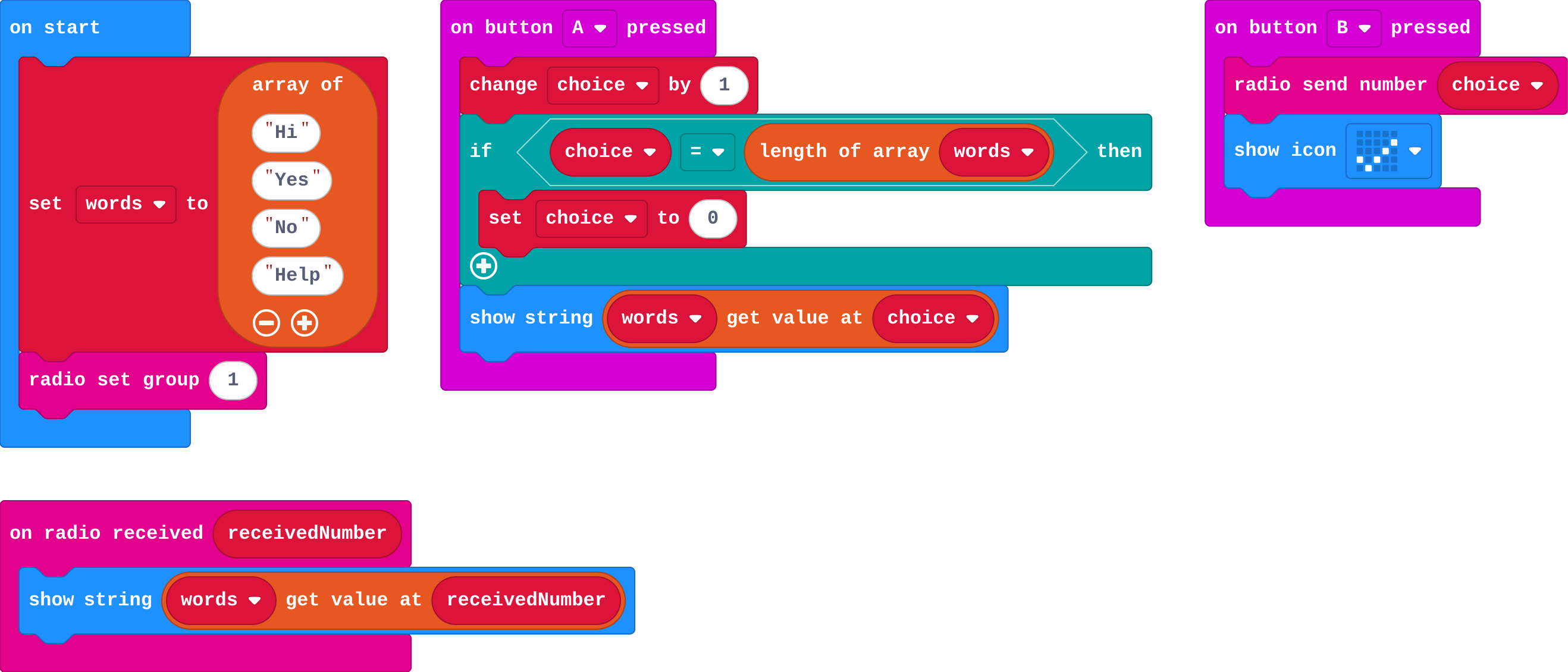
Show as code
let words = ["Hi", "Yes", "No", "Help"]
let choice = 0
radio.setGroup(1)
input.onButtonPressed(Button.A, function () {
    choice += 1
    if (choice == words.length) {
        choice = 0
    }
    basic.showString(words[choice])
})
input.onButtonPressed(Button.B, function () {
    radio.sendNumber(choice)
    basic.showIcon(IconNames.Yes)
})
radio.onReceivedNumber(function (receivedNumber) {
    basic.showString(words[receivedNumber])
})
Modify › Got it!
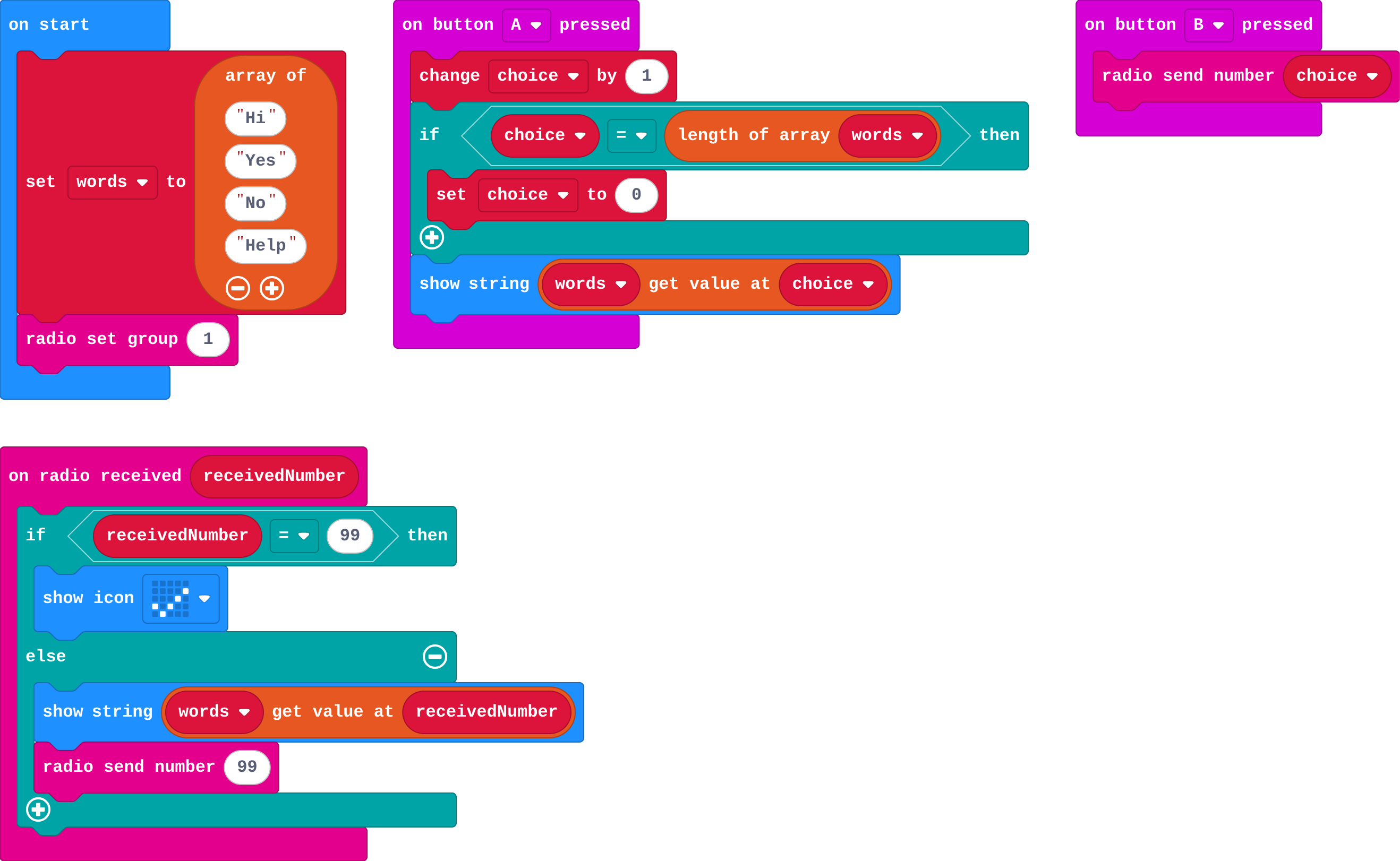
Show as code
let words = ["Hi", "Yes", "No", "Help"]
let choice = 0
radio.setGroup(1)
input.onButtonPressed(Button.A, function () {
    choice += 1
    if (choice == words.length) {
        choice = 0
    }
    basic.showString(words[choice])
})
input.onButtonPressed(Button.B, function () {
    radio.sendNumber(choice)
})
radio.onReceivedNumber(function (receivedNumber) {
    if (receivedNumber == 99) {
        basic.showIcon(IconNames.Yes)
    } else {
        basic.showString(words[receivedNumber])
        radio.sendNumber(99)
    }
})
Make
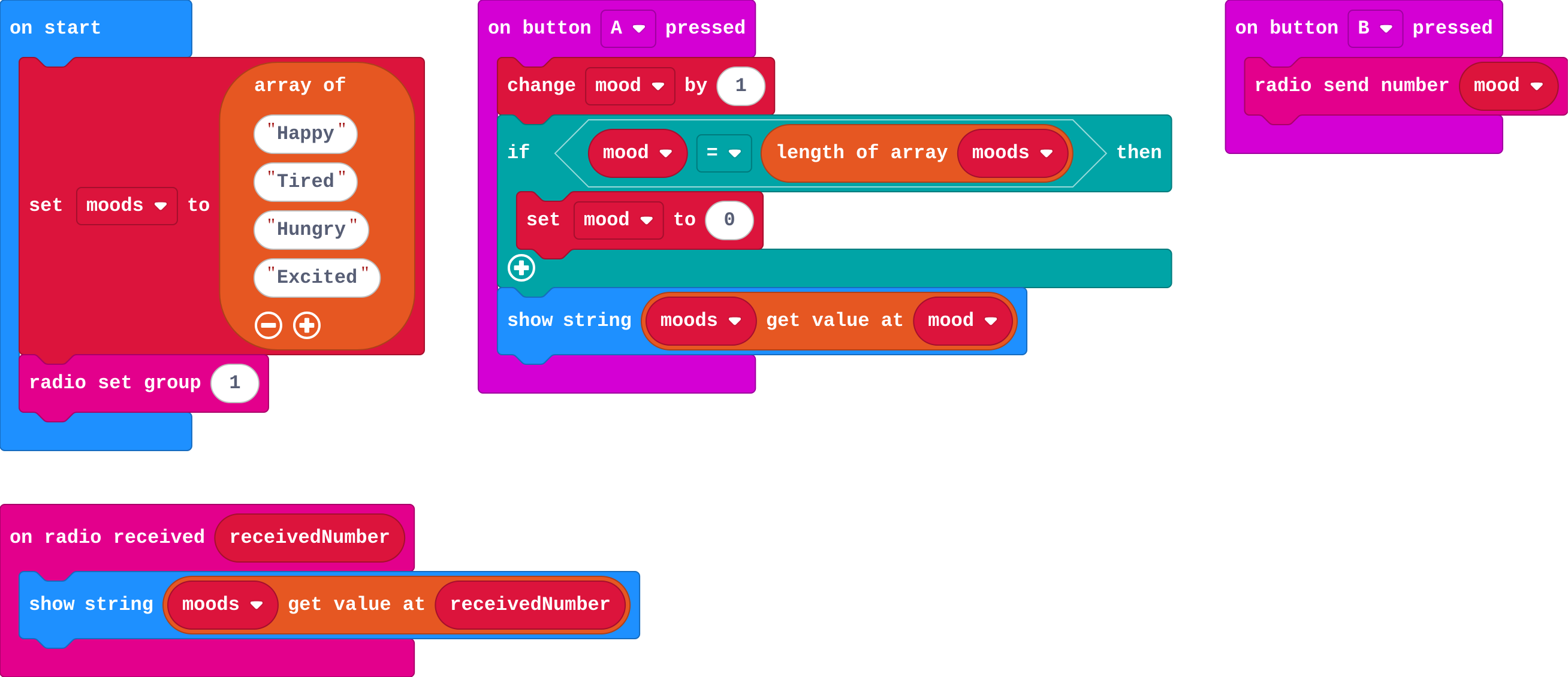
Show as code
let moods = ["Happy", "Tired", "Hungry", "Excited"]
let mood = 0
radio.setGroup(1)
input.onButtonPressed(Button.A, function () {
    mood += 1
    if (mood == moods.length) {
        mood = 0
    }
    basic.showString(moods[mood])
})
input.onButtonPressed(Button.B, function () {
    radio.sendNumber(mood)
})
radio.onReceivedNumber(function (receivedNumber) {
    basic.showString(moods[receivedNumber])
})
Change a quiz buzzer
Open task: any program that does what the step asks.
Stretch and support
Stretch: Send two numbers in one message: the sender's player number times 10, plus the word's place (so 23 means player 2 said word 3). Decode it on the receiver.
Support: Give students the mood list and the A stepping blocks, and ask them to add the sending and receiving.
Exit ticket
Your micro:bit sends 1. Your list is Hi, Yes, No. Your partner's list is Yes, No, Hi. What does your partner's micro:bit show, and why?
No. Only the place number travels, and place 1 in your partner's list is No.
What each step is for
- Investigate: A message is a code both sides must share: the same list, in the same order. Sending the place number keeps the message small.
- Modify: Adding to the shared list needs no other change, because the loop back to 0 uses the list's length. A reply is just another agreed number.
- Mix it up: The first true question wins, so the order of the questions about receivedNumber decides what each number does.
Where it leads
Next unit: time. The micro:bit can measure how long something takes. Class ideas: a class emoji vote; a secret code where groups invent their own word lists and swap them.