---
marp: true
theme: default
html: true
---

# A shared code

micro:bit: talk and play · Talk

<!-- Speaker note: Students send a place number that stands for a word in a list both micro:bits share, and see that a message is a code both sides must agree on. About 45 minutes (Predict and Run 7 min · Investigate 12 min · Modify 10 min · Mix it up 3 min · Make 9 min · Quiz buzzer 4 min). -->

---

## Today

**We are learning to** send a place number that stands for a word in a list both micro:bits share.

- I can send a place number and look up the word it stands for.
- I can explain why both micro:bits need the same list in the same order.
- I can step through a list with a button and loop back to the start.

<!-- Speaker note: Before class: This lesson joins earlier ideas: **lists** (places from 0), **variables** (the chosen place) and **radio**. Both micro:bits hold the same list of words. Instead of sending a word, the sender sends its **place number**; the receiver shows the word at that place (*get value at receivedNumber*). That shared list is a **code**, and both sides must agree on it exactly: same words, same order. Stepping through a list uses a variable that goes up by 1 and goes back to 0 when it reaches the length. A reply (such as 99 for "got it") is just another agreed number that is not a place in the list. Teacher: Mix it up: else if over receivedNumber, where the order of the questions matters. -->

---

## Why it matters

> Morse code, flag signals and the numbers a fast-food counter calls out all work because both sides agree what each code means.

<!-- Speaker note: Last lesson, 1 meant "left" and 2 meant "right" because you decided so. A **list** makes that agreement clear: if both micro:bits have the same list of words, sending a **place number** is enough. The receiver looks up the word at that place. -->

---

<span style="background:#dbeafe; color:#1a1a1a; border:1.5px solid #3b82f6; padding:6px 18px; border-radius:8px; font-size:1em; font-weight:500;">💬 Discussion</span>

## Predict

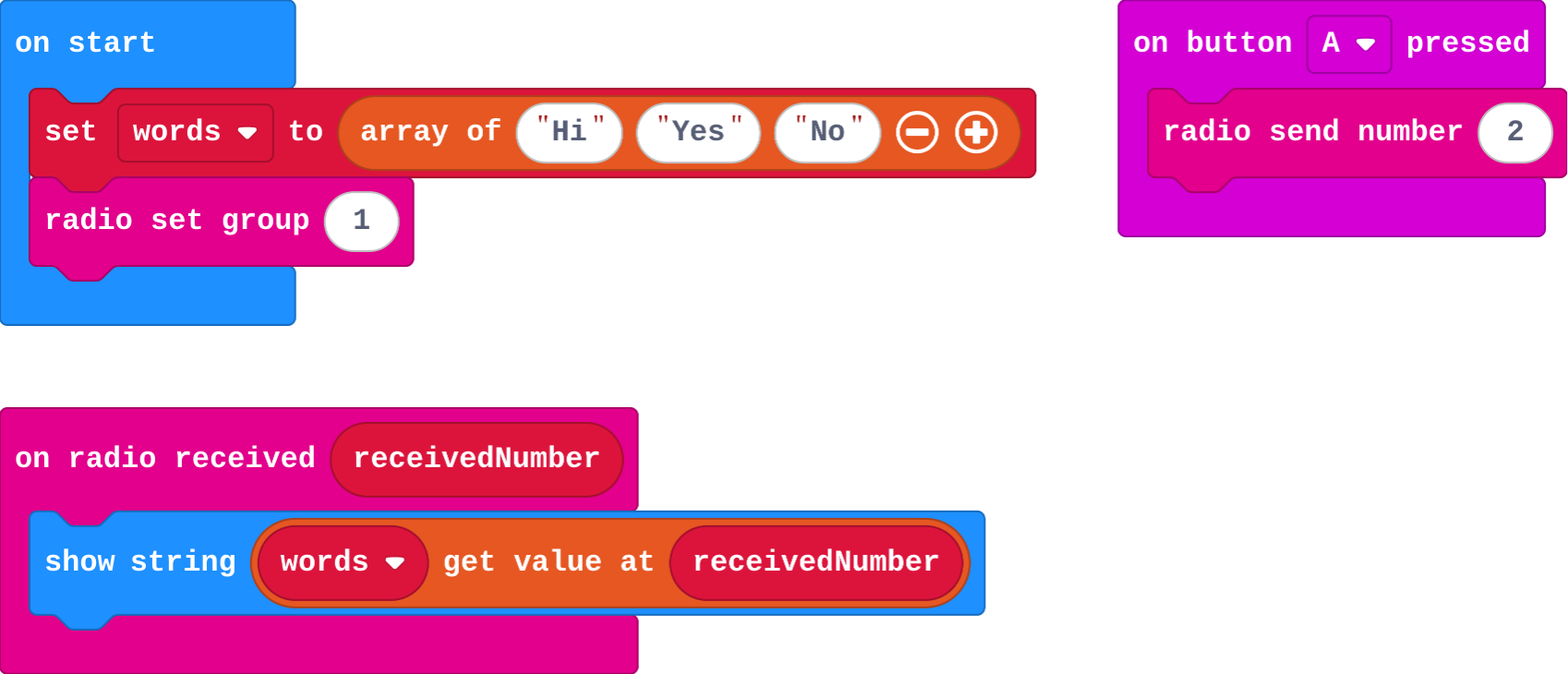
![h:360](https://studio.learningwaypoints.com/tutorials/_pictures/makecode/code/cb434abb1fc7.png?v=3a0b862809eb78b0)

**You press A on one micro:bit, so it sends 2. What does the other micro:bit show?**

- Hi
- No
- Yes
- 2

<!-- Speaker note: What happens: No. The receiver looks up place 2 in its list: Hi is at 0, Yes at 1, No at 2. Take two or three predictions before anyone runs it. -->

<!-- Speaker note: Teacher: many say 2. Ask what the receiver does with the number (looks it up). -->

---

<span style="background:#dcfce7; color:#1a1a1a; border:1.5px solid #22c55e; padding:6px 18px; border-radius:8px; font-size:1em; font-weight:500;">✅ Check</span>

## What happened?

* No. The receiver looks up place 2 in its list: Hi is at 0, Yes at 1, No at 2.

<!-- Speaker note: Reveal after running. Ask who predicted it, and what made them think so. -->

---

<span style="background:#fef3c7; color:#1a1a1a; border:1.5px solid #f59e0b; padding:6px 18px; border-radius:8px; font-size:1em; font-weight:500;">✍️ Activity</span>

## Run it

Open the lesson at this step and try it together.

[studio.learningwaypoints.com/tutorials/code/microbit-play/microbit-messages/?full=step-2#step-2](https://studio.learningwaypoints.com/tutorials/code/microbit-play/microbit-messages/?full=step-2#step-2)

<!-- Speaker note: Press **A** on one micro:bit and read the word on the other. Students should be able to say: I pressed A and checked which word the other micro:bit showed. -->

<!-- Speaker note: Teacher: it shows No. Say it plainly: the number is a code for a word both sides know. -->

---

<span style="background:#dbeafe; color:#1a1a1a; border:1.5px solid #3b82f6; padding:6px 18px; border-radius:8px; font-size:1em; font-weight:500;">💬 Discussion</span>

## Investigate

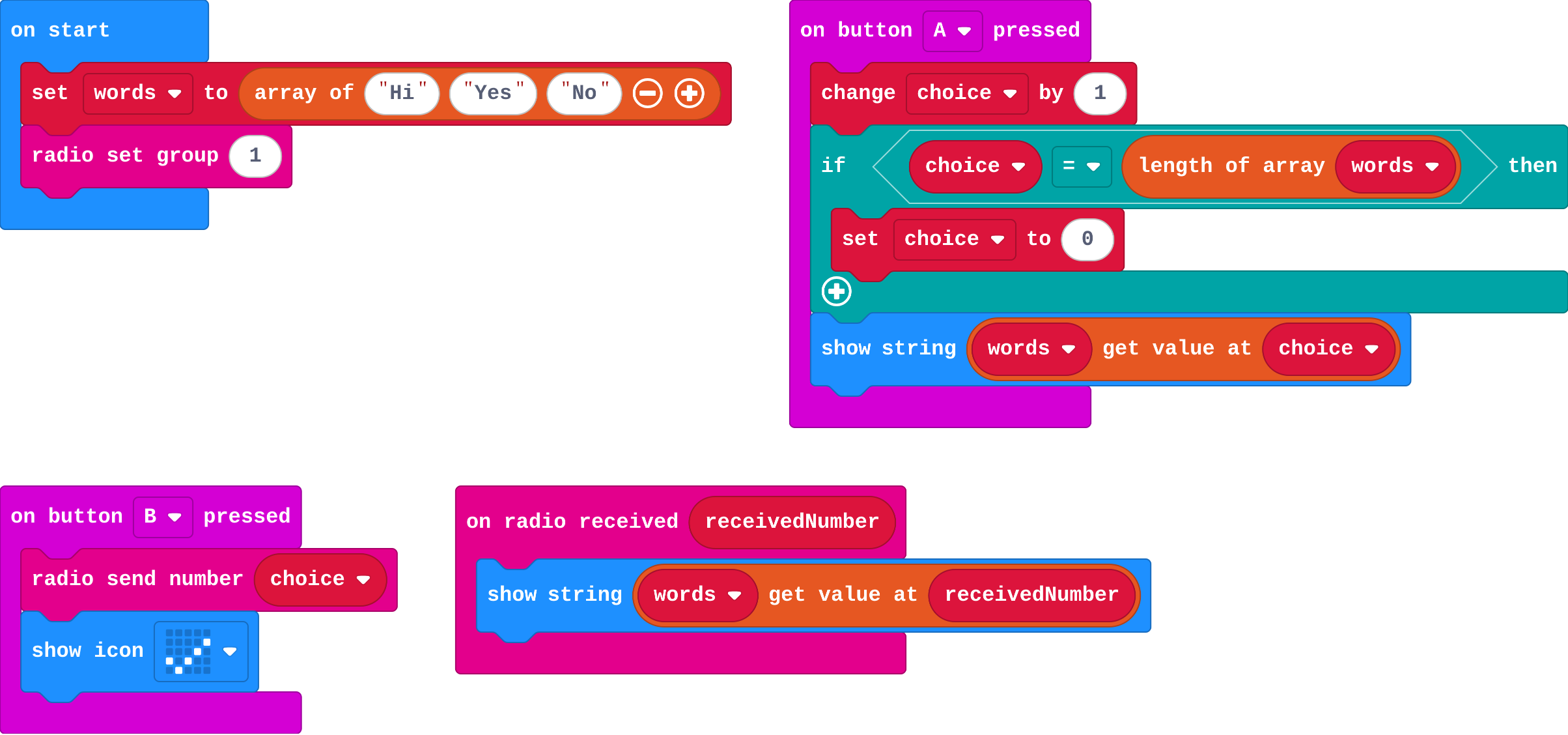
![h:360](https://studio.learningwaypoints.com/tutorials/_pictures/makecode/code/98c129ea3961.png?v=5059eba5d8badf69)

<!-- Speaker note: **A** steps through the list; **B** sends the place number of the chosen word. What this step is for: A message is a code both sides must share: the same list, in the same order. Sending the place number keeps the message small. -->

<!-- Speaker note: Teacher: the trace shows the loop back to 0. Ella and Tom is this lesson's misconception: a code only works if both sides share it. -->

---

<span style="background:#dcfce7; color:#1a1a1a; border:1.5px solid #22c55e; padding:6px 18px; border-radius:8px; font-size:1em; font-weight:500;">✅ Check</span>

## Choose and send

**This messenger lets you choose a word with A, then send it with B. Fill in choice after each press of A.**

| press | choice after | word shown |
|---|---|---|
| (start) | 0 |  |
| A | ? | ? |
| A | ? | ? |
| A | ? | ? |

* Answer: 1, Yes, 2, No, 0, Hi

<!-- Speaker note: Each A adds 1. When choice reaches 3 (the length of the list), the if sets it back to 0, so it loops round the list. -->

<style scoped>pre, marp-pre { font-size: 0.5em; line-height: 1.25; } section { font-size: 24px; }</style>

---

<span style="background:#dcfce7; color:#1a1a1a; border:1.5px solid #22c55e; padding:6px 18px; border-radius:8px; font-size:1em; font-weight:500;">✅ Check</span>

## Ella and Tom

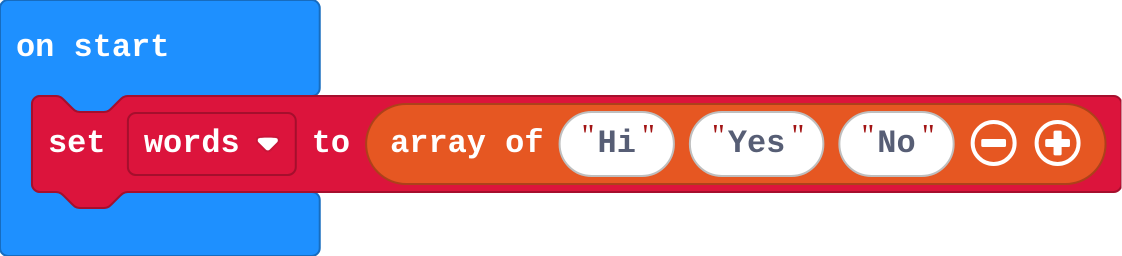
Ella's list:

![h:128](https://studio.learningwaypoints.com/tutorials/_pictures/makecode/code/b48fc8b749f3.png?v=f1c116adf2a66741)

Tom's list:

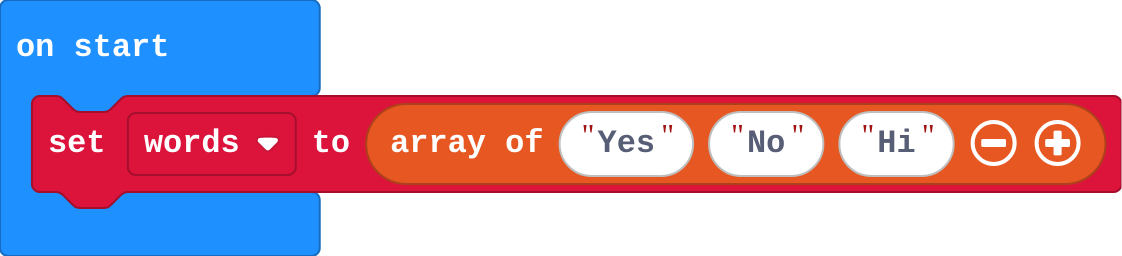
![h:128](https://studio.learningwaypoints.com/tutorials/_pictures/makecode/code/85e2f3d04579.png?v=0060d7492e3d079a)

**Ella and Tom built the messenger, but Tom's list is in a different order. Ella sends Yes, and Tom's micro:bit shows No. Why?**

- Tom's group is wrong
- Only the place number is sent, and the same place holds a different word in Tom's list
- Lists cannot be sent by radio
- The radio changed the number

* Answer: Only the place number is sent, and the same place holds a different word in Tom's list

<!-- Speaker note: Ella sends place 1. In her list place 1 is Yes; in Tom's it is No. Both micro:bits must use the same list in the same order. -->

<style scoped>pre, marp-pre { font-size: 0.5em; line-height: 1.25; } section { font-size: 18px; }</style>

---

<span style="background:#dcfce7; color:#1a1a1a; border:1.5px solid #22c55e; padding:6px 18px; border-radius:8px; font-size:1em; font-weight:500;">✅ Check</span>

## Why a number?

**Why send the place number instead of the whole word?**

- Both micro:bits already have the list, so a small number is all that needs to travel
- Radio cannot send words
- It is the only block that works
- Numbers are prettier

* Answer: Both micro:bits already have the list, so a small number is all that needs to travel

<!-- Speaker note: Radio can send words, but a number is shorter and both sides already know what it stands for. That shared list is a code. -->

<style scoped>pre, marp-pre { font-size: 0.5em; line-height: 1.25; } section { font-size: 27px; }</style>

---

<span style="background:#fef3c7; color:#1a1a1a; border:1.5px solid #f59e0b; padding:6px 18px; border-radius:8px; font-size:1em; font-weight:500;">✍️ Activity</span>

## Codebooks <span style="font-size:.6em;color:#64748b">(4 min)</span>

Pairs each write a list of three words. One holds up a place number; the other says the word at that place in their own list.

<!-- Speaker note: Swap one pair's lists into a different order. The code breaks: that is Ella and Tom. -->

---

<span style="background:#fef3c7; color:#1a1a1a; border:1.5px solid #f59e0b; padding:6px 18px; border-radius:8px; font-size:1em; font-weight:500;">✍️ Activity</span>

## Modify


- **One more word:** Add a fourth word. Did you need to change anything else? Why not?
- **Got it!:** Make the receiver **reply**: when a word arrives, it sends back 99, and the sender shows a tick when 99 arrives. Real messaging apps do this to show "delivered"

[Open this step](https://studio.learningwaypoints.com/tutorials/code/microbit-play/microbit-messages/?full=step-4#step-4)

<!-- Speaker note: What this step is for: Adding to the shared list needs no other change, because the loop back to 0 uses the list's length. A reply is just another agreed number. Hints, in order: Click + on the list block. Both micro:bits run the same program, so one change updates both lists. / In on radio received: if receivedNumber = 99, show a tick; else show the word and send 99. / Ask about 99 first, because 99 is not a place in the list. For students who need more support: Give students the mood list and the A stepping blocks, and ask them to add the sending and receiving. For early finishers: Send two numbers in one message: the sender's player number times 10, plus the word's place (so 23 means player 2 said word 3). Decode it on the receiver. The hard part, on purpose: Both sides must share the same list in the same order. When the wrong word shows, ask them to compare the two lists item by item. When students get stuck: The wrong word shows. Ask: Are both lists the same, in the same order? Fix: Make the lists match exactly on both micro:bits. / Pressing A past the end shows nothing or an error. Ask: What happens when choice reaches the length of the list? Fix: Add if choice = length of words, set choice to 0. / The tick shows instead of the word, or the word shows instead of the tick. Ask: Which number means 'got it', and is it checked first? Fix: Check receivedNumber = 99 first; else show the word. -->

<!-- Speaker note: Teacher: adding a word needs nothing else changed, because of the length. The reply task is how real apps show 'delivered'. -->

---

<span style="background:#dbeafe; color:#1a1a1a; border:1.5px solid #3b82f6; padding:6px 18px; border-radius:8px; font-size:1em; font-weight:500;">💬 Discussion</span>

## Investigate: Mix it up

![h:360](https://studio.learningwaypoints.com/tutorials/_pictures/makecode/code/7c0997fe30b6.png?v=721f97cc118868df)

<!-- Speaker note: What this step is for: The first true question wins, so the order of the questions about receivedNumber decides what each number does. -->

---

<span style="background:#dcfce7; color:#1a1a1a; border:1.5px solid #22c55e; padding:6px 18px; border-radius:8px; font-size:1em; font-weight:500;">✅ Check</span>

## Mix it up

**What does this receiver show for each number that arrives?**

| receivedNumber | shows |
|---|---|
| 1 | ? |
| 2 | ? |
| 5 | ? |

* Answer: happy face, sad face, cross

<!-- Speaker note: 5 is more than 3, so the first part runs. 2 is not more than 3, but it is more than 1. 1 is neither, so else runs. What this step is for: The first true question wins, so the order of the questions about receivedNumber decides what each number does. -->

---

<span style="background:#fef3c7; color:#1a1a1a; border:1.5px solid #f59e0b; padding:6px 18px; border-radius:8px; font-size:1em; font-weight:500;">✍️ Activity</span>

## Make

Make a **mood check-in** for the start of class. Each student's micro:bit has a list of moods (at least three). **A** steps through them, **B** sends the chosen one, and the teacher's micro:bit shows it.

[Open this step](https://studio.learningwaypoints.com/tutorials/code/microbit-play/microbit-messages/?full=step-6#step-6)

<!-- Speaker note: Hints, in order: Make a list of moods and a variable mood. A changes mood by 1 and goes back to 0 at the end of the list. / B sends mood. on radio received shows get value at receivedNumber. -->

<!-- Speaker note: Teacher: a mood check-in. With real micro:bits, the teacher's micro:bit can sit at the front. -->

---

<span style="background:#fef3c7; color:#1a1a1a; border:1.5px solid #f59e0b; padding:6px 18px; border-radius:8px; font-size:1em; font-weight:500;">✍️ Activity</span>

## Change a quiz buzzer

This buzzer lets you pick an answer, A, B or C, and send it to the quiz master. Add a fourth answer, D, then make the quiz master's micro:bit show a tick after each answer arrives.

[Open this step](https://studio.learningwaypoints.com/tutorials/code/microbit-play/microbit-messages/?full=step-7#step-7)

---

<span style="background:#fef3c7; color:#1a1a1a; border:1.5px solid #f59e0b; padding:6px 18px; border-radius:8px; font-size:1em; font-weight:500;">✍️ Activity</span>

## Check in <span style="font-size:.6em;color:#64748b">(3 min)</span>

Send your mood to the next pair's micro:bit. Did they get the mood you meant?

---

<span style="background:#dcfce7; color:#1a1a1a; border:1.5px solid #22c55e; padding:6px 18px; border-radius:8px; font-size:1em; font-weight:500;">✅ Check</span>

## Exit ticket

**Your micro:bit sends 1. Your list is Hi, Yes, No. Your partner's list is Yes, No, Hi. What does your partner's micro:bit show, and why?**

* No. Only the place number travels, and place 1 in your partner's list is No.

<!-- Speaker note: Students answer on paper or a mini whiteboard before the reveal. Anyone who cannot answer needs the main idea again next lesson. Where this leads: Next unit: time. The micro:bit can measure how long something takes. Class ideas: a class emoji vote; a secret code where groups invent their own word lists and swap them. -->