Sprites on the screen
Students place sprites on the Arcade screen and see that x counts across from the left and y counts down from the top.
Classroom resources
Load these into Waypoints Prepare: choose Load URL and paste the copied address, or download the file and import it. In Prepare, the worksheet's Teacher edition shows the answers; the student copy hides them.
Students will be able to
- I can make a sprite and draw its picture.
- I can place a sprite with x and y, and say where on the screen a position is.
- I can explain why a bigger y is lower on a game screen.
Timing
Predict and Run 10 min · Investigate 10 min · Modify 10 min · Make 10 min · Start screen 5 min
Before class
A sprite is a small picture the game can place, move and test (characters, coins, clouds). The Arcade screen is 160 pixels across and 120 down. A position is (x, y): x counts across from the left edge, and y counts down from the top edge, so (0, 0) is the top left corner and (80, 60) is the middle. This is the opposite of a maths graph, where y counts up; nearly every computer screen works this way. Each sprite block says of kind Player: ignore the kind for now, it matters from lesson 4. Try the Make task yourself: four sprites, two blocks each.
Running the lesson
- Predict: most students who know graphs put the duck near the top. Let them commit, then Run.
- Run: point at the duck and say it plainly: y counts down from the top.
- Investigate: the match builds a mental map of the screen. Mia's sun is the graph habit (bigger y is higher); have students fix it in the playground.
- Modify: each new sprite needs a new variable name, or it replaces the old one. Show the dropdown on the variable name.
- Make: four sprites, each with create and set position. The sprite picture editor opens when you click the picture.
- Start screen: no new ideas, just practice reading and changing positions.
In class
On the slides at these points. Students can do the whole lesson on their own; these are for the room. In the deck, the Run, Modify and Make slides have the live playground in them (the tutorial link is the backup), and the notes above are in each slide's speaker notes.
- Human screen (investigate, 4 min)
The classroom floor is the screen: the front left corner is (0, 0). The teacher calls a position; a student walks there.
Call (80, 110): the student walks to the back. y counts down from the front.
- Guess the coordinates (end, 3 min)
Show your scene to the next pair. They guess each sprite's x and y before you show the blocks.
The hard part (on purpose)
y counts down from the top on a game screen, the opposite of maths graphs. Ask them to predict where a sprite will go before placing it.
When students get stuck
| What you will see | A question to ask | The fix |
|---|---|---|
| A sprite ends up near the bottom when the student wanted it at the top. | Which way does y count on a game screen? | Down from the top. Use a small y (about 15) to go near the top. |
| Adding a new sprite makes an old one vanish. | What is the new sprite's variable called? | Both use the same name, so the new one replaces the old one. Click the name and choose New variable. |
| A sprite cannot be seen. | What are its x and y? | x must be between 0 and 160 and y between 0 and 120, or it is off the screen. Also check the picture is not the same colour as the background. |
Answers to the checks
- Predict: The duck is set to x 20, y 100. Where on the screen does it appear?
Near the bottom left. x 20 is near the left edge. y counts down from the top, so y 100 is near the bottom (the screen is 120 tall). - Where is it?: Match each position with where a sprite there appears.
(0, 0) → B. the top left corner; (80, 60) → D. the middle of the screen; (160, 120) → E. the bottom right corner; (80, 110) → A. near the bottom, halfway across; (150, 10) → C. near the top right corner - Down by how much?: A sprite is at (80, 60). You change its y to 90. How many pixels does it move down?
30
y counts down, so 90 is 30 more than 60: the sprite moves 30 pixels down the screen. - Mia's sun: Mia wants her sun high in the sky. She sets its position to (140, 110), because 'a bigger y is higher'. Where does her sun appear?
Low, near the bottom right
On a game screen y counts down from the top, so 110 is near the bottom. For a sun high in the sky, Mia needs a small y, such as 15.
Solutions
One possible solution for each task. Other correct programs are fine.
Modify › Change the sky
Open task: any program that does what the step asks.
Modify › Add your own sprite
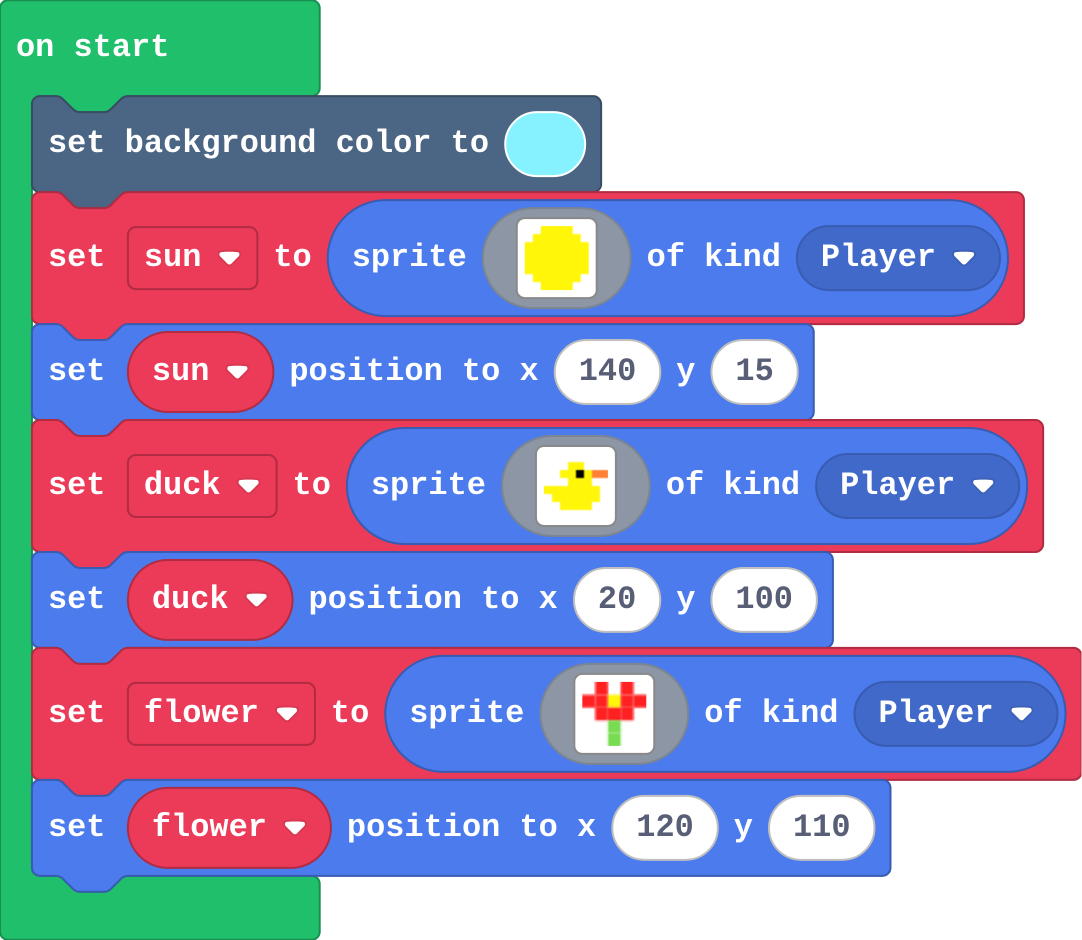
Show as code
scene.setBackgroundColor(9)
let sun = sprites.create(img`
    . . 5 5 5 5 . .
    . 5 5 5 5 5 5 .
    5 5 5 5 5 5 5 5
    5 5 5 5 5 5 5 5
    5 5 5 5 5 5 5 5
    5 5 5 5 5 5 5 5
    . 5 5 5 5 5 5 .
    . . 5 5 5 5 . .
    `, SpriteKind.Player)
sun.setPosition(140, 15)
let duck = sprites.create(img`
    . . . . . . . .
    . . . 5 5 . . .
    . . 5 5 f 5 4 4
    . . . 5 5 5 . .
    5 5 5 5 5 5 5 .
    . 5 5 5 5 5 5 .
    . . 5 5 5 5 . .
    . . . . . . . .
    `, SpriteKind.Player)
duck.setPosition(20, 100)
let flower = sprites.create(img`
    . 2 . 2 .
    2 2 5 2 2
    . 2 2 2 .
    . . 7 . .
    . . 7 . .
    `, SpriteKind.Player)
flower.setPosition(120, 110)
Make
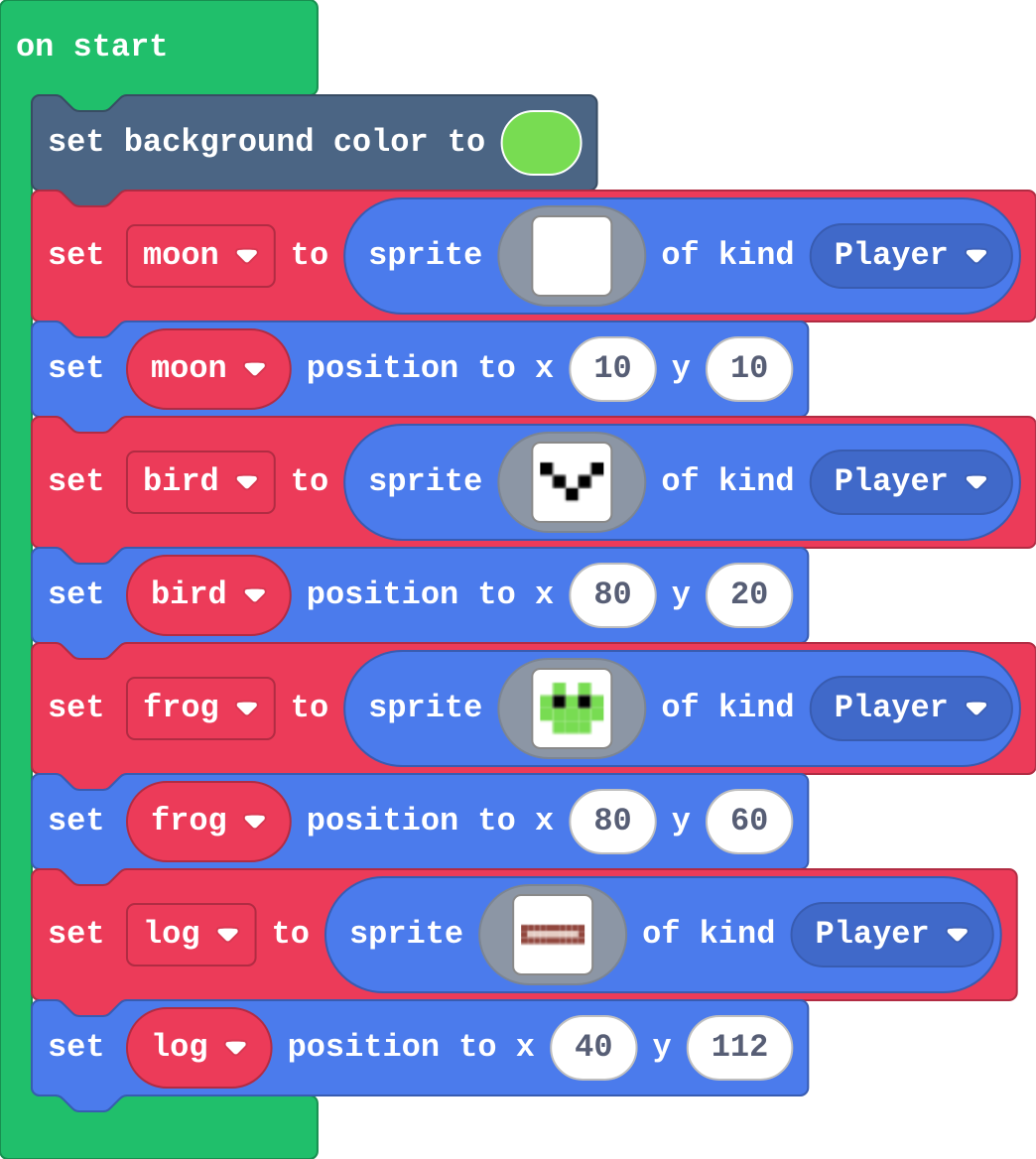
Show as code
scene.setBackgroundColor(7)
let moon = sprites.create(img`
    . 1 1 1 .
    1 1 1 . .
    1 1 . . .
    1 1 1 . .
    . 1 1 1 .
    `, SpriteKind.Player)
moon.setPosition(10, 10)
let bird = sprites.create(img`
    f . . . f
    . f . f .
    . . f . .
    `, SpriteKind.Player)
bird.setPosition(80, 20)
let frog = sprites.create(img`
    . 7 . 7 .
    7 f 7 f 7
    7 7 7 7 7
    . 7 7 7 .
    `, SpriteKind.Player)
frog.setPosition(80, 60)
let log = sprites.create(img`
    e e e e e e e e e e
    e d d d d d d d d e
    e e e e e e e e e e
    `, SpriteKind.Player)
log.setPosition(40, 112)
Change a start screen
Open task: any program that does what the step asks.
Stretch and support
Stretch: Make a scene that tells a tiny story with five sprites, and place one sprite exactly in the middle of the screen.
Support: Give students a grid sketch of the screen with (0, 0), (80, 60) and (160, 120) marked, and let them plan positions on paper first.
Exit ticket
A sprite is at (80, 20). Is it near the top or near the bottom? How do you know?
Near the top. y counts down from the top edge, and 20 is small, so it is close to the top.
What each step is for
- Investigate: x counts across from the left edge (0 to 160) and y counts down from the top edge (0 to 120), so (0, 0) is the top left corner and a bigger y is lower on the screen.
- Modify: Changing x moves a sprite across; changing y moves it up or down. Each new sprite needs its own create and set position blocks.
Where it leads
Next lesson the sprites move: with the controller, and with a speed. Class ideas: recreate a famous painting or a classroom layout as a scene; a 'where is it?' game where a partner guesses a position from the screen.