A list per level
Students keep per-level settings in lists, look them up with the level as the place (counted from 0), start each level with a startLevel function, and build a three-level dodger with a win.
Classroom resources
Load these into Waypoints Prepare: choose Load URL and paste the copied address, or download the file and import it. In Prepare, the worksheet's Teacher edition shows the answers; the student copy hides them.
Students will be able to
- I can keep what changes per level in a list.
- I can look up the value for this level, knowing places start at 0.
- I can write a startLevel function that clears the old level and sets up the new one.
Timing
Predict and Run 8 min · Investigate 12 min · Modify 10 min · Mix it up 3 min · Make 13 min · Fishing 4 min
Before class
A list such as speeds (40, 70, 100) holds what changes per level; speeds[level] (get value at) looks up the value at that place, counted from 0, so level 0 uses 40. That is why the level now starts at 0 (last lesson it started at 1), and the splash shows level + 1 with join, labelled copy-for-now.
A function startLevel sets up a level: destroy all sprites of kind Enemy clears the old one, a splash, and a new enemy at speeds[level]. The win checks level = 3 before startLevel, since a list of 3 has no place 3.
The Make is the biggest program so far (about 25 blocks): try it yourself first.
Running the lesson
- Predict: students who answer 70 count from 1. Kai's question returns to it. Let the 40 and 70 camps argue; the Run settles it.
- Investigate: the trace practises places from 0; the match names each block's job.
- Modify: a second list works exactly like speeds. A fourth level needs a fourth item and the win moved.
- Mix it up: the moving goal from last lesson.
- Make: plan on paper first: which lists, what goes in startLevel, where the level-up goes. Rock speeds are negative because rocks fly left.
In class
On the slides at these points. Students can do the whole lesson on their own; these are for the room. In the deck, the Run, Modify and Make slides have the live playground in them (the tutorial link is the backup), and the notes above are in each slide's speaker notes.
- Lockers (investigate, 3 min)
Three students hold cards 40, 70 and 100, labelled with places 0, 1, 2. Call out a level; the matching card goes up.
Call level 3: no one moves. That is the crash after the last level.
- Level table (end, 4 min)
On paper, design a fourth level: speed, colour and goal.
The hard part (on purpose)
Places start at 0. When a level is off by one, ask which place the list starts at.
When students get stuck
| What you will see | A question to ask | The fix |
|---|---|---|
| The splash says Level 0, or the speed is wrong by one level. | Where does the list start counting? | Places start at 0. The level starts at 0, and the splash shows level + 1. |
| The enemy stops, or the game breaks, after the last level. | What is speeds[3] when the list has 3 items? | There is no place 3. Check level = 3 and end the game (win) before calling startLevel. |
| Old enemies stay on the screen at the next level. | What does startLevel do first? | Add destroy all sprites of kind Enemy at the top of startLevel. |
Answers to the checks
- Predict: The game starts and startLevel runs with level 0. What speed does the enemy get?
40. Level 0 is the first place in the list, because places are counted from 0. - What startLevel does: speeds is 40, 70, 100. Fill in what startLevel does at each level.
40, 2, 70, 3, 100
The level is the place in the list, counted from 0, so level 0 uses 40. The splash adds 1, because players count levels from 1. - Kai's levels: Kai starts his level at 1, not 0. What goes wrong?
The first level is already fast (70), and there is no place 3 for the last level
speeds[1] is the second item, 70, so the slow level is skipped. After two level-ups he asks for speeds[3], and a list of 3 items only has places 0, 1 and 2. - Which block does what?: Match each block in this game with its job.
destroy all sprites of kind Enemy → D. clears away the old level's enemy; speeds[level] → B. the speed for this level, looked up in the list; change level by 1 → A. moves the player on to the next level; if level = 3 then game over (win) → C. ends the game after the last level - Mix it up: goal starts at 4, and each level-up changes goal by 4. At what score does the third level-up happen?
12
The level goes up at 4, then goal is 8, then 12: the third level-up is at 12.
Solutions
One possible solution for each task. Other correct programs are fine.
Modify › A colour per level
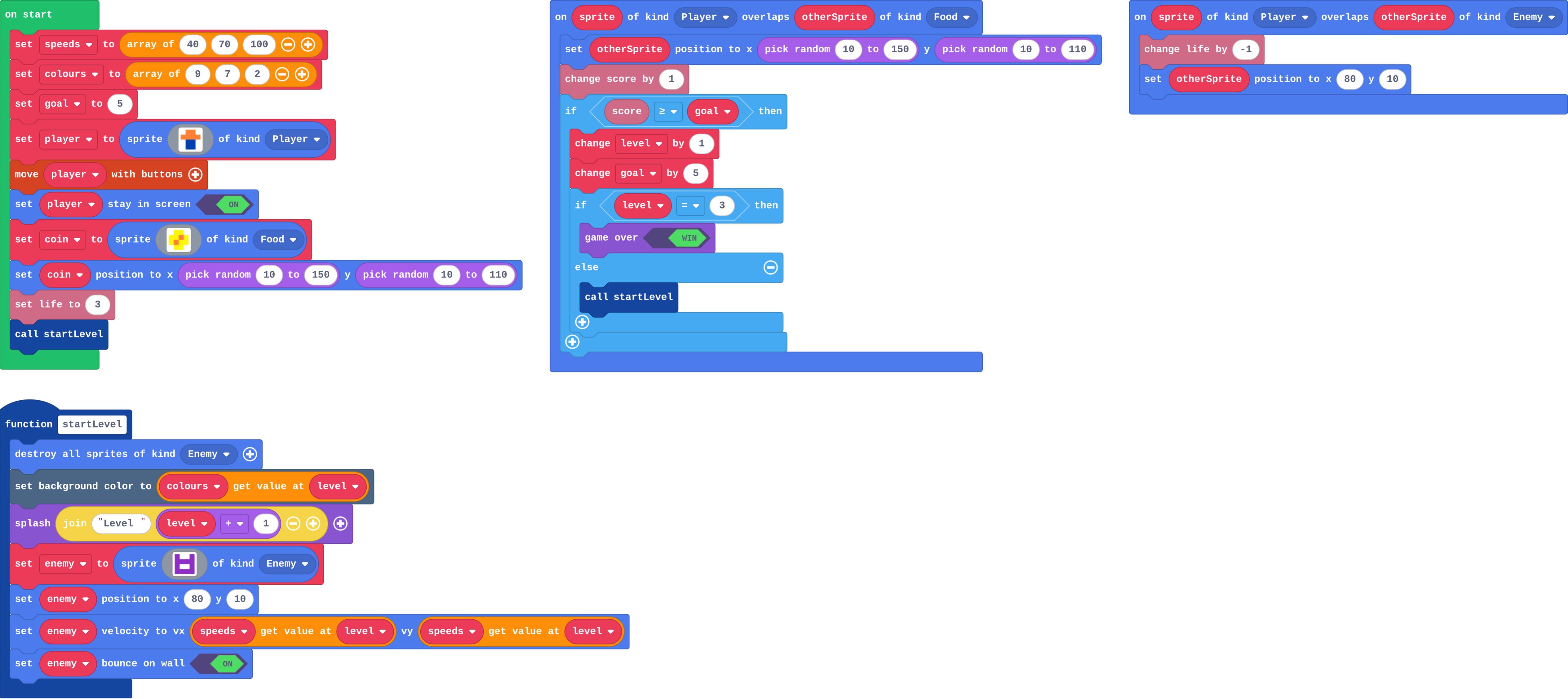
Show as code
let enemy: Sprite = null
let speeds = [40, 70, 100]
let colours = [9, 7, 2]
let level = 0
let goal = 5
function startLevel () {
    sprites.destroyAllSpritesOfKind(SpriteKind.Enemy)
    scene.setBackgroundColor(colours[level])
    game.splash("Level " + (level + 1))
    enemy = sprites.create(img`
        a . . a
        a a a a
        a 1 1 a
        a a a a
        `, SpriteKind.Enemy)
    enemy.setPosition(80, 10)
    enemy.setVelocity(speeds[level], speeds[level])
    enemy.setBounceOnWall(true)
}
let player = sprites.create(img`
    . 4 4 .
    4 4 4 4
    . 8 8 .
    . 8 8 .
    `, SpriteKind.Player)
controller.moveSprite(player)
player.setStayInScreen(true)
let coin = sprites.create(img`
    . 5 5 .
    5 5 4 5
    5 4 5 5
    . 5 5 .
    `, SpriteKind.Food)
coin.setPosition(randint(10, 150), randint(10, 110))
info.setLife(3)
startLevel()
sprites.onOverlap(SpriteKind.Player, SpriteKind.Food, function (sprite, otherSprite) {
    otherSprite.setPosition(randint(10, 150), randint(10, 110))
    info.changeScoreBy(1)
    if (info.score() >= goal) {
        level += 1
        goal += 5
        if (level == 3) {
            game.gameOver(true)
        } else {
            startLevel()
        }
    }
})
sprites.onOverlap(SpriteKind.Player, SpriteKind.Enemy, function (sprite, otherSprite) {
    info.changeLifeBy(-1)
    otherSprite.setPosition(80, 10)
})
Modify › A fourth level
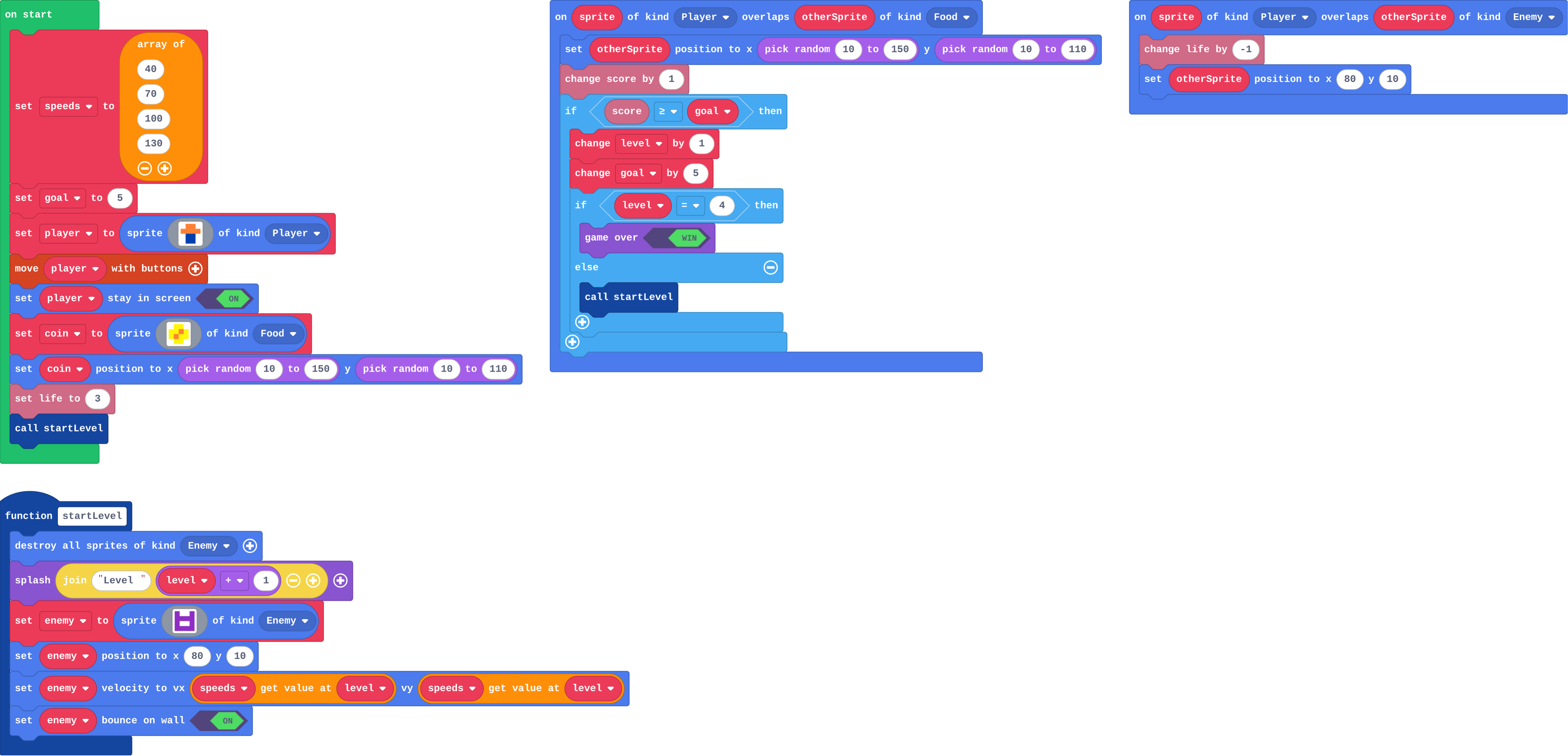
Show as code
let enemy: Sprite = null
let speeds = [40, 70, 100, 130]
let level = 0
let goal = 5
function startLevel () {
    sprites.destroyAllSpritesOfKind(SpriteKind.Enemy)
    game.splash("Level " + (level + 1))
    enemy = sprites.create(img`
        a . . a
        a a a a
        a 1 1 a
        a a a a
        `, SpriteKind.Enemy)
    enemy.setPosition(80, 10)
    enemy.setVelocity(speeds[level], speeds[level])
    enemy.setBounceOnWall(true)
}
let player = sprites.create(img`
    . 4 4 .
    4 4 4 4
    . 8 8 .
    . 8 8 .
    `, SpriteKind.Player)
controller.moveSprite(player)
player.setStayInScreen(true)
let coin = sprites.create(img`
    . 5 5 .
    5 5 4 5
    5 4 5 5
    . 5 5 .
    `, SpriteKind.Food)
coin.setPosition(randint(10, 150), randint(10, 110))
info.setLife(3)
startLevel()
sprites.onOverlap(SpriteKind.Player, SpriteKind.Food, function (sprite, otherSprite) {
    otherSprite.setPosition(randint(10, 150), randint(10, 110))
    info.changeScoreBy(1)
    if (info.score() >= goal) {
        level += 1
        goal += 5
        if (level == 4) {
            game.gameOver(true)
        } else {
            startLevel()
        }
    }
})
sprites.onOverlap(SpriteKind.Player, SpriteKind.Enemy, function (sprite, otherSprite) {
    info.changeLifeBy(-1)
    otherSprite.setPosition(80, 10)
})
Make
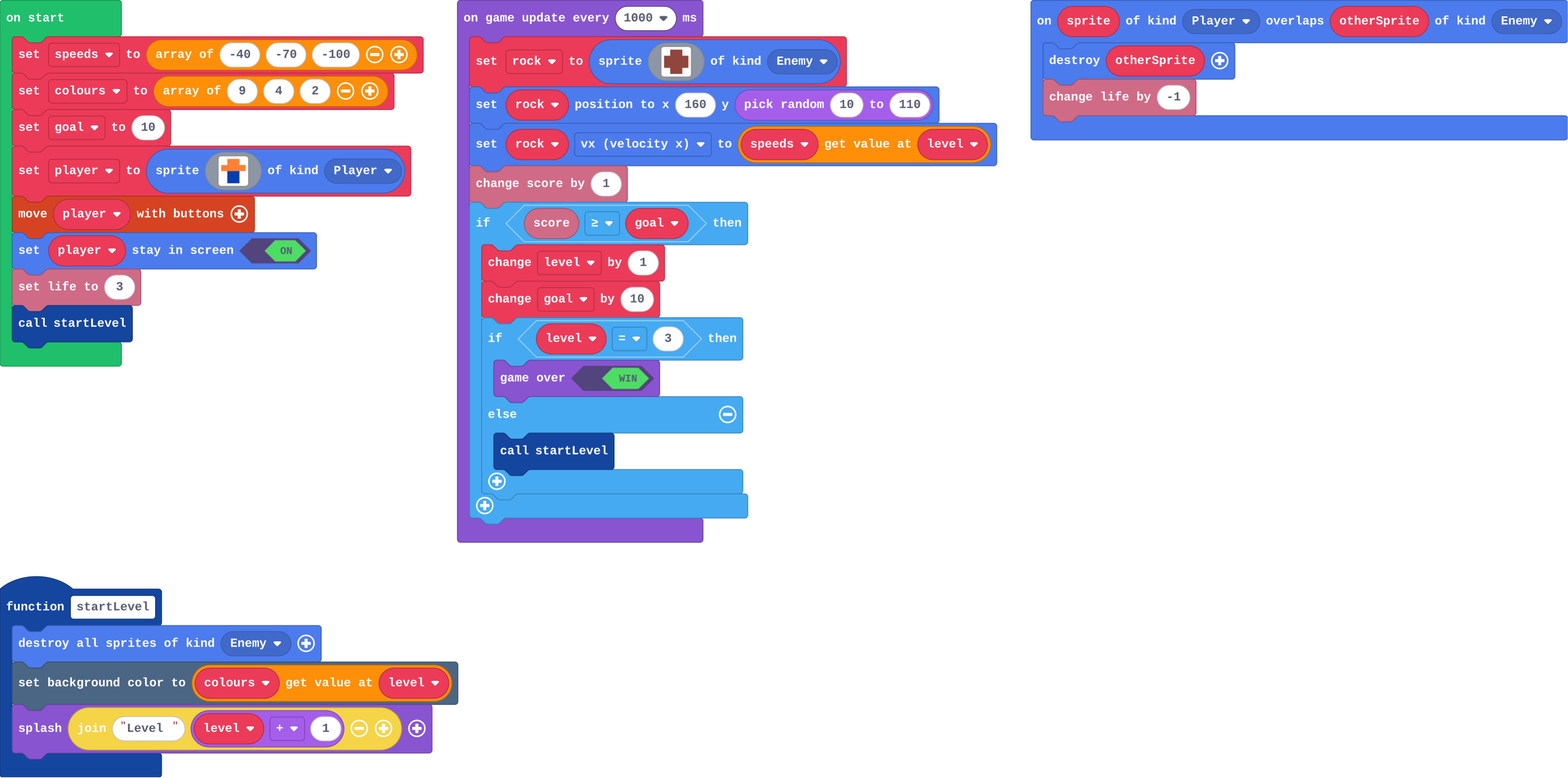
Show as code
let rock: Sprite = null
let speeds = [-40, -70, -100]
let colours = [9, 4, 2]
let level = 0
let goal = 10
function startLevel () {
    sprites.destroyAllSpritesOfKind(SpriteKind.Enemy)
    scene.setBackgroundColor(colours[level])
    game.splash("Level " + (level + 1))
}
let player = sprites.create(img`
    . 4 4 .
    4 4 4 4
    . 8 8 .
    . 8 8 .
    `, SpriteKind.Player)
controller.moveSprite(player)
player.setStayInScreen(true)
info.setLife(3)
startLevel()
game.onUpdateInterval(1000, function () {
    rock = sprites.create(img`
        . e e .
        e e e e
        e e e e
        . e e .
        `, SpriteKind.Enemy)
    rock.setPosition(160, randint(10, 110))
    rock.vx = speeds[level]
    info.changeScoreBy(1)
    if (info.score() >= goal) {
        level += 1
        goal += 10
        if (level == 3) {
            game.gameOver(true)
        } else {
            startLevel()
        }
    }
})
sprites.onOverlap(SpriteKind.Player, SpriteKind.Enemy, function (sprite, otherSprite) {
    otherSprite.destroy()
    info.changeLifeBy(-1)
})
Change a fishing game
Open task: any program that does what the step asks.
Stretch and support
Stretch: Add a third list, the number of enemies per level, and call your function from B3 that many times.
Support: Give students the Make game with the lists and startLevel already made, so they add only the level-up and the win.
Exit ticket
speeds is 40, 70, 100 and level is 1. What speed does the enemy get, and why?
70: level 1 is the second place in the list, because places are counted from 0.
What each step is for
- Investigate: A list holds what changes per level, looked up with the level as the place, counted from 0; startLevel clears the old level and sets up the new one.
- Modify: Anything that changes per level can be another list, read with the same place; one more level is one more item in each list.
- Mix it up: A goal that moves up makes the next level further away.
Where it leads
Next unit: power-ups, with true or false and things that run out. Skillmap: Jungle Jump Platformer (arcade.makecode.com/skillmaps) builds a level per map. Class idea: design a level table on paper (speed, colour, enemies, goal) before coding it.