---
marp: true
theme: default
html: true
---

# A list per level

Arcade advanced skills · Levels

<!-- Speaker note: Students keep per-level settings in lists, look them up with the level as the place (counted from 0), start each level with a startLevel function, and build a three-level dodger with a win. About 50 minutes (Predict and Run 8 min · Investigate 12 min · Modify 10 min · Mix it up 3 min · Make 13 min · Fishing 4 min). -->

---

## Today

**We are learning to** keep what changes from level to level in a list, and look it up with the level as the place, counted from 0.

- I can keep what changes per level in a list.
- I can look up the value for this level, knowing places start at 0.
- I can write a startLevel function that clears the old level and sets up the new one.

<!-- Speaker note: Before class: A **list** such as `speeds` (40, 70, 100) holds what changes per level; `speeds[level]` (**get value at**) looks up the value at that **place**, counted from 0, so level 0 uses 40. That is why the level now starts at **0** (last lesson it started at 1), and the splash shows `level + 1` with join, labelled copy-for-now. A **function** `startLevel` sets up a level: **destroy all sprites of kind Enemy** clears the old one, a **splash**, and a new enemy at `speeds[level]`. The win checks *level = 3* before startLevel, since a list of 3 has no place 3. The Make is the biggest program so far (about 25 blocks): try it yourself first. Teacher: Mix it up: the moving goal from last lesson. -->

---

## Why it matters

> Faster ghosts, a new colour, more aliens: each level is a row in a table. A list is one column of that table.

<!-- Speaker note: Last lesson the level was one number. Now each level has its own **speed**. A **list** (in **Arrays**) holds them in order: `speeds` is 40, 70, 100. **get value at** looks one up by its **place**: `speeds[level]`. Places in a list are counted from **0**. So the level now starts at **0**, and the splash shows `level + 1`, because players count from 1. **destroy all sprites of kind** (Sprites) clears the old level's enemy. -->

---

<span style="background:#dbeafe; color:#1a1a1a; border:1.5px solid #3b82f6; padding:6px 18px; border-radius:8px; font-size:1em; font-weight:500;">💬 Discussion</span>

## Predict

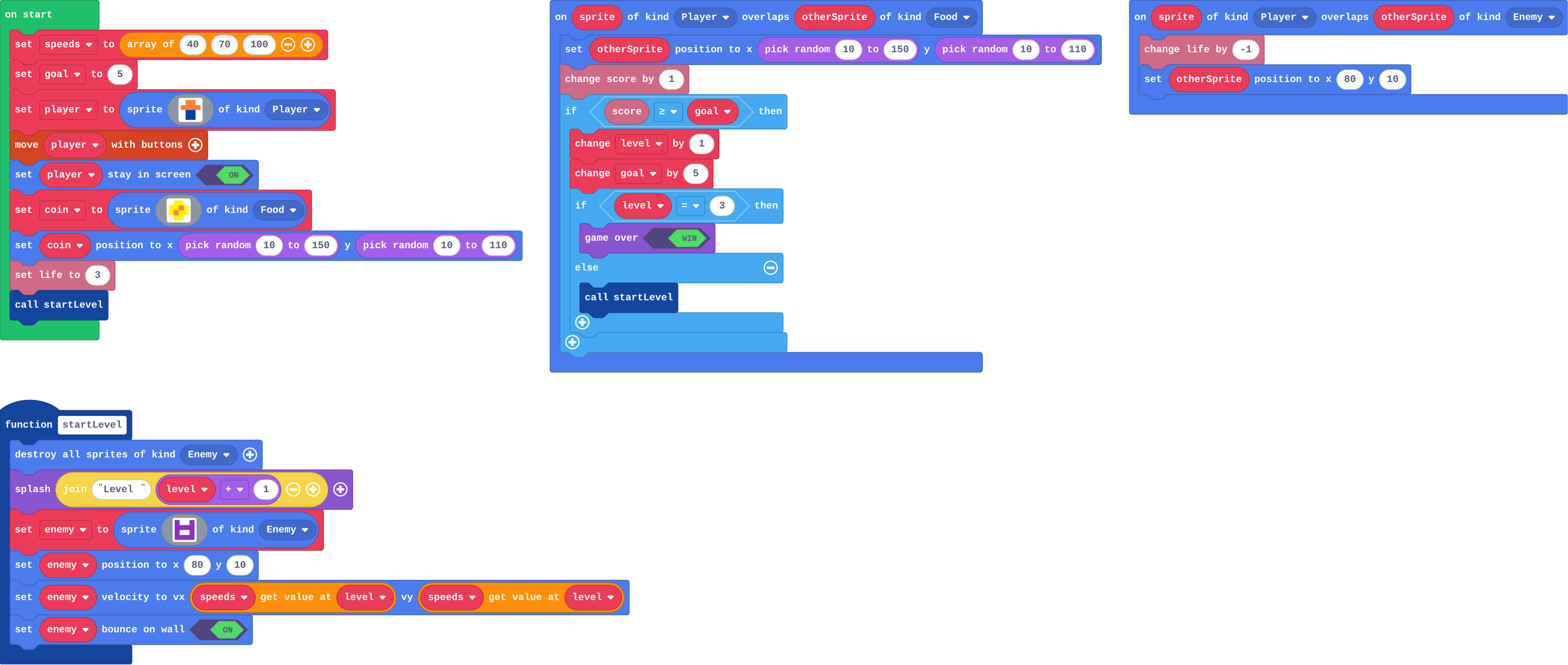
![h:360](https://studio.learningwaypoints.com/tutorials/_pictures/makecode/code/364f7c04edea.png?v=f2359f4ea0b40d01)

**The game starts and startLevel runs with level 0. What speed does the enemy get?**

- 0
- 40
- 70
- 100

<!-- Speaker note: What happens: 40. Level 0 is the first place in the list, because places are counted from 0. Take two or three predictions before anyone runs it. -->

<!-- Speaker note: Teacher: students who answer 70 count from 1. Kai's question returns to it. Let the 40 and 70 camps argue; the Run settles it. -->

---

<span style="background:#dcfce7; color:#1a1a1a; border:1.5px solid #22c55e; padding:6px 18px; border-radius:8px; font-size:1em; font-weight:500;">✅ Check</span>

## What happened?

* 40. Level 0 is the first place in the list, because places are counted from 0.

<!-- Speaker note: Reveal after running. Ask who predicted it, and what made them think so. -->

---

<span style="background:#fef3c7; color:#1a1a1a; border:1.5px solid #f59e0b; padding:6px 18px; border-radius:8px; font-size:1em; font-weight:500;">✍️ Activity</span>

## Run it

Open the lesson at this step and try it together.

[studio.learningwaypoints.com/tutorials/code/arcade-advanced/arcade-level-list/?full=step-2#step-2](https://studio.learningwaypoints.com/tutorials/code/arcade-advanced/arcade-level-list/?full=step-2#step-2)

<!-- Speaker note: Collect coins and dodge the purple enemy. Press **A** (space) to close each splash. Can you win? Students should be able to say: I reached level 2 (or further) and compared with my prediction. -->

---

<span style="background:#dbeafe; color:#1a1a1a; border:1.5px solid #3b82f6; padding:6px 18px; border-radius:8px; font-size:1em; font-weight:500;">💬 Discussion</span>

## Investigate

![h:360](https://studio.learningwaypoints.com/tutorials/_pictures/makecode/code/364f7c04edea.png?v=f2359f4ea0b40d01)

<!-- Speaker note: What this step is for: A list holds what changes per level, looked up with the level as the place, counted from 0; startLevel clears the old level and sets up the new one. -->

<!-- Speaker note: Teacher: the trace practises places from 0; the match names each block's job. -->

---

<span style="background:#dcfce7; color:#1a1a1a; border:1.5px solid #22c55e; padding:6px 18px; border-radius:8px; font-size:1em; font-weight:500;">✅ Check</span>

## What startLevel does

**speeds is 40, 70, 100. Fill in what startLevel does at each level.**

| level | splash shows Level … | enemy speed |
|---|---|---|
| 0 | 1 | ? |
| 1 | ? | ? |
| 2 | ? | ? |

* Answer: 40, 2, 70, 3, 100

<!-- Speaker note: The level is the place in the list, counted from 0, so level 0 uses 40. The splash adds 1, because players count levels from 1. -->

---

<span style="background:#dcfce7; color:#1a1a1a; border:1.5px solid #22c55e; padding:6px 18px; border-radius:8px; font-size:1em; font-weight:500;">✅ Check</span>

## Kai's levels

**Kai starts his level at 1, not 0. What goes wrong?**

- The enemy never appears
- The first level is already fast (70), and there is no place 3 for the last level
- Nothing: lists start at 1
- The splash says Level 0

* Answer: The first level is already fast (70), and there is no place 3 for the last level

<!-- Speaker note: speeds[1] is the second item, 70, so the slow level is skipped. After two level-ups he asks for speeds[3], and a list of 3 items only has places 0, 1 and 2. -->

<style scoped>pre, marp-pre { font-size: 0.5em; line-height: 1.25; } section { font-size: 27px; }</style>

---

<span style="background:#dcfce7; color:#1a1a1a; border:1.5px solid #22c55e; padding:6px 18px; border-radius:8px; font-size:1em; font-weight:500;">✅ Check</span>

## Which block does what?

**Match each block in this game with its job.**

| | |
|---|---|
| `destroy all sprites of kind Enemy` | A. the speed for this level, looked up in the list |
| `speeds[level]` | B. clears away the old level's enemy |
| `change level by 1` | C. moves the player on to the next level |
| `if level = 3 then game over (win)` | D. ends the game after the last level |

* Answer: destroy all sprites of kind Enemy → B. clears away the old level's enemy; speeds[level] → A. the speed for this level, looked up in the list; change level by 1 → C. moves the player on to the next level; if level = 3 then game over (win) → D. ends the game after the last level

<!-- Speaker note:  -->

<style scoped>pre, marp-pre { font-size: 0.5em; line-height: 1.25; } section { font-size: 17px; }</style>

---

<span style="background:#fef3c7; color:#1a1a1a; border:1.5px solid #f59e0b; padding:6px 18px; border-radius:8px; font-size:1em; font-weight:500;">✍️ Activity</span>

## Lockers <span style="font-size:.6em;color:#64748b">(3 min)</span>

Three students hold cards 40, 70 and 100, labelled with places 0, 1, 2. Call out a level; the matching card goes up.

<!-- Speaker note: Call level 3: no one moves. That is the crash after the last level. -->

---

<span style="background:#fef3c7; color:#1a1a1a; border:1.5px solid #f59e0b; padding:6px 18px; border-radius:8px; font-size:1em; font-weight:500;">✍️ Activity</span>

## Modify


- **A colour per level:** Give each level its own **background colour**, from a new list. Set it in **startLevel**.
- **A fourth level:** Add a **fourth level** with the fastest enemy yet. What else must change?

[Open this step](https://studio.learningwaypoints.com/tutorials/code/arcade-advanced/arcade-level-list/?full=step-4#step-4)

<!-- Speaker note: What this step is for: Anything that changes per level can be another list, read with the same place; one more level is one more item in each list. Hints, in order: Make a new list, colours, with three numbers, in on start. Arrays has the list block. / In startLevel: set background color to (get value at level from colours). / Add a fourth speed to the list. / The win now comes at level 4. For students who need more support: Give students the Make game with the lists and startLevel already made, so they add only the level-up and the win. For early finishers: Add a third list, the number of enemies per level, and call your function from B3 that many times. The hard part, on purpose: Places start at 0. When a level is off by one, ask which place the list starts at. When students get stuck: The splash says Level 0, or the speed is wrong by one level. Ask: Where does the list start counting? Fix: Places start at 0. The level starts at 0, and the splash shows level + 1. / The enemy stops, or the game breaks, after the last level. Ask: What is speeds[3] when the list has 3 items? Fix: There is no place 3. Check level = 3 and end the game (win) before calling startLevel. / Old enemies stay on the screen at the next level. Ask: What does startLevel do first? Fix: Add destroy all sprites of kind Enemy at the top of startLevel. -->

<!-- Speaker note: Teacher: a second list works exactly like speeds. A fourth level needs a fourth item and the win moved. -->

---

<span style="background:#dcfce7; color:#1a1a1a; border:1.5px solid #22c55e; padding:6px 18px; border-radius:8px; font-size:1em; font-weight:500;">✅ Check</span>

## Mix it up

**goal starts at 4, and each level-up changes goal by 4. At what score does the third level-up happen?**

* Answer: 12

<!-- Speaker note: The level goes up at 4, then goal is 8, then 12: the third level-up is at 12. What this step is for: A goal that moves up makes the next level further away. -->

---

<span style="background:#fef3c7; color:#1a1a1a; border:1.5px solid #f59e0b; padding:6px 18px; border-radius:8px; font-size:1em; font-weight:500;">✍️ Activity</span>

## Make

This dodger scores a point for every rock. Give it **three levels**:

- each level has its own **background colour** and **rock speed** (faster each level), from lists,
- **startLevel** clears the old rocks, sets the colour and splashes the level,
- every 10 points, the level goes up (where the score changes),
- after level 3, the player **wins** (game over, win).

[Open this step](https://studio.learningwaypoints.com/tutorials/code/arcade-advanced/arcade-level-list/?full=step-6#step-6)

<!-- Speaker note: Hints, in order: In on start: a list of three rock speeds (negative, they fly left), a list of three colours, and a goal of 10. Call startLevel. / startLevel: destroy all Enemy sprites, set the background from the colours list, splash the level. / In the timer, set rock vx to the speed for this level. After change score: if score ≥ goal, change level by 1, change goal by 10, then if level = 3 game over (win), else startLevel. -->

<!-- Speaker note: Teacher: plan on paper first: which lists, what goes in startLevel, where the level-up goes. Rock speeds are negative because rocks fly left. -->

<style scoped>pre, marp-pre { font-size: 0.5em; line-height: 1.25; } section { font-size: 25px; }</style>

---

<span style="background:#fef3c7; color:#1a1a1a; border:1.5px solid #f59e0b; padding:6px 18px; border-radius:8px; font-size:1em; font-weight:500;">✍️ Activity</span>

## Change a fishing game

Catch fish with the net. Every 5 fish the water gets deeper and the fish swim faster. Add a **fourth level** (both lists need a fourth item, and the win must move), then make the deepest level's fish the fastest yet.

[Open this step](https://studio.learningwaypoints.com/tutorials/code/arcade-advanced/arcade-level-list/?full=step-7#step-7)

---

<span style="background:#fef3c7; color:#1a1a1a; border:1.5px solid #f59e0b; padding:6px 18px; border-radius:8px; font-size:1em; font-weight:500;">✍️ Activity</span>

## Level table <span style="font-size:.6em;color:#64748b">(4 min)</span>

On paper, design a fourth level: speed, colour and goal.

---

<span style="background:#dcfce7; color:#1a1a1a; border:1.5px solid #22c55e; padding:6px 18px; border-radius:8px; font-size:1em; font-weight:500;">✅ Check</span>

## Exit ticket

**speeds is 40, 70, 100 and level is 1. What speed does the enemy get, and why?**

* 70: level 1 is the second place in the list, because places are counted from 0.

<!-- Speaker note: Students answer on paper or a mini whiteboard before the reveal. Anyone who cannot answer needs the main idea again next lesson. Where this leads: Next unit: power-ups, with true or false and things that run out. Skillmap: Jungle Jump Platformer (arcade.makecode.com/skillmaps) builds a level per map. Class idea: design a level table on paper (speed, colour, enemies, goal) before coding it. -->